

ByteDance (OpenRAIL++)
Share this post:
LatentSync & MuseTalk: Open Source Lip Sync for Dubbing
Matching mouth geometry to re-recorded dialogue is a painstaking phase of film localization and ADR. LatentSync (ByteDance/LatentSync, arXiv:2412.09262) and MuseTalk (TMElyralab/MuseTalk, arXiv:2410.10122) automate dialogue synchronization by modifying facial video frames directly from reference speech. Filmmakers can test vocal takes in the lip sync workspace today, then deploy these open weights models locally for private studio dubbing passes.
Studio availability. LatentSync and MuseTalk are not available in AI FILMS Studio. These are open weights research releases for local GPU processing. To sync character lips to audio tracks in the cloud, use the lip sync workspace featuring ByteDance LipSync, Kling LipSync, and PixVerse LipSync.
The Localization Challenge: Pixel Artifacts vs Latent Diffusion
Older lip synchronization tools like Wav2Lip operated in raw pixel space. Pixel space synthesis often blurs teeth, distorts jawlines, and leaves visible boundary seams around the mouth box.
Modern open source models resolve these visual flaws by working inside compressed latent spaces. Instead of warping raw pixels, networks condition diffusion models on audio representations extracted by acoustic encoders.
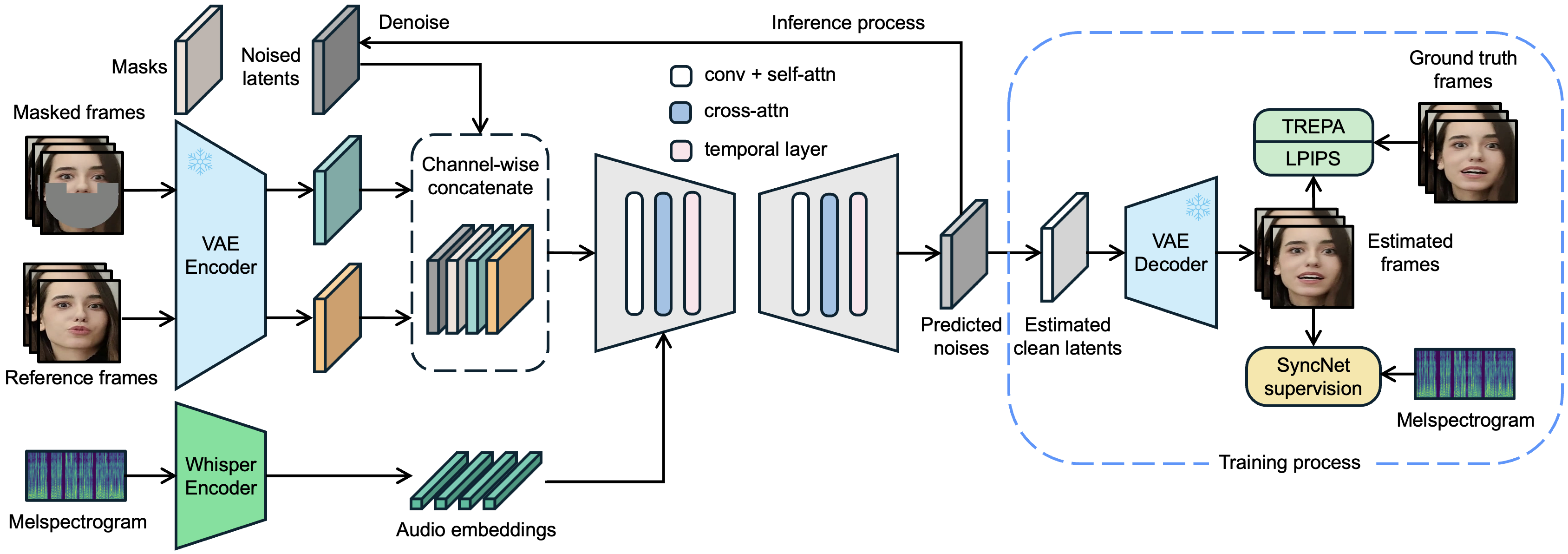
LatentSync 1.6: 512px High Resolution Inpainting
ByteDance designed LatentSync as an end to end framework without intermediate facial landmark vectors. It uses a modified Stable Diffusion UNet trained to denoise masked facial latents conditioned on OpenAI Whisper audio embeddings.
Key technical improvements in LatentSync include:
- Direct Latent Inpainting. The network predicts mouth movements directly in the VAE latent space. This approach preserves natural skin pores and lighting continuity.
- Temporal Attention Layers. Specialized temporal cross attention layers prevent flickering across consecutive frames.
- 512x512 High Resolution Weights. Version 1.6 upgrades the training resolution to 512 pixels square. The higher resolution eliminates the dental blur common in earlier releases.
LatentSync 1.5 operates comfortably within 8 GB to 10 GB of VRAM. LatentSync 1.6 requires roughly 18 GB of VRAM for native 512x512 processing.
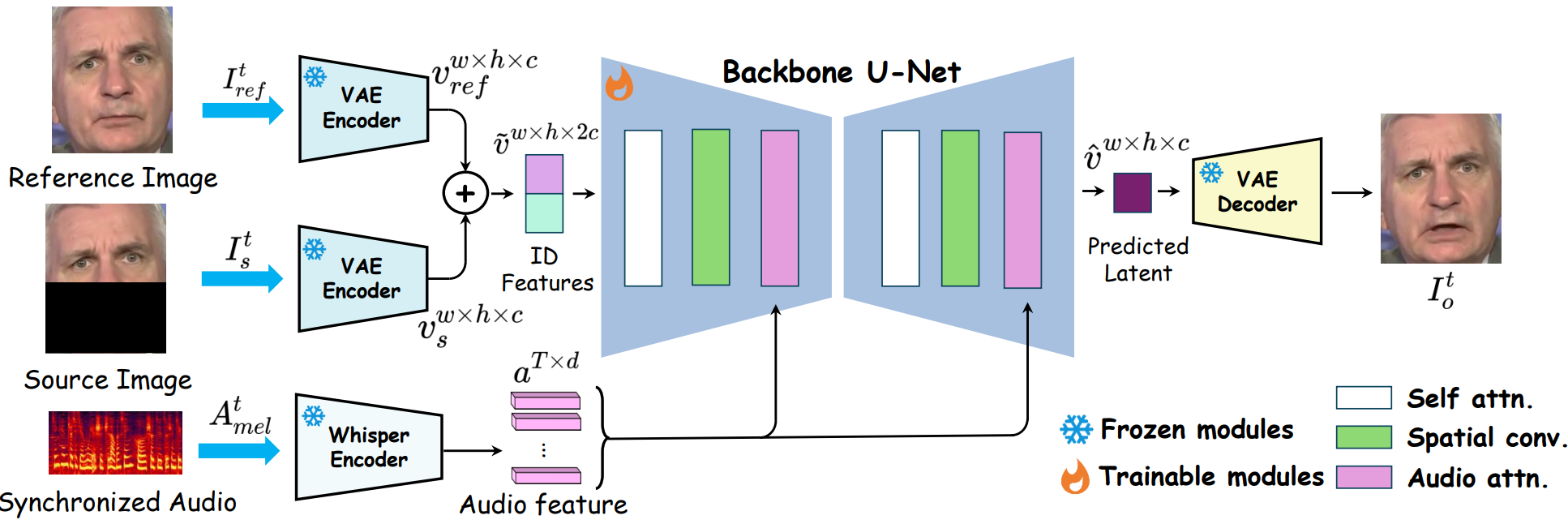
MuseTalk 1.5: Real Time Audio Synchronization
While LatentSync prioritizes photorealistic inpainting, MuseTalk focuses on inference speed. Developed by Lyra Lab at Tencent Music Entertainment, MuseTalk operates inside the latent space of ft-mse-vae.
MuseTalk delivers several distinct advantages for post production:
- Real Time Frame Rates. The model processes more than 30 frames per second on an NVIDIA Tesla V100 or RTX 4090. Even on an entry level RTX 3050 Ti laptop GPU, it runs near real time speeds.
- Multilingual Vocal Support. The acoustic encoder understands English, Mandarin, and Japanese speech inputs without phonetic transcription.
- Adjustable Face Centering. Editors can adjust the bounding box center coordinates to handle dynamic camera angles.
Version 1.5 incorporates perceptual loss, GAN adversarial loss, and synchronization loss to sharpen facial geometry during dramatic monologues.
Hardware and Performance Comparison
The table below outlines technical specifications for local film localization rigs:
| Model | Checkpoint | VRAM Minimum | Resolution | Speed (RTX 4090) | License |
|---|---|---|---|---|---|
| LatentSync 1.5 | ByteDance/LatentSync |
~8 GB to 10 GB | 256x256 | ~12 fps | OpenRAIL++ |
| LatentSync 1.6 | ByteDance/LatentSync-1.6 |
~18 GB | 512x512 | ~6 fps | OpenRAIL++ |
| MuseTalk 1.0 | TMElyralab/MuseTalk |
~6 GB to 8 GB | 256x256 | ~35 fps | MIT License |
| MuseTalk 1.5 | TMElyralab/MuseTalk-1.5 |
~8 GB | 256x256 | ~30 fps | MIT License |
Running MuseTalk Locally in Python
You can process dialogue alignment locally using the official MuseTalk pipeline:
import subprocess
import torch

# Configure input video and dialogue audio paths
video_path = "raw_footage/actor_close_up_take_3.mp4"
audio_path = "localized_audio/spanish_dub_mix.wav"

# Run MuseTalk inference pipeline
command = [
    "python", "-m", "scripts.inference",
    "--inference_config", "configs/inference/test.yaml",
    "--video_path", video_path,
    "--audio_path", audio_path,
    "--bbox_shift", "5",  # Adjust chin framing
    "--result_dir", "output_dubbed_takes/"
]

subprocess.run(command, check=True)
Cloud Lip Synchronization in AI FILMS Studio
For cloud productions, AI FILMS Studio offers integrated lip sync generators without local GPU requirements. The lip sync workspace hosts ByteDance LipSync, Kling LipSync, and PixVerse LipSync for automated video localization.
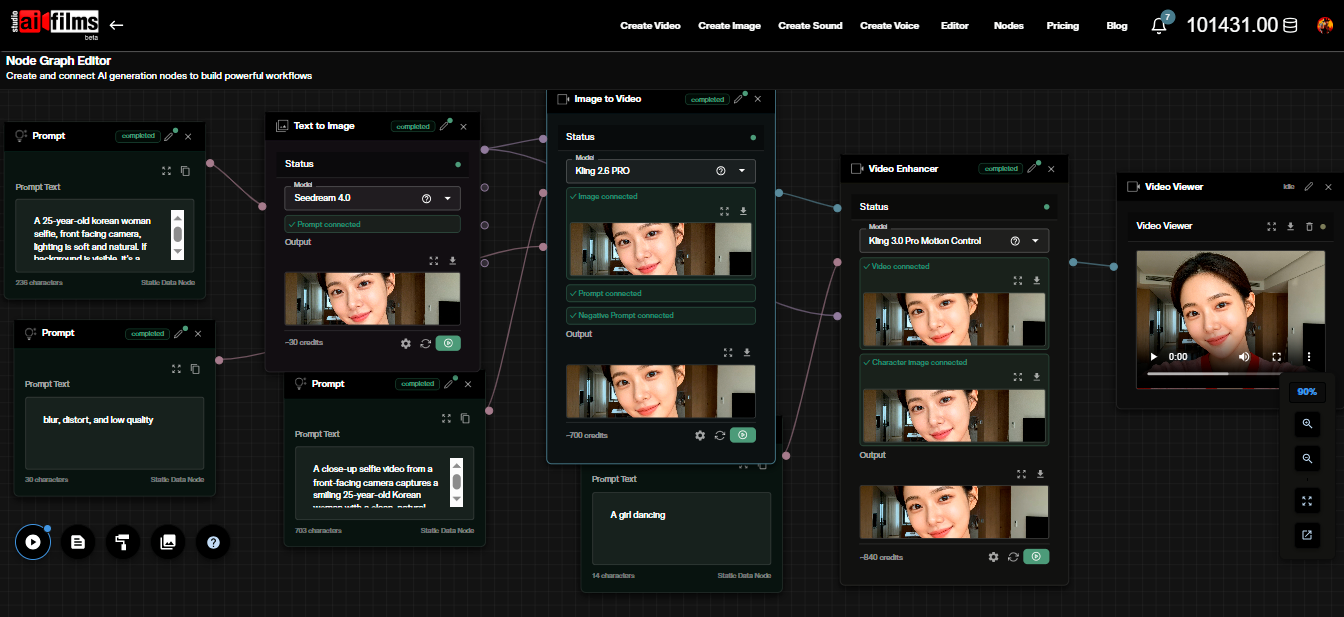
You can also combine lip sync models with camera motion tools inside the Nodes Graph Editor. Route an audio node from an AI voice generator into a video character node to synchronize expressions across entire sequences. To explore companion research on video generation and audio modeling, read our analysis of LongCat-Video avatar synchronization and JavisDiT unified audio-video generation.
Sources
LatentSync Paper (arXiv:2412.09262) | LatentSync GitHub (bytedance/LatentSync) | LatentSync 1.6 Model Card (ByteDance/LatentSync-1.6) | MuseTalk Paper (arXiv:2410.10122) | MuseTalk GitHub (TMElyralab/MuseTalk) | MuseTalk Hugging Face (TMElyralab/MuseTalk)
Continue Reading


Video & LipSync
- Video Generator
- Text to Video
- Image to Video
- Start-End Frame to Video
- Draw to Video
- Motion Control
- Video Enhancer
- Video Upscaler
- Video Extend
- Video to Video LipSync
- Audio to Video LipSync
- Image to Video LipSync
- Video FaceSwap
- Seedance 2.5
- WAN 3.0
- Seedance 2
- FLUX 3
- Minimax H3
- Vidu Q3 Pro
- Grok Imagine Video 1.5
- Gemini Omni
- Google Veo 3.1
- Kling 3.0 Pro
- Luma Ray 3.2
- LTX 2.3
- Happy Horse 1.1
- Kling 3.0 Motion
- ByteDance Upscaler
- InfiniteTalk
- InsightFace
Image & Edit
- AI Character
- AI Actor
- Art Generator
- Text to Image
- Image to Image
- LoRA Image to Image
- Draw to Edit
- Image LoRA Training
- Remove Background
- Image Enhancer
- MidJourney 8.0
- Krea 2
- OpenAI GPT Image 2.0
- Nano Banana Pro Ultra
- Nano Banana 2 Lite
- Nano Banana Pro
- Minimax Image
- Clarity Pro
- Z-Image Turbo LoRA
- Krea 2 Turbo LoRA
- Z-Image LoRA Trainer
- Qwen Image LoRA Trainer
- Background Erase Network 2 (BEN2)