

Yuda Song et al., Xiaomi (arXiv:2403.16627 / Apache 2.0)
Share this post:
SDXS, SD Turbo & SD x4: Open Source CPU Storyboard AI
SDXS-512 (IDKiro/sdxs-512-0.9 and IDKiro/sdxs-512-dreamshaper, arXiv:2403.16627), SD Turbo (stabilityai/sd-turbo), LCM Dreamshaper v7 (SimianLuo/LCM_Dreamshaper_v7), and Stable Diffusion v1.5 (sd15 and sd15-img2img) form a complete local storyboard previsualization stack that runs on standard laptop CPUs using 4 GB to 8 GB of system RAM without a discrete GPU. When compiled with Intel OpenVINO (optimum-intel) via rupeshs/sdxs-512-0.9-openvino (sdxs-ov) and rupeshs/sd-turbo-openvino (sd-turbo-ov), single step 512x512 storyboard panels render in 3 to 8 seconds on a CPU, and can then be promoted to 2048x2048 production plates using the text guided Stable Diffusion x4 Upscaler (sd-x4-upscaler) on a 6 GB VRAM GPU.
Studio availability.
SDXS-512(sdxs-ov,sdxs-orig-vae), SD Turbo (sd-turbo-ov,sd-turbo), Stable Diffusion v1.5 (sd15,sd15-img2img), LCM Dreamshaper v7 (lcm-dreamshaper-v7), and the Stable Diffusion x4 Upscaler (sd-x4-upscaler) are not available in AI FILMS Studio. This article covers public open weights models for local deployment. To generate and upscale images in the Studio, see the models listed on the Text to Image and Image Upscaler pages.
Why One Step OpenVINO Distillation Unlocks Zero GPU Previsualization
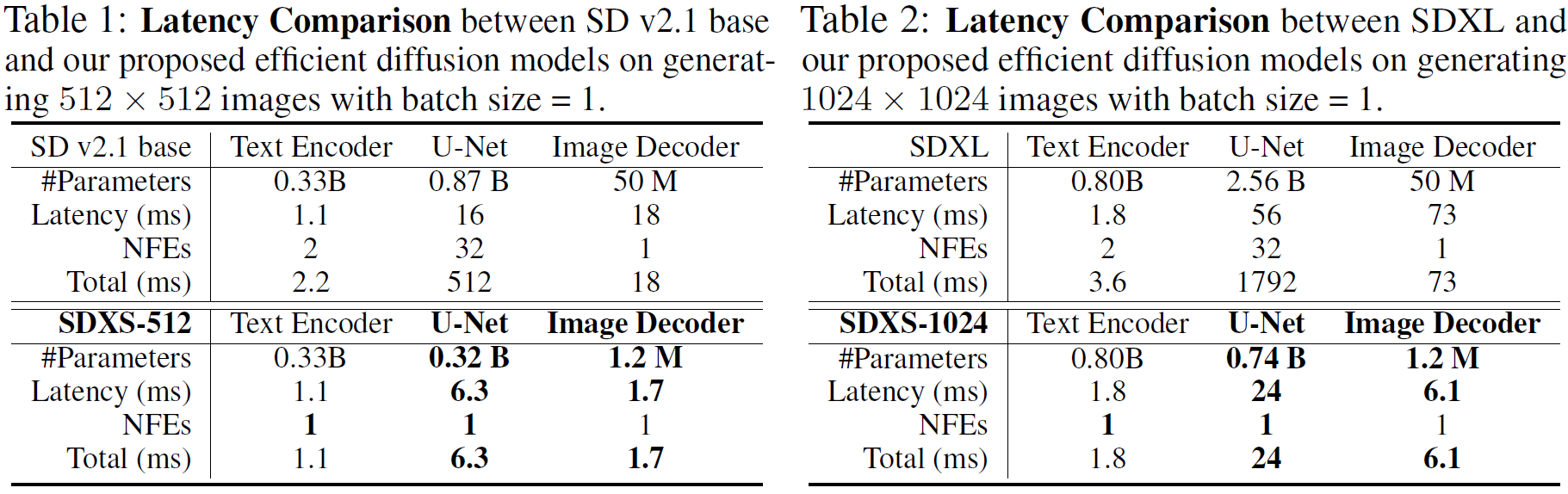
On location scouts, writers' rooms, and travel laptops without NVIDIA CUDA hardware, running a 20 step or 50 step diffusion model on a CPU takes several minutes per frame. Two architectural bottlenecks account for that latency. First, the iterative denoising UNet executes dozens of sequential forward passes. Second, the standard Variational Autoencoder (VAE) decoder consumes heavy floating point compute when expanding 64x64 latents back to 512x512 RGB pixels.
SDXS (IDKiro/sdxs, developed by Yuda Song, Zehao Sun, and Xuanwu Yin) eliminates both bottlenecks simultaneously.
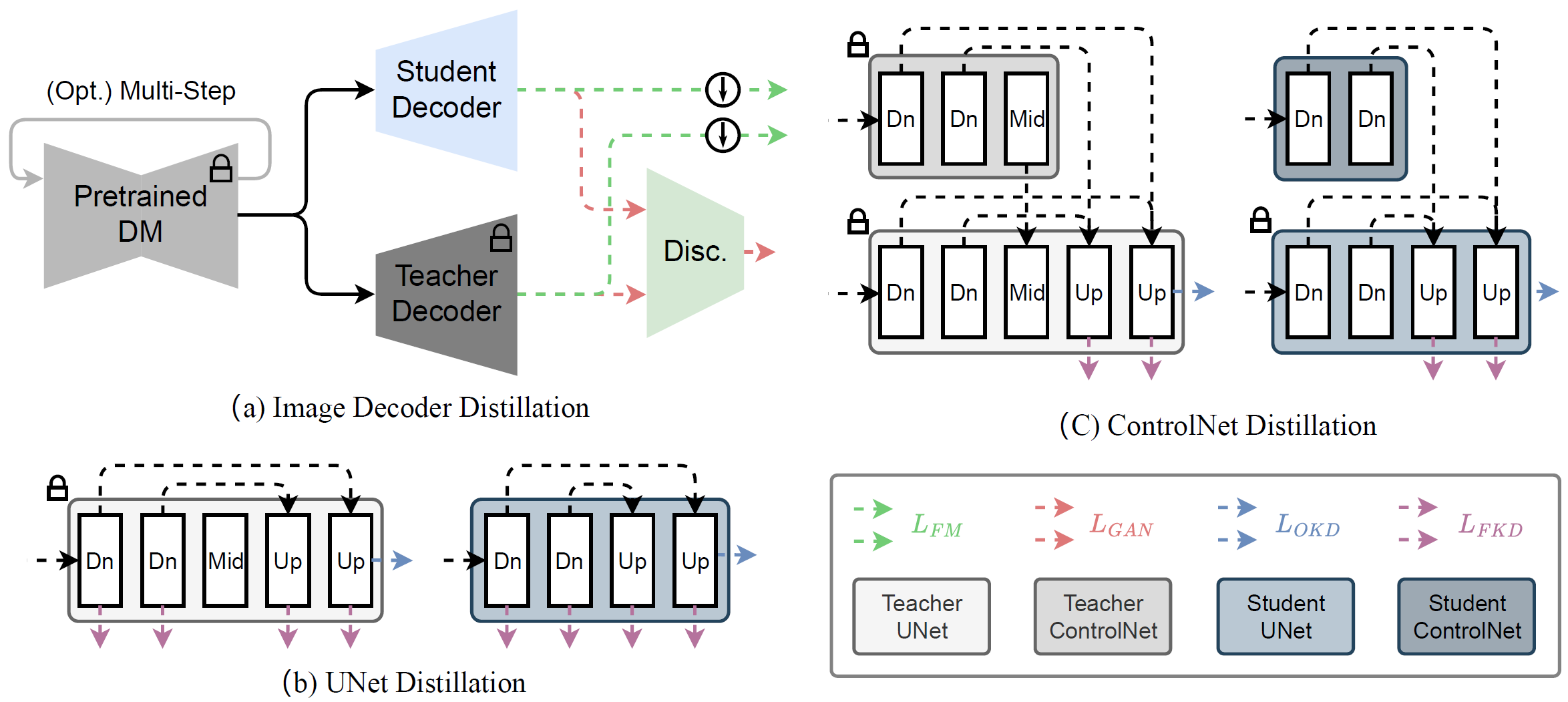
- Block removal UNet distillation and tiny VAE decoder. SDXS prunes redundant middle and attention blocks from the teacher UNet through knowledge distillation and trains an ultra lightweight image decoder to mimic the original VAE decoder output using a combination of output distillation loss and GAN adversarial loss. For users who prefer the uncompressed decoder characteristics of the original VAE at 1 step, the
IDKiro/sdxs-512-dreamshapercheckpoint (sdxs-orig-vae, MIT license) retains the standard VAE alongside the distilled 1 step UNet. - Trajectory straightening via feature matching. Extending Diff-Instruct score distillation with feature matching loss over the second half of the timestep schedule straightens the sampling trajectory into a single function evaluation (
1 step,guidance_scale=0.0or1.0). - OpenVINO graph compilation (
sdxs-ovandsd-turbo-ov). ExportingSDXS-512-0.9and Adversarial Diffusion Distillation (ADD)SD Turboto Intel OpenVINO Intermediate Representation (IR) fuses convolutions and attention kernels for x86 AVX2 and AVX-512 instructions, dropping 1 step512x512CPU generation to 3 to 8 seconds inside 4 GB to 6 GB of system RAM.
Multi Step CPU Refining & 6 GB VRAM 4x Diffusion Upscaling
While sdxs-ov and sd-turbo-ov prioritize instant single step thumbnailing, directors often want stronger classifier free guidance (CFG), negative prompts, or sketch based image to image conditioning before upscaling a chosen panel.
- LCM Dreamshaper v7 (
lcm-dreamshaper-v7). Distilled via Latent Consistency Models (SimianLuo/LCM_Dreamshaper_v7), this checkpoint generates stylized512x512frames in 4 steps (guidance_scale=8.0) using 6 GB to 8 GB of CPU RAM. - Stable Diffusion v1.5 Text to Image (
sd15) and Img2Img (sd15-img2img). Both pipelines share thestable-diffusion-v1-5/stable-diffusion-v1-5weights in 4 GB of RAM at 20 default steps (guidance_scale=7.5). Runningsd15-img2img(strength=0.6to0.75) turns a rough storyboard sketch or a 1 stepsdxs-ovdraft into a refined composition with full negative prompt control. - Stable Diffusion x4 Upscaler (
sd-x4-upscaler). Unlike non generative GAN upscalers that only sharpen existing edges,stabilityai/stable-diffusion-x4-upscaleris a text conditioned latent diffusion super resolution model requiring 6 GB of VRAM. Taking a512x512CPU storyboard frame and a descriptive prompt, it hallucinates clean film grain, fabric weave, and architectural detail at 4x resolution (2048x2048). Because self attention memory scales quadratically with spatial dimensions, input images fed tosd-x4-upscalershould be kept at or below512x512pixels.
CPU & Upscaler Model Hardware and License Matrix
| Model Variant & ID | Hugging Face Repository | Task & Default Steps | RAM / VRAM Required | Disk Size | License |
|---|---|---|---|---|---|
SDXS-512 OpenVINO (sdxs-ov) |
rupeshs/sdxs-512-0.9-openvino |
Text to Image (1 step, 512x512) |
CPU only (4 to 5 GB RAM) | ~3.01 GB | Apache 2.0 (verify base card) |
SD Turbo OpenVINO (sd-turbo-ov) |
rupeshs/sd-turbo-openvino |
Text to Image (1 step, 512x512) |
CPU only (6 GB RAM) | ~5.17 GB | Inherits Stability AI Community |
SDXS Original VAE (sdxs-orig-vae) |
IDKiro/sdxs-512-dreamshaper |
Text to Image (1 step, 512x512) |
CPU only (4 GB RAM) | ~3.2 GB | MIT |
SD Turbo PyTorch (sd-turbo) |
stabilityai/sd-turbo |
Text to Image (1 step, 512x512) |
CPU only (4 GB RAM) / GPU | ~3.5 GB | Stability AI Community License |
LCM Dreamshaper v7 (lcm-dreamshaper-v7) |
SimianLuo/LCM_Dreamshaper_v7 |
Text to Image (4 steps, CFG=8.0) |
CPU only (6 to 8 GB RAM) | ~6.0 GB | CreativeML OpenRAIL-M / MIT |
SD v1.5 Text to Image (sd15) |
stable-diffusion-v1-5/stable-diffusion-v1-5 |
Text to Image (20 steps, CFG=7.5) |
CPU only (4 GB RAM) / GPU | ~4.2 GB | CreativeML OpenRAIL-M |
SD v1.5 Img2Img (sd15-img2img) |
stable-diffusion-v1-5/stable-diffusion-v1-5 |
Image to Image (20 steps, strength=0.75) |
CPU only (4 GB RAM) / GPU | Shared with sd15 |
CreativeML OpenRAIL-M |
SD x4 Upscaler (sd-x4-upscaler) |
stabilityai/stable-diffusion-x4-upscaler |
Text Guided 4x Upscaling ($\le 512\text{px} \rightarrow 2048\text{px}$) | 6 GB VRAM GPU | ~3.6 GB | CreativeML OpenRAIL++ |
Running OpenVINO CPU Generation and SD x4 Upscaling in Python
Install optimum-intel, openvino, and diffusers to run 1 step CPU storyboard generation with OVStableDiffusionPipeline:
pip install optimum-intel openvino diffusers transformers accelerate onnx
from optimum.intel import OVStableDiffusionPipeline

# 1. Fast 1-step CPU storyboard draft with SDXS-512 OpenVINO (3 to 8 seconds on CPU)
ov_pipe = OVStableDiffusionPipeline.from_pretrained(
    "rupeshs/sdxs-512-0.9-openvino"
)

# Note: do not call ov_pipe.reshape() on SDXS OpenVINO; keep guidance_scale=1.0
panel = ov_pipe(
    prompt="Wide anamorphic storyboard frame of a neon alley in rain, noir silhouette, 35mm lens",
    num_inference_steps=1,
    guidance_scale=1.0,
).images[0]
panel.save("storyboard_512_cpu.png")
To refine the composition on CPU with sd15-img2img or upscale the 512x512 panel 4x to 2048x2048 on a 6 GB VRAM GPU with StableDiffusionUpscalePipeline, run the following script:
import torch
from diffusers import StableDiffusionImg2ImgPipeline, StableDiffusionUpscalePipeline
from diffusers.utils import load_image

draft_img = load_image("storyboard_512_cpu.png")

# 2. Optional CPU Image-to-Image refinement pass with SD v1.5 (sd15-img2img)
img2img_pipe = StableDiffusionImg2ImgPipeline.from_pretrained(
    "stable-diffusion-v1-5/stable-diffusion-v1-5",
    torch_dtype=torch.float32,
)
refined_panel = img2img_pipe(
    prompt="Wide anamorphic film frame of a neon alley in rain, wet asphalt reflections, 35mm cinema lens",
    negative_prompt="blurry, low quality, distorted perspective",
    image=draft_img,
    strength=0.6,
    num_inference_steps=20,
    guidance_scale=7.5,
).images[0]
refined_panel.save("storyboard_512_refined.png")

# 3. 4x text-guided diffusion upscaling (512x512 -> 2048x2048) on a 6 GB VRAM GPU
upscaler = StableDiffusionUpscalePipeline.from_pretrained(
    "stabilityai/stable-diffusion-x4-upscaler",
    torch_dtype=torch.float16,
).to("cuda")
upscaler.enable_attention_slicing()

upscaled_2k = upscaler(
    prompt="Sharp 35mm film grain, wet cobblestone reflections, crisp neon signage",
    image=refined_panel,
    num_inference_steps=20,
    guidance_scale=7.5,
).images[0]
upscaled_2k.save("storyboard_2048_upscaled.png")
Storyboard to Final Shot Workflows in AI FILMS Studio
Blocking out 30 storyboard thumbnails on a laptop CPU with sdxs-ov or sd-turbo-ov lets directors test framing and lens choices at zero compute cost before committing to high resolution cloud renders. For related local image and upscaling guides, see our articles on FLUX ControlNet and FLUX.2 GGUF shot design, BiRefNet, Real-ESRGAN x4, and SwinIR matting and restoration, and SeedVR2 and Real-ESRGAN Video upscaling.
When you are ready to move from 512x512 local previsualization to studio grade keyframes and motion, open the Text to Image and Image Upscaler pages, launch the image workspace, or chain image generation, upscaling, and video animation inside the Nodes Graph Editor.


Sources
- IDKiro/sdxs Official GitHub Repository
- SDXS: Real-Time One-Step Latent Diffusion Models with Image Conditions (arXiv:2403.16627)
- rupeshs/sdxs-512-0.9-openvino on Hugging Face
- rupeshs/sd-turbo-openvino on Hugging Face
- stabilityai/sd-turbo on Hugging Face
- SimianLuo/LCM_Dreamshaper_v7 on Hugging Face
- stabilityai/stable-diffusion-x4-upscaler on Hugging Face
Continue Reading


Video & LipSync
- Video Generator
- Text to Video
- Image to Video
- Start-End Frame to Video
- Draw to Video
- Motion Control
- Video Enhancer
- Video Upscaler
- Video Extend
- Video to Video LipSync
- Audio to Video LipSync
- Image to Video LipSync
- Video FaceSwap
- Seedance 2.5
- WAN 3.0
- Seedance 2
- FLUX 3
- Minimax H3
- Vidu Q3 Pro
- Grok Imagine Video 1.5
- Gemini Omni
- Google Veo 3.1
- Kling 3.0 Pro
- Luma Ray 3.2
- LTX 2.3
- Happy Horse 1.1
- Kling 3.0 Motion
- ByteDance Upscaler
- InfiniteTalk
- InsightFace
Image & Edit
- AI Character
- AI Actor
- Art Generator
- Text to Image
- Image to Image
- LoRA Image to Image
- Draw to Edit
- Image LoRA Training
- Remove Background
- Image Enhancer
- MidJourney 8.0
- Krea 2
- OpenAI GPT Image 2.0
- Nano Banana Pro Ultra
- Nano Banana 2 Lite
- Nano Banana Pro
- Minimax Image
- Clarity Pro
- Z-Image Turbo LoRA
- Krea 2 Turbo LoRA
- Z-Image LoRA Trainer
- Qwen Image LoRA Trainer
- Background Erase Network 2 (BEN2)