

Weijie Lyu et al., UC Merced & Adobe Research (CVPR 2026)
Share this post:
FaceCam: Open Source Portrait Video Camera Control AI
FaceCam (weijielyu/FaceCam) is an open source portrait video camera control framework developed by researchers at the University of California, Merced and Adobe Research, presented at CVPR 2026 (arXiv:2603.05506) with official checkpoints hosted at wlyu/FaceCam. Built on top of the Wan 2.2 14B (Wan-AI/Wan2.2-I2V-A14B) video diffusion transformer and DiffSynth-Studio, FaceCam takes a single monocular human portrait video and renders the performance along customizable 3D camera trajectories using scale aware facial landmark conditioning.
Studio availability. FaceCam is not available in AI FILMS Studio. This article covers a public research release. To generate video in the Studio, see the models listed on the Motion Control page or open the video workspace.
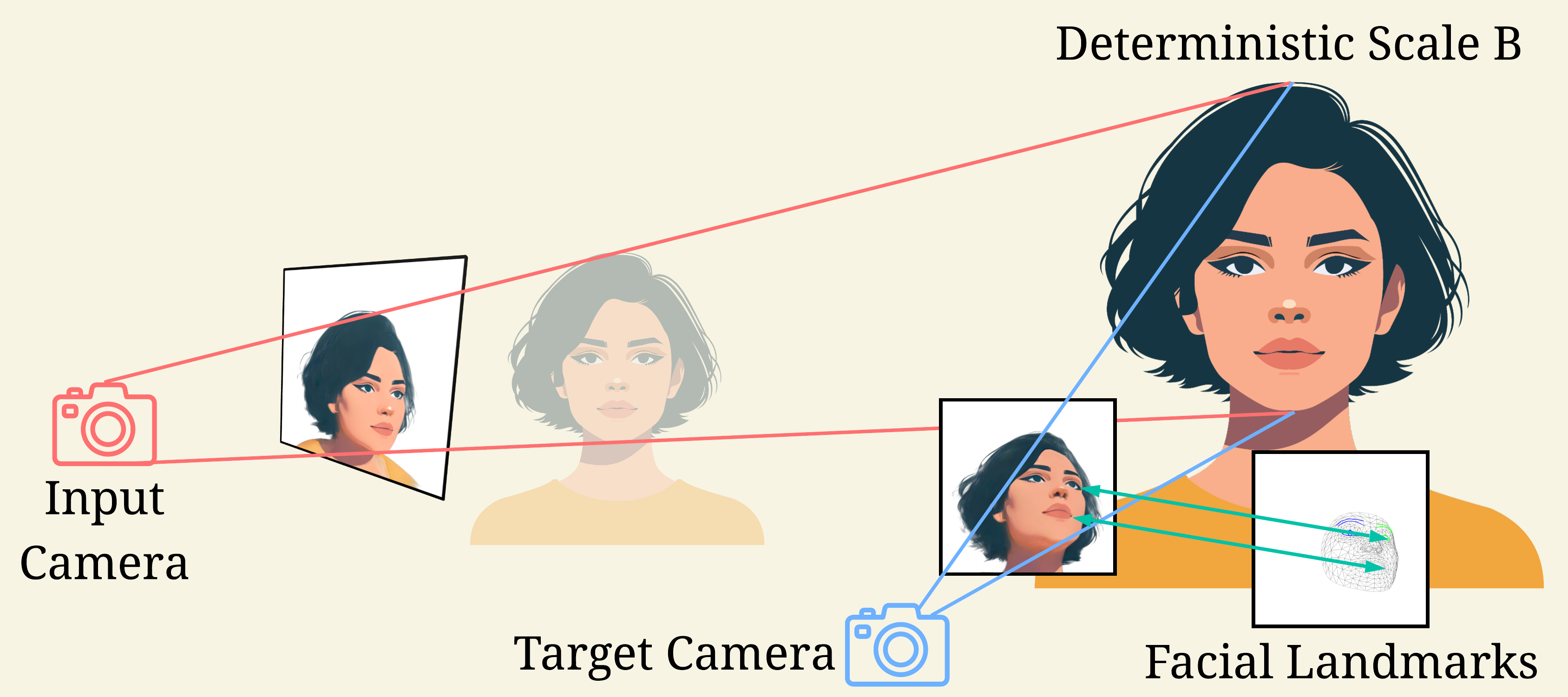
Scale aware 2D facial landmark trajectory conditioning signal rendered from a proxy 3D head
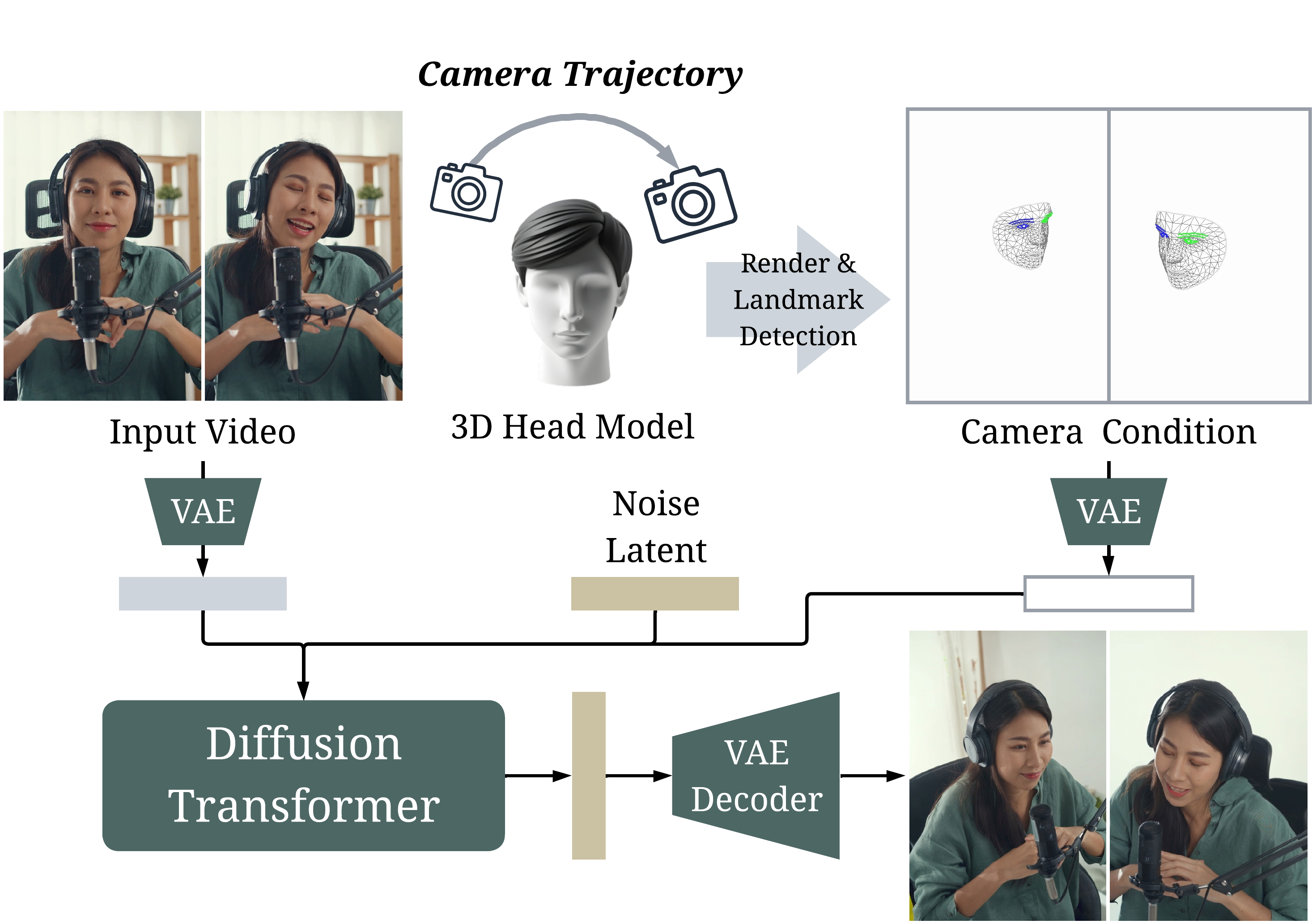
FaceCam output portrait video following the target 3D camera arc while preserving identity
Why Standard Camera Control Models Distort Close Up Portraits
General scene camera control models represent camera movement through raw 6DoF extrinsic matrices or Plücker ray embeddings. In a monocular close up portrait video, metric depth is unobservable from a single camera. Because the true distance between the lens and the actor is ambiguous up to a global scale factor, applying standard extrinsic conditioning forces the video diffusion model to guess the focal length and subject scale simultaneously.
When the virtual camera orbits or pushes in on a human face, scale ambiguity causes nose elongation, jaw warping, and identity drift across frames. Explicit 3D reconstruction pipelines attempt to fit a 3D mesh or Gaussian splat to the input video first, but monocular depth estimation errors around hair, glasses, and rapid lip movements bake geometric artifacts directly into the novel view rendering.
Scale Aware Camera Conditioning via 2D Facial Landmarks
FaceCam eliminates both metric scale ambiguity and fragile 3D mesh reconstruction by introducing scale aware camera conditioning in 2D image space.
- Image space point correspondences. Under projective geometry, two uncalibrated views with known 2D point correspondences determine the fundamental matrix, and with known camera intrinsics they recover relative camera pose up to a global scale. Portrait videos naturally provide dense 2D correspondences through facial landmarks.
- Proxy 3D head rendering at inference. During inference, FaceCam places a generic proxy 3D head model (
gaussians.ply) at the origin, renders it along the target 3D camera trajectory using differentiable Gaussian rasterization, and extracts 2D facial landmarks with MediaPipe (face_landmarker_v2_with_blendshapes.task). - Deterministic latent fusion. The source portrait video and the rasterized 2D landmark sequence pass through the
Wan2.1_VAE.pthencoder into theWan2.2-I2V-A14Bhigh noise and low noise Diffusion Transformer experts, which synthesize the camera controlled output at704x480across 81 frames.
Training Without 4D Synthetic Scans: Synthetic Motion & Multi Shot Stitching
Training a camera controllable portrait generator normally requires expensive 4D studio domes with moving robotic camera rigs. FaceCam trains exclusively on stationary multi view studio captures (Ava-256) and monocular videos in the wild by combining two data augmentation strategies.
- Synthetic camera motion. Continuous 2D crop windows pan and zoom across high resolution static footage to simulate smooth focal length and translation shifts.
- Multi shot stitching. Clips from different stationary studio cameras filming the same performance are concatenated into discontinuous multi view sequences. Although the training clips contain abrupt camera cuts between fixed viewpoints, the flow matching Diffusion Transformer generalizes at test time to smooth, continuous 3D camera trajectories.
Synthetic camera zoom augmentation generated from stationary portrait capture
Multi shot stitching across static studio cameras that teaches 3D viewpoint transitions
Hardware, VRAM & Model Component Matrix
| Component | Repository / File | Architecture & Role | Hardware & VRAM | License |
|---|---|---|---|---|
| Base Video Backbone | Wan-AI/Wan2.2-I2V-A14B |
14B MoE Diffusion Transformer (high_noise + low_noise) |
80 GB VRAM (standard) / 48 GB VRAM (--low_vram offload) |
Apache 2.0 |
| FaceCam Checkpoints | wlyu/FaceCam (wan2.2_14b/) |
Camera conditioned flow matching DiT weights (704x480, 81 frames) |
Supports single GPU or 4x GPU accelerate |
Research / Open Weights |
| Proxy 3D Head Asset | wlyu/FaceCam (gaussians.ply) |
3D Gaussian head proxy rendered via diff-gaussian-rasterization |
Runs on CUDA alongside MediaPipe | Research / Open Weights |
| Facial Landmarker | face_landmarker_v2_with_blendshapes.task |
MediaPipe float16 2D facial landmark extractor | CPU / lightweight GPU | Apache 2.0 |
Running FaceCam Locally With Wan 2.2 14B
Set up the Python 3.11 environment with xformers, diff-gaussian-rasterization, and mediapipe==0.10.21, then download both the base Wan2.2-I2V-A14B weights and the wlyu/FaceCam checkpoints.
git clone https://github.com/weijielyu/FaceCam.git
cd FaceCam

conda create -n facecam python=3.11 -y
conda activate facecam
pip install -e .
pip install xformers
pip install git+https://github.com/graphdeco-inria/diff-gaussian-rasterization --no-build-isolation
pip install mediapipe==0.10.21 modelscope huggingface_hub

mkdir -p models ckpts
modelscope download --model Wan-AI/Wan2.2-I2V-A14B --local_dir ./models/Wan-AI/Wan2.2-I2V-A14B
huggingface-cli download wlyu/FaceCam --local-dir ./ckpts
wget -O ckpts/face_landmarker_v2_with_blendshapes.task -q \
  https://storage.googleapis.com/mediapipe-models/face_landmarker/face_landmarker/float16/1/face_landmarker.task
To run portrait camera rendering on a single 48 GB GPU with CPU offloading between the text encoder, dual DiT experts, and VAE, pass the --low_vram flag, or distribute across four GPUs with accelerate.
# Single 48 GB GPU with CPU offloading (704x480, 81 frames)
python inference.py \
    --model_dir ./models \
    --ckpt_dir ./ckpts \
    --input_path ./inputs/actor_closeup.mp4 \
    --output_dir ./outputs \
    --low_vram

# Multi GPU distributed inference across 4 GPUs
accelerate launch --num_processes 4 inference.py \
    --model_dir ./models \
    --ckpt_dir ./ckpts \
    --input_path ./inputs \
    --output_dir ./outputs
For each input clip <name>.mp4, the script outputs the generated camera controlled video (<name>.mp4), the MediaPipe cropped source plate (<name>_input.mp4), and the rendered landmark trajectory preview (<name>_camera.mp4). Directors can customize exact pan, tilt, and dolly arcs by editing random_camera_params in inference.py.
Filmmaker Use Cases & AI FILMS Studio Workflows
In dialogue editing and virtual production, a static tripod interview or self tape often lacks the subtle camera movement needed to match dynamic scene coverage. FaceCam lets visual effects teams add a slow dolly push in, a parallax arc around a speaking actor, or a rack angle shift in post production while locking the actor's lip sync and micro expressions.
For related open source camera and character pipelines, explore our guides on CameraNoise, TriMotion, and FlashMotion camera control, OmniDirector camera motion cloning, and Wan-Animate-2 character animation and viewpoint control.
To direct camera movement and character performance in the cloud without a 48 GB workstation GPU, open the Motion Control page or chain reference plates and motion drivers inside the Nodes Graph Editor.


Sources
Continue Reading


Video & LipSync
- Video Generator
- Text to Video
- Image to Video
- Start-End Frame to Video
- Draw to Video
- Motion Control
- Video Enhancer
- Video Upscaler
- Video Extend
- Video to Video LipSync
- Audio to Video LipSync
- Image to Video LipSync
- Video FaceSwap
- Seedance 2.5
- WAN 3.0
- Seedance 2
- FLUX 3
- Minimax H3
- Vidu Q3 Pro
- Grok Imagine Video 1.5
- Gemini Omni
- Google Veo 3.1
- Kling 3.0 Pro
- Luma Ray 3.2
- LTX 2.3
- Happy Horse 1.1
- Kling 3.0 Motion
- ByteDance Upscaler
- InfiniteTalk
- InsightFace
Image & Edit
- AI Character
- AI Actor
- Art Generator
- Text to Image
- Image to Image
- LoRA Image to Image
- Draw to Edit
- Image LoRA Training
- Remove Background
- Image Enhancer
- MidJourney 8.0
- Krea 2
- OpenAI GPT Image 2.0
- Nano Banana Pro Ultra
- Nano Banana 2 Lite
- Nano Banana Pro
- Minimax Image
- Clarity Pro
- Z-Image Turbo LoRA
- Krea 2 Turbo LoRA
- Z-Image LoRA Trainer
- Qwen Image LoRA Trainer
- Background Erase Network 2 (BEN2)