

Tongyi-MAI / Alibaba (Apache 2.0)
Share this post:
Z-Image & ERNIE-Image: Open Weights Concept Art for Film
Pre production for an AI film starts with visual development by generating hundreds of storyboard panels, lighting keys, costume turnarounds, and diegetic set graphics before a single video frame is rendered. While 30 billion parameter image models require heavy workstation hardware, two compact Apache 2.0 open weights architectures deliver top tier photorealism and typography on 8 GB to 12 GB consumer GPUs. Z-Image and Z-Image-Turbo (Tongyi-MAI/Z-Image-Turbo, arXiv:2511.22699) pack a 6 billion parameter Scalable Single Stream Diffusion Transformer (S3-DiT) into an 8 step (8 NFE) generator that runs inside 12 GB of VRAM. ERNIE-Image and ERNIE-Image-Turbo (baidu/ERNIE-Image) pair an 8 billion parameter single stream DiT with a structured Prompt Enhancer (PE) that excels at multi panel storyboards, film posters, and dense bilingual signage inside 8 GB of VRAM (FP16).
Studio availability. ERNIE-Image is not available in AI FILMS Studio, and Z-Image Turbo Text to Image was previously available and is now retired (
Z-Image Turbo Image to Image,Z-Image Turbo LoRA, andZ-Image LoRA Trainerremain live in the Studio). To generate images in the Studio, see the models listed on the text to image page.
Single Stream Diffusion Transformers (S3-DiT) vs Dual Stream Models
First generation large Diffusion Transformers (such as MMDiT in SD3 and dual stream layers in FLUX.1) maintain separate weight matrices for text tokens and image latent tokens across early transformer blocks, doubling parameter overhead. Both Z-Image (6B) and ERNIE-Image (8B) adopt a Single Stream DiT (S3-DiT) design:
- Unified Sequence Concatenation. Text tokens, visual semantic tokens, and image VAE latent tokens are concatenated along the sequence dimension and processed through a single shared transformer stream from layer 1 to the final output projection.
- Higher Parameter Density on Consumer GPUs. Because every attention head and MLP block operates jointly over text and pixel latents, a 6B to 8B single stream model matches the spatial composition and prompt adherence of 12B to 20B dual stream models while cutting VRAM consumption down to 8 GB (
ERNIE-Image FP16) and 12 GB (Z-Image BF16).
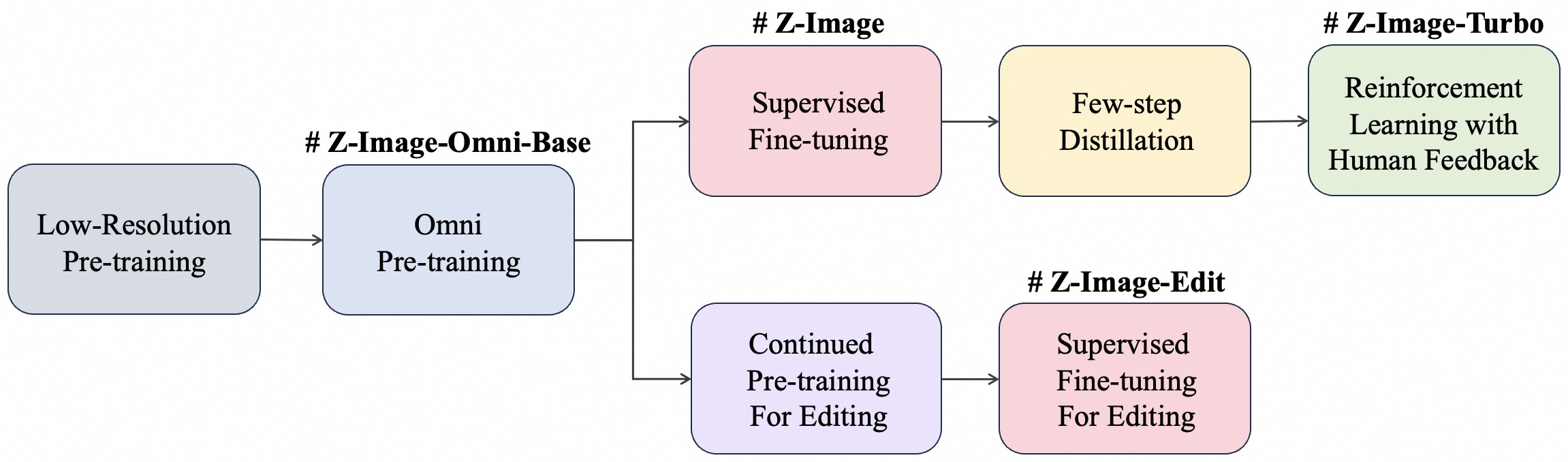

Inside Z-Image and Z-Image-Turbo: Decoupled-DMD and DMDR
To compress a 50 step foundation model (Tongyi-MAI/Z-Image) into an 8 step (guidance_scale=0.0) turbo generator (Tongyi-MAI/Z-Image-Turbo) without losing skin pores, film grain, or dramatic lighting contrast, the Z-Image team introduced two distillation papers alongside the model weights:
- **Decoupled Distribution Matching Distillation (
Decoupled-DMD,arXiv:2511.22677).**Separates the distillation objective into two distinct mechanisms: Classifier Free Guidance Augmentation (CA), which acts as the primary engine driving few step convergence, and Distribution Matching (DM), which acts as a regularizer that prevents structural artifacts. - DMD Meets Reinforcement Learning (
DMDR,arXiv:2511.13649). Integrates reinforcement learning (RL) reward optimization directly into the Distribution Matching Distillation loop. While standard distilled models often look flat compared to their 50 step teachers, DMDR uses RL to push aesthetic quality, micro texture, and human preference Elo above the base model while DMD regularizes the policy against reward hacking.
For filmmakers, Z-Image-Turbo generates 1024x1024 or widescreen keyframe concepts in 8 DiT forward passes (num_inference_steps=9, guidance_scale=0.0), making it fast enough for interactive look development during director pitch sessions.
Inside ERNIE-Image 8B: Structured Storyboards and Diegetic Text
In narrative filmmaking, concept artists frequently need to generate diegetic text inside a scene (such as neon storefront signs, newspaper headlines, control room HUD displays, clapperboards, or movie posters) as well as multi panel storyboards that maintain consistent style across frames.
ERNIE-Image (baidu/ERNIE-Image and baidu/ERNIE-Image-Turbo) addresses both tasks through an integrated Prompt Enhancer (use_pe=True) and layout aware pretraining:
- GenEval & OneIG-EN Benchmarks. On
GenEval, the 8BERNIE-Imagemodel achieves an overall score of 0.8856 (1.0000on single object,0.9596on two object, and0.8625on spatial position binding), outperformingFLUX.2-klein-9B(0.8481). - LongTextBench Typography Accuracy. On
LongTextBench,ERNIE-Image (w/ PE)scores 0.9804 on English long form text rendering and 0.9661 on Chinese text rendering (0.9733average), whileZ-Imagescores 0.9355.
For related open source and commercial image generation workflows, see our technical breakdowns of HiDream-O1 pixel native open source image generation, FLUX.2 production image generation, and Qwen-Image-Edit multi angle scene generation.
Hardware & Technical Comparison
| Specification | Z-Image (6B Base) |
Z-Image-Turbo (6B Distilled) |
ERNIE-Image / Turbo (8B) |
|---|---|---|---|
| Hugging Face Repo | Tongyi-MAI/Z-Image |
Tongyi-MAI/Z-Image-Turbo |
baidu/ERNIE-Image (ERNIE-Image-Turbo) |
| Architecture | 6B Single Stream DiT (S3-DiT) |
6B S3-DiT (Decoupled-DMD + DMDR) |
8B Single Stream DiT + Prompt Enhancer |
| Inference Steps | 20 to 50 steps (CFG 3.5) |
8 steps (CFG 0.0, no negative prompt) |
50 steps (Base) / 8 steps (Turbo) |
| Minimum VRAM | 12 GB VRAM (BF16) |
12 GB VRAM (BF16) |
8 GB VRAM (FP16) / 16 GB (BF16) |
| Download Size | ~23 GB | ~23 GB | ~8 GB (FP16) to ~16 GB (BF16) |
| License | Apache 2.0 | Apache 2.0 | Apache 2.0 |
| Studio Availability | Z-Image LoRA Trainer (Live) |
Z-Image Turbo Image to Image & LoRA (Live) |
Not in Studio (never) |
Running Z-Image-Turbo and ERNIE-Image Locally in Python
Both model families run natively in Hugging Face diffusers. Below is a minimal script for generating widescreen (1376x768) storyboard frames with Z-Image-Turbo in 8 steps and ERNIE-Image with its built in Prompt Enhancer:
import torch
from diffusers import ErnieImagePipeline, ZImagePipeline

# Option A: Z-Image-Turbo (8 DiT forwards, CFG = 0.0, 12 GB VRAM)
z_pipe = ZImagePipeline.from_pretrained(
    "Tongyi-MAI/Z-Image-Turbo",
    torch_dtype=torch.bfloat16,
).to("cuda")

keyframe = z_pipe(
    prompt="Wide anamorphic film still, 1970s neo-noir detective standing under a flickering diner sign reading 'MIDNIGHT EXPRESS', wet asphalt reflections, 35mm Kodak Vision3 500T",
    height=768,
    width=1376,
    num_inference_steps=9,
    guidance_scale=0.0,
).images[0]
keyframe.save("storyboard_keyframe_z_turbo.png")

# Option B: ERNIE-Image 8B with Prompt Enhancer (use_pe=True)
ernie_pipe = ErnieImagePipeline.from_pretrained(
    "Baidu/ERNIE-Image",
    torch_dtype=torch.bfloat16,
)
ernie_pipe.enable_model_cpu_offload()

poster = ernie_pipe(
    prompt="A four-panel cinematic storyboard showing a spacecraft docking sequence in low Earth orbit, technical telemetry labels in each panel corner",
    height=848,
    width=1264,
    num_inference_steps=50,
    guidance_scale=4.0,
    use_pe=True,
).images[0]
poster.save("storyboard_panels_ernie.png")
Concept Art, LoRA Training & Storyboarding in AI FILMS Studio
Inside AI FILMS Studio, several tools from the Z-Image family and leading cloud foundation models are live today in the Image Workspace and on the Text to Image and Image to Image pages:
- Z-Image Turbo Image to Image, Z-Image Turbo LoRA & Z-Image LoRA Trainer. All three are live in AI FILMS Studio. You can train a custom character or production design LoRA using Z-Image LoRA Trainer, generate stylized variations with Z-Image Turbo LoRA, and refine storyboard compositions with Z-Image Turbo Image to Image.
- Seedream 5.0 Pro, FLUX.2 Pro, MidJourney 8.0 & Nano Banana PRO Ultra. Live in the Studio for high resolution text-to-image keyframe generation and character consistency.
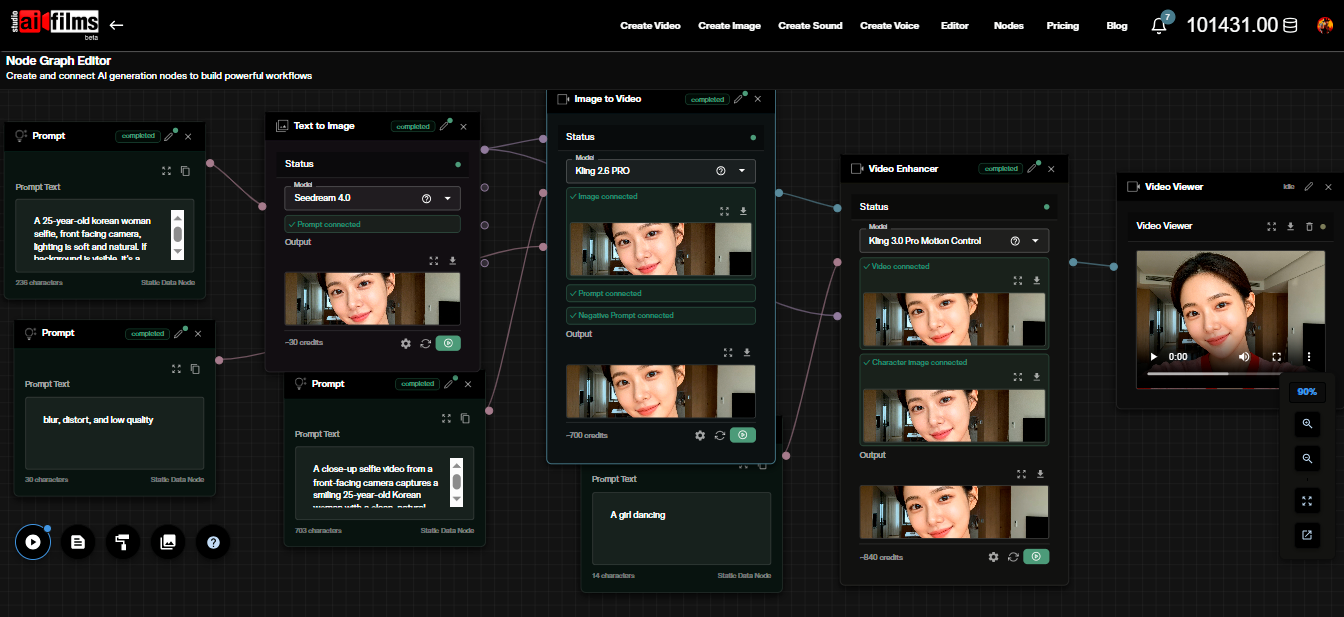
- Nodes Graph Editor Pre-Production Pipelines. In the Nodes Graph Editor, you can wire a Z-Image Turbo LoRA or FLUX.2 Pro image node directly into a start and end frame or image-to-video node to animate your approved storyboard panels inside a single workflow.
Sources
Z-Image Technical Report (arXiv:2511.22699) | Decoupled-DMD (arXiv:2511.22677) | DMDR (arXiv:2511.13649) | ERNIE-Image Hugging Face (baidu/ERNIE-Image)
Continue Reading


Video & LipSync
- Video Generator
- Text to Video
- Image to Video
- Start-End Frame to Video
- Draw to Video
- Motion Control
- Video Enhancer
- Video Upscaler
- Video Extend
- Video to Video LipSync
- Audio to Video LipSync
- Image to Video LipSync
- Video FaceSwap
- Seedance 2.5
- WAN 3.0
- Seedance 2
- FLUX 3
- Minimax H3
- Vidu Q3 Pro
- Grok Imagine Video 1.5
- Gemini Omni
- Google Veo 3.1
- Kling 3.0 Pro
- Luma Ray 3.2
- LTX 2.3
- Happy Horse 1.1
- Kling 3.0 Motion
- ByteDance Upscaler
- InfiniteTalk
- InsightFace
Image & Edit
- AI Character
- AI Actor
- Art Generator
- Text to Image
- Image to Image
- LoRA Image to Image
- Draw to Edit
- Image LoRA Training
- Remove Background
- Image Enhancer
- MidJourney 8.0
- Krea 2
- OpenAI GPT Image 2.0
- Nano Banana Pro Ultra
- Nano Banana 2 Lite
- Nano Banana Pro
- Minimax Image
- Clarity Pro
- Z-Image Turbo LoRA
- Krea 2 Turbo LoRA
- Z-Image LoRA Trainer
- Qwen Image LoRA Trainer
- Background Erase Network 2 (BEN2)