
Share this post:
EffectErase: Remove Objects and Their Visual Effects from Video
Researchers at Fudan University published EffectErase, a video object removal system accepted to CVPR 2026. The model erases not just the target object but also its visual side effects, including shadows, reflections, and physical deformations on surrounding surfaces, then fills in a coherent background.
The Problem With Existing Removal Tools
Standard video inpainting methods remove a masked region and reconstruct what belongs there. They fail on a common production problem: objects in video cast shadows, produce reflections on floors and walls, and cause soft deformations in cloth or other flexible materials nearby. Erase only the object and the artifacts remain, making the removal visually obvious.
EffectErase addresses this by treating effect erasing as a joint task. The model learns to identify and remove the full footprint an object leaves on a scene, not just the object silhouette. Authors Yang Fu, Yike Zheng, Ziyun Dai, and Henghui Ding call this "effect erasing" to distinguish it from simple inpainting.
Before and After: Drag Scene
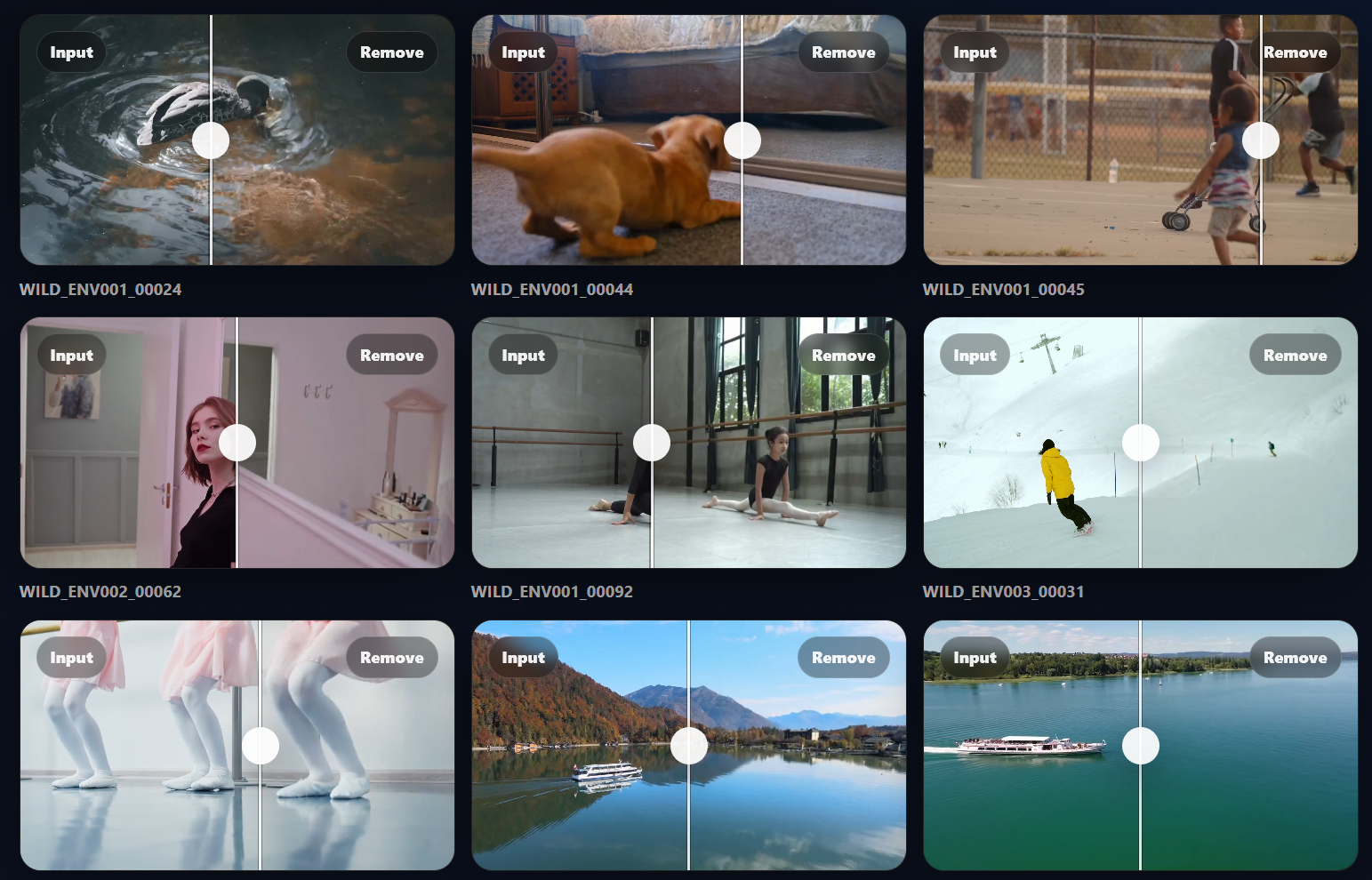
The pair below shows the original video with foreground and background elements on the left, and the cleaned background after removal on the right.
Original: with object
After EffectErase: background restored
The VOR Dataset
Fudan's team built VOR (Video Object Removal), a dataset of 60,000 high quality video pairs covering five effect types. Each pair contains the original scene with the object present, the clean background without it, and a segmentation mask.
The dataset combines two sources. Synthetic sequences were rendered in Blender using 3D environments and animations, which gives precise ground truth for complex effects. Real world captures across diverse scenes provide the variety needed to generalize. Masks were generated by SAM2, the same segmentation model that EffectErase uses at inference time, followed by human refinement.
Original: with object
After EffectErase: background restored
Original: with object
After EffectErase: background restored
Architecture and Reciprocal Training
EffectErase builds on the DiffSynth-Studio framework and uses the Wan2.1-Fun-1.3B-InP model as its base video diffusion transformer. Input videos are encoded into latent space through a VAE, then processed through Diffusion Transformer blocks with cross-attention.
The key design choice is treating object insertion as a reciprocal auxiliary task during training. Removal and insertion share effect regions and structural cues in opposite directions. Training them jointly helps the model learn where effects are located more precisely than training removal alone. The authors introduce an effect consistency loss to enforce that both tasks focus on the same affected area.
At inference, users switch between removal and insertion modes by changing the inputs. The model itself is the same for both.
Original: with object
After EffectErase: background restored
Benchmark Results
EffectErase outperforms five established methods: ObjectClear, OmniPaint, ProPainter, DiffuEraser, and ROSE. The benchmark tests cover diverse object categories and multi-object scenes drawn from the VOR dataset.
The CVPR 2026 acceptance reflects that effect aware removal is a distinct and harder problem than standard inpainting. Most prior work targets simple rectangular regions or objects without attached visual artifacts. EffectErase's performance advantage is largest on scenes with prominent shadows and reflections, where competing tools leave visible traces.
For comparison, MatAnyone 2, also accepted to CVPR 2026, takes a complementary approach by extracting foreground subjects with pixel-level alpha mattes rather than erasing them from the background.
Open Source and Licensing
EffectErase is open source and publicly available. The code is on GitHub, the VOR dataset is on Hugging Face, and the paper is on arXiv.
The license is CC BY-NC 4.0. Both the code and dataset carry a non-commercial restriction. The authors explicitly state: research purposes only, commercial use is strictly prohibited. Filmmakers and studios evaluating EffectErase for production pipelines will need to contact the authors directly at aleeyanger@gmail.com for any commercial inquiry.
SAM2.1 is required for mask generation as a preprocessing step before running the model. For object removal driven by text instructions without any mask input, SAMA is a 14B instruction guided video editing model covering removal, replacement, addition, and style transfer. For video editing tools that are MIT licensed and permit commercial use, Kiwi-Edit covers object removal alongside a broader set of editing tasks.
Sources
arXiv: EffectErase: Joint Video Object Removal and Insertion for High-Quality Effect Erasing GitHub: FudanCVL/EffectErase Hugging Face: FudanCVL/EffectErase Project Page: henghuiding.com/EffectErase
Continue Reading
.jpg?w=3840)


Video & LipSync
- Video Generator
- Text to Video
- Image to Video
- Start-End Frame to Video
- Draw to Video
- Motion Control
- Video Enhancer
- Video Upscaler
- Video Extend
- Video to Video LipSync
- Audio to Video LipSync
- Image to Video LipSync
- Video FaceSwap
- Seedance 2.5
- WAN 3.0
- Seedance 2
- FLUX 3
- Minimax H3
- Vidu Q3 Pro
- Grok Imagine Video 1.5
- Gemini Omni
- Google Veo 3.1
- Kling 3.0 Pro
- Luma Ray 3.2
- LTX 2.3
- Happy Horse 1.1
- Kling 3.0 Motion
- ByteDance Upscaler
- InfiniteTalk
- InsightFace
Image & Edit
- AI Character
- AI Actor
- Art Generator
- Text to Image
- Image to Image
- LoRA Image to Image
- Draw to Edit
- Image LoRA Training
- Remove Background
- Image Enhancer
- MidJourney 8.0
- Krea 2
- OpenAI GPT Image 2.0
- Nano Banana Pro Ultra
- Nano Banana 2 Lite
- Nano Banana Pro
- Minimax Image
- Clarity Pro
- Z-Image Turbo LoRA
- Krea 2 Turbo LoRA
- Z-Image LoRA Trainer
- Qwen Image LoRA Trainer
- Background Erase Network 2 (BEN2)