

AI FILMS architecture diagram from the inworld/voice-isolator README (Apache 2.0)
Share this post:
Inworld Voice Isolator: Open Source Film Audio Cleanup
Location sound rarely arrives clean in the edit bay. Generator hum, passing traffic, wind gusts, and hard room tails force productions into expensive ADR sessions. Inworld Voice Isolator v1, released in November 2026 under the Apache 2.0 license, isolates foreground speech at full 48 kHz broadcast quality while preserving the actor's own breaths, laughter, and sighs without hallucinating synthetic audio. It ships as two lightweight checkpoints, a 64.0M offline model for post production and a 58.2M causal streaming model with 20 ms look ahead.
Studio availability. Try the public Hugging Face demo below; Inworld Voice Isolator is not part of a paid AI FILMS Studio plan (use MiniMax Speech 2.8 HD Text to Speech in the voice workspace for example instead).
Try Inworld Voice Isolator Live
Upload a noisy production WAV or test the bundled noisy speech examples in the live Hugging Face Space below. The offline tab returns both the isolated 48 kHz dialogue track and the exact removed background residual so you can audition what was stripped out.
Architecture and Technical Design
Inworld Voice Isolator operates directly in the 48 kHz STFT domain (n_fft=2048, hop=480, 10 ms frames). Each frame's spectrum is partitioned into 46 frequency bands that stay narrow across low speech fundamentals and widen toward upper harmonics, mapping to width 512 tokens. Seven dual path refinement blocks alternate between four time and band attention blocks (with rotary positional embeddings) and three bidirectional or causal Mamba state space blocks (state size 16).
Per band output heads predict a bounded complex mask plus a bounded per bin residual added to the input spectrum before the inverse STFT. Because the model is a strict denoiser rather than a generative vocoder, it never invents missing high frequencies or alters the speaker's vocal identity. Subtracting the clean voice stem from the aligned mono input yields an exact background noise or music residual stem.
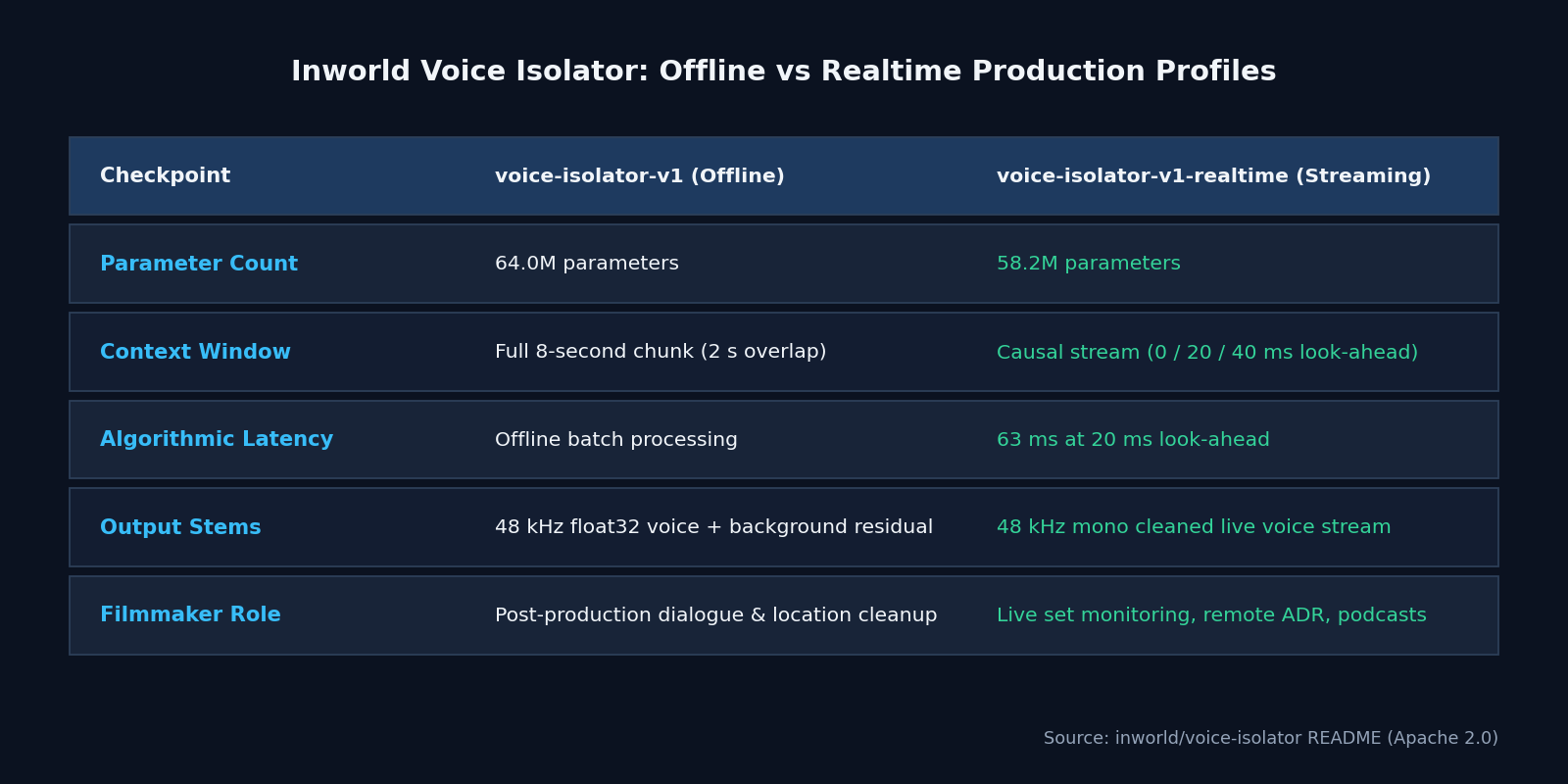
AI FILMS comparison chart from inworld/voice-isolator README (Apache 2.0)
Inworld trained v1 on roughly 10,000 hours of unique speech spanning read dialogue, expressive character performances, whispered lines, singing, and non verbal human sounds mixed with traffic, rain, wind, music, crowd murmur, and measured room impulse responses.
When two people talk simultaneously, the model keeps the louder foreground speaker and suppresses a quieter voice a few decibels down. If both speakers sit at similar levels, both voices usually survive intact, which is critical for overlapping documentary interviews.
Hardware, VRAM, and License Matrix
| Checkpoint | Parameters | Context / Latency | Supported Hardware | License | Production Role |
|---|---|---|---|---|---|
voice-isolator-v1 (Offline) |
64.0M | 8 second chunks (2 s overlap) | CUDA, Apple Silicon MPS (PyTorch 2.6+), CPU | Apache 2.0 | Dialogue editorial, documentary cleanup, ADR prep |
voice-isolator-v1-realtime |
58.2M | Causal, 0 / 20 / 40 ms look ahead (63 ms latency) | CUDA, Apple Silicon MPS, CPU | Apache 2.0 | Live on set monitoring, remote voice direction, streams |
Because both checkpoints are under 65 million parameters, they run comfortably on CPU or Apple Silicon laptops as well as NVIDIA GPUs. Both code and weights are released under Apache 2.0 with SHA256 checksum verification on first download.
Parameter Reference
| Parameter / Flag | Default / Options | Practical Impact |
|---|---|---|
mode |
"offline" or "streaming" |
Selects the 64.0M offline or 58.2M realtime checkpoint |
lookahead_frames |
0, 2 (20 ms), or 4 (40 ms) |
Higher look ahead improves denoising in streaming mode at 63 ms total latency (2) |
--output-sr |
48000 (0 preserves input rate) |
Standardizes exports to 48 kHz float32 film sound specs |
--background |
Auto saved as *_background.wav |
Exports the exact subtracted ambient noise or music stem |
--no-background |
Off | Saves only the isolated clean voice WAV |
--device |
Auto (cuda, mps, cpu) |
Forces execution device for batch render farms |
Local Python and CLI Setup
Install the official inworld-voice-isolation package. The CLI automatically downloads the pinned Apache 2.0 weights on first run and outputs both the clean 48 kHz float32 voice track and the removed background track.
pip install inworld-voice-isolation

# Offline cleanup (writes dialogue_clean.wav and dialogue_clean_background.wav)
voice-isolate boom_take_04.wav dialogue_clean.wav

# Realtime streaming mode with 20 ms look ahead
voice-isolate boom_take_04.wav dialogue_streamed.wav --mode streaming --lookahead 2
For automated NLE ingest pipelines, call the Python API directly to split location audio into separate dialogue and ambient stems.
from inworld import voice_isolation

offline = voice_isolation.VoiceIsolator("inworld/voice-isolator")
wav, sample_rate = voice_isolation.load_audio("boom_take_04.wav")

voice = offline.isolate(wav, sample_rate)
background = wav - voice

voice_isolation.save_audio("boom_take_04_voice.wav", voice, sample_rate, subtype="FLOAT")
voice_isolation.save_audio("boom_take_04_bg.wav", background, sample_rate, subtype="FLOAT")
Filmmaker Production Playbook
1. Recover wet room tone without killing breaths. Aggressive noise gates chop off quiet inhalations and whispered endings, making actors sound robotic. Because Inworld Voice Isolator preserves non verbal vocalizations and exports a phase aligned background stem, re-recording mixers can dial 10% to 15% of the removed room tone back under the dialogue so cuts feel natural.
2. Prep clean reference stems for AI voice cloning and lip sync. Open source TTS and dubbing pipelines degrade rapidly when reference audio carries wind or music bleed. Run location takes through voice-isolator-v1 before feeding them into local voice cloning or cloud voice workflows in the voice workspace.
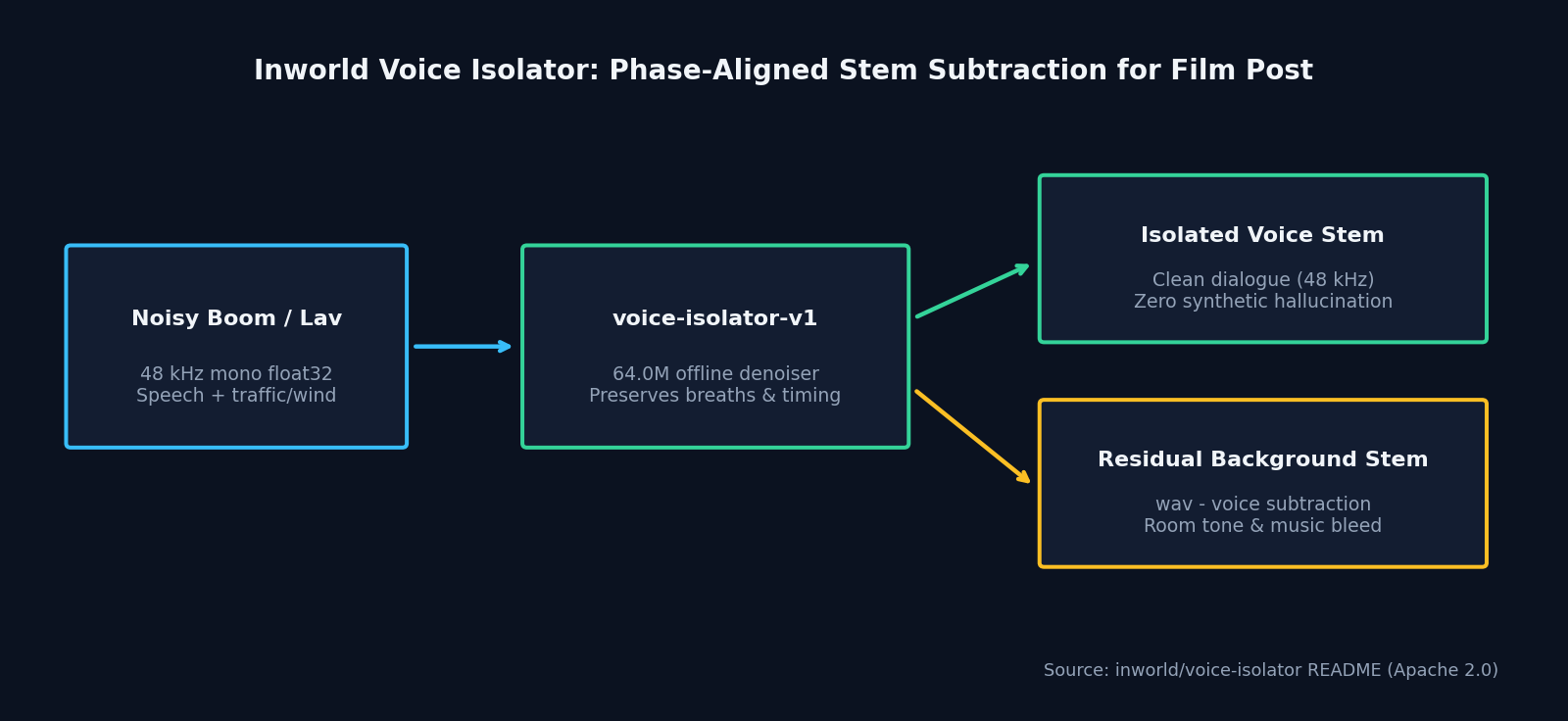
AI FILMS workflow diagram from inworld/voice-isolator README (Apache 2.0)
- Separate vocals from scratch music tracks. When rough cuts arrive baked with temporary music under narration, subtracting the isolated voice yields a quick backing residual that helps sound editors spot cues and retime transitions.
- Know when you need restoration instead of denoising. Inworld states clearly that v1 is a denoiser, not a bandwidth restoration model. If a phone recording or damaged lavalier mic has lost all frequencies above 4 kHz, Voice Isolator removes the noise cleanly without inventing upper treble (restoration is planned for v2). Pair cleaned dialogue with cloud sound design on the sound workspace or visual edits on the text to video page.
Related Reading
- AudioLDM2 & MusicGen: Open Source Foley and Score AI
- Foley-Omni Generates Speech, Sound Effects and Music from Video
- MiDashengLM-Gen: One Apache 2.0 Model for Speech, Music and SFX
- StepAudio-3-Music: Open Source 48 kHz Film Score AI


Sources
Continue Reading


Video & LipSync
- Video Generator
- Text to Video
- Image to Video
- Start-End Frame to Video
- Draw to Video
- Motion Control
- Video Enhancer
- Video Upscaler
- Video Extend
- Video to Video LipSync
- Audio to Video LipSync
- Image to Video LipSync
- Video FaceSwap
- Seedance 2.5
- WAN 3.0
- Seedance 2
- FLUX 3
- Minimax H3
- Vidu Q3 Pro
- Grok Imagine Video 1.5
- Gemini Omni
- Google Veo 3.1
- Kling 3.0 Pro
- Luma Ray 3.2
- LTX 2.3
- Happy Horse 1.1
- Kling 3.0 Motion
- ByteDance Upscaler
- InfiniteTalk
- InsightFace
Image & Edit
- AI Character
- AI Actor
- Art Generator
- Text to Image
- Image to Image
- LoRA Image to Image
- Draw to Edit
- Image LoRA Training
- Remove Background
- Image Enhancer
- MidJourney 8.0
- Krea 2
- OpenAI GPT Image 2.0
- Nano Banana Pro Ultra
- Nano Banana 2 Lite
- Nano Banana Pro
- Minimax Image
- Clarity Pro
- Z-Image Turbo LoRA
- Krea 2 Turbo LoRA
- Z-Image LoRA Trainer
- Qwen Image LoRA Trainer
- Background Erase Network 2 (BEN2)