

AI FILMS architecture diagram from BRIA FIBO 2.0 technical documentation
Share this post:
BRIA FIBO 2.0 Edit: Open Source JSON Image Editing
Natural language image editing often suffers from prompt drift. Ask a model to warm up a key light and it silently alters the actor's wardrobe or camera lens. BRIA FIBO 2.0 Edit Turbo (briaai/Fibo-2.0-edit-turbo), released on October 19, 2026, replaces loose text prompts with structured Visual GenAI Language (VGL) JSON blueprints that edit images like surgical diffs. Built on an 8B 44 block single stream Diffusion Transformer trained exclusively on licensed datasets, it completes multi reference and masked edits in 4 guidance free steps.
Studio availability. Try the public Hugging Face demo below; BRIA FIBO 2.0 Edit is not part of a paid AI FILMS Studio plan (use ByteDance SeedEdit 3.0 Image to Image in the image workspace for example instead).
Try BRIA FIBO 2.0 Edit Live
Explore the interactive BRIA Studio editor below with brush masking, up to 4 reference layers, split view comparison, and direct JSON instruction overrides. The embed is sized to 1250 px so the canvas, advanced controls, and Generate Edit button display without inner scrollbars.
Architecture and Technical Design
FIBO 2.0 unifies text-to-image generation and multi reference editing inside one 8B parameter flow matching DiT with 44 single stream transformer blocks. Visual latents run through the FLUX.2 VAE, while Qwen3-VL-4B-Instruct encodes the structured VGL JSON schema alongside up to four reference images (<image_1> through <image_4>) and an optional binary mask.
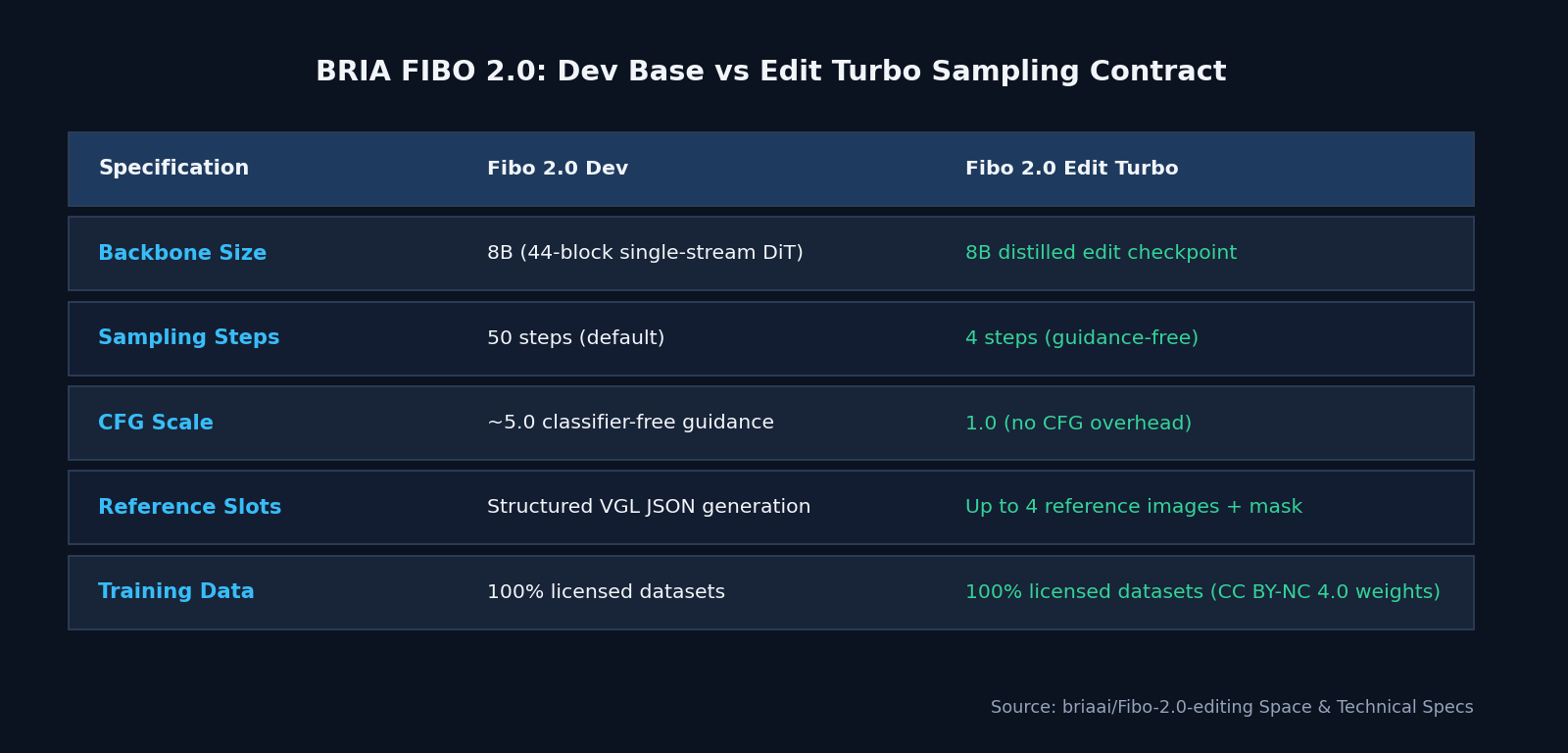
AI FILMS specification comparison from briaai/Fibo-2.0-editing
Instead of parsing a flat paragraph, VGL separates camera focal length, depth of field, lighting direction, color palette, subject attributes, and rendered signage into explicit JSON keys. When an art director changes only the lighting block from overcast daylight to sodium vapor night, unedited keys stay locked.
The family splits into two checkpoints. Fibo 2.0 Dev runs at roughly 50 steps with CFG near 5.0 for base generation and fine tuning, while Fibo 2.0 Edit Turbo is distilled down to 4 steps with CFG 1.0 for interactive look development.
The official Hugging Face Space also exposes two surfaces, including a layered Photoshop style Studio interface with before and after split view, and a node based /workflow canvas that lets artists chain sequential edits while caching upstream outputs.
Hardware, VRAM, and License Matrix
| Checkpoint | Parameters | Steps & CFG | Approx. VRAM | License | Best Studio Role |
|---|---|---|---|---|---|
briaai/Fibo-2.0-edit-turbo |
8B DiT + Qwen3-VL-4B | 4 steps, CFG 1.0 | ~20 to 24 GB (BF16) | CC BY-NC 4.0 (Gated) | Fast shot continuity edits and multi reference plates |
briaai/Fibo-2.0-dev |
8B DiT + Qwen3-VL-4B | ~50 steps, CFG 5.0 | ~20 to 24 GB (BF16) | CC BY-NC 4.0 (Gated) | Base keyframe generation and LoRA fine tuning |
| BRIA Enterprise License / API | 8B | Production API / self host | Cloud or on prem | Commercial (100% licensed data) | Indemnified studio advertising and film production |
Like RMBG 3.0, the open weights on Hugging Face carry a gated CC BY-NC 4.0 non commercial license. Commercial productions require a direct commercial agreement with BRIA, which provides full dataset provenance and legal indemnification.
Parameter Reference
| Parameter | Recommended Value | Effect on Output |
|---|---|---|
num_inference_steps |
4 (Edit Turbo) / 50 (Dev) |
Edit Turbo is strictly distilled for 4 step execution |
guidance_scale |
1.0 (Edit Turbo) / 5.0 (Dev) |
Keep 1.0 on Edit Turbo to prevent oversaturated contrast |
| Reference images | Up to 4 (<image_1> .. <image_4>) |
Injects wardrobe, prop, actor, and set lighting references |
| Optional mask | White painted region over source | Restricts pixel updates strictly to the masked zone |
| VGL JSON instruction | Structured JSON object | Disentangles camera, lighting, color grade, and text changes |
Local Python and CLI Setup
FIBO 2.0 requires Python 3.11 or newer, recent diffusers with FIBO 2 support, and Hugging Face authentication after accepting the gated model terms.
pip install -U torch transformers accelerate pillow
pip install git+https://github.com/huggingface/diffusers.git
hf auth login
import json
import torch
from diffusers import DiffusionPipeline
from PIL import Image

pipe = DiffusionPipeline.from_pretrained(
    "briaai/Fibo-2.0-edit-turbo",
    torch_dtype=torch.bfloat16,
    trust_remote_code=True,
).to("cuda")

source = Image.open("exterior_day_plate.png").convert("RGB")
prop_ref = Image.open("vintage_lantern_ref.png").convert("RGB")

vgl_edit = json.dumps({
    "edit_instruction": "Change lighting to golden hour dusk and place the brass lantern from <image_2> on the wooden table in <image_1>.",
    "lighting": {"condition": "warm golden hour backlight", "shadows": "long soft shadows"},
    "camera": {"preserve_framing": True, "preserve_depth_of_field": True},
})

edited = pipe(
    prompt=vgl_edit,
    image=[source, prop_ref],
    num_inference_steps=4,
    guidance_scale=1.0,
    generator=torch.Generator("cuda").manual_seed(7),
).images[0]

edited.save("exterior_dusk_edited.png")
Filmmaker Production Playbook
- Version control your look development in Git. Because FIBO 2.0 accepts deterministic JSON schemas instead of fragile adjective chains, art departments can store shot lighting and color grade definitions as
.jsonfiles alongside the script. Changing"lighting.condition"across twenty storyboard plates produces uniform visual continuity. - Swap props and wardrobe across 4 reference slots. Pass the master set plate as
<image_1>, a hero costume swatch as<image_2>, and a practical prop photo as<image_3>, then paint a quick mask over the actor's hand or table surface so the rest of the frame remains pixel stable. - Inspect edits in 4 steps before committing to video. Fast 4 step turnaround lets directors review five lighting variations in under a minute before locking the final start frame for image-to-video generation.
- Use cloud image editing for commercial turnarounds. When you need commercial clearance without local GPU setup, edit frames directly with ByteDance SeedEdit 3.0 Image to Image or FLUX.2 PRO Image to Image on the image to image page inside the image workspace.
Related Reading
- Qwen-Image 2.1 Turbo: 8 Step Open Weights 2K Image AI
- FLUX 2 Tutorial: Image Generation and Editing in AI FILMS Studio
- Qwen-Image-Edit 2509: Transform Still Images Into Multi Angle Scenes
- Qwen-Video-Edit: Open Source Instruction Video Editing


Sources
Continue Reading


Video & LipSync
- Video Generator
- Text to Video
- Image to Video
- Start-End Frame to Video
- Draw to Video
- Motion Control
- Video Enhancer
- Video Upscaler
- Video Extend
- Video to Video LipSync
- Audio to Video LipSync
- Image to Video LipSync
- Video FaceSwap
- Seedance 2.5
- WAN 3.0
- Seedance 2
- FLUX 3
- Minimax H3
- Vidu Q3 Pro
- Grok Imagine Video 1.5
- Gemini Omni
- Google Veo 3.1
- Kling 3.0 Pro
- Luma Ray 3.2
- LTX 2.3
- Happy Horse 1.1
- Kling 3.0 Motion
- ByteDance Upscaler
- InfiniteTalk
- InsightFace
Image & Edit
- AI Character
- AI Actor
- Art Generator
- Text to Image
- Image to Image
- LoRA Image to Image
- Draw to Edit
- Image LoRA Training
- Remove Background
- Image Enhancer
- MidJourney 8.0
- Krea 2
- OpenAI GPT Image 2.0
- Nano Banana Pro Ultra
- Nano Banana 2 Lite
- Nano Banana Pro
- Minimax Image
- Clarity Pro
- Z-Image Turbo LoRA
- Krea 2 Turbo LoRA
- Z-Image LoRA Trainer
- Qwen Image LoRA Trainer
- Background Erase Network 2 (BEN2)