

BFS Head Swap V1.1 Qwen-Image 2.1 result by Alissonerdx (MIT)
Share this post:
BFS Best Face Swap: Open Source LoRA VFX Replacement
Legacy face swapping models paste low resolution crops onto a target frame, breaking lighting direction, hairlines, and head shape. BFS (Best Face Swap) by Alissonerdx takes a different approach by releasing MIT licensed LoRA adapters trained directly on modern diffusion backbones including Qwen-Image 2.1, FLUX.2 Klein, Krea 2, and experimental LTX-2 video weights. With over 223,000 Hugging Face downloads and more than 1,000 Space likes, BFS has become a go to open source toolkit for head, face, and selective body replacement in still frames and stunt double look development.
Studio availability. Try the public Hugging Face demo below; BFS Best Face Swap is not part of a paid AI FILMS Studio plan (use InsightFace Video Face Swap in the video workspace for example instead).
Try BFS Best Face Swap Live
Test the bfs_head_v1_qwen_2.1 head swap LoRA directly below. The live Hugging Face Space pairs Qwen-Image 2.1 with an optional 6 step turbo mode so you can inspect lighting integration and hairline blending in seconds.
Architecture and Technical Design
Instead of running an external face detector and blending a 128x128 facial crop over a finished plate, BFS operates natively inside the diffusion transformer's latent space. When conditioned on a target body plate and a reference identity portrait, the LoRA guides the base model to reconstruct the entire head, jaw structure, hairstyle, and ambient light reflection in a single generative pass.
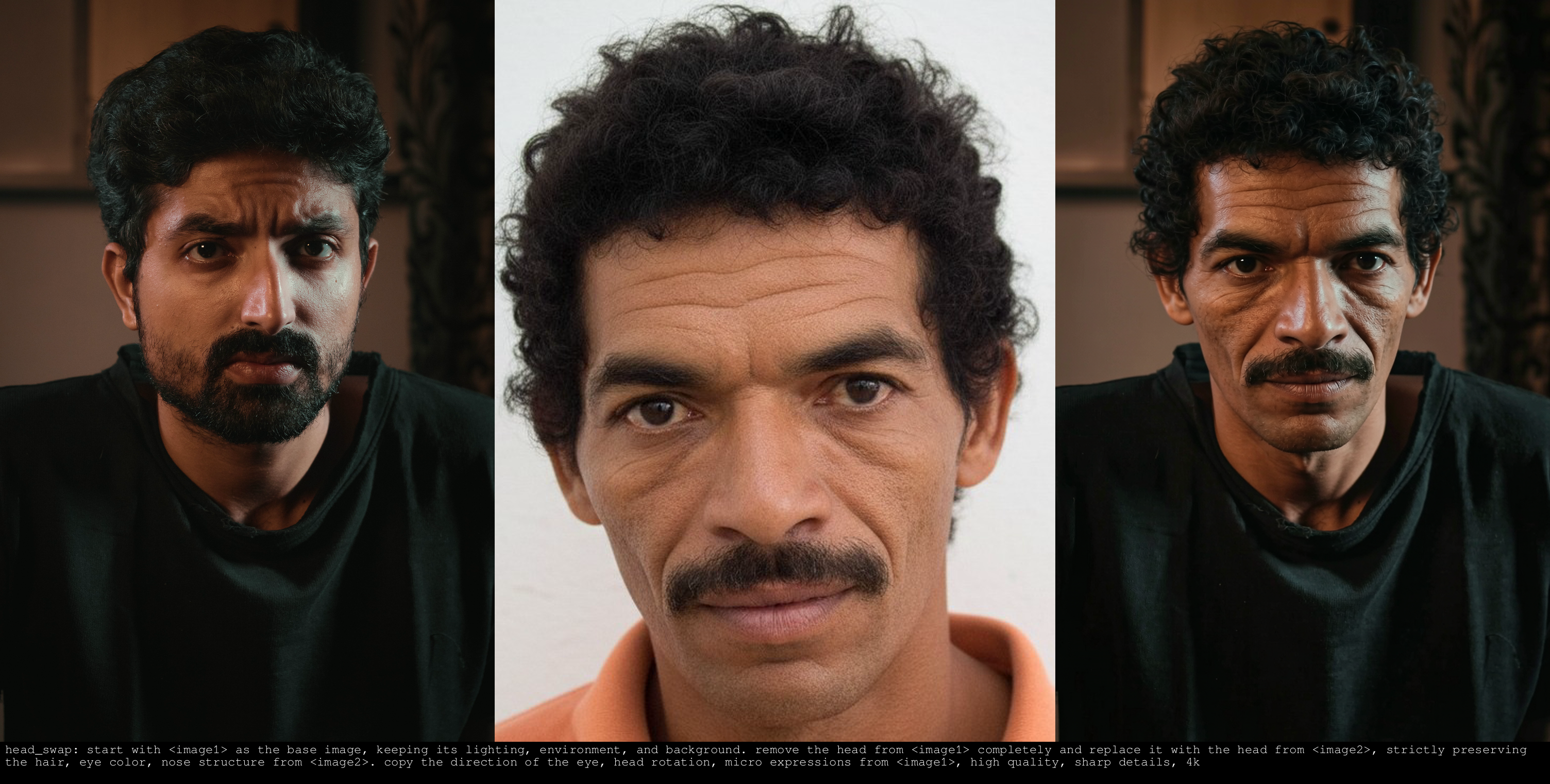
BFS Qwen-Image 2.1 head replacement example by Alissonerdx (MIT)
BFS ships specialized checkpoints across five model families, each with its own input order and prompt contract. For Qwen-Image 2.1, the repository provides head replacement weights (bfs_head_v1.1_qwen_2.1.safetensors), full body swap weights, and a Selective Body Swap (Magenta) variant that replaces only the person marked with a magenta stroke inside crowded multi actor scenes.
For faster or smaller hardware setups, BFS also includes rank 64 and rank 128 adapters for FLUX.2 Klein 4B and 9B, head and body LoRAs for Krea 2 Raw, and experimental IC-LoRA checkpoints trained for LTX-2 video frames.
Each BFS release enforces strict base model matching. Mixing a Qwen-Image 2.1 LoRA with an older Qwen-Image-Edit 2509 backbone or reversing the body first, reference face second image order will degrade identity fidelity.
Hardware, VRAM, and License Matrix
| Model Family | Recommended BFS LoRA File | Base Model License | BFS LoRA License | Typical VRAM | Primary Filmmaking Task |
|---|---|---|---|---|---|
| Qwen-Image 2.1 (Head) | bfs_head_v1.1_qwen_2.1.safetensors |
Qwen Research License | MIT | 16 to 24 GB | High fidelity keyframe head replacement |
| Qwen-Image 2.1 (Selective) | bfs_body_swap_selective_magenta_v1.0_qwen_2.1.safetensors |
Qwen Research License | MIT | 16 to 24 GB | Single actor swap in multi person plates |
| FLUX.2 Klein 4B / 9B | bfs_head_v1_flux-klein_9b_step3500_rank128.safetensors |
FLUX.2 Klein License | MIT | 12 to 18 GB | Fast multi reference portrait and shot fixes |
| Krea 2 Raw | bfs_head_swap_v1.1_krea2.safetensors |
Krea 2 Open Weights | MIT | 16 to 24 GB | Photographic skin texture and body swap |
| Experimental LTX-2 | bfs_head_swap_v1_ltx2_ic_lora_12000_train_3.safetensors |
LTX-2 Open Weights | MIT | 24 GB+ | Experimental video head replacement |
While every BFS LoRA weight file is distributed under the permissive MIT License, commercial clearance depends on the underlying base model you pair it with. Check the base checkpoint license before deploying BFS outputs in paid client work, and always obtain explicit talent consent before generating likenesses.
Parameter Reference
| Parameter | Recommended Value | Notes for VFX Artists |
|---|---|---|
lora_scale |
1.0 starting point |
Lower to 0.75 to 0.85 if the swap over smooths skin grain |
| Input image order | Target body first, reference face second | Several BFS head variants require body first order |
| Turbo inference steps | 6 steps (with Viggle Turbo LoRA) |
Used in the public Space for fast interactive previews |
| Base inference steps | 28 to 40 steps |
Higher step counts improve fine hair strands and ear geometry |
| Magenta selective mask | Pure magenta paint stroke over target actor | Required only for the selective body swap checkpoint |
Local Python and CLI Setup
Download the exact BFS LoRA checkpoint matching your base model from Hugging Face, then load it in diffusers with load_lora_weights.
hf download Alissonerdx/BFS-Best-Face-Swap \
  bfs_head_v1_flux-klein_9b_step3500_rank128.safetensors \
  --local-dir ./loras/bfs
import torch
from diffusers import DiffusionPipeline
from PIL import Image

pipe = DiffusionPipeline.from_pretrained(
    "black-forest-labs/FLUX.2-klein-9B",
    torch_dtype=torch.bfloat16,
).to("cuda")

pipe.load_lora_weights(
    "./loras/bfs",
    weight_name="bfs_head_v1_flux-klein_9b_step3500_rank128.safetensors",
)
pipe.fuse_lora(lora_scale=1.0)

target_body = Image.open("stunt_double_plate.png").convert("RGB")
reference_face = Image.open("actor_reference_portrait.png").convert("RGB")

result = pipe(
    prompt="Head swap matching the scene lighting, grain, and camera focus.",
    image=[target_body, reference_face],
    num_inference_steps=28,
    generator=torch.Generator("cuda").manual_seed(42),
).images[0]

result.save("bfs_head_swap_output.png")
Always confirm the exact input ordering and prompt contract inside the matching docs/ file in the BFS repository whenever you switch between Qwen-Image 2.1, FLUX.2 Klein, Krea 2, and LTX-2 checkpoints.
Filmmaker Production Playbook
1. Build consistent start frames for character shots. Before running image-to-video generation, lock your lead actor's face onto the exact wardrobe and blocking plate using BFS on Qwen-Image 2.1 or FLUX.2 Klein. Because BFS relights the entire head instead of pasting an oval mask, side profiles and harsh rim lights hold up much better when animated.
2. Isolate one actor in crowded frames. Use the Selective Body Swap Magenta checkpoint when an ensemble shot has three or four actors on screen. Painting a quick magenta marker over the background extra tells the diffusion pass to swap only that person while leaving the remaining cast untouched.
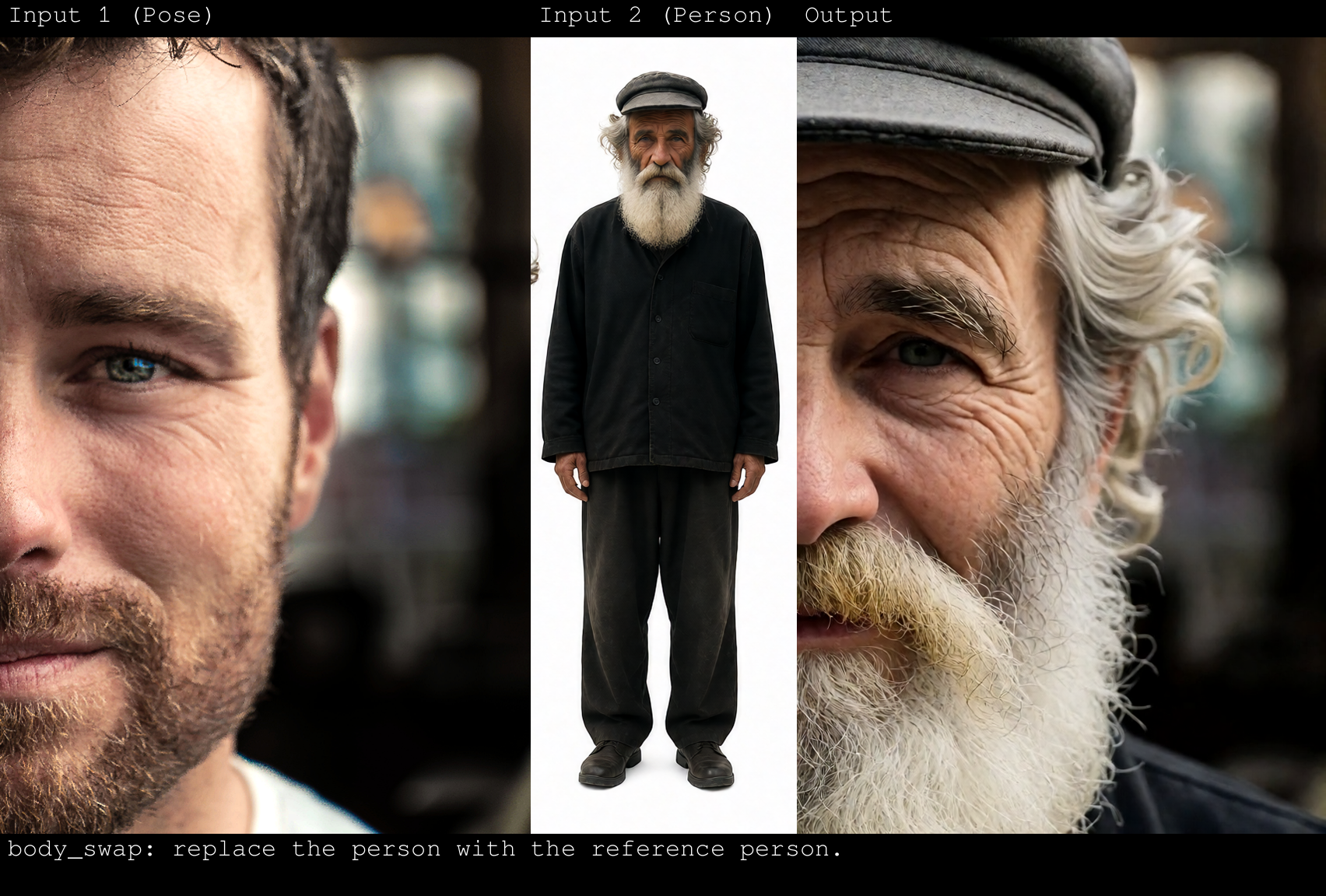
BFS Body Swap Krea 2 closeup example by Alissonerdx (MIT)
- Keep consent and talent agreements documented. The BFS authors explicitly prohibit generating likenesses of public figures or individuals without consent. Treat every open source face replacement pass with the same actor release forms required for traditional digital double VFX.
- Move to cloud video face swap for moving plates. When you need direct video to video face replacement without managing local LoRA stacks, run InsightFace Video Face Swap in the video workspace or build character reference sheets on the character generator page.
Related Reading
- Bark TTS, Voicebox & INSwapper: Open Source Voice & VFX
- FLUX.3 Klein: Open Weights Multi Reference Image AI
- Qwen-Image 2.1 Turbo: 8 Step Open Weights 2K Image AI
- LBM Relighting & FLUX.2-Klein Relight Brush: VFX AI


Sources
Continue Reading


Video & LipSync
- Video Generator
- Text to Video
- Image to Video
- Start-End Frame to Video
- Draw to Video
- Motion Control
- Video Enhancer
- Video Upscaler
- Video Extend
- Video to Video LipSync
- Audio to Video LipSync
- Image to Video LipSync
- Video FaceSwap
- Seedance 2.5
- WAN 3.0
- Seedance 2
- FLUX 3
- Minimax H3
- Vidu Q3 Pro
- Grok Imagine Video 1.5
- Gemini Omni
- Google Veo 3.1
- Kling 3.0 Pro
- Luma Ray 3.2
- LTX 2.3
- Happy Horse 1.1
- Kling 3.0 Motion
- ByteDance Upscaler
- InfiniteTalk
- InsightFace
Image & Edit
- AI Character
- AI Actor
- Art Generator
- Text to Image
- Image to Image
- LoRA Image to Image
- Draw to Edit
- Image LoRA Training
- Remove Background
- Image Enhancer
- MidJourney 8.0
- Krea 2
- OpenAI GPT Image 2.0
- Nano Banana Pro Ultra
- Nano Banana 2 Lite
- Nano Banana Pro
- Minimax Image
- Clarity Pro
- Z-Image Turbo LoRA
- Krea 2 Turbo LoRA
- Z-Image LoRA Trainer
- Qwen Image LoRA Trainer
- Background Erase Network 2 (BEN2)