

DAMO Academy / Alibaba Group, RealisMotion (ICML 2026)
Share this post:
RealisMotion: Open Source 3D World-Space Motion Control
RealisMotion (JingyunLiang/RealisMotion) is an open source decomposed human motion control and video generation framework developed by DAMO Academy at Alibaba Group and accepted at ICML 2026 (arXiv:2508.08588). While traditional pose driven character animators lock the foreground actor, camera path, and background plate to a single driving video's 2D skeleton, RealisMotion builds a ground aware 3D world coordinate system that explicitly decouples foreground subject appearance, background video, 3D walking or running trajectory, and local body action.
Studio availability. RealisMotion is not available in AI FILMS Studio. This article covers a public research release. To generate motion controlled video in the Studio, see the models listed on the Motion Control page or in Studio Nodes.
RealisMotion decomposed human motion control placing a reference subject onto a custom 3D trajectory and action sequence
How RealisMotion Decouples Subject, Background, Trajectory, and Action
In standard human image animation, transferring a dance or stunt clip onto a character in a new scene fails whenever the camera angle, ground slope, or walking path differs from the driving footage. RealisMotion solves this by lifting human motion into a ground aware 3D world coordinate system before conditioning a Diffusion Transformer.
- Ground aware 3D world coordinate unprojection. Using
GVHMR(SMPL-Xestimation in world coordinates) andDepthProfocal length calibration, RealisMotion estimates the 3D ground plane of the target background video. User drawn 2D pixel trajectories are unprojected into 3D world coordinates with automatic speed alignment, stride matching, and global body orientation adjustment along the path tangent. - Mix and match 3D motion editing. Once inside the 3D world coordinate space, directors can combine any body action from a motion bank (or a text to motion generator) with custom 3D trajectories (
edit_trajectory,edit_trajectory_as_heart,affine_transform, oredit_trajectory_kickoff), while preserving the target actor'sSMPL-Xbody shape parameterbeta(or interpolating between adultSMPL-Xand childSMIL-Xtemplates via--kid). - Spatially aligned multi buffer rendering. The edited 3D mesh sequence is projected back into camera space as spatially aligned depth maps, surface normal maps, vertex color semantic maps (
cs_map.mp4), andHaMeR3D hand meshes (hamer.mp4) with depth tested hand occlusion masking. - Element wise DiT token injection. Inside the Diffusion Transformer, the foreground reference subject is injected as full attention tokens, the masked background video is concatenated along the channel dimension (using random background masking during training to prevent ghost duplicate actors), and the 3D trajectory and action buffers are injected via spatial addition.
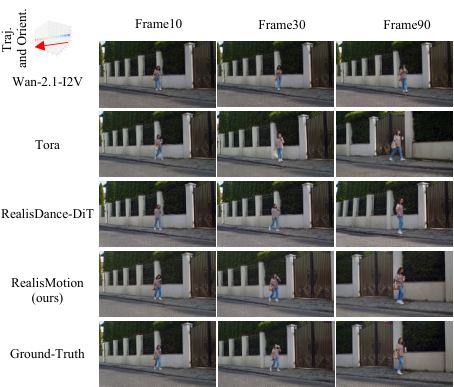
RealisMotion unprojects 2D paths into 3D ground coordinates, aligning body orientation and stride speed to the scene perspective. Credit: DAMO Academy.
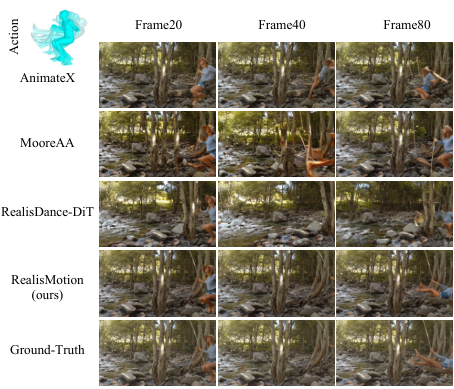
Combining SMPL-X semantic vertex maps with HaMeR hand meshes preserves limb geometry and finger articulation during complex actions. Credit: DAMO Academy.
RealisMotion T2V decomposed scene editing replacing character actions and trajectories inside a dynamic rooftop video plate
Checkpoints, Benchmarks & Hardware Matrix
RealisMotion provides two inference backbones on Hugging Face alongside the Trajectory100 evaluation dataset (jingyunliang/Trajectory100).
| Checkpoint / Resource | Hugging Face ID | Supported Control Modes | Target Hardware & Acceleration | License / Status |
|---|---|---|---|---|
| RealisMotion T2V | jingyunliang/RealisMotion |
Fully decomposed foreground subject, dynamic background video (V2V), 3D trajectory, and action control |
Single 40 to 80 GB GPU (H20 / A100 / H100) or 8 GPU torchrun; supports --enable-teacache and --save-gpu-memory |
Academic Research Release |
| RealisMotion I2V | theFoxofSky/RealisDance-DiT |
Single reference image animation driven by 3D world space cs_map.mp4 and hamer.mp4 buffers |
Single 24 to 80 GB CUDA GPU with FlashAttention-3 and TeaCache |
Academic Research Release |
| Trajectory100 Benchmark | jingyunliang/Trajectory100 |
100 test sequences evaluating 3D trajectory accuracy, orientation alignment, and action fidelity | Evaluation benchmark dataset | Open Research Dataset |
Running RealisMotion 3D Motion Editing and Inference Locally
Clone the repository, install FlashAttention-3, and download the jingyunliang/RealisMotion checkpoint from Hugging Face.
git clone https://github.com/JingyunLiang/RealisMotion.git
cd RealisMotion
conda create -n realismotion python=3.10 -y
conda activate realismotion
pip install -r requirements.txt

huggingface-cli download --resume-download jingyunliang/RealisMotion \
  --local-dir pretrained_models/RealisMotion
To edit a character's 3D trajectory in world coordinates using GVHMR and render the conditioning maps (cs_map.mp4 and mask.mp4), run hmc/realismotion_render_demo.py, then pass the generated motion folder to inference_t2v.py.
# Step 1: Unproject custom 2D waypoints into 3D ground-aware world coordinates
export PYTHONPATH="YOUR_PATH/GVHMR/hmr4d:$PYTHONPATH"
python hmc/realismotion_render_demo.py \
  --video inputs/example_video/justin.mp4 \
  --motion_path inputs/motion_bank/tstageboy \
  --reference_path inputs/demo/justin \
  --output_root inputs/demo \
  --window_size 25 \
  --repeat_smpl 18 51 8 \
  --edit_type edit_trajectory \
  --edit_trajectory_args 815 500 952 1050 1192 502 \
  -s

# Step 2: Run decomposed T2V video generation with TeaCache acceleration
CUDA_VISIBLE_DEVICES=0 python inference_t2v.py \
  --ref_path inputs/demo/internalaffairs/0_input_video.mp4 \
  --ref_cs_map_path inputs/demo/internalaffairs/cs_map.mp4 \
  --ref_mask_path inputs/demo/internalaffairs/mask.mp4 \
  --background_path inputs/demo/internalaffairs/0_input_video.mp4 \
  --background_mask_path inputs/demo/internalaffairs/mask.mp4 \
  --motion_folder inputs/demo/internalaffairs_falldown_internalaffairs \
  --background_num_frames 97 \
  --motion_num_frames 97 \
  --prompt "Two figures on a city rooftop under an overcast sky, dramatic urban harbor backdrop." \
  --enable-teacache \
  --save-dir ./outputs
For related character animation and trajectory pipelines, compare RealisMotion with Wan-Animate-2 character animation and viewpoint control, NVIDIA ARDY real time 3D motion generation, and Time-to-Move (TTM) motion control.
Motion Control and Character Blocking in AI FILMS Studio
RealisMotion requires local GVHMR 3D human mesh estimation, DepthPro calibration, and SMPL-X rendering passes. To animate characters, transfer actor performances, or block motion trajectories directly in the browser, open the video workspace or build multi stage character and camera graphs in the Nodes Graph Editor.


Sources
Continue Reading


Video & LipSync
- Video Generator
- Text to Video
- Image to Video
- Start-End Frame to Video
- Draw to Video
- Motion Control
- Video Enhancer
- Video Upscaler
- Video Extend
- Video to Video LipSync
- Audio to Video LipSync
- Image to Video LipSync
- Video FaceSwap
- Seedance 2.5
- WAN 3.0
- Seedance 2
- FLUX 3
- Minimax H3
- Vidu Q3 Pro
- Grok Imagine Video 1.5
- Gemini Omni
- Google Veo 3.1
- Kling 3.0 Pro
- Luma Ray 3.2
- LTX 2.3
- Happy Horse 1.1
- Kling 3.0 Motion
- ByteDance Upscaler
- InfiniteTalk
- InsightFace
Image & Edit
- AI Character
- AI Actor
- Art Generator
- Text to Image
- Image to Image
- LoRA Image to Image
- Draw to Edit
- Image LoRA Training
- Remove Background
- Image Enhancer
- MidJourney 8.0
- Krea 2
- OpenAI GPT Image 2.0
- Nano Banana Pro Ultra
- Nano Banana 2 Lite
- Nano Banana Pro
- Minimax Image
- Clarity Pro
- Z-Image Turbo LoRA
- Krea 2 Turbo LoRA
- Z-Image LoRA Trainer
- Qwen Image LoRA Trainer
- Background Erase Network 2 (BEN2)