

Tencent Hunyuan3D, WorldClaw (arXiv:2608.05248)
Share this post:
WorldClaw: Open Source Agentic 3D World AI for Film
WorldClaw (Tencent-Hunyuan/Hunyuan3D-WorldClaw) is an open source agentic 3D scene generation framework developed by the Tencent Hunyuan3D team (arXiv:2608.05248) and showcased on the WorldClaw project page. Instead of lifting monocular video into a baked point cloud or Gaussian splat where individual props cannot be moved, WorldClaw uses a coarse to fine multi agent pipeline powered by Hunyuan3D, SAM3, SAM3D, and Blender tool skills to turn a single text prompt into an explorable 3D environment with a region aware height field, procedural and generative PBR materials, and editable instance level 3D meshes (2048x2048 PBR textures for hero structures and 1024x1024 textures for secondary props).
Studio availability. WorldClaw is not available in AI FILMS Studio. This article covers a public research release. To generate video in the Studio, see the models listed on the Text to Video page or in Studio Nodes.
WorldClaw agentic 3D world generation from open ended prompts with RGB, instance, normal, and depth passes
Why Virtual Production Needs Explicit Instance Level 3D Worlds
Current 3D world generators fall into two camps that create friction on a virtual production stage. Image and video lifting pipelines synthesize plausible camera flythroughs and lift them into 3D Gaussians or monolithic meshes, but novel viewpoints off the camera path blur and individual buildings, vehicles, or trees cannot be selected, relit, or repositioned. Conversely, rule based procedural generators (Infinigen) maintain clean geometry but struggle to construct stylized architectural districts, desert battlefields, or fantasy settlements from open ended creative briefs.
WorldClaw bridges both paradigms by orchestrating specialized foundation models and executable 3D tools across three coarse to fine stages.
- Intent analysis and spatial layout planning. Planning agents parse a single director prompt into a structured JSON specification defining distinct semantic regions, terrain topography, road and river networks, reusable ecological assets, hero landmarks, and spatial relationships.
- Global terrain foundation and procedural scattering. A terrain builder constructs a globally coherent height field from the semantic layout map, assigns region specific procedural or generative PBR materials, and scatters vegetation, rocks, and foliage according to slope, elevation, and regional masks.
- Terrain conditioned regional composition and mesh reconstruction. For detail heavy focal regions, WorldClaw renders terrain conditioned reference views (
GPT-Image-2), segments individual instances (SAM3andSAM3D), reconstructs complete textured 3D meshes withHunyuan3D, and recovers each object's 6DoF pose and scale on the terrain. - Closed loop render verification and contact refinement. Render based inspection agents (
Claude Opus 4.8vision loop) evaluate multi view renders and an automated defect queue, correcting floating props, terrain intersections, scale mismatches, and texture seams through local terrain co deformation and targeted mesh regeneration.
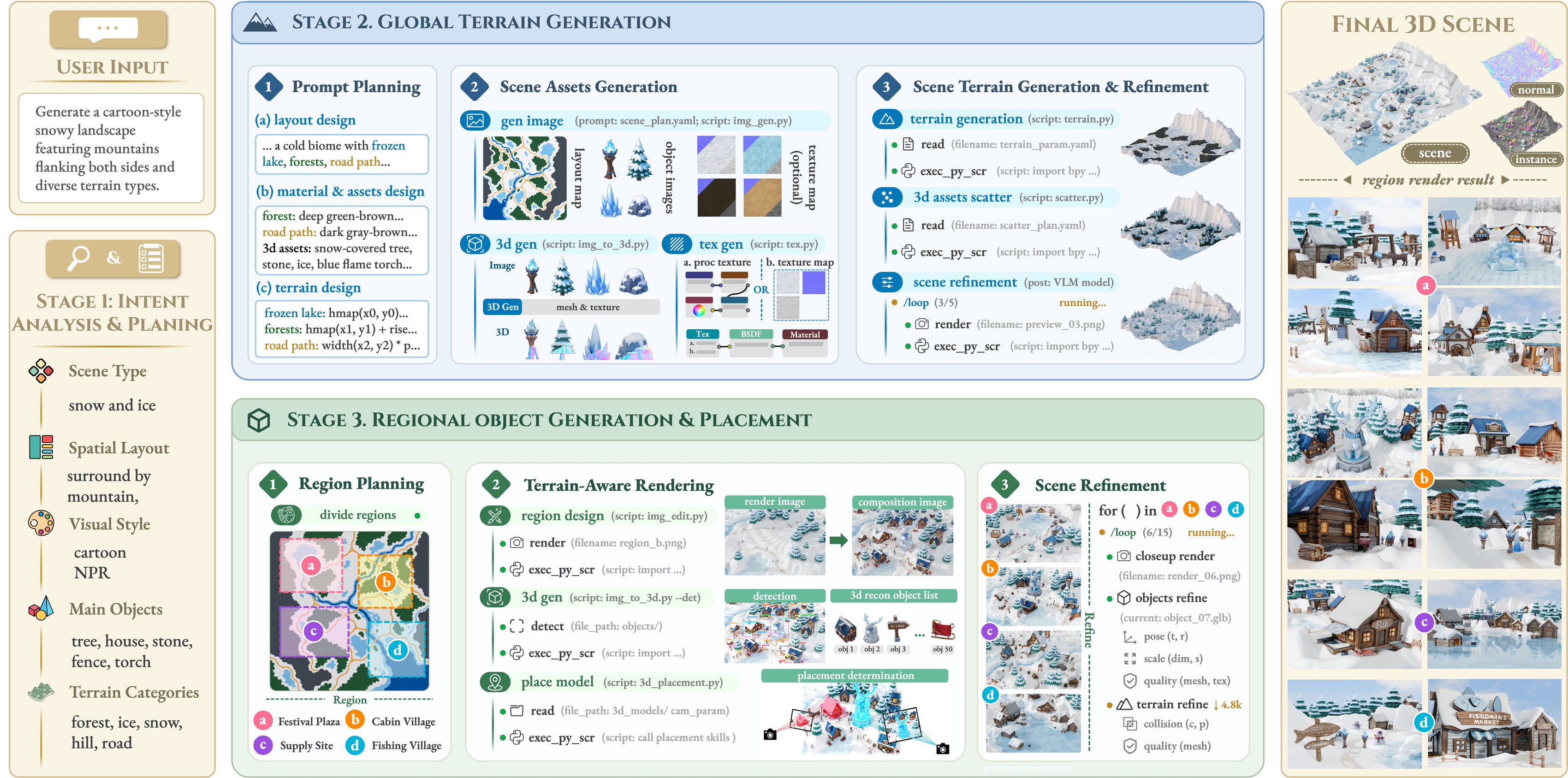
WorldClaw translates a single text prompt into a semantic layout, global terrain height field, and reconstructed Hunyuan3D instance meshes. Credit: Tencent Hunyuan3D.

Render based refinement agents inspect support surfaces and object contacts, applying local co deformation to eliminate floating geometry. Credit: Tencent Hunyuan3D.
WorldClaw Snowbound Outpost instance segmentation pass showing individually editable 3D buildings, vehicles, and terrain props
Multi Pass Outputs: RGB, Instance Masks, Surface Normals & Metric Depth
Because every structure, vehicle, and prop in a WorldClaw scene is instantiated as an explicit 3D mesh with PBR materials rather than a baked radiance field, the scene exports four synchronized geometry and appearance buffers for downstream compositing and camera control.
- Shaded RGB pass (
rgb.mp4). Full PBR lit environment render across aerialorbitand ground levelwalkcamera tracks. - Editable instance mask pass (
instance.mp4). Per object semantic IDs that let layout artists isolate, swap, or animate individual buildings, ships, or props in Blender, Unreal Engine, or Nuke. - Surface normal pass (
normal.mp4). World space and camera space surface orientation maps for relighting and shader replacement. - Metric depth pass (
depth.mp4). True metric distance buffers for depth conditioned video generation, atmospheric fog, and rack focus compositing.
System Components, Hardware & Specification Matrix
| Module / Stage | Underlying Models & Tools | Output Artifact | Reference Hardware | License / Status |
|---|---|---|---|---|
| Planning & Inspection Agents | Claude Opus 4.8 + WorldClaw Skill Suite |
Region layout JSON, asset specs, and closed loop render inspection reports | API or local agent orchestrator | Apache 2.0 / arXiv Open Research |
| Global Terrain & Scattering | Procedural Height Field + Material & Foliage Scatter Tools | Composite terrain mesh, semantic masks, and scattered ecological instances | 4x NVIDIA H20 GPUs (server benchmark) | Open Research Release |
| Regional 2D to 3D Lift | GPT-Image-2 + SAM3 + SAM3D |
Terrain conditioned regional compositions, instance masks, and 6DoF poses | 4x NVIDIA H20 GPUs | Open Research Release |
| 3D Mesh & PBR Synthesis | Tencent-Hunyuan/Hunyuan3D |
Watertight textured 3D meshes (2048x2048 hero PBR / 1024x1024 prop PBR) |
24 to 80 GB VRAM CUDA GPUs | Tencent Hunyuan3D Community License |
Integrating WorldClaw Passes Into Local 3D and Video Pipelines
To inspect the repository structure, scene specifications, and multi pass benchmark outputs locally, clone the official Hunyuan3D-WorldClaw repository and pair the exported Blender/GLB assets or depth and normal buffers with local rendering scripts.
git clone https://github.com/Tencent-Hunyuan/Hunyuan3D-WorldClaw.git
cd Hunyuan3D-WorldClaw
In a virtual production or previs pipeline, you can invoke blender headlessly to render synchronized RGB, Instance, Normal, and Depth passes along custom camera curves from an exported WorldClaw scene directory.
import bpy
from pathlib import Path

scene_dir = Path("./worldclaw_scenes/snowbound_outpost")
bpy.ops.wm.open_mainfile(filepath=str(scene_dir / "scene_refined.blend"))

scene = bpy.context.scene
scene.render.engine = "CYCLES"
scene.cycles.device = "GPU"
scene.render.resolution_x = 1600
scene.render.resolution_y = 1200

view_layer = scene.view_layers["ViewLayer"]
view_layer.use_pass_z = True
view_layer.use_pass_normal = True
view_layer.use_pass_object_index = True

for cam_name in ["Camera_Orbit", "Camera_Walk"]:
    scene.camera = bpy.data.objects[cam_name]
    scene.render.filepath = str(scene_dir / f"renders/{cam_name}_rgb_")
    bpy.ops.render.render(animation=True)
For related 3D world and interactive environment models, compare WorldClaw with HY-World 2.0 3D world and 360 panorama generation, HunyuanWorld-Mirror single image 3D scene generation, and NVIDIA Lyra 2.0 open source 3D world generation.
World Building and Previs Workflows in AI FILMS Studio
WorldClaw orchestrates multi agent 3D mesh reconstruction and Blender terrain refinement on multi GPU servers. To generate cinematic establishing shots, environment flythroughs, and multi angle scene plates directly in the browser, open the video workspace or chain environment plates and camera moves inside the Nodes Graph Editor.


Sources
Continue Reading


Video & LipSync
- Video Generator
- Text to Video
- Image to Video
- Start-End Frame to Video
- Draw to Video
- Motion Control
- Video Enhancer
- Video Upscaler
- Video Extend
- Video to Video LipSync
- Audio to Video LipSync
- Image to Video LipSync
- Video FaceSwap
- Seedance 2.5
- WAN 3.0
- Seedance 2
- FLUX 3
- Minimax H3
- Vidu Q3 Pro
- Grok Imagine Video 1.5
- Gemini Omni
- Google Veo 3.1
- Kling 3.0 Pro
- Luma Ray 3.2
- LTX 2.3
- Happy Horse 1.1
- Kling 3.0 Motion
- ByteDance Upscaler
- InfiniteTalk
- InsightFace
Image & Edit
- AI Character
- AI Actor
- Art Generator
- Text to Image
- Image to Image
- LoRA Image to Image
- Draw to Edit
- Image LoRA Training
- Remove Background
- Image Enhancer
- MidJourney 8.0
- Krea 2
- OpenAI GPT Image 2.0
- Nano Banana Pro Ultra
- Nano Banana 2 Lite
- Nano Banana Pro
- Minimax Image
- Clarity Pro
- Z-Image Turbo LoRA
- Krea 2 Turbo LoRA
- Z-Image LoRA Trainer
- Qwen Image LoRA Trainer
- Background Erase Network 2 (BEN2)