

Zhejiang University ZIP Lab, Monash, UC Berkeley BAIR & Adelaide, ATAS (arXiv:2610.20571)
Share this post:
ATAS (Any Time, Any Space): Open Source Multi Shot Video
Any Time, Any Space (ATAS) (ziplab/ATAS, arXiv:2610.20571, October 2026) is an open source world state centric agentic framework from Zhejiang University ZIP Lab, Monash University, UC Berkeley BAIR, and the University of Adelaide that compiles multi scene screenplays into spatially and temporally consistent multi shot films. Unlike standard text to video pipelines that suffer from "spatial amnesia" the moment a scene cuts away and returns, ATAS separates persistent 3D Scene Memory (registered static set geometry) from time indexed Event Memory (dynamic character and prop actions), letting directors revisit locations or recapture earlier narrative moments from brand new camera angles.
Studio availability. ATAS is not available in AI FILMS Studio. This article covers the October 2026 open source research framework (
arXiv:2610.20571). To build multi shot sequences and storyboards inside the Studio today, combine Storyboards with WAN 3.0, Seedance 2.5, or Kling 3 in the video workspace and Nodes editor.
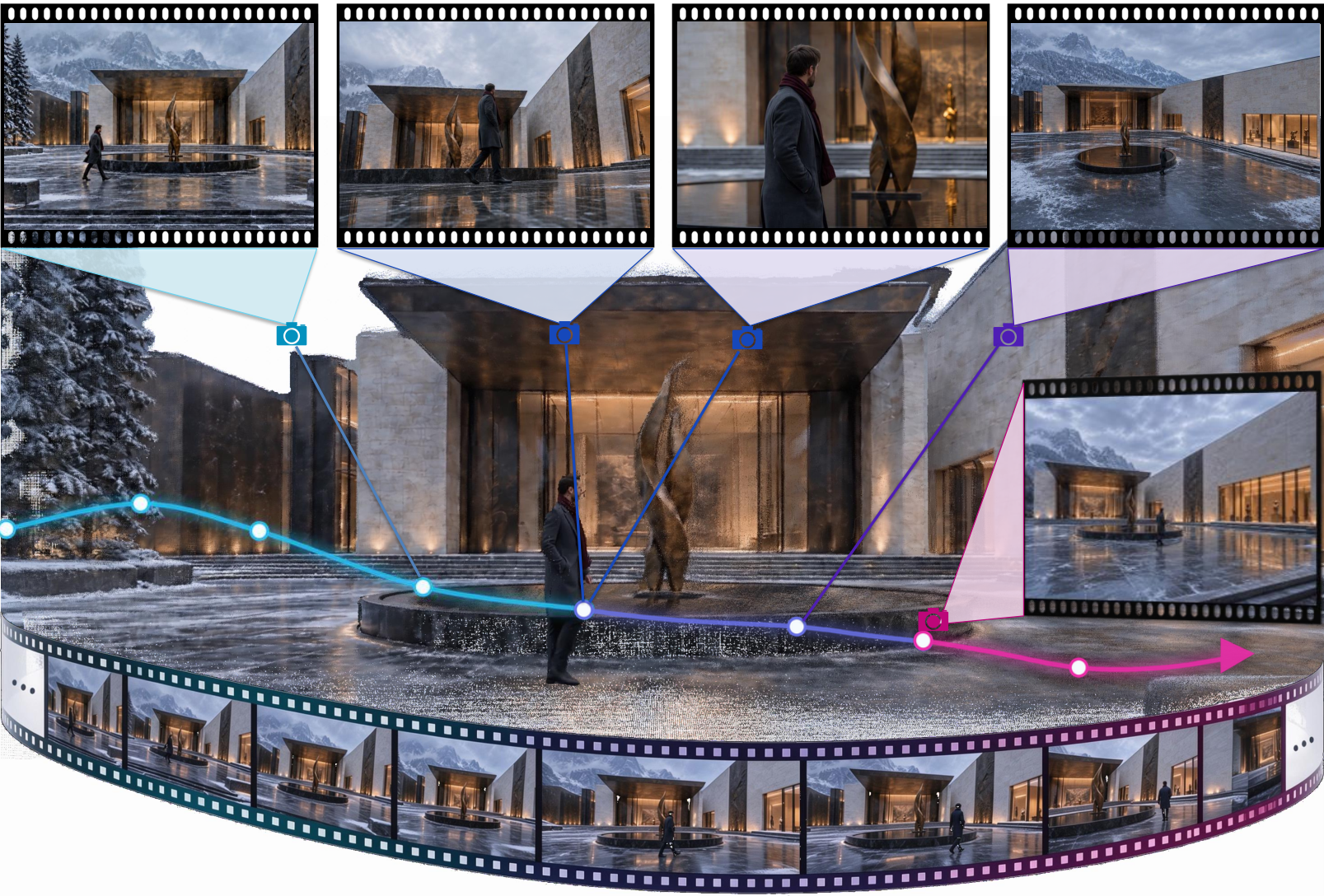
Why Multi Shot AI Films Break Continuity
Real narrative cinema rarely plays in one linear, uninterrupted master shot. A director cuts from a kitchen argument (Shot A) to a hallway arrival (Shot B), cuts back to the kitchen ten minutes later (Shot C, Location Revisit), and then flashes back to the exact moment a glass shattered from an overhead angle (Shot D, Event Recapture).
Standard autoregressive or keyframe chained video models fail both patterns because they only condition on the immediately preceding clip. By Shot C, the kitchen window has moved walls; by Shot D, the spilled water and character blocking no longer match Shot A.
ATAS introduces a structured world state database sitting between the screenplay and the video generator:
- Screenplay to shot request compiler. An agentic planner parses a screenplay into structured shot descriptors specifying camera pose, physical set location, timestamp (
t), and participating entities. - Static Scene Memory (
Space). Every generated location is registered into a persistent 3D geometric scene memory. When the script returns to that set five scenes later, ATAS retrieves the exact furniture layout, lighting fixtures, and doorway positions before rendering the new camera angle. - Time indexed Event Memory (
Time). Dynamic actions, a character dropping a briefcase, a car pulling up outside, a door left ajar, are logged as time indexed multi view observations. When a filmmaker requests a reverse angle or flashback at timestampt, ATAS retrieves the active event state attso continuity matches frame for frame. - Conditional memory update loop. After each shot renders, ATAS verifies geometric and semantic consistency and updates both Scene Memory and Event Memory so subsequent shots inherit every permanent change (such as a broken lamp or moved chair).
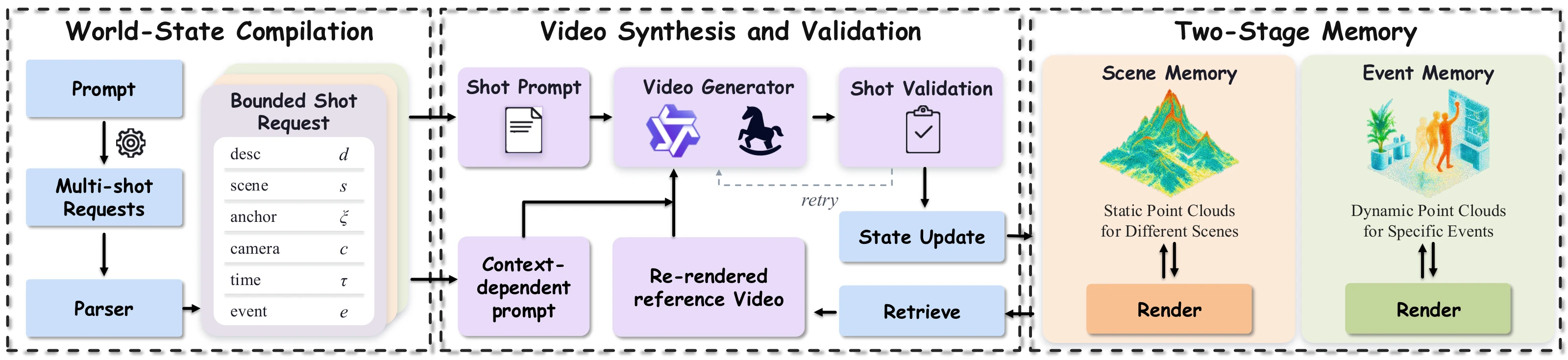
ATAS agentic workflow linking screenplay compilation, static Scene Memory, and time indexed Event Memory. Credit: ZIP Lab (arXiv:2610.20571).
Rather than treating each shot as an isolated text prompt, ATAS treats the film set as a live database queried by space coordinates and story time.
This lets directors edit non linearly, cutting between parallel storylines or inserting reaction shots without rebuilding the set from scratch.
ATAS vs. Standard Multi Shot Pipelines
| Capability | Standard Prompt Chaining | Keyframe / StoryMem Chaining | ATAS (arXiv:2610.20571) |
|---|---|---|---|
| Consecutive Cut Continuity | Weak (drifts every cut) | Good on adjacent shots | Strong (explicit 3D geometry retrieval) |
| Non Consecutive Location Revisit | Fails (spatial amnesia) | Degrades past 3–4 cuts | Native (persistent Static Scene Memory) |
Multi Angle Event Recapture (Same t) |
Fails | Not supported | Native (Time indexed Event Memory) |
| Permanent Set State Changes | Forgotten on next cut | Partially preserved | Logged via conditional memory updates |
Qualitative tests across Location Revisit and Event Recapture scenarios demonstrate ATAS holding wall art, table props, and character trajectories consistent across non consecutive cuts and dramatic camera angle shifts.
Human evaluation studies reported in the paper show strong preference for ATAS over sequential multi shot baselines on spatial coherence and narrative clarity.
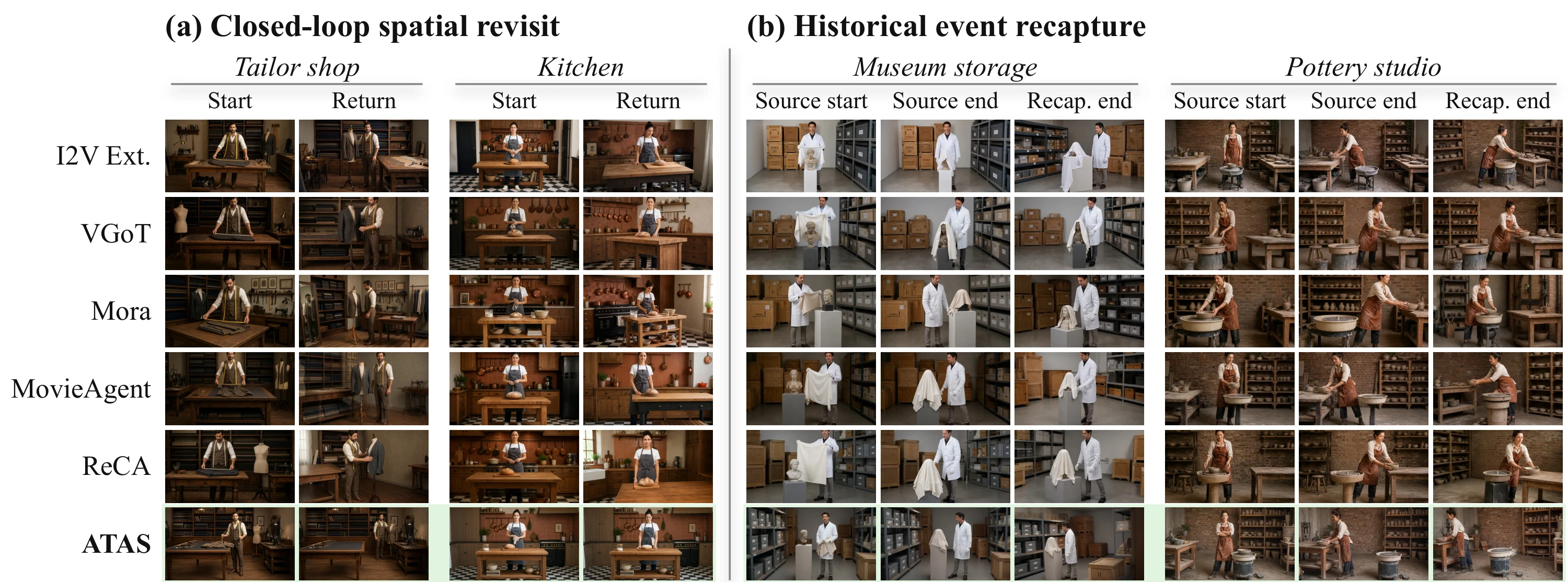
Location Revisit and Event Recapture continuity benchmarks in ATAS across non consecutive shots. Credit: ZIP Lab (arXiv:2610.20571).
Parameter Reference Table
| Parameter | Recommended Value | Role in Multi Shot Pipeline |
|---|---|---|
--script_path |
Structured JSON / Fountain script | Defines scenes, characters, timestamps (t), and shot coverage list. |
--scene_memory_dir |
Persistent project folder | Stores registered 3D static geometry and camera poses per location ID. |
--event_memory_dir |
Persistent project folder | Indexes dynamic actor/prop state observations by story timestamp t. |
--video_backbone |
Open I2V / Camera DiT backend | Modular video generator called by ATAS once memory views are rendered. |
--update_threshold |
0.75 – 0.85 |
Confidence gate before committing a newly generated shot back into Scene Memory. |
Local Setup with Python
Clone ziplab/ATAS to run screenplay driven multi shot generation with persistent world state memory:
git clone https://github.com/ziplab/ATAS.git
cd ATAS
pip install -r requirements.txt
python run_atas.py \
  --script_path ./examples/detective_interrogation_script.json \
  --scene_memory_dir ./memory/interrogation_room \
  --event_memory_dir ./memory/interrogation_events \
  --output_dir ./renders/scene_07_multishot
Filmmaker Production Playbook
- Tag every shot in your script with explicit
location_idandstory_timefields. Even a rough 10 shot sequence gains dramatic visual continuity when the planner knows Shot 8 occurs 30 seconds after Shot 2 in the exact same room. - Generate your establishing wide shot first. Rendering a clean master wide shot seeds ATAS's Static Scene Memory with full room geometry so tight over the shoulder and reverse shots inherit accurate doorways, windows, and practical lamps.
- Use Event Recapture for action coverage. Shoot a stunt or prop interaction once in a master angle, then query the exact same timestamp
tfrom a low 24mm camera pose to assemble classic multi camera Hollywood editing coverage.
Related Reading
- ShotPlan: Cinematic Multi Shot Video Generation
- StoryMem: Multi Shot Video Storytelling with Visual Memory
- ShotStream: Open Source Streaming Multi Shot Video Generation
- GeoState & World from Motion: Open Source 4D Camera Control


Sources
Continue Reading


Video & LipSync
- Video Generator
- Text to Video
- Image to Video
- Start-End Frame to Video
- Draw to Video
- Motion Control
- Video Enhancer
- Video Upscaler
- Video Extend
- Video to Video LipSync
- Audio to Video LipSync
- Image to Video LipSync
- Video FaceSwap
- Seedance 2.5
- WAN 3.0
- Seedance 2
- FLUX 3
- Minimax H3
- Vidu Q3 Pro
- Grok Imagine Video 1.5
- Gemini Omni
- Google Veo 3.1
- Kling 3.0 Pro
- Luma Ray 3.2
- LTX 2.3
- Happy Horse 1.1
- Kling 3.0 Motion
- ByteDance Upscaler
- InfiniteTalk
- InsightFace
Image & Edit
- AI Character
- AI Actor
- Art Generator
- Text to Image
- Image to Image
- LoRA Image to Image
- Draw to Edit
- Image LoRA Training
- Remove Background
- Image Enhancer
- MidJourney 8.0
- Krea 2
- OpenAI GPT Image 2.0
- Nano Banana Pro Ultra
- Nano Banana 2 Lite
- Nano Banana Pro
- Minimax Image
- Clarity Pro
- Z-Image Turbo LoRA
- Krea 2 Turbo LoRA
- Z-Image LoRA Trainer
- Qwen Image LoRA Trainer
- Background Erase Network 2 (BEN2)