

Xuyang Cao et al., JD Health International & Zhejiang University (MIT)
Share this post:
JoyVASA: Open Source Audio-Driven Portrait & Character AI
JoyVASA (jdh-algo/JoyVASA) is an open source audio driven portrait and animal animation framework developed by researchers at JD Health International and Zhejiang University (arXiv:2411.09209), with weights published at jdh-algo/JoyVASA. Rather than running pixel diffusion across every video frame, JoyVASA decouples static 3D facial appearance representations (KwaiVGI/LivePortrait) from an identity independent Diffusion Transformer (DiT) that predicts 3D facial expression dynamics and head motion directly from speech audio on an 8 GB VRAM consumer GPU.
Studio availability. JoyVASA is not available in AI FILMS Studio. This article covers a public research release. To generate lip synced dialogue or character motion in the Studio, see the models listed on the Motion Control page or open the lip sync workspace.
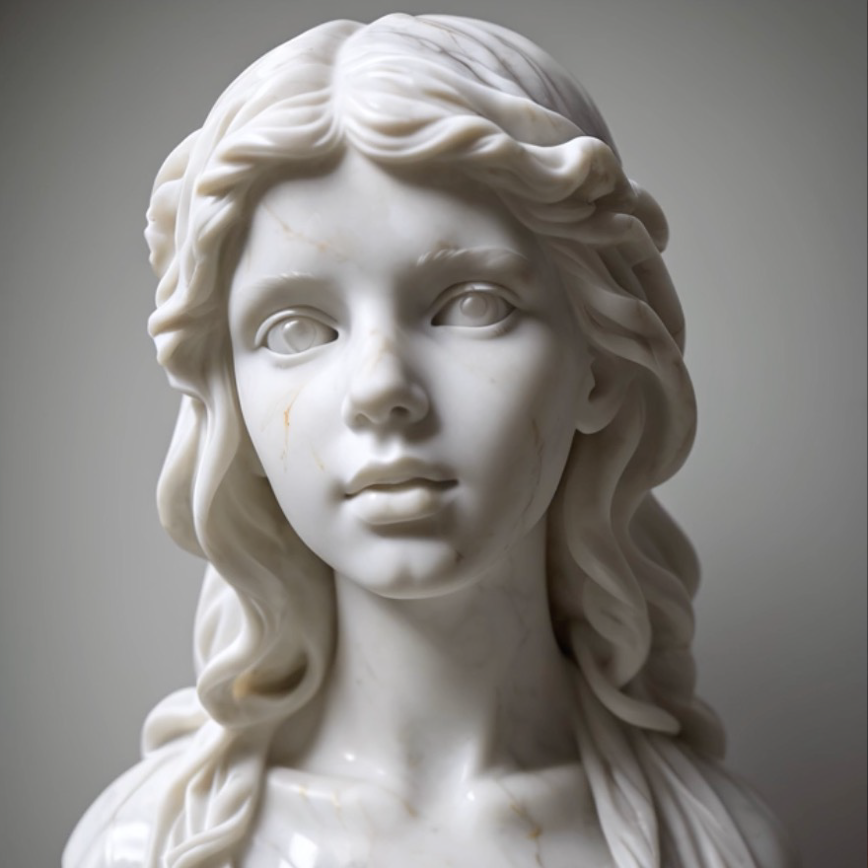
JoyVASA driving human portraits, stylized paintings, and animal characters from a single identity independent audio motion sequence
Why Decoupling 3D Facial Appearance From Audio Motion Matters
End to end latent diffusion talking head models synthesize every output frame through a 2D UNet or video DiT conditioned on both the reference portrait and the audio spectrogram. That architecture couples speaker identity to motion generation, creating three bottlenecks for independent filmmakers.
- Temporal drift on long dialogue monologues. Over sequences longer than a few seconds, autoregressive pixel denoising accumulates color shifts and background shimmer.
- High VRAM and slow frame rates. Denoising full latent frames over 40 steps requires 16 GB to 24 GB of VRAM and minutes of compute per dialogue line.
- Human only failure modes. Models trained exclusively on human facial pixel latents fail when asked to animate stylized 3D mascots, anthropomorphized dogs, or cats.
JoyVASA removes these constraints through a two stage decoupled pipeline.
Two Stage Architecture: 3D Implicit Keypoints + Audio Motion DiT
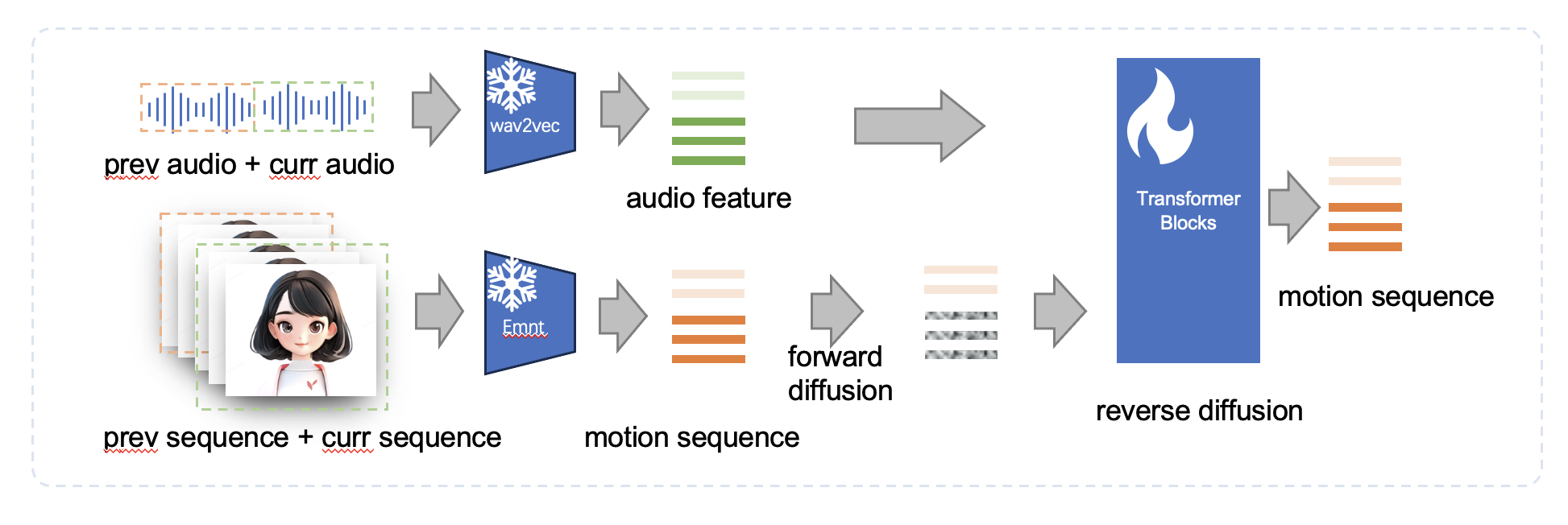
In the first stage, JoyVASA builds on the implicit 3D keypoint framework of LivePortrait. An appearance encoder (appearance_feature_extractor.pth) extracts a static 3D facial appearance volume from a single reference image, while a motion encoder (motion_extractor.pth) represents expression deformations, head rotation, translation, and scale as compact 3D keypoints without any identity information.
In the second stage, JoyVASA trains a Diffusion Transformer (iter_0020000.pt) to predict sequences of these dynamic 3D motion coefficients directly from speech embeddings extracted by TencentGameMate/chinese-hubert-base or facebook/wav2vec2-base-960h.
- Sliding window motion sampling. Because the DiT operates on low dimensional 3D motion tokens rather than image pixels, it samples long dialogue sequences in overlapping sliding windows with classifier free guidance (
--cfg_scale 2.0), maintaining smooth head nods and lip sync across extended speeches. - Cross species animal animation (
--animation_mode animal). Because the audio to motion DiT is completely independent of character identity, the exact same generated motion sequence can warp the 3D appearance volume of a cat, dog, or stylized creature using theliveportrait_animalsgenerator (spade_generator.pth+xpose.pth).
JoyVASA animal portrait animation driven by speech audio cues
JoyVASA human portrait animation with natural head motion and lip sync
Checkpoints, VRAM & Component Matrix
| Component | Repository / Path | Role in Pipeline | Tested Hardware & VRAM | License |
|---|---|---|---|---|
| JoyVASA Motion DiT | jdh-algo/JoyVASA (iter_0020000.pt) |
Audio conditioned Diffusion Transformer for 3D motion sequences | 8 GB VRAM (tested on RTX 4060 Laptop 8 GB & A100) | MIT / Open Research |
| LivePortrait Human | KwaiVGI/LivePortrait (liveportrait/) |
3D appearance extractor, warping module, and SPADE generator | Shared inside 8 GB VRAM footprint | MIT |
| LivePortrait Animals | KwaiVGI/LivePortrait (liveportrait_animals/ + xpose.pth) |
Animal keypoint alignment and SPADE rendering | Requires MultiScaleDeformableAttention CUDA op |
MIT |
| Speech Encoders | TencentGameMate/chinese-hubert-base / facebook/wav2vec2-base-960h |
Extracts acoustic embeddings from multilingual .wav dialogue |
Runs on GPU or CPU | Apache 2.0 / MIT |
Running JoyVASA Locally on an 8 GB VRAM GPU
JoyVASA runs on Ubuntu 20.04 and Windows 11 with CUDA 12.1 and requires only 8 GB of VRAM (verified on an NVIDIA RTX 4060 Laptop GPU). Clone the repository, install requirements.txt, and build the MultiScaleDeformableAttention operator if you plan to animate animal characters.
git clone https://github.com/jdh-algo/JoyVASA.git
cd JoyVASA

conda create -n joyvasa python=3.10 -y
conda activate joyvasa
pip install -r requirements.txt

# Optional: compile XPose deformable attention for animal mode
cd src/utils/dependencies/XPose/models/UniPose/ops
python setup.py build install
cd ../../../../../../../
Download the JoyVASA, LivePortrait, and speech encoder checkpoints into ./pretrained_weights/:
git lfs install
git clone https://huggingface.co/jdh-algo/JoyVASA pretrained_weights/JoyVASA
git clone https://huggingface.co/TencentGameMate/chinese-hubert-base pretrained_weights/chinese-hubert-base
git clone https://huggingface.co/facebook/wav2vec2-base-960h pretrained_weights/wav2vec2-base-960h
huggingface-cli download KwaiVGI/LivePortrait --local-dir pretrained_weights --exclude "*.git*" "README.md" "docs"
Run human or animal audio driven animation from the command line, or launch the local Gradio interface on port 7862:
# Animate a human portrait from a dialogue WAV file
python inference.py \
    -r assets/examples/imgs/joyvasa_003.png \
    -a assets/examples/audios/joyvasa_003.wav \
    --animation_mode human \
    --cfg_scale 2.0

# Animate an animal character portrait from speech
python inference.py \
    -r assets/examples/imgs/joyvasa_001.png \
    -a assets/examples/audios/joyvasa_001.wav \
    --animation_mode animal \
    --cfg_scale 2.0

# Launch the interactive Gradio web UI at http://127.0.0.1:7862
python app.py
Increasing --cfg_scale intensifies facial articulation and head movement amplitude, while lowering it produces subtler conversational delivery.
Character Lip Sync & Animation in AI FILMS Studio
JoyVASA is well suited for local animatics, talking animal storyboards, and multilingual dialogue previews on an 8 GB laptop GPU. For related local dubbing and voice pipelines, read our guides on LatentSync 1.6 and MuseTalk 1.5 lip sync dubbing, Open Source Voice Cloning with Qwen3-TTS, F5-TTS, and Kokoro, and AnyTalker multi person talking video generation.
To synchronize character dialogue or transfer full body performance in the browser without local model setup, open the lip sync workspace, explore the Motion Control page, or wire voice generation directly into lip sync nodes inside the Nodes Graph Editor.


Sources
- jdh-algo/JoyVASA Official GitHub Repository
- JoyVASA Official Project Page (JD Health & Zhejiang University)
- JoyVASA: Portrait and Animal Image Animation with Diffusion-Based Audio-Driven Facial Dynamics and Head Motion Generation (arXiv:2411.09209)
- jdh-algo/JoyVASA Pretrained Checkpoints on Hugging Face
Continue Reading


Video & LipSync
- Video Generator
- Text to Video
- Image to Video
- Start-End Frame to Video
- Draw to Video
- Motion Control
- Video Enhancer
- Video Upscaler
- Video Extend
- Video to Video LipSync
- Audio to Video LipSync
- Image to Video LipSync
- Video FaceSwap
- Seedance 2.5
- WAN 3.0
- Seedance 2
- FLUX 3
- Minimax H3
- Vidu Q3 Pro
- Grok Imagine Video 1.5
- Gemini Omni
- Google Veo 3.1
- Kling 3.0 Pro
- Luma Ray 3.2
- LTX 2.3
- Happy Horse 1.1
- Kling 3.0 Motion
- ByteDance Upscaler
- InfiniteTalk
- InsightFace
Image & Edit
- AI Character
- AI Actor
- Art Generator
- Text to Image
- Image to Image
- LoRA Image to Image
- Draw to Edit
- Image LoRA Training
- Remove Background
- Image Enhancer
- MidJourney 8.0
- Krea 2
- OpenAI GPT Image 2.0
- Nano Banana Pro Ultra
- Nano Banana 2 Lite
- Nano Banana Pro
- Minimax Image
- Clarity Pro
- Z-Image Turbo LoRA
- Krea 2 Turbo LoRA
- Z-Image LoRA Trainer
- Qwen Image LoRA Trainer
- Background Erase Network 2 (BEN2)