

Qwen-Image-2.1 Outfit Swap Consistency LoRA comparison by ausboss
Share this post:
Qwen-Image-2.1 Outfit Swap: Open Source Costume AI
Costume tests and digital wardrobe continuity fixes often fail in general image editors for subtle camera reasons. The model swaps the jacket cleanly, yet it pulls the lens back slightly, shifts the subject by four pixels, or softens the actor's face and background lights. Qwen-Image-2.1 Outfit Swap Consistency LoRA (ausboss/Qwen-Image-2.1-Outfit-Swap-Consistency-LoRA), released in October 2026, fixes framing drift directly. Across 16 held out test swaps, the rank 32 adapter cuts median pixel drift from 3.6 px down to 0.1 px so the new costume lands directly on the original plate. You can test this open source model free in your browser below with zero login.
Studio availability. Try the public Hugging Face demo below; Qwen-Image-2.1 Outfit Swap is not part of a paid AI FILMS Studio plan (use ByteDance SeedEdit 3.0 Image to Image in the image workspace for example instead).
Try Qwen-Image-2.1 Outfit Swap Live
Upload a person plate and a reference garment image into the public Hugging Face Space below to inspect pixel locked wardrobe transfers directly in your browser.
Architecture and Technical Design
The adapter is a rank 32 LoRA trained on top of Qwen-Image-2.1 specifically to suppress unintended global edits during two image wardrobe transfers. Rather than trying to alter how Qwen draws fabrics or buttons, the adapter constrains the model so untouched pixels stay locked to image 1.
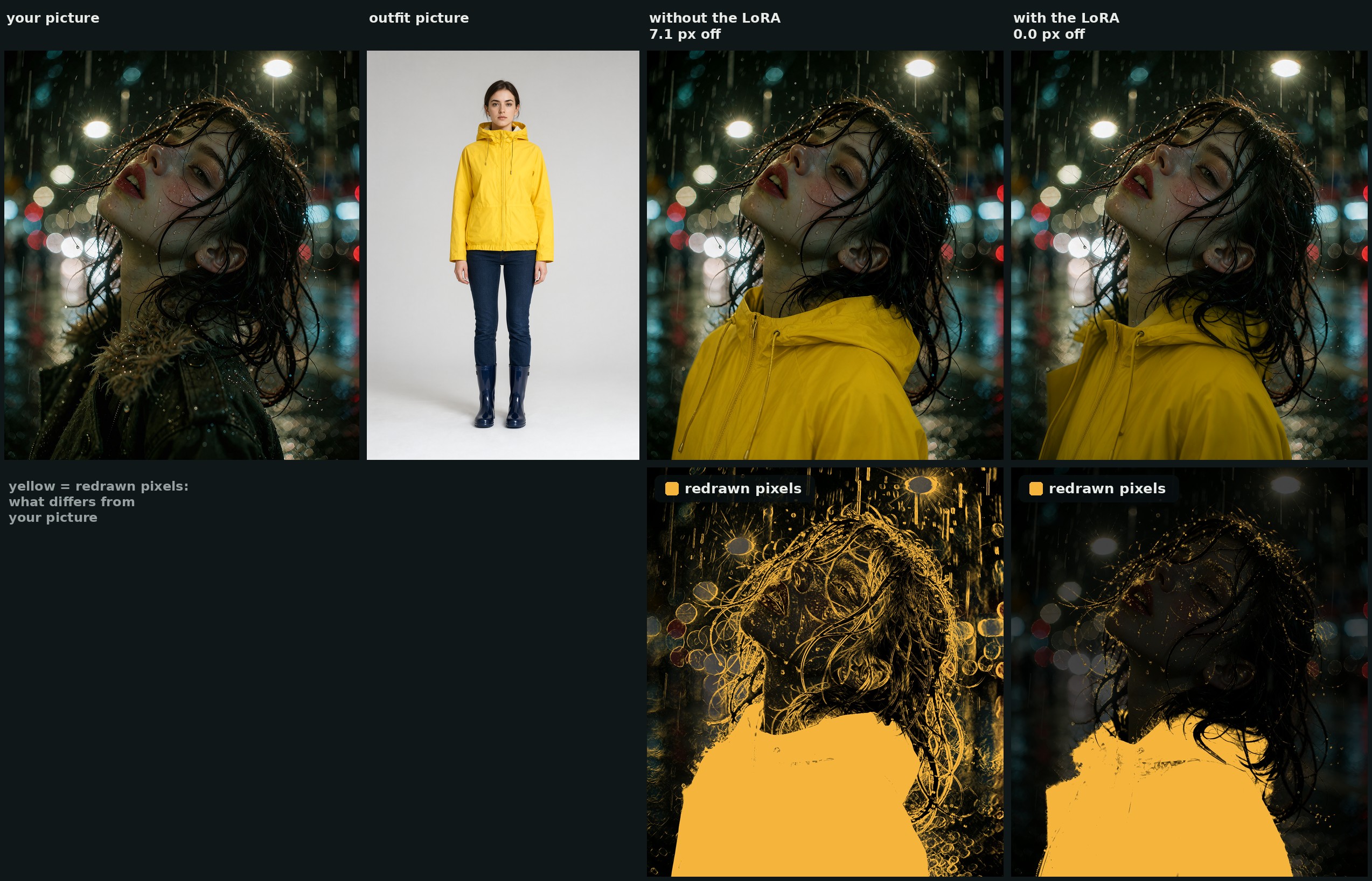
Pixel difference evaluation in rain by ausboss
Quantitative measurements across 16 unseen person and outfit pairs (at roughly 2 megapixels, 25 steps, CFG 1.0, LoRA strength 1.0) reveal how dramatically the adapter stabilizes production stills. Worst corner median alignment improves from 3.6 px to 0.1 px (worst case drops from 7.0 px to 0.2 px).
Face pixel modification drops from 14.1% down to 1.7%, and background repainting drops from 10.8% down to 0.9%. Even stubborn legacy garments such as boots or jeans underneath a new dress clear cleanly in 2 of 3 seeds compared to 0 of 3 without the adapter.
Three training checkpoints ship in the repository so artists can pick their preferred balance between aggressive old garment removal and maximum background preservation.
Step 1,000 (qwen-image-2.1-outfit-swap.safetensors) is the recommended starting checkpoint because it clears prior clothing most reliably while holding 0.1 px framing alignment. Step 1,250 preserves more existing lower garments when only a coat or top changes, while step 1,500 sits at the end of the training run.
No trigger word is required, and lowering strength to 0.5 reintroduces half of the framing drift (1.8 px), so keeping strength at 1.0 is essential for plate locked VFX work.
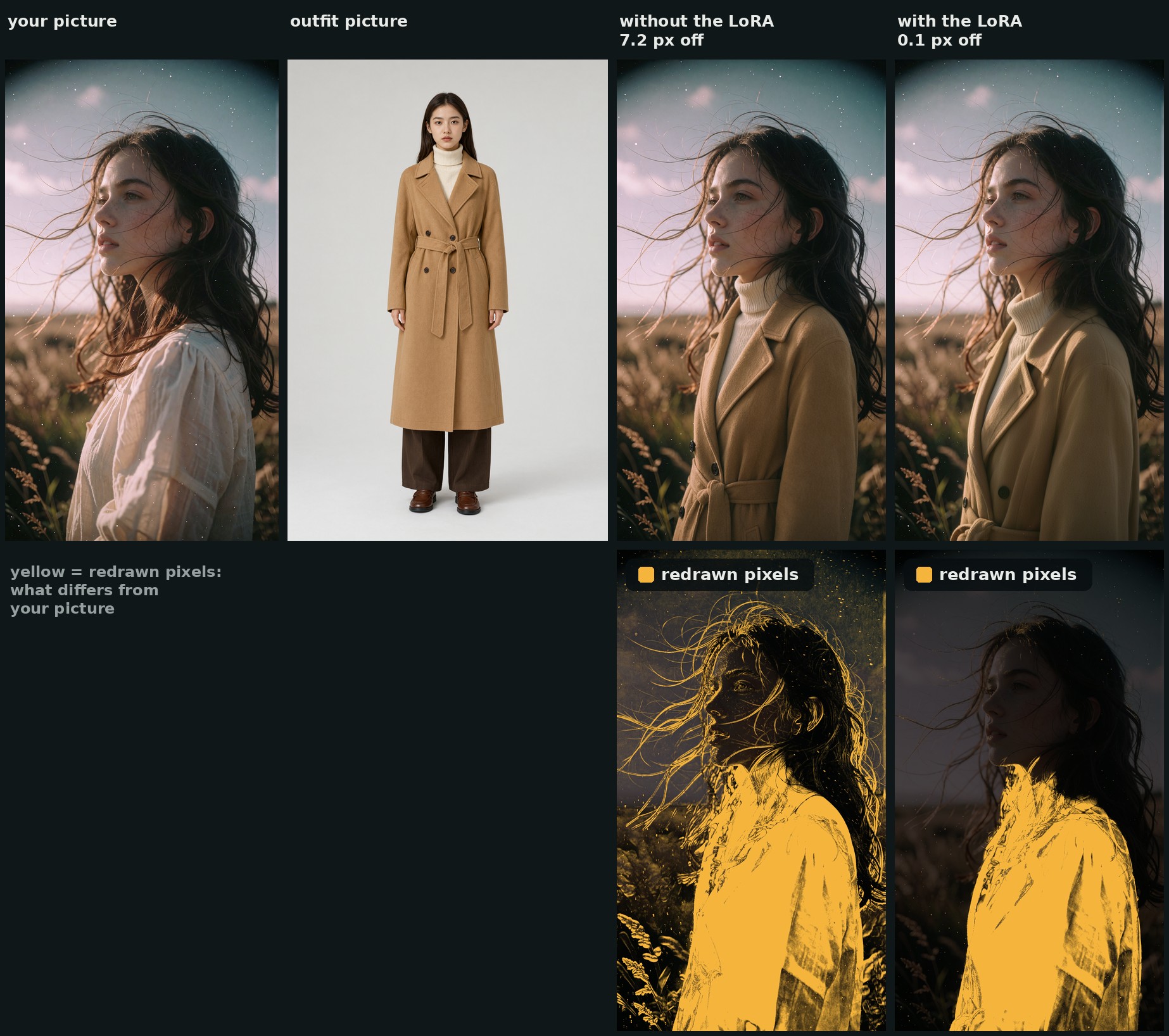
Trench coat unseen pair pixel difference test by ausboss
Hardware, VRAM, and License Matrix
| Checkpoint File | Training Step | Typical VRAM (with Qwen-Image-2.1) | Alignment Drift (Median) | License | Intended Use |
|---|---|---|---|---|---|
qwen-image-2.1-outfit-swap.safetensors |
Step 1,000 | ~16 to 24 GB (quantized) / ~32 GB (BF16) | 0.1 px | Qwen Research License | Recommended default; clears old clothes best |
qwen-image-2.1-outfit-swap-1250.safetensors |
Step 1,250 | Same as above | 0.1 px | Qwen Research License | Jacket or top swaps keeping existing pants |
qwen-image-2.1-outfit-swap-1500.safetensors |
Step 1,500 | Same as above | 0.1 px | Qwen Research License | End of run comparison checkpoint |
The adapter inherits the qwen-research-license from Qwen/Qwen-Image-2.1. Review Qwen's license terms before commercial deployment.
Parameter Reference
| Parameter | Recommended Value | Effect on Wardrobe Swaps |
|---|---|---|
| LoRA Strength | 1.0 |
Required for 0.1 px lock; 0.5 allows 1.8 px drift |
| Inference Steps | 25 (euler / simple) |
Tested 2 MP quality baseline |
guidance_scale (CFG) |
1.0 |
Matches Qwen-Image-2.1 distilled guidance behavior |
| Target Resolution | ~2 megapixels | Preserves fabric weave and actor skin texture |
| Trigger Word | None | Uses direct natural language instruction referencing image 1 and image 2 |
Local Python and CLI Setup
Download the step 1,000 safetensors file from Hugging Face and attach it to your local Qwen/Qwen-Image-2.1 Diffusers or local inference runner at strength 1.0.
pip install -U huggingface_hub diffusers torch safetensors
hf download ausboss/Qwen-Image-2.1-Outfit-Swap-Consistency-LoRA \
  qwen-image-2.1-outfit-swap.safetensors \
  --local-dir ./loras
Use the exact two image prompt structure verified in the author's benchmark suite:
Dress the person in image 1 in the <outfit, in a few words> shown in image 2.
Keep their face, hair, hands, pose and the background exactly the same.
Filmmaker Production Playbook
- Build consistent costume lookbooks for director approvals. Shoot one clean medium shot of your actor on location, then audition ten wardrobe references in image 2. Because camera framing stays within 0.1 px, you can toggle A/B plates in your editor without jarring jump cuts.
- Feed pixel locked costume stills directly into image-to-video. Once the director signs off on a wardrobe change, send the swapped still into MiniMax H3 Image to Video or Google VEO 3.1 Image to Video in AI FILMS Studio to animate the scene with the exact new outfit.
- Keep outfit descriptions short in the prompt. Three to six descriptive words (such as "dark wool trench coat") give Qwen-Image-2.1 enough semantic guidance while letting image 2 supply exact fabric texture and cut.
- Pair with face or head replacement when casting changes too. If you need to swap both wardrobe and actor identity on keyframe plates, combine this workflow with BFS Best Face Swap.
Related Reading
- Qwen-Image-2.1 Turbo: Open Weights 8-Step 2K Image Editing
- BFS Best Face Swap: Open Source LoRA VFX Replacement
- MiniMax-H3 Character Swap: Open Source Video Recast
- Explore cloud image editing models on the AI Image to Image Generator page.


Sources
Continue Reading


Video & LipSync
- Video Generator
- Text to Video
- Image to Video
- Start-End Frame to Video
- Draw to Video
- Motion Control
- Video Enhancer
- Video Upscaler
- Video Extend
- Video to Video LipSync
- Audio to Video LipSync
- Image to Video LipSync
- Video FaceSwap
- Seedance 2.5
- WAN 3.0
- Seedance 2
- FLUX 3
- Minimax H3
- Vidu Q3 Pro
- Grok Imagine Video 1.5
- Gemini Omni
- Google Veo 3.1
- Kling 3.0 Pro
- Luma Ray 3.2
- LTX 2.3
- Happy Horse 1.1
- Kling 3.0 Motion
- ByteDance Upscaler
- InfiniteTalk
- InsightFace
Image & Edit
- AI Character
- AI Actor
- Art Generator
- Text to Image
- Image to Image
- LoRA Image to Image
- Draw to Edit
- Image LoRA Training
- Remove Background
- Image Enhancer
- MidJourney 8.0
- Krea 2
- OpenAI GPT Image 2.0
- Nano Banana Pro Ultra
- Nano Banana 2 Lite
- Nano Banana Pro
- Minimax Image
- Clarity Pro
- Z-Image Turbo LoRA
- Krea 2 Turbo LoRA
- Z-Image LoRA Trainer
- Qwen Image LoRA Trainer
- Background Erase Network 2 (BEN2)