

Seedleap.ai / Zing Team (Apache 2.0)
Share this post:
Zing-0.5: Open Source 5B Interactive World Model
Seedleap.ai released Zing-0.5 under Apache 2.0 as a 5B autoregressive world model built for real time playability. Built on Wan2.2-TI2V-5B, it ranks number 2 overall on the WBench leaderboard and number 1 among real time world models. You can test Zing-0.5 free in the embedded browser demo below with zero login.
Studio availability. Try the public Hugging Face demo below; Zing-0.5 is not part of a paid AI FILMS Studio plan (use Google VEO 3.1 Text to Video in the video workspace for example instead).
Try Zing-0.5 Live
Launch a playable world rollout inside the official Seedleap Hugging Face Space below. Walk through the scene with keyboard controls and switch text prompts live while the camera moves.
Architecture and Technical Design
Zing-0.5 transforms the Wan2.2-TI2V-5B video backbone into a block causal streaming renderer using four step Distribution Matching Distillation (DMD). Instead of generating a fixed 5 second clip from start to finish, the generator maintains a causal KV cache and rolls out continuous latent chunks as keyboard actions and text updates arrive.
Event scale teacher supervision aligns movement and scene events during distillation. An 8 channel action vector maps continuous W/A/S/D/I/J/K/L keyboard controls into camera translation and look direction on every frame interval. At the same time, online text conditioning lets directors alter weather, lighting, or story events mid rollout without resetting the spatial layout.
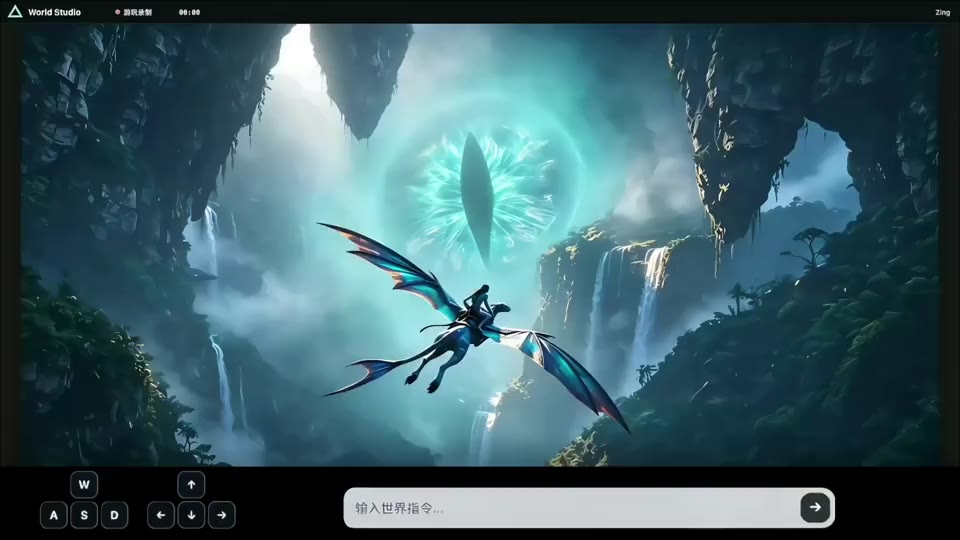
Interactive action rollout by Seedleap.ai (Apache 2.0)
Zing-0.5 manages long sequences through sliding window attention paired with attention sinks. The default offline configuration uses a 97 frame local window with 9 sink frames on 80 GB GPUs, while real time or lower memory setups drop cleanly to 33 local frames and 5 sink frames.
When a director triggers a prompt driven state change, the runtime pins the first block of the new prompt as it leaves the tail window. This keeps the updated scene state consistent as the camera continues moving forward.
In November 2026, the Zing Team also published the Zing-1.0 technical report (`arXiv:2611.27336`), outlining Controllable Rendering and the WorldKit proxy engine. Zing-0.5 remains the live open weights checkpoint you can download, inspect, and serve over WebSockets through Zing-SGLang today.
Every session logs cleanly as a JSONL interaction timeline, so directors can replay exact camera moves and prompt switches deterministically for virtual scouting or previz reviews.
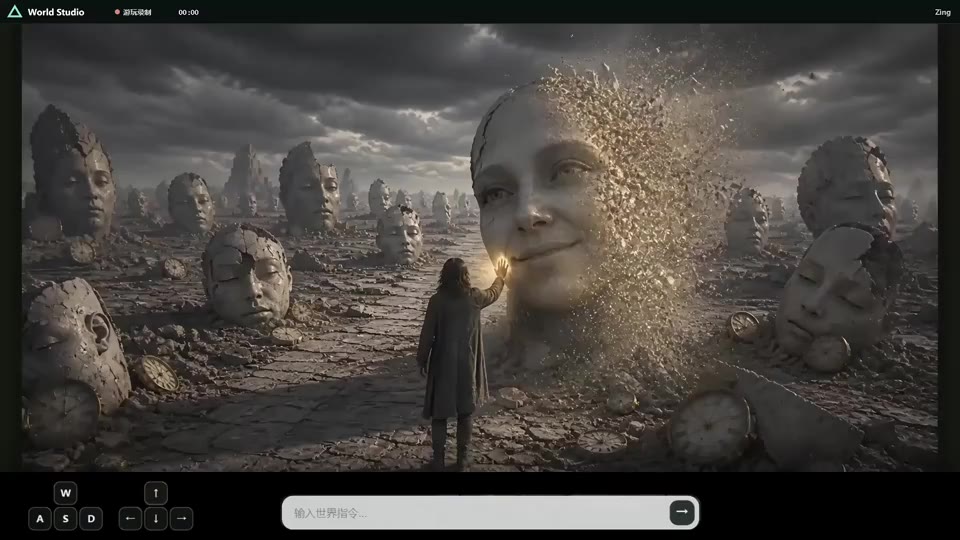
Mid rollout prompt switch still by Seedleap.ai (Apache 2.0)
Hardware, Window Profiles, and License Matrix
| Profile | Local Window (--local-attn-size) |
Sink Size (--sink-size) |
Recommended Hardware | Best Use Case |
|---|---|---|---|---|
| Default offline | 97 |
9 |
NVIDIA H100 (80 GB VRAM) | High continuity recorded rollouts |
| Real time / lower VRAM | 33 |
5 |
Single consumer or workstation CUDA GPU | Live WebSocket steering and previz |
| Full history | -1 |
0 |
Multi chunk high VRAM GPU | Short diagnostic comparisons |
| Attribute | Specification |
|---|---|
| Release date | August 26, 2026 (Tech report September 15, 2026) |
| Base model | Wan-AI/Wan2.2-TI2V-5B-Diffusers (5B parameters) |
| Technical reports | arXiv:2609.17909 (Zing-0.5), arXiv:2611.27336 (Zing-1.0) |
| License | Apache 2.0 (commercial use permitted) |
| Sampling method | 4 step DMD with causal KV cache |
| Output grid constraints | Height and width divisible by 32; frames follow 1 + 4N |
Parameter Reference
| Parameter / Control | Format or Values | Filmmaker Effect |
|---|---|---|
reference_frame_count |
0 (text) or 1 (image) |
Starts a world from text alone or locks frame 1 to concept art |
keyboard_direction_frame_interval |
Shape [N, 8] in [0, 1] |
Encodes W/A/S/D/I/J/K/L movement and camera look angles |
text_prompt_interval |
Ordered [start, end) frame ranges |
Changes weather, lighting, or action during a live take |
output.height / output.width |
Multiples of 32 (default 480 x 832) |
Controls aspect ratio and memory footprint |
--seed |
Integer | Keeps world layout repeatable when replaying a JSONL script |
Local CLI and SGLang WebSocket Setup
Clone seedleap/zing-world-model, place generator/model.pt alongside pretrained/text_encoder/, pretrained/tokenizer/, and pretrained/vae/, and run an example JSONL rollout.
CUDA_VISIBLE_DEVICES=0 \
ZING_PYTHON=/path/to/python \
bash run.sh \
  --pretrained-dir /path/to/Zing-0.5/pretrained \
  --checkpoint /path/to/Zing-0.5/generator/model.pt \
  --messages examples/case7_action_prompt_switch_t2v.jsonl \
  --local-attn-size 33 \
  --sink-size 5 \
  --output-dir outputs/case7 \
  --seed 0
For live WebSocket streaming, launch the official Zing-SGLang server and connect the Python client.
ZING_MODEL_PATH=./models/Zing-0.5-SGLang \
  examples/zing_0_5/launch_server.sh

python examples/zing_0_5/client.py \
  --prompt "A first-person walk through a misty pine forest at sunrise" \
  --action w \
  --chunks 4 \
  --output outputs/forest
Filmmaker Production Playbook
Virtual Location Scouting From Concept Art
Set reference_frame_count to 1 and supply a production designer's keyframe as the starting image. Directors can walk forward, pan left, or tilt up inside the painted set to test sightlines before commissioning full 3D environment assets.
Blocking Continuous Steadicam Shots
Standard text-to-video models treat camera motion as a vague text hint. Recording a JSONL action sequence lets cinematographers block exact push ins, lateral tracks, and look turns frame by frame, then hand the recorded clip to editorial as an animated storyboard.
Live Atmosphere and Lighting Transitions
Using text_prompt_interval controls, a director can start a shot in golden hour sunlight and transition the same street into heavy rain or neon dusk mid take without cutting the camera.
Known Limitations and FAQ
What resolution does Zing-0.5 render natively?
Default examples render at 832 x 480 (any height and width divisible by 32 is valid). For final 1080p or 2K delivery, pass recorded rollouts through a video upscaler such as Kandinsky 6.0 VSR 2.0.
Can I run Zing-0.5 on Windows natively? The official inference scripts target Linux with Python 3.11 and a CUDA GPU. Windows users should run it inside WSL2 or connect to a remote Linux SGLang WebSocket server.
Are Zing-0.5 weights cleared for commercial studio use? Yes. Both code and checkpoints ship under the Apache 2.0 license.
Related Reading
- AlayaWorld: Open Source Playable Video World Model
- Lingbot World: Open Source World Simulator for Commercial Use
- NVIDIA SANA-WM: Open Source 60s World Video Model
- AI Text-to-Video Generator

Sources
Continue Reading


Video & LipSync
- Video Generator
- Text to Video
- Image to Video
- Start-End Frame to Video
- Draw to Video
- Motion Control
- Video Enhancer
- Video Upscaler
- Video Extend
- Video to Video LipSync
- Audio to Video LipSync
- Image to Video LipSync
- Video FaceSwap
- Seedance 2.5
- WAN 3.0
- Seedance 2
- FLUX 3
- Minimax H3
- Vidu Q3 Pro
- Grok Imagine Video 1.5
- Gemini Omni
- Google Veo 3.1
- Kling 3.0 Pro
- Luma Ray 3.2
- LTX 2.3
- Happy Horse 1.1
- Kling 3.0 Motion
- ByteDance Upscaler
- InfiniteTalk
- InsightFace
Image & Edit
- AI Character
- AI Actor
- Art Generator
- Text to Image
- Image to Image
- LoRA Image to Image
- Draw to Edit
- Image LoRA Training
- Remove Background
- Image Enhancer
- MidJourney 8.0
- Krea 2
- OpenAI GPT Image 2.0
- Nano Banana Pro Ultra
- Nano Banana 2 Lite
- Nano Banana Pro
- Minimax Image
- Clarity Pro
- Z-Image Turbo LoRA
- Krea 2 Turbo LoRA
- Z-Image LoRA Trainer
- Qwen Image LoRA Trainer
- Background Erase Network 2 (BEN2)