

Zekai Gu et al., HKUST Intelligent Graphics Lab (SIGGRAPH 2025, Apache 2.0)
Share this post:
Diffusion as Shader: Open Source 3D Video Control AI
Diffusion as Shader (DaS, arXiv:2501.03847) from the HKUST Intelligent Graphics Lab is a SIGGRAPH 2025 open source framework (Apache 2.0) that treats a video diffusion transformer like a 3D graphics shader. Built on CogVideoX-5B-I2V with weights hosted at EXCAI/Diffusion-As-Shader, DaS conditions video generation on 3D tracking videos, color coded 3D point trajectories rendered from dynamic scene meshes or unprojected depth clouds, unlocking camera control, 3D object manipulation, animatic mesh to video shading, and motion transfer from a single model checkpoint.
Studio availability. Diffusion as Shader is not available in AI FILMS Studio. This article covers a public research release. To control motion and camera paths in the Studio, see the models listed on the Motion Control page or open the video workspace.
Diffusion as Shader SIGGRAPH 2025 overview across mesh to video, camera control, and 3D object manipulation
3D object rotation and translation guided by 3D coordinate tracking maps
Why 3D Tracking Videos Unify Geometry and Motion Control
2D control signals such as Canny edges, depth maps, or 2D optical flow vectors lose correspondence whenever an object rotates in 3D space or passes behind an foreground element. When a 3D previz artist animates an untextured asset in Blender or rotates a tracked object inside a live plate, frame wise depth maps do not tell the diffusion model which surface point in Frame 1 corresponds to which surface point in Frame 49.
Diffusion as Shader solves correspondence drift by coloring every 3D surface point according to its initial canonical (X, Y, Z) coordinate in the first frame and rendering those colored points across the entire camera and object animation.
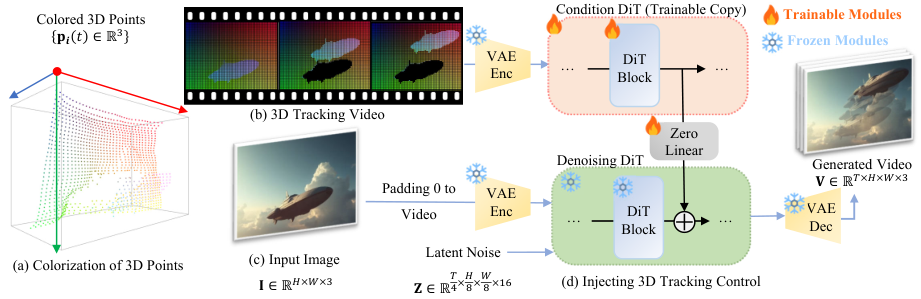
Diffusion as Shader encodes 3D coordinate tracking videos through a trainable DiT copy branch. Credit: Zekai Gu et al., HKUST (Apache 2.0).
Because each 3D vertex keeps its exact RGB coordinate color as it moves across the screen, the 3D tracking video explicitly encodes both surface geometry and long range 3D correspondence.
Fine tuning `CogVideoX-5B-I2V` with a trainable Transformer condition branch requires under 10,000 synthetic and real video clips on 8 H800 GPUs for just 3 days.
Four Filmmaking Tasks From One 3D Tracking Representation
By changing how the 3D tracking video is constructed before inference, DaS executes four distinct production workflows without changing checkpoints.
1. Mesh to Video Shading: Export untextured 3D layout animations from Blender or Unreal Engine as UV coordinate tracking passes, and shade them into photorealistic cinema shots guided by a reference keyframe.
2. 3D Object Manipulation & Camera Control: Segment an object with grounded `SAM2`, unproject its metric depth with `MoGe`, and apply arbitrary 3D translation, rotation (`--object_motion`), or 6-DoF camera extrinsics (`--override_extrinsics`).
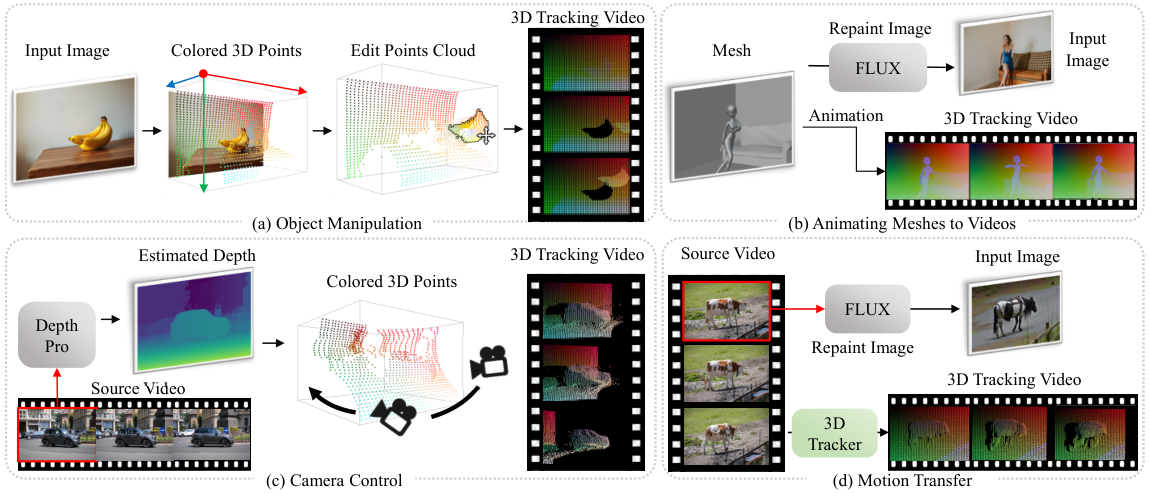
One 3D tracking representation drives mesh shading, camera control, object manipulation, and motion transfer. Credit: HKUST IGL (Apache 2.0).
Hardware, VRAM & Component Matrix
| Component | Repository / Model ID | Function & Resolution | Hardware & VRAM | License |
|---|---|---|---|---|
| DaS Diffusion Backbone | EXCAI/Diffusion-As-Shader (CogVideoX-5B-I2V) |
3D tracking conditioned DiT (720x480, 49 frames) |
24 GB to 32 GB VRAM (supports CPU offload) | Apache 2.0 |
Monocular Geometry (MoGe) |
Ruicheng/moge-vitl |
Metric 3D point cloud unprojection for single images | Included in preprocessing script | MIT |
3D Point Tracker (SpaTracker / Cotracker) |
VGGT / Cotracker + Grounded-SAM-2 |
Dynamic 3D point trajectory extraction and object masking | 12 GB to 16 GB VRAM | Apache 2.0 |
Running Diffusion as Shader Locally
Clone IGL-HKUST/DiffusionAsShader with submodules (MoGe and Grounded-SAM-2), install the CUDA dependencies, and run scripts/evaluate.sh for any of the four control modes.
git clone --recursive https://github.com/IGL-HKUST/DiffusionAsShader.git
cd DiffusionAsShader
pip install -r requirements.txt

# 1. Camera control on an input image using a custom Blender or preset camera trajectory
python demo.py \
  --prompt "A vintage lighthouse on rocky cliffs at sunset, crashing ocean waves." \
  --checkpoint_path EXCAI/Diffusion-As-Shader \
  --input_path examples/Camera_Control/lighthouse.png \
  --camera_motion "trans -0.1 0 0 0 5" \
  --override_extrinsics "append" \
  --output_dir ./outputs/camera

# 2. 3D object manipulation (rotate or move a segmented subject in 3D space)
python demo.py \
  --prompt "A classic sports car parked on a wet cobblestone street." \
  --checkpoint_path EXCAI/Diffusion-As-Shader \
  --input_path examples/Object_Manipulation/car.png \
  --object_motion "rot 0 45 0" \
  --tracking_method spatracker \
  --object_mask_path examples/Object_Manipulation/car_mask.png \
  --output_dir ./outputs/manipulation
To shade a raw 3D layout animation exported from Blender (mesh-to-video), stylize the first frame using FLUX.1-Depth-dev (repaint: true) so the texture matches your lighting direction, and DaS propagates that look across all 49 frames of the 3D mesh render.
3D Previz & AI FILMS Studio Workflows
For layout artists and technical directors, Diffusion as Shader turns rough greybox 3D animations into textured shots without UV unwrapping, shader authoring, or path tracing render farms. A previz artist blocks out camera lenses and simple proxy geometry in Blender, exports the 3D coordinate pass, and renders multiple lighting and weather variations from different first frame concept plates.
For related open source 3D and motion pipelines, read our guides on RealisMotion 3D world space motion control, Time-to-Move (TTM) motion control, and Light-X 4D camera and relighting control.
To run motion control, sketch to video, and image-to-video workflows directly in the cloud, visit the Motion Control and Draw to Video pages or chain models visually inside the Nodes Graph Editor.


Sources
Continue Reading


Video & LipSync
- Video Generator
- Text to Video
- Image to Video
- Start-End Frame to Video
- Draw to Video
- Motion Control
- Video Enhancer
- Video Upscaler
- Video Extend
- Video to Video LipSync
- Audio to Video LipSync
- Image to Video LipSync
- Video FaceSwap
- Seedance 2.5
- WAN 3.0
- Seedance 2
- FLUX 3
- Minimax H3
- Vidu Q3 Pro
- Grok Imagine Video 1.5
- Gemini Omni
- Google Veo 3.1
- Kling 3.0 Pro
- Luma Ray 3.2
- LTX 2.3
- Happy Horse 1.1
- Kling 3.0 Motion
- ByteDance Upscaler
- InfiniteTalk
- InsightFace
Image & Edit
- AI Character
- AI Actor
- Art Generator
- Text to Image
- Image to Image
- LoRA Image to Image
- Draw to Edit
- Image LoRA Training
- Remove Background
- Image Enhancer
- MidJourney 8.0
- Krea 2
- OpenAI GPT Image 2.0
- Nano Banana Pro Ultra
- Nano Banana 2 Lite
- Nano Banana Pro
- Minimax Image
- Clarity Pro
- Z-Image Turbo LoRA
- Krea 2 Turbo LoRA
- Z-Image LoRA Trainer
- Qwen Image LoRA Trainer
- Background Erase Network 2 (BEN2)