

Apple ML Research, FastFrames (arXiv:2611.23226, Apple Sample Code License)
Share this post:
FastFrames: Open Source Real Time Video Diffusion AI
FastFrames (apple-aiml-research/ml-fastframes, arXiv:2611.23226) from Apple Machine Learning Research and Cornell University is a November 2026 open weights autoregressive video diffusion suite achieving interactive frame latencies of 36 ms to 45 ms per frame (22 to 27 FPS). Released on November 16, 2026 across FastFrames-S (1.3B) and FastFrames-L (14B) checkpoints alongside a 16x accelerated LingBot-World v2 1.3B interactive camera control pipeline, FastFrames compresses causal video diffusion down to two denoising steps per chunk while eliminating KV cache and VAE decoding bottlenecks.
Studio availability. FastFrames is not available in AI FILMS Studio. This article covers a public research release from November 2026. To generate video or direct camera paths in the Studio, see the models listed on the Text to Video and Motion Control pages.
FastFrames interactive camera and scene steering running at 36ms to 45ms per frame latency
Breaking the Latency Wall in Autoregressive Video Diffusion
Standard bidirectional video diffusion models generate an entire 5 second (121 frame) clip simultaneously across 30 to 50 denoising steps. While bidirectional attention produces high visual fidelity, a director testing camera blocking or action timing must wait 30 seconds to several minutes before seeing Frame 1.
Causal autoregressive video generators predict frames sequentially in small temporal blocks so playback can start immediately. Yet earlier causal models still face three latency barriers that keep them below interactive frame rates.
- Four to eight denoising steps per causal chunk. Even distilled causal transformers typically require 4 or more evaluations per frame block, keeping per frame latency above
150 ms. - Unbounded KV cache growth. Storing full key value (
KV) attention states across dozens of historical chunks saturates memory bandwidth and slows every subsequent step. - 3D causal VAE decode stalls. Decoding latent blocks back to RGB pixels often creates periodic frame stutter that breaks real time interactive camera steering.
FastFrames (arXiv:2611.23226) attacks all three bottlenecks jointly across its 1.3B and 14B models.
Two Step Causal Distillation, Compact KV Windowing & 16x LingBot Speedup
- Two step causal trajectory distillation. FastFrames distills multi step causal diffusion teachers into a 2-step student generator (
FastFrames-Sat1.3Bparameters andFastFrames-Lat14Bparameters) with classifier free guidance folded directly into the student weights (CFG=1.0). - Compact sliding KV cache & causal VAE overlap. Paper ablations (
kv_ablation_fig.pngandvae_ablation_fig.pnginarXiv:2611.23226) demonstrate that pruning redundant historical KV tokens while overlapping causal VAE decoding with transformer execution brings end to end latency down to36 msto45 msper frame without temporal flicker. - 16x faster
LingBot-World v2camera control. To demonstrate interactive virtual production scouting, Apple ML Research applied FastFrames optimizations to theLingBot-World v21.3Bcamera conditioned world model, achieving a 16x speedup over upstream LingBot and enabling live keyboard and mouse 6-DoF camera flight on a single GPU or across an 8-GPU node.
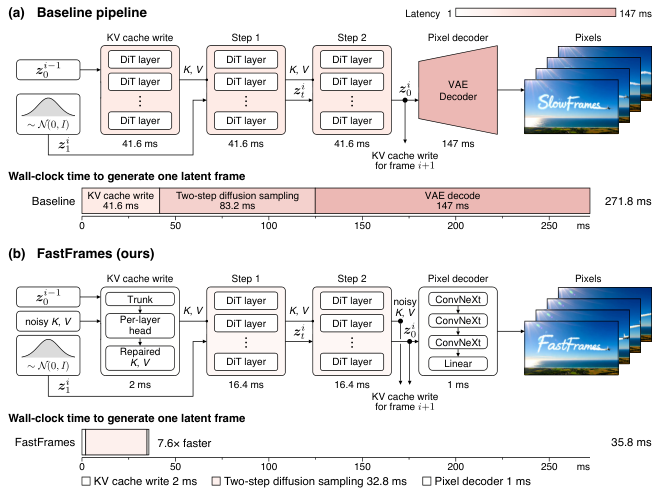
FastFrames two step causal diffusion and KV cache pipeline. Credit: Apple ML Research (arXiv:2611.23226).
By restricting each autoregressive block to two forward passes and bounding KV memory bandwidth, FastFrames maintains steady frame delivery from the first second of generation through extended interactive sessions.
Filmmakers testing shot blocking can steer subject action or camera trajectory mid-take rather than waiting for offline batch renders to finish.
Try FastFrames-L Live in the Browser
You can test FastFrames-L directly in the browser using the public Gradio Space embedded below (mrfakename-fastframes-l.hf.space), which loads without login.
The companion `LingBot-World v2` integration (`apps/lingbot/demo.py`) shows how FastFrames turns a slow camera conditioned world diffusion model into a live virtual viewfinder.
Before deploying in studio pipelines, note the licensing terms. Apple releases the FastFrames code under the **Apple Sample Code License** and the `FastFrames-S` / `FastFrames-L` checkpoints under the **Apple Research Model License** (research only), while `LingBot-World v2` weights follow upstream **`CC BY-NC-SA 4.0`** terms.
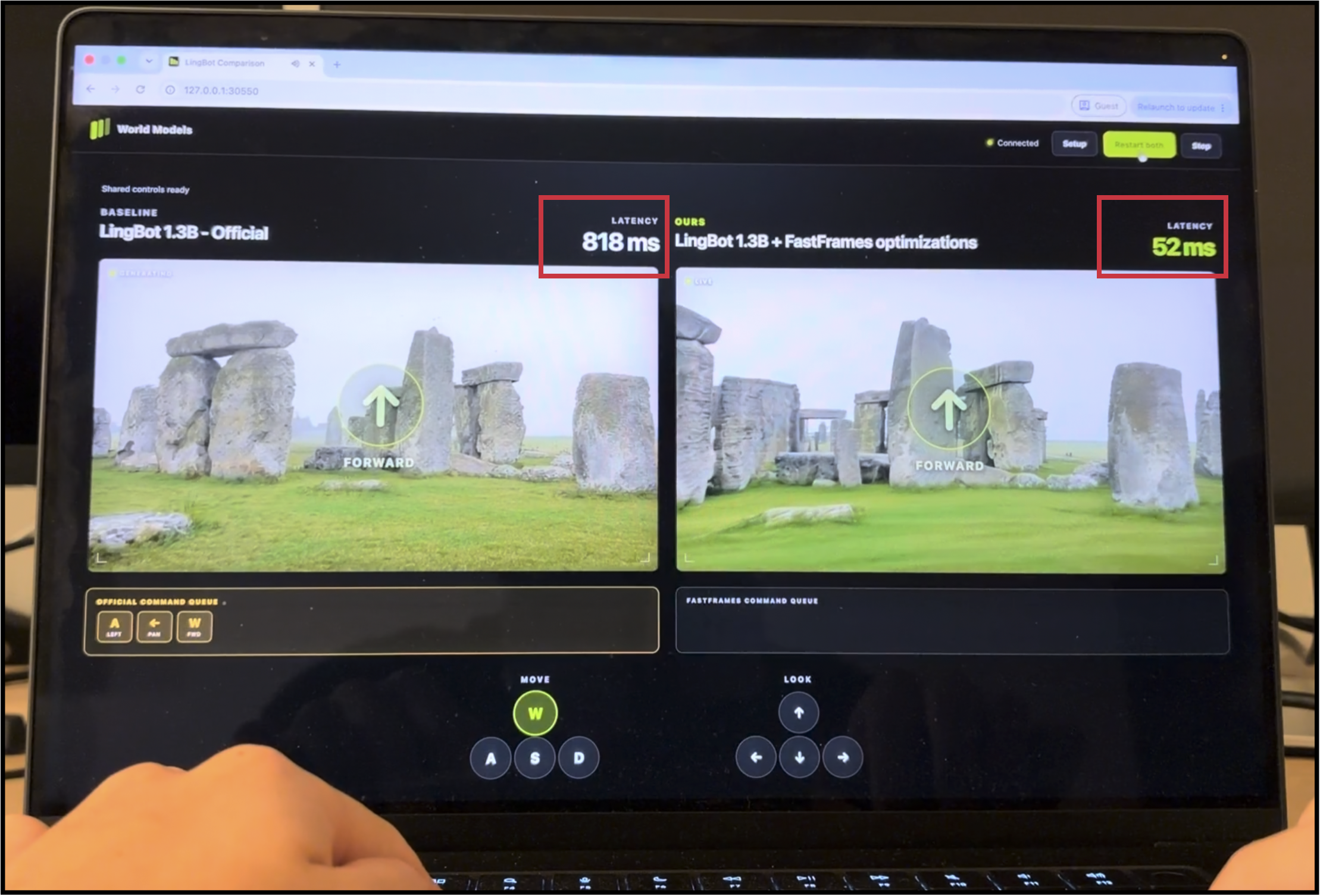
Interactive LingBot-World v2 camera steering accelerated 16x with FastFrames. Credit: arXiv:2611.23226.
Model Variants, Latency & License Matrix
| Checkpoint / App | Hugging Face ID | Parameters & Steps | Frame Latency / Speedup | Hardware & Runner | License |
|---|---|---|---|---|---|
FastFrames-S |
apple/FastFrames-S |
1.3B (2 steps, CFG=1.0) |
36 ms to 45 ms per frame (22–27 FPS) |
Single 16 GB to 24 GB+ GPU (uv runner) |
Apple Research Model License (Research Only) |
FastFrames-L |
apple/FastFrames-L |
14B (2 steps, CFG=1.0) |
High fidelity 2-step causal stream | Single 40 GB to 80 GB GPU or multi GPU | Apple Research Model License (Research Only) |
FastFrames + LingBot 1.3B |
apps/lingbot/demo.py |
1.3B (2 steps + 6-DoF camera) |
16x faster than upstream LingBot | 1 GPU (--gpus 1) up to 8 GPUs (--gpus 8) |
CC BY-NC-SA 4.0 + Apple Sample Code |
WaveForcing-1.3B |
SJTU-DENG-Lab/WaveForcing-1.3B |
1.3B (4 or 5 steps, wavefront) |
Streaming 60s+ long take rollouts | Single or multi GPU (Wan 1.3B format) |
Apache 2.0 (Commercial OK) |
Running FastFrames and the 16x LingBot Camera Demo Locally
Clone apple-aiml-research/ml-fastframes and use uv to install the base environment or the optional --extra lingbot --extra demo packages.
git clone https://github.com/apple-aiml-research/ml-fastframes.git
cd ml-fastframes

# Run 2-step text-to-video generation with FastFrames-S (1.3B) or FastFrames-L (14B)
uv run python scripts/generate.py \
  --model apple/FastFrames-S \
  --prompt "A corgi surfing a wave at sunset, warm golden reflection on ocean spray." \
  --seed 0 \
  --output outputs/corgi_fastframes.mp4
To launch the live interactive LingBot-World v2 1.3B camera controlled demo on a single GPU or scale across an 8-GPU workstation, run apps/lingbot/demo.py.
# Single-GPU interactive LingBot camera control demo (16x accelerated)
CUDA_VISIBLE_DEVICES=0 uv run --extra lingbot --extra demo \
  python apps/lingbot/demo.py --gpus 1

# Multi-GPU 8-card low-latency interactive world server
CUDA_VISIBLE_DEVICES=0,1,2,3,4,5,6,7 uv run --extra lingbot --extra demo \
  python apps/lingbot/demo.py --gpus 8
Production Playbook for Filmmakers
- Use
FastFrames-S+LingBotfor R&D shot exploration. Because FastFrames and LingBot carry research only licenses, use them during early director R&D to test camera lenses, dolly speeds, and blocking interactively at 25 FPS before generating commercial plates. - Switch to Apache 2.0
WaveForcing-1.3BorHy-Nomasfor commercial pipelines. When your production requires unrestricted commercial licensing for streaming long takes or interactive worlds, pair the architectural lessons of FastFrames with WaveForcing-1.3B and MovieRoll or WorldCrafter and Apache 2.0 Hy-Nomas. - Compare across real time video generators. Read our companion guides on DMAD and DuoMatching 4-step audio and video distillation, SANA-Streaming 24 FPS video editing, and Helios real time long video generation.
For commercial cloud generation with live licensed models, visit the Text to Video and Motion Control pages, or connect multi node pipelines visually in the Nodes Graph Editor.


Sources
- apple-aiml-research/ml-fastframes Official GitHub Repository
- Apple ML Research FastFrames Project Page
- FastFrames: Video Generation at Interactive Latency (arXiv:2611.23226)
- apple/FastFrames-L 14B Model Card on Hugging Face
- apple/FastFrames-S 1.3B Model Card on Hugging Face
- mrfakename/fastframes-l Interactive Space on Hugging Face
Continue Reading


Video & LipSync
- Video Generator
- Text to Video
- Image to Video
- Start-End Frame to Video
- Draw to Video
- Motion Control
- Video Enhancer
- Video Upscaler
- Video Extend
- Video to Video LipSync
- Audio to Video LipSync
- Image to Video LipSync
- Video FaceSwap
- Seedance 2.5
- WAN 3.0
- Seedance 2
- FLUX 3
- Minimax H3
- Vidu Q3 Pro
- Grok Imagine Video 1.5
- Gemini Omni
- Google Veo 3.1
- Kling 3.0 Pro
- Luma Ray 3.2
- LTX 2.3
- Happy Horse 1.1
- Kling 3.0 Motion
- ByteDance Upscaler
- InfiniteTalk
- InsightFace
Image & Edit
- AI Character
- AI Actor
- Art Generator
- Text to Image
- Image to Image
- LoRA Image to Image
- Draw to Edit
- Image LoRA Training
- Remove Background
- Image Enhancer
- MidJourney 8.0
- Krea 2
- OpenAI GPT Image 2.0
- Nano Banana Pro Ultra
- Nano Banana 2 Lite
- Nano Banana Pro
- Minimax Image
- Clarity Pro
- Z-Image Turbo LoRA
- Krea 2 Turbo LoRA
- Z-Image LoRA Trainer
- Qwen Image LoRA Trainer
- Background Erase Network 2 (BEN2)