

Tencent Hunyuan & SJTU, AuK Technical Report (arXiv:2609.08936)
Share this post:
Hunyuan AuK: Open Source Speech & Dialogue Editing AI
AuK (Tencent-Hunyuan/AuK, arXiv:2609.08936) from Tencent Hunyuan and Shanghai Jiao Tong University is an open source foundational model for zero shot speech generation and in place dialogue editing that has earned over 1,610 GitHub stars since its late 2026 release. Upgraded through October and November 2026 with AuK-Flash distillation, a 7.5 GiB encoder VRAM reduction, offline GGUF inference in audio.cpp, native Apple Silicon MLX support, vLLM-Omni serving, and the VoxCanvas content editing data pipeline (released November 10, 2026), AuK lets film editors rewrite individual words inside a recorded take while preserving the actor's exact voice and room tone.
Studio availability. Tencent Hunyuan AuK is not available in AI FILMS Studio. This article covers a public research release. To generate speech or clone voices in the Studio, open the voice workspace to use ElevenLabs Eleven V3 Text to Speech, MiniMax Speech 2.8 HD Text to Speech, or MiniMax Voice Clone, and pair dialogue with video on the Image to Video page.
Hunyuan AuK overview demonstrating zero shot speech generation and natural in place dialogue editing (unmute for audio)
Why ADR Word Replacement Needs In-Place Speech Editing
During post production, a single changed word in a script or a flubbed line on set normally forces an Automated Dialogue Replacement (ADR) session. Even when an editor clones the actor's voice with a standard text-to-speech generator, splicing a freshly generated phrase into the middle of a location recording fails because the synthetic clip lacks the acoustic room reflection, microphone proximity, and background ambience of the surrounding take.
AuK (arXiv:2609.08936, selected as the official Single Model Track baseline for the ICASSP 2027 Audio Editing Challenge) unifies text-to-speech synthesis and masked audio infilling inside one foundation model.
- Context preserving dialogue infilling. Given an existing audio recording, its original transcript, and an edited transcript where words are inserted, deleted, or replaced, AuK masks only the modified timestamp span and synthesizes the new words to match the surrounding vocal prosody and acoustic environment.
- AuK-Flash distillation and 7.5 GiB memory cut. In September and October 2026 (
PR #19andPR #22), the team cut encoder memory by ~7.5 GiB and released theAuK-Flashfew step distillation pipeline, bringing high fidelity speech editing to single consumer CUDA GPUs. - Cross platform deployment (
audio.cppGGUF, Apple Silicon MLX,vLLM-Omni). Unlike research repos tied to one PyTorch version, AuK runs offline in C++ viaaudio.cpp --family auk(GGUF), natively on Macbooks via thefeat/mlx-apple-siliconbranch, and at data center scale viavLLM-Omni. - VoxCanvas editing pipeline (November 10, 2026). Paired with
ZhikangNiu/VoxCanvasandQwen3-ASR-1.7Bword alignment timestamps (zkniu/VoxCanvas), studios can automate word level transcript alignment before running batch dialogue edits.
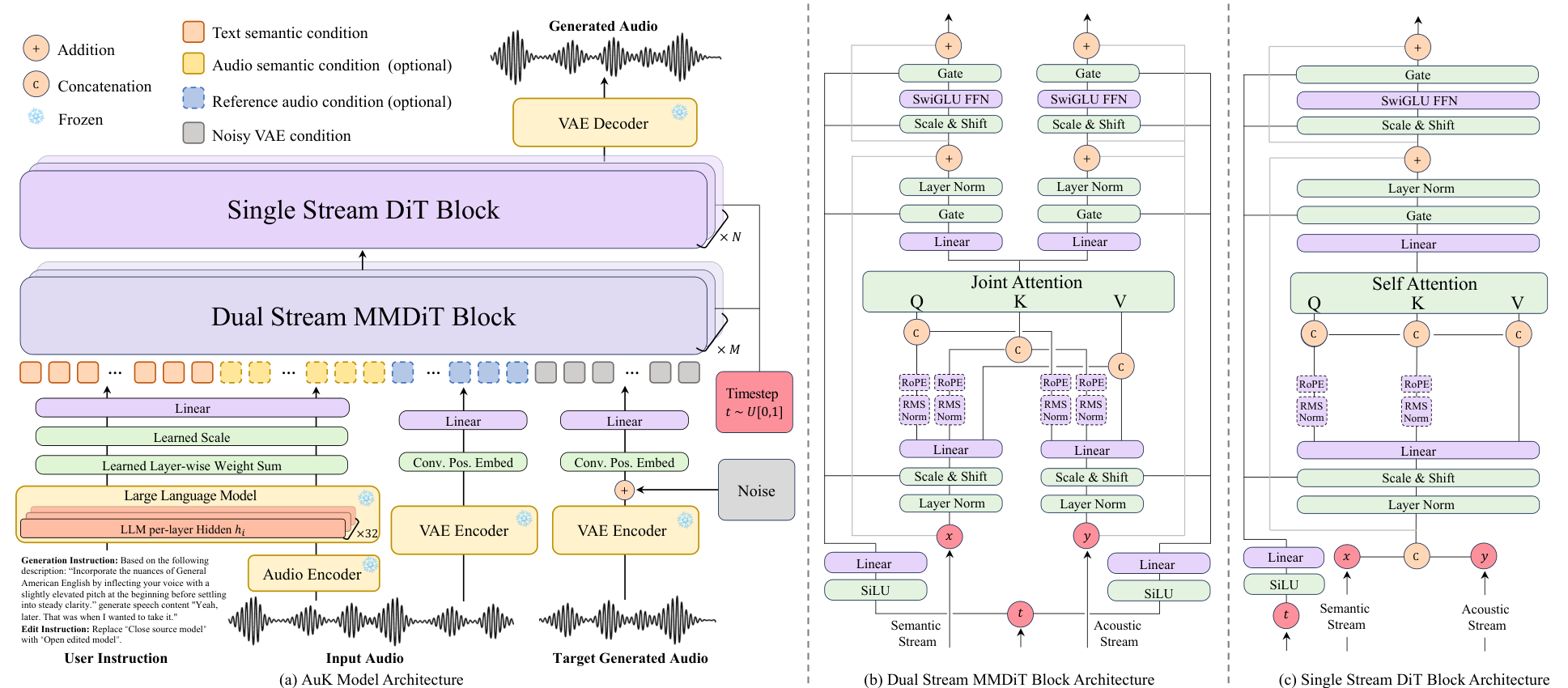
Hunyuan AuK unified architecture for zero shot TTS and timestamp-masked dialogue editing. Credit: Tencent Hunyuan & SJTU (arXiv:2609.08936).
By conditioning on unmasked acoustic context before and after the edited phrase, AuK preserves breathing cadence, emotional intensity, and background room tone across splice boundaries.
Sound editors can fix a mispronounced character name or replace a line for broadcast censorship without booking an ADR stage.
Try Tencent Hunyuan AuK Live in the Browser
Test AuK zero shot speech generation and transcript editing directly in the official Tencent Hugging Face Space embedded below (tencent-auk.hf.space), which loads without login.
Across zero shot voice cloning, speech insertion, word substitution, and acoustic continuity benchmarks, `AuK` outperforms task specific TTS and infilling baselines, earning its selection as the ICASSP 2027 Audio Editing Challenge baseline.
When paired with the November 2026 `VoxCanvas` alignment pipeline, `Qwen3-ASR-1.7B` automatically locates exact millisecond word boundaries so editors only edit the text string.
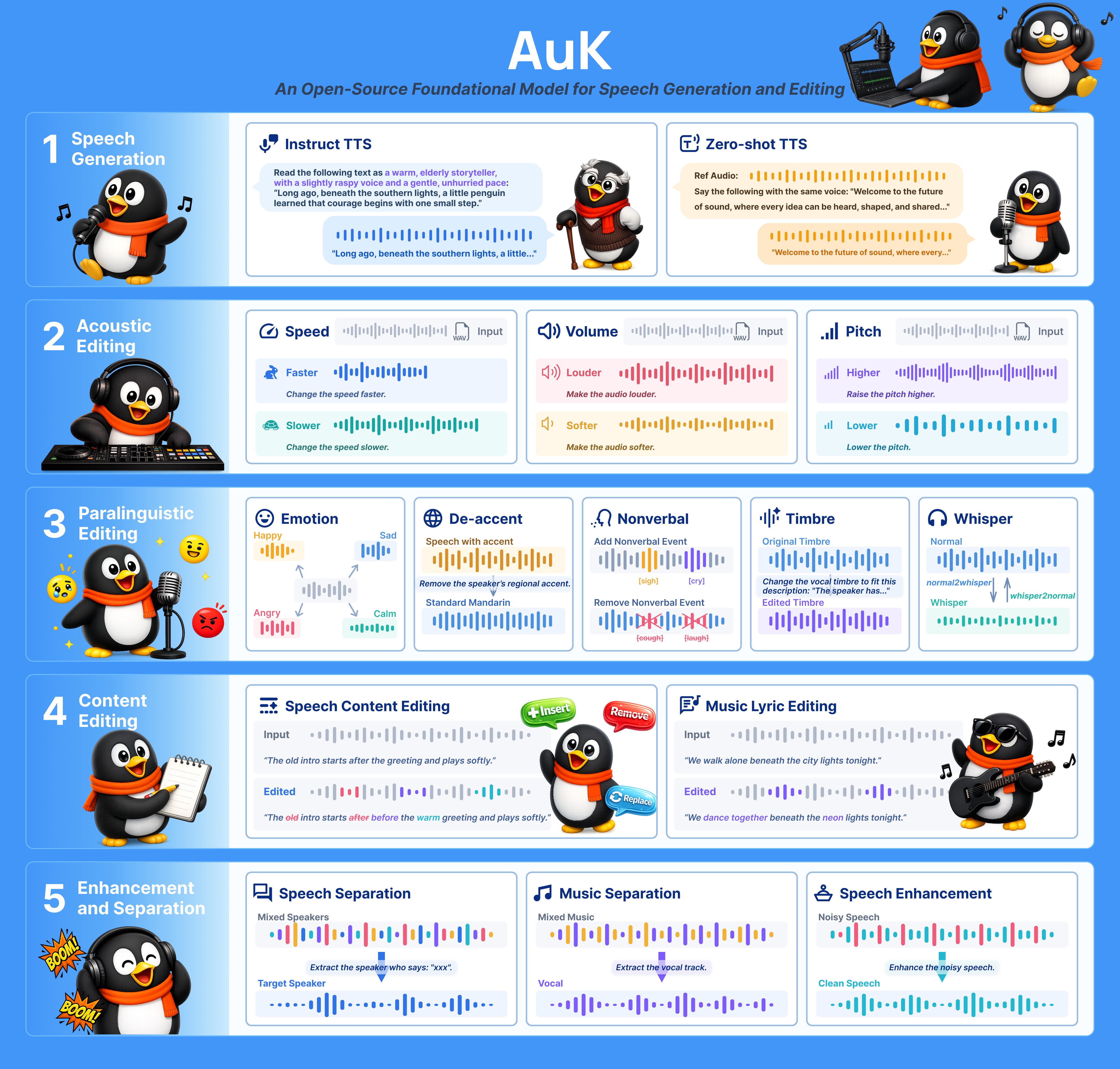
AuK capability breakdown and benchmark evaluation across generation and editing tasks. Credit: Tencent-Hunyuan/AuK.
Runtime Backends, Hardware & Feature Matrix
| Runtime / Variant | Repository / Branch | Key Advantage | Target Hardware & Memory | Status |
|---|---|---|---|---|
AuK & AuK-Flash (PyTorch CUDA) |
Tencent-Hunyuan/AuK (main) |
Full zero shot TTS + dialogue editing (-7.5 GiB encoder memory optimization) |
12 GB to 16 GB VRAM (with --cpu-offload) |
Open Source |
AuK GGUF (audio.cpp) |
0xShug0/audio.cpp (--family auk) |
Pure C++ offline inference with quantized GGUF weights | 6 GB to 10 GB VRAM or CPU / hybrid | Open Source |
AuK Apple Silicon (MLX) |
Tencent-Hunyuan/AuK (feat/mlx-apple-silicon) |
Native unified memory execution on M series Macs | 16 GB+ Apple Silicon unified RAM | Open Source |
AuK Production Server (vLLM-Omni) |
vllm-project/vllm-omni (AuK-H100.md) |
High throughput two stage batch serving | Single A100 / H100 GPU | Open Source |
Running Hunyuan AuK Locally (PyTorch, audio.cpp GGUF, and Apple MLX)
To run the official PyTorch repository with the 7.5 GiB memory reduction and CPU offloading on a single consumer GPU, clone Tencent-Hunyuan/AuK.
git clone https://github.com/Tencent-Hunyuan/AuK.git
cd AuK
pip install -r requirements.txt

# Zero-shot dialogue editing: replace words inside an existing location recording
python infer_edit.py \
  --audio_path examples/location_take.wav \
  --orig_transcript "Meet me at the north dock at midnight." \
  --target_transcript "Meet me at the south hangar at dawn." \
  --cpu_offload \
  --output outputs/edited_take.wav
To run quantized AuK or AuK-Flash offline in C++ using audio.cpp, use the --family auk flag.
git clone https://github.com/0xShug0/audio.cpp.git
cd audio.cpp
cmake -B build && cmake --build build --config Release

# Run GGUF offline speech synthesis and editing with audio.cpp
./build/bin/audio-cli \
  --family auk \
  --model ./models/auk-flash-q8_0.gguf \
  --prompt "The signal is coming from inside the perimeter wall." \
  --ref-audio examples/actor_ref.wav \
  --out outputs/auk_gguf_line.wav
On Apple Silicon Macbooks, check out the feat/mlx-apple-silicon branch (git checkout feat/mlx-apple-silicon) to run native MLX dialogue editing on M2, M3, or M4 unified memory.
Production Playbook for Filmmakers
- Patch single word script changes without ADR. When a character name, street address, or plot detail changes in the final edit, pass the original
.wavclip and updated sentence intoAuKso the replacement words inherit the exact microphone reverb and vocal rasp of the on set performance. - Re-sync lips after dialogue edits. After changing a phrase with
AuK, pass the original video shot and the newly editededited_take.wavinto an open source lip sync dubber such as VidDub and TaoMate-FVSR or LatentSync 1.6 and MuseTalk 1.5 so the actor's mouth matches the rewritten words. - Compare across open source speech and audio systems. Read our companion guides on Zyphra ZONOS3-Mini and Tiny-Voca Apache 2.0 voice cloning, MOSS-TTS Local Transformer v1.5 voice cloning, and MiDashengLM-Gen unified Apache 2.0 speech, music, and SFX.
To generate dialogue, clone voices, and lip sync character video directly in the cloud without local setup, open the voice workspace and lipsync workspace, or connect audio and video nodes visually in the Nodes Graph Editor.


Sources
- Tencent-Hunyuan/AuK Official GitHub Repository
- AuK Official Project Page
- AuK Technical Report: An Open-Source Foundational Model for Speech Generation and Editing (arXiv:2609.08936)
- tencent/AuK Interactive Demo Space on Hugging Face
- ZhikangNiu/VoxCanvas Content-Editing Data Pipeline on GitHub
- 0xShug0/audio.cpp AuK GGUF Community Documentation
Continue Reading


Video & LipSync
- Video Generator
- Text to Video
- Image to Video
- Start-End Frame to Video
- Draw to Video
- Motion Control
- Video Enhancer
- Video Upscaler
- Video Extend
- Video to Video LipSync
- Audio to Video LipSync
- Image to Video LipSync
- Video FaceSwap
- Seedance 2.5
- WAN 3.0
- Seedance 2
- FLUX 3
- Minimax H3
- Vidu Q3 Pro
- Grok Imagine Video 1.5
- Gemini Omni
- Google Veo 3.1
- Kling 3.0 Pro
- Luma Ray 3.2
- LTX 2.3
- Happy Horse 1.1
- Kling 3.0 Motion
- ByteDance Upscaler
- InfiniteTalk
- InsightFace
Image & Edit
- AI Character
- AI Actor
- Art Generator
- Text to Image
- Image to Image
- LoRA Image to Image
- Draw to Edit
- Image LoRA Training
- Remove Background
- Image Enhancer
- MidJourney 8.0
- Krea 2
- OpenAI GPT Image 2.0
- Nano Banana Pro Ultra
- Nano Banana 2 Lite
- Nano Banana Pro
- Minimax Image
- Clarity Pro
- Z-Image Turbo LoRA
- Krea 2 Turbo LoRA
- Z-Image LoRA Trainer
- Qwen Image LoRA Trainer
- Background Erase Network 2 (BEN2)