
Go with the Flow & LeviTor: Open Source Motion Video AI

Ryan Burgert et al., Eyeline Studios & Netflix (CVPR 2025)
Share this post:
Go with the Flow & LeviTor: Open Source Motion Video AI
Go with the Flow (Motion-Controllable Video Diffusion Models Using Real-Time Warped Noise, arXiv:2501.08331) from Netflix Eyeline Studios and LeviTor (3D Trajectory Oriented Image-to-Video Synthesis, arXiv:2412.15214, CVPR 2025 Highlight) give filmmakers direct spatial and depth control over how objects move inside generated video shots. Go with the Flow (Eyeline-Labs/Go-with-the-Flow) steers CogVideoX-5B and Wan 2.1 by warping the initial Gaussian latent noise along optical flow fields without modifying the base model architecture. LeviTor (hlwang06/LeviTor) combines 2D K-means clustered object masks with metric depth values so characters and props can orbit around one another in 3D space with accurate mutual occlusion.
Studio availability. Go with the Flow and LeviTor are not available in AI FILMS Studio. This article covers public research releases. To control motion and animate stills in the Studio, see the models listed on the Motion Control and Image to Video pages.
LeviTor 3D trajectory oriented image-to-video synthesis handling foreground and background occlusions
How Go with the Flow Controls Motion via Real Time Warped Noise
Most motion controllable video diffusion models add heavy ControlNet branches or spatial adapter layers that must be retrained for every new base model. Go with the Flow eliminates adapter bloat by encoding motion directly into the structure of the starting latent noise.
- Distribution preserving noise warping. Standard video diffusion models expect independent and identically distributed Gaussian noise at each frame. Naively warping noise pixels along an optical flow field introduces bilinear interpolation blur and breaks Gaussian variance. Go with the Flow introduces a real time tree based pixel subdivision and consolidation algorithm on the GPU that warps noise along arbitrary 2D flow fields while keeping every frame strictly Gaussian.
- Cut and drag interactive animation GUI. Using the bundled Gradio cut and drag editor (
cut_and_drag_gui.py), a storyboard artist cuts out one or more polygons from a starting frame, drags them along paths across the canvas, scales or rotates them, and exports a coarse animation template alongside an automatic optical flow field. - Noise degradation (
gamma) slider for rigidity control. At inference time, mixing a controlled fraction of fresh random noise (--degradation 0.5) into the warped noise lets the director dial between rigid camera/object adherence (0.0) and organic fluid secondary motion (0.7).

Go with the Flow warps initial Gaussian noise along optical flow fields with zero architectural changes to the base DiT. Credit: Eyeline Labs (arXiv:2501.08331).
Because the base diffusion architecture never changes, fine tuning `CogVideoX-5B-I2V` or `CogVideoX-2B-T2V` on warped noise requires zero extra parameters and zero inference latency overhead.
The same noise warping script also works for video-to-video motion transfer by extracting `RAFT` optical flow from a driving live action plate and applying it to a new prompt or first frame.
How LeviTor Solves 3D Depth Ordering and Mutual Occlusion
2D drag trajectories work well when objects move side to side in a single plane, but they fail when one character walks behind a pillar or two vehicles cross paths in depth. LeviTor extends trajectory control to three dimensions without requiring users to sculpt 3D meshes.
During training, LeviTor segments object masks with `SAM`, samples K-means clustered keypoint centers on each object, and pairs those clusters with monocular depth values to form sparse 3D control points.
At inference, the user draws a 2D path and assigns start and end depth values (`z`). LeviTor projects the clustered 3D points into depth ordered 2D masks so the closer object naturally occludes the farther object when their paths intersect.
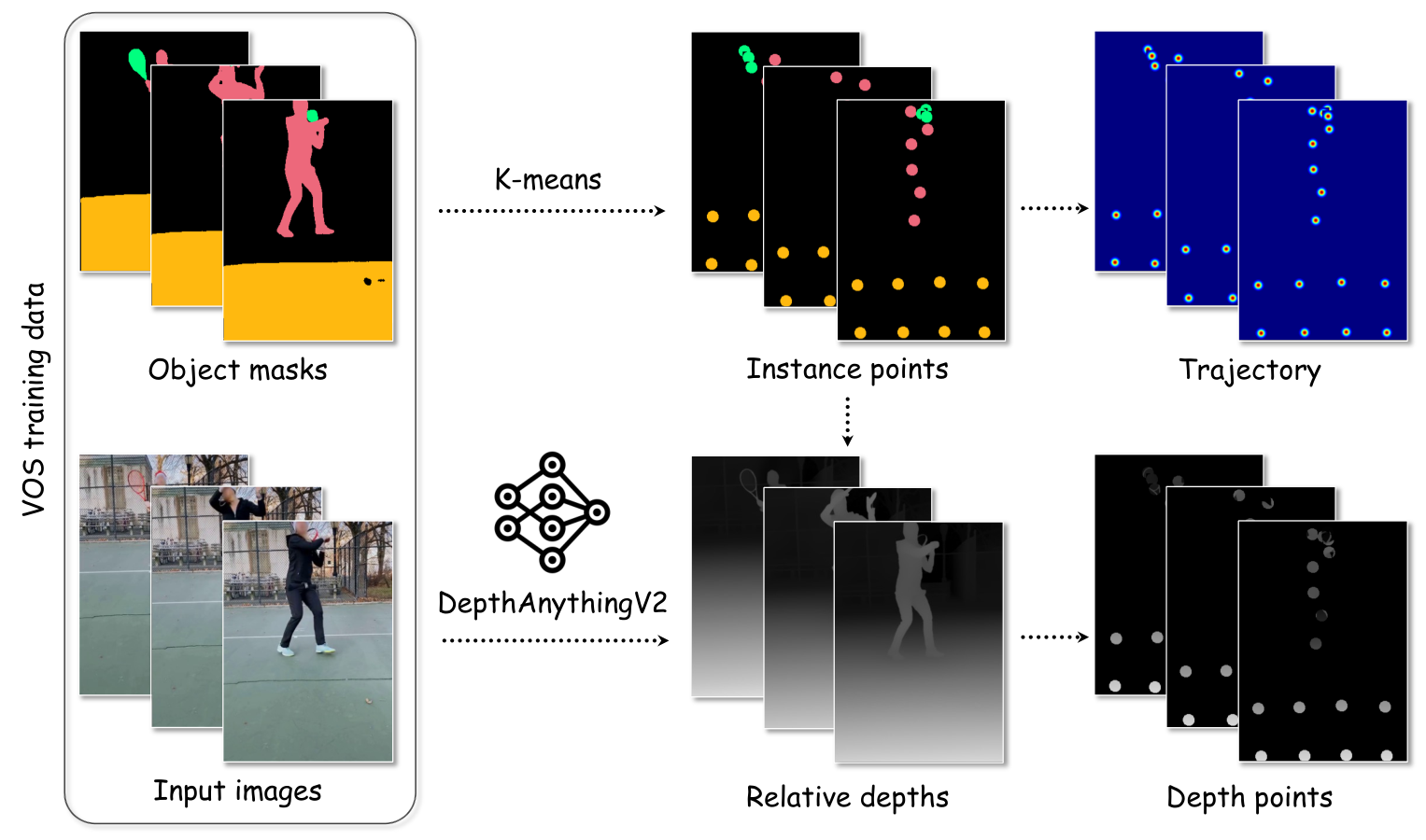
LeviTor pairs K-means clustered object regions with depth values to resolve 3D occlusion ordering. Credit: Hao Wang et al., Ant Group (CVPR 2025).
Hardware, VRAM & Model Comparison
| Model / Checkpoint | Base Architecture | Control Signal | Hardware & VRAM | License |
|---|---|---|---|---|
Go with the Flow (CogVideoX-5B-I2V) |
5B DiT fine tuned on warped Gaussian noise | Cut and drag polygons or RAFT optical flow + --degradation |
11 GB VRAM (with CPU offload) to 35 GB VRAM | Open Weights (Eyeline-Labs/Go-with-the-Flow) |
Go with the Flow (CogVideoX-2B-T2V) |
2B DiT text-to-video with warped noise | Optical flow warped noise from driving video | 8 GB to 16 GB VRAM | Open Weights |
LeviTor (hlwang06/LeviTor) |
Stable Video Diffusion XT (512x512 / 576x1024, 16 frames) |
2D drag trajectories + depth values (z) + SAM object clusters |
16 GB to 24 GB VRAM | Open Research Weights |
Running Cut and Drag Motion Control Locally
To animate a still storyboard frame with Go with the Flow on a single GPU, clone Eyeline-Labs/Go-with-the-Flow, launch the cut and drag GUI to sketch your object trajectories, warp the noise, and run cut_and_drag_inference.py.
git clone https://github.com/Eyeline-Labs/Go-with-the-Flow.git
cd Go with the Flow
pip install -r requirements_local.txt

# Step 1: Launch interactive Cut and Drag polygon trajectory GUI
python cut_and_drag_gui.py

# Step 2: Warp initial Gaussian noise along the exported animation clip
python make_warped_noise.py outputs/my_cut_and_drag_cartridge.mp4 \
  --output_folder noise_warp_output_folder

# Step 3: Render 49 frame 480p video with CogVideoX-5B-I2V (runs in 11 GB VRAM with offload)
python cut_and_drag_inference.py noise_warp_output_folder \
  --prompt "A golden retriever running across a sunlit meadow while the camera pans left." \
  --degradation 0.5 \
  --output_mp4_path outputs/final_shot.mp4
To run LeviTor's interactive 3D depth trajectory Gradio app locally, download stabilityai/stable-video-diffusion-img2vid-xt and hlwang06/LeviTor and launch gradio_demo.py.
git clone https://github.com/robbyant-research/LeviTor.git
cd LeviTor
pip install -r requirements.txt

python scripts/gradio_demo.py
Storyboard Blocking & AI FILMS Studio Workflows
Cut and drag warped noise and 3D depth trajectories mirror how a film director marks blocking arrows on a printed storyboard. Instead of writing complex text prompts to describe which character crosses in front of another, the artist drags the foreground subject along a shallow depth curve and sends the background vehicle along a deep counter path.
For related open source motion control guides, read our coverage of Time-to-Move (TTM) cut and drag motion control, Wan-Move point trajectory video generation, RealisMotion 3D world space motion control, and MiniMax Music 3 and GGUF open source film score AI.
To animate storyboard stills and control character movement in the browser without local CUDA setup, visit the Motion Control and Image to Video pages or connect custom motion pipelines inside the Nodes Graph Editor.


Sources
- Eyeline-Labs/Go with the Flow Official GitHub Repository
- Go with the Flow Project Page (Netflix Eyeline Studios, CVPR 2025)
- Go with the Flow: Motion-Controllable Video Diffusion Models Using Real-Time Warped Noise (arXiv:2501.08331)
- robbyant-research/LeviTor Official GitHub Repository
- LeviTor: 3D Trajectory Oriented Image-to-Video Synthesis (CVPR 2025 Highlight, arXiv:2412.15214)
Continue Reading


Video & LipSync
- Video Generator
- Text to Video
- Image to Video
- Start-End Frame to Video
- Draw to Video
- Motion Control
- Video Enhancer
- Video Upscaler
- Video Extend
- Video to Video LipSync
- Audio to Video LipSync
- Image to Video LipSync
- Video FaceSwap
- Seedance 2.5
- WAN 3.0
- Seedance 2
- FLUX 3
- Minimax H3
- Vidu Q3 Pro
- Grok Imagine Video 1.5
- Gemini Omni
- Google Veo 3.1
- Kling 3.0 Pro
- Luma Ray 3.2
- LTX 2.3
- Happy Horse 1.1
- Kling 3.0 Motion
- ByteDance Upscaler
- InfiniteTalk
- InsightFace
Image & Edit
- AI Character
- AI Actor
- Art Generator
- Text to Image
- Image to Image
- LoRA Image to Image
- Draw to Edit
- Image LoRA Training
- Remove Background
- Image Enhancer
- MidJourney 8.0
- Krea 2
- OpenAI GPT Image 2.0
- Nano Banana Pro Ultra
- Nano Banana 2 Lite
- Nano Banana Pro
- Minimax Image
- Clarity Pro
- Z-Image Turbo LoRA
- Krea 2 Turbo LoRA
- Z-Image LoRA Trainer
- Qwen Image LoRA Trainer
- Background Erase Network 2 (BEN2)