

MiniMax AI, MiniMax-Music3 (MiniMax Music 3 Community License)
Share this post:
MiniMax Music 3 & GGUF: Open Source Film Score AI
MiniMax Music 3 (MiniMaxAI/MiniMax-Music3) and MiniMax-Music3-GGUF (audio-cpp/MiniMax-Music3-GGUF and joemattie/MiniMax-Music3-GGUF) bring full length vocal song and cinematic instrumental score generation to local workstations. Released in August 2026 and downloaded more than 686,000 times on Hugging Face with nearly 1,600 likes, MiniMax Music 3 ships native integrations for Hugging Face diffusers and SGLang-Omni, while the community GGUF packages let indie filmmakers compose temp scores and title tracks offline in audio.cpp on consumer GPUs.
Studio availability. MiniMax Music 3 is not available in AI FILMS Studio. While MiniMax Music 2.5 Lyric to Music, ACE-Step 1.5 Lyrics to Music, and Suno Text to Music are live in the Studio, the open weights MiniMax Music 3 release covered here is a separate local model. To generate music and film scores in the Studio, open the music workspace.
MiniMax Music 3 Cinematic Orchestral & Vocal Showcase Track 1
Full-band dynamic arrangement and stereo mastering from the official MiniMax Music 3 demo page.
MiniMax Music 3 Text-to-Music Reference Sample (`.wav`)
Uncompressed reference output bundled in the `MiniMaxAI/MiniMax-Music3` repository.
Architecture: Unified Structural Song and Score Modeling
Early open source music generators such as MusicGen or Stable Audio Open 1.0 excel at 10 to 45 second ambient loops, yet they lose harmonic structure across multi minute film cues that transition from an intro verse into a rising orchestral bridge and climax.
MiniMax Music 3 solves long horizon musical phrasing by pairing high sample rate acoustic latent modeling with explicit section and style conditioning.
- Multi section song and score structure. Prompts can specify instrumentation, BPM tempo, mood changes, and structural markers (
[Intro],[Verse],[Chorus],[Bridge],[Outro], or[Instrumental Solo]) so cues build toward narrative edit points rather than repeating a static 4-bar loop. - Native
diffusersandSGLang-Omnipipelines. MiniMax collaborated directly with theSGLang-Omniand Hugging Facediffusersteams (MiniMaxMusic3Pipeline) so studios can run single script Python generation or launch a high throughput local scoring server. - 680,000+ download
GGUFtoolchain (audio.cpp). Community quantized weights (audio-cpp/MiniMax-Music3-GGUFandjoemattie/MiniMax-Music3-GGUFinQ4_K_M,Q6_K, andQ8_0) allow C++ inference via0xShug0/audio.cppwithout heavy Python dependency stacks.
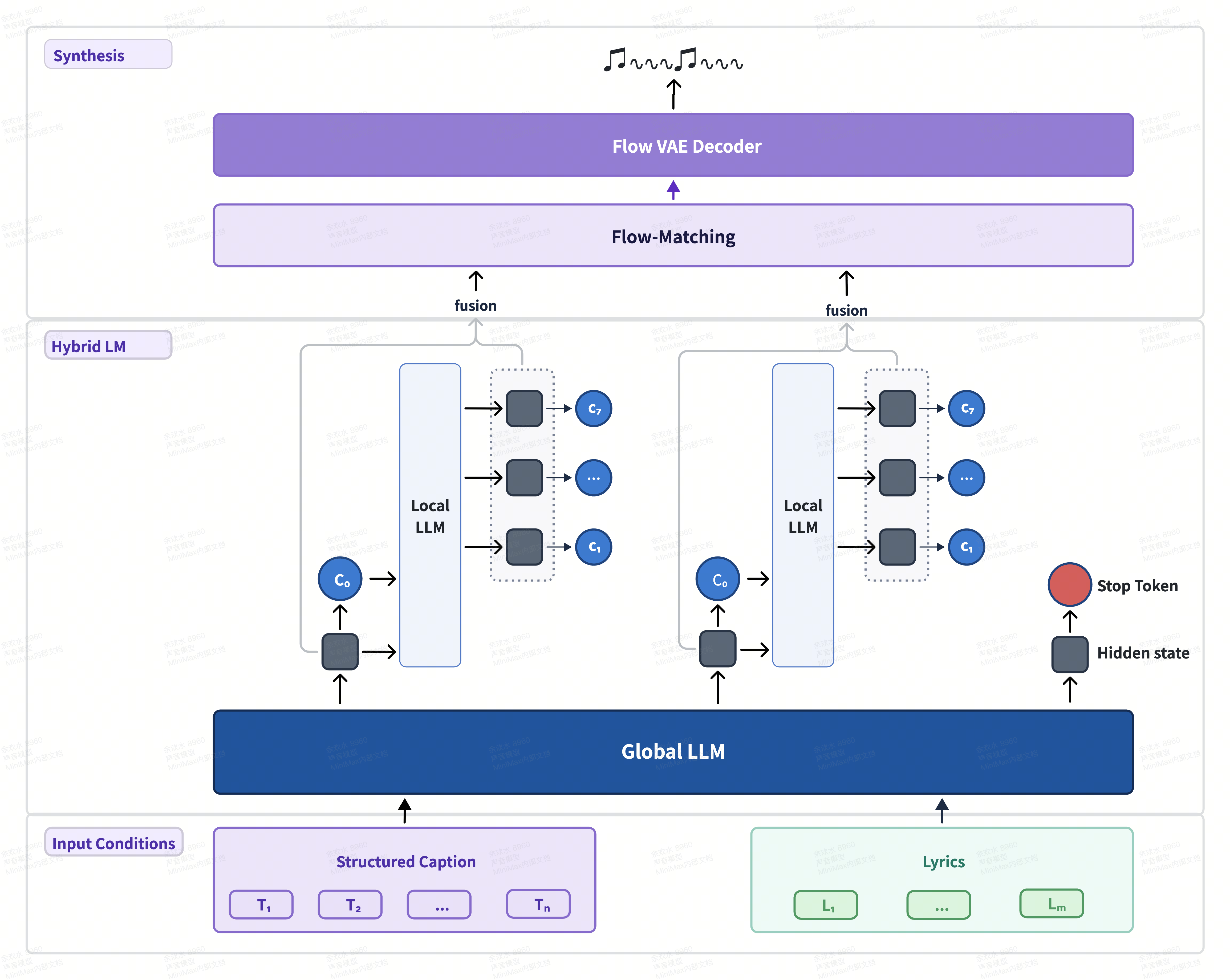
MiniMax Music 3 architecture for structured text and lyric to music synthesis. Credit: MiniMax AI.
Separating high level musical structure planning from high frequency stereo waveform synthesis keeps basslines, percussion transients, and lead vocals phase coherent across full songs.
Film editors can generate purely instrumental underscore cues for dialogue scenes or full vocal tracks for title sequences and trailers from the same checkpoint.
Try MiniMax Music 3 Live in the Browser
Test MiniMax-Music3 directly in the official Hugging Face Space embedded below (minimaxai-minimax-music3.hf.space), which loads without login. You can also explore the community song studio Space at jamesyao777-minimax-music3-song-studio.hf.space.
The `audio.cpp` GGUF port has driven over 680,000 downloads on Hugging Face because it lets editors run `MiniMax-Music3` alongside local video editors on 8 GB to 16 GB consumer GPUs.
Using `Q8_0` quantization preserves stereo separation and cymbal shimmer virtually indistinguishable from full `bfloat16`, while `Q4_K_M` cuts memory nearly in half for laptop scoring sessions.

Official MiniMax Music 3 multi-genre showcase cover from minimax-ai.github.io/music3-demo.
Checkpoints, Runtimes & Open Music Comparison Matrix
| Model / Package | Hugging Face Repository | Runtime Engine | Hardware & VRAM | License |
|---|---|---|---|---|
MiniMax-Music3 (Base BF16) |
MiniMaxAI/MiniMax-Music3 |
Hugging Face diffusers & SGLang-Omni |
16 GB to 24 GB VRAM | MiniMax Music 3 Community License |
MiniMax-Music3-GGUF |
audio-cpp/MiniMax-Music3-GGUF & joemattie/MiniMax-Music3-GGUF |
0xShug0/audio.cpp (Q4_K_M / Q8_0) |
8 GB to 12 GB VRAM (or CPU/GPU hybrid) | MiniMax Music 3 Community License |
ACE-Step 1.5 |
ACE-Step/Ace-Step1.5 |
Native PyTorch / Comfy / Studio Cloud | 4 GB to 8 GB VRAM | Apache 2.0 |
YuE2-3B |
m-a-p/YuE2-3B |
PyTorch + editable ABC notation score | 12 GB to 16 GB VRAM | Apache 2.0 |
Running MiniMax Music 3 Locally (diffusers, SGLang-Omni, and audio.cpp GGUF)
To run MiniMaxAI/MiniMax-Music3 via SGLang-Omni or diffusers, install sglang-omni following the official MiniMax Music 3 cookbook (sgl-project.github.io/sglang-omni/cookbook/minimax_music3.html).
# Install SGLang-Omni and download MiniMax-Music3 weights
git clone https://github.com/sgl-project/sglang-omni.git
cd sglang-omni
pip install -e .

huggingface-cli download MiniMaxAI/MiniMax-Music3 --local-dir ./models/MiniMax-Music3

# Launch SGLang-Omni MiniMax Music 3 server
python -m sglang_omni.launch_server \
  --model-path ./models/MiniMax-Music3 \
  --port 8000
To run quantized MiniMax-Music3-GGUF on an 8 GB to 12 GB consumer GPU without Python overhead, build 0xShug0/audio.cpp and download the GGUF package.
git clone https://github.com/0xShug0/audio.cpp.git
cd audio.cpp
cmake -B build && cmake --build build --config Release

# Download Q8 or Q4 GGUF weights from Hugging Face
huggingface-cli download audio-cpp/MiniMax-Music3-GGUF --local-dir ./models/music3-gguf

# Generate a cinematic thriller trailer score cue offline
./build/bin/audio-cli \
  --model ./models/music3-gguf/minimax-music3-q8_0.gguf \
  --prompt "Cinematic sci-fi thriller score, 92 BPM, pulsing analog synth bass, solo cello melody building into brass swells, instrumental." \
  --out outputs/thriller_cue.wav
Production Playbook for Filmmakers
- Score to edit markers with structural tags. When generating trailer music or montage songs, explicitly include
[Intro],[Build],[Climax], and[Outro]in your prompt alongside a target BPM (90 BPM,120 BPM) so the musical transitions align cleanly with 24 fps timeline cuts. - Use
Q8_0GGUF inaudio.cppon single-GPU workstations. If your primary GPU also handles video editing in DaVinci Resolve or local diffusion nodes,audio.cpploads and unloads the single.gguffile in seconds without holding persistent PyTorch CUDA pools. - Compare across open source film scoring tools. Explore our related guides on ACE-Step 1.5 open source music generation, YuE2 open source lyrics-to-song AI with editable ABC score, Stable Audio 3 open weight music and SFX, and AudioLDM2, Stable Audio Open, and MusicGen local foley and score AI.
To generate music right in the browser with MiniMax Music 2.5 Lyric to Music, ACE-Step 1.5 Lyrics to Music, or Suno Text to Music, open the music workspace or connect audio and video nodes visually in the Nodes Graph Editor.


Sources
- MiniMaxAI/MiniMax-Music3 Official Model Repository on Hugging Face
- MiniMax-AI/MiniMax-Music3 Official GitHub Repository
- MiniMax Music 3 Official Audio Showcase Page
- MiniMaxAI/MiniMax-Music3 Interactive Space on Hugging Face
- audio-cpp/MiniMax-Music3-GGUF Quantized Weights on Hugging Face
- SGLang-Omni MiniMax Music 3 Deployment Cookbook
Continue Reading


Video & LipSync
- Video Generator
- Text to Video
- Image to Video
- Start-End Frame to Video
- Draw to Video
- Motion Control
- Video Enhancer
- Video Upscaler
- Video Extend
- Video to Video LipSync
- Audio to Video LipSync
- Image to Video LipSync
- Video FaceSwap
- Seedance 2.5
- WAN 3.0
- Seedance 2
- FLUX 3
- Minimax H3
- Vidu Q3 Pro
- Grok Imagine Video 1.5
- Gemini Omni
- Google Veo 3.1
- Kling 3.0 Pro
- Luma Ray 3.2
- LTX 2.3
- Happy Horse 1.1
- Kling 3.0 Motion
- ByteDance Upscaler
- InfiniteTalk
- InsightFace
Image & Edit
- AI Character
- AI Actor
- Art Generator
- Text to Image
- Image to Image
- LoRA Image to Image
- Draw to Edit
- Image LoRA Training
- Remove Background
- Image Enhancer
- MidJourney 8.0
- Krea 2
- OpenAI GPT Image 2.0
- Nano Banana Pro Ultra
- Nano Banana 2 Lite
- Nano Banana Pro
- Minimax Image
- Clarity Pro
- Z-Image Turbo LoRA
- Krea 2 Turbo LoRA
- Z-Image LoRA Trainer
- Qwen Image LoRA Trainer
- Background Erase Network 2 (BEN2)