

LiveFoley Authors, arXiv:2611.05988
Share this post:
LiveFoley: Open Source Real Time Video to Audio Foley
LiveFoley (dalision/livefoley, arXiv:2611.05988, November 2026) is an open source streaming causal autoregressive diffusion framework built for real time video to audio (V2A) Foley synthesis in interactive worlds and live film previews. By pairing a trailing sliding window visual frontend with a Local Diffusion Transformer (LocDiT) backend that maintains an expanded temporal context window, LiveFoley generates crisp, frame accurate footsteps, cloth rustles, impacts, and room ambience below human perceptual audio visual latency thresholds.
Studio availability. LiveFoley is not available in AI FILMS Studio. This article covers the November 2026 public research release (
arXiv:2611.05988). To generate sound effects, Foley stems, and synchronized film audio directly in the browser, open the AI Sound Generator or the sound workspace.
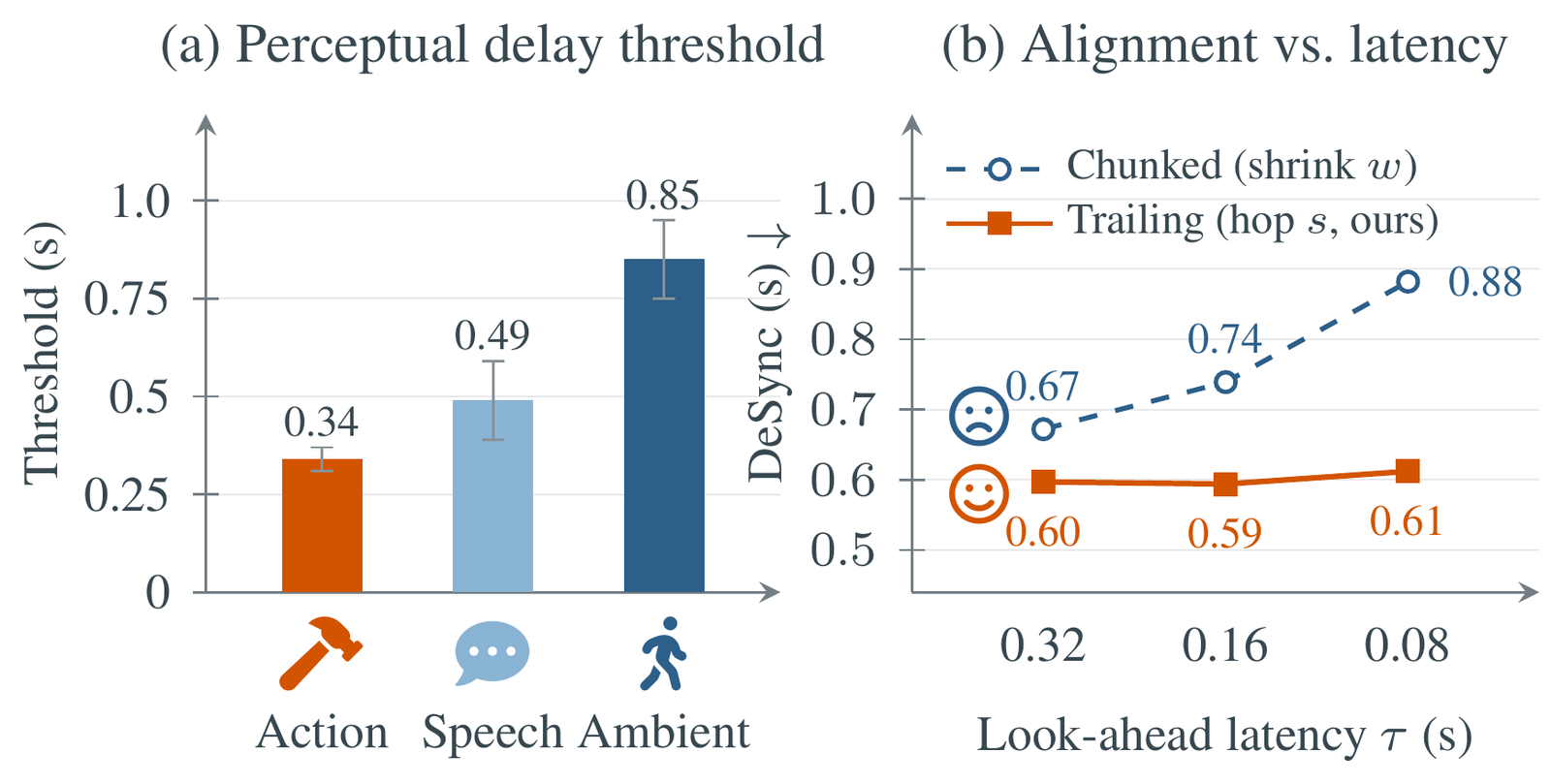
Why Offline Video to Audio Fails Interactive Production
Offline video to audio models wait for an entire 8 or 10 second clip to finish rendering before bidirectional attention scans future frames to place impact sounds. That offline bottleneck breaks down in two modern filmmaking workflows: interactive world simulators (such as LingBot-World-V2 or FastFrames) where future frames do not exist yet, and live edit bays where sound designers want immediate Foley feedback as they scrub or cut silent AI shots.
LiveFoley removes the wait for future video frames through three architectural designs:
- Trailing sliding window visual frontend. Instead of requiring full clip lookahead, LiveFoley encodes incoming video frames inside a tight trailing causal window. Acoustic events trigger within milliseconds of visual contact, keeping door slams, footsteps, and glass shatters under the human perceptual sync threshold (
~45–100 ms). - Local Diffusion Transformer (
LocDiT) with expanded temporal denoising. Purely short window audio generators lose room tone continuity and produce rhythmic chunking artifacts. LiveFoley'sLocDiTbackend uses causal chunked denoising over an expanded historical audio latent window, preserving steady rain, engine hums, and reverb tails across continuous streams. - Offline grade acoustic quality in streaming mode. Across mean opinion score (
MOS) and temporal alignment metrics, LiveFoley matches offline bidirectional V2A baselines while running causally in real time.
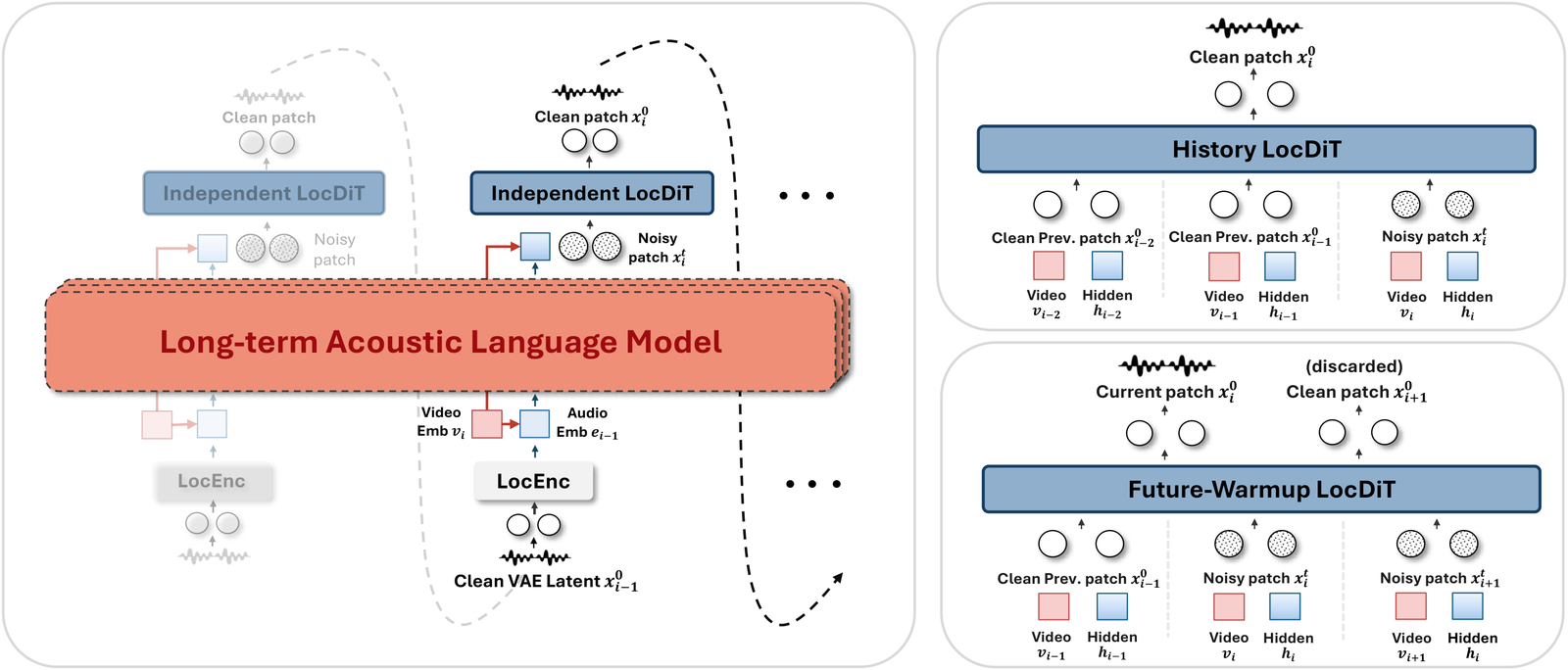
LiveFoley LocDiT streaming backend pairing causal autoregressive conditioning with expanded temporal context. Credit: LiveFoley Authors (arXiv:2611.05988).
Conventional streaming audio models trade temporal smoothness for low latency, causing background ambience to reset at every chunk boundary.
LiveFoley's expanded temporal window keeps the acoustic floor consistent across continuous shots while still reacting instantaneously to sharp visual impacts.
Hardware, Latency, and Workflow Comparison
| Mode / Baseline | Streaming Capable | Visual Lookahead | Perceived Sync Latency | VRAM Footprint | Best Use Case |
|---|---|---|---|---|---|
LiveFoley (LocDiT Causal) |
Yes (Real Time) | Zero future frames (trailing window) | Sub perceptual threshold | 8 GB – 16 GB VRAM |
Interactive world models, live NLE Foley spotting, streaming previews |
| Offline Bidirectional V2A | No (Clip based) | Full 8–10s clip required | 10s – 45s batch wait |
12 GB – 24 GB VRAM |
Final offline post production stems on locked picture cuts |
Human listener evaluations (`MOS`) show LiveFoley rivaling offline V2A systems on audio realism, semantic relevance, and onset alignment while delivering real time causal playback.
Sound supervisors can layer LiveFoley's real time Foley pass under dialogue from **Ming-3.0-tts** and score stems from **MiniMax Music 3** to audition full mixes during picture lock.
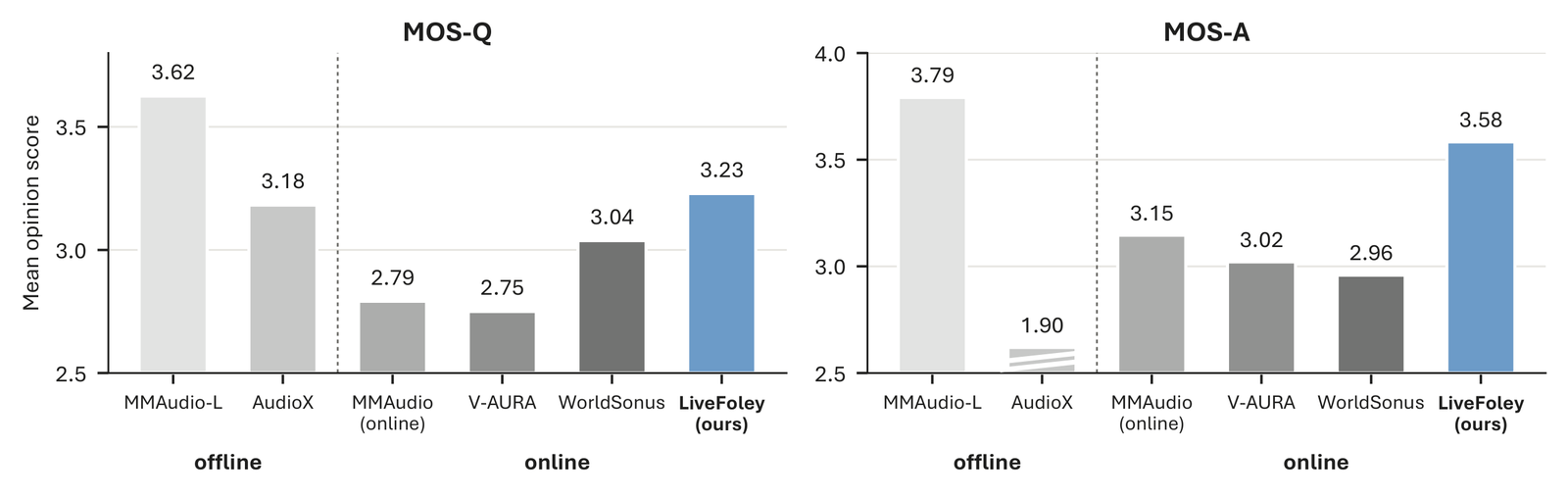
Human listening test (MOS) comparison demonstrating offline grade fidelity under causal streaming constraints. Credit: LiveFoley Authors (arXiv:2611.05988).
Parameter Reference Table
| Parameter | Recommended Value | Effect on Streaming Foley |
|---|---|---|
--chunk_ms |
200 to 400 ms |
Sets streaming audio hop size; shorter hops lower latency on interactive feeds. |
--context_window |
4.0 to 8.0 seconds |
Expanded historical latent buffer inside LocDiT to preserve steady room tone. |
--denoise_steps |
4 to 8 |
Balances real time throughput against high frequency transient crispness. |
--text_prompt |
Optional acoustic material cue | Guides surface texture (e.g., "wet cobblestone footsteps, distant thunder") when visual cues are ambiguous. |
--sample_rate |
44100 or 48000 Hz |
Matches standard 48 kHz film post production timelines without resampling drift. |
Local Setup with Python
Clone the official LiveFoley repository (dalision/livefoley) to run causal streaming V2A synthesis on silent video renders:
git clone https://github.com/dalision/livefoley.git
cd livefoley
pip install -r requirements.txt
import torch
from livefoley import LiveFoleyStream

engine = LiveFoleyStream.from_pretrained("dalision/livefoley", device="cuda")

engine.process_video_stream(
    video_path="silent_alley_chase_24fps.mp4",
    text_guidance="Heavy leather boots running on wet asphalt, flapping coat fabric, distant city traffic",
    chunk_duration_ms=250,
    context_seconds=6.0,
    denoise_steps=6,
    output_wav="alley_chase_livefoley_48k.wav",
)
Filmmaker Production Playbook
- Attach LiveFoley to silent real time world models. Pairing
LiveFoleywith visual streams from LingBot-World-V2 or Apple FastFrames turns silent virtual scouting walks into tactile audio visual environments on set. - Use short text cues to disambiguate surface materials. Visual frames alone rarely tell a Foley model whether a dark floor is hollow wood, wet concrete, or painted steel; a five word text cue locks the exact material resonance.
- Export separate Foley stems for mixing. Keep LiveFoley's
48 kHzWAV stem separate from dialogue and music so your re recording mixer can EQ high frequency transients and duck impacts cleanly under spoken lines.
Related Reading
- Foley-Omni: Open Source Unified Video Soundtrack Generation
- Kling-Foley & PrismAudio: Open Source Video to Audio
- HunyuanVideo-Foley: Open Source Video Sound Effects
- LingBot-World-V2: Open Source 60 FPS World Simulator


Sources
Continue Reading


Video & LipSync
- Video Generator
- Text to Video
- Image to Video
- Start-End Frame to Video
- Draw to Video
- Motion Control
- Video Enhancer
- Video Upscaler
- Video Extend
- Video to Video LipSync
- Audio to Video LipSync
- Image to Video LipSync
- Video FaceSwap
- Seedance 2.5
- WAN 3.0
- Seedance 2
- FLUX 3
- Minimax H3
- Vidu Q3 Pro
- Grok Imagine Video 1.5
- Gemini Omni
- Google Veo 3.1
- Kling 3.0 Pro
- Luma Ray 3.2
- LTX 2.3
- Happy Horse 1.1
- Kling 3.0 Motion
- ByteDance Upscaler
- InfiniteTalk
- InsightFace
Image & Edit
- AI Character
- AI Actor
- Art Generator
- Text to Image
- Image to Image
- LoRA Image to Image
- Draw to Edit
- Image LoRA Training
- Remove Background
- Image Enhancer
- MidJourney 8.0
- Krea 2
- OpenAI GPT Image 2.0
- Nano Banana Pro Ultra
- Nano Banana 2 Lite
- Nano Banana Pro
- Minimax Image
- Clarity Pro
- Z-Image Turbo LoRA
- Krea 2 Turbo LoRA
- Z-Image LoRA Trainer
- Qwen Image LoRA Trainer
- Background Erase Network 2 (BEN2)