

Hugging Apps / Lightricks LTX-2.5 Alpha Gen Space
Share this post:
LTX-2.5 Alpha Gen: Open Source Video Alpha Matting
Lightricks released LTX-2.5 Alpha Gen (Lightricks/LTX-2.5-22b-IC-LoRA-Alpha-Gen) on September 28, 2026, turning the 22 billion parameter distilled LTX-2.5 video backbone into a dedicated video matting model. Filmmakers and VFX compositors can upload any RGB footage and extract a temporally stable grayscale alpha matte without green screens or manual rotoscoping. You can test this open weights video matting model free in the embedded browser demo below with zero login.
Studio availability. Try the public Hugging Face demo below; LTX-2.5 Alpha Gen is not part of a paid AI FILMS Studio plan (use LTX-2.3 Image to Video in the video workspace for example instead).
Try LTX-2.5 Alpha Gen Live
Upload an RGB video clip or select one of the built in stock examples below, then click Cut out subject to generate both a green screen composite and a raw grayscale alpha matte directly in your browser.
Architecture and Technical Design
LTX-2.5 Alpha Gen is distributed as an in context LoRA adapter (ltx-2.5-22b-ic-lora-alpha-gen-0.9.safetensors) trained on top of the distilled 22B LTX-2.5 transformer. Instead of treating matting as a per frame segmentation task, the pipeline passes the source RGB beauty clip into LTX2InContextPipeline as an LTX2ReferenceCondition at strength 1.0 with an empty text prompt.
Because the model operates across the full spatiotemporal latent volume of the clip, it tracks fine hair, motion blur, and semi transparent edges coherently from frame to frame. Sampling runs in a single distilled stage using DISTILLED_SIGMA_VALUES (eight denoising steps) at the clip's native aspect ratio, skipping the second stage latent upsampler used in standard text-to-video generation.
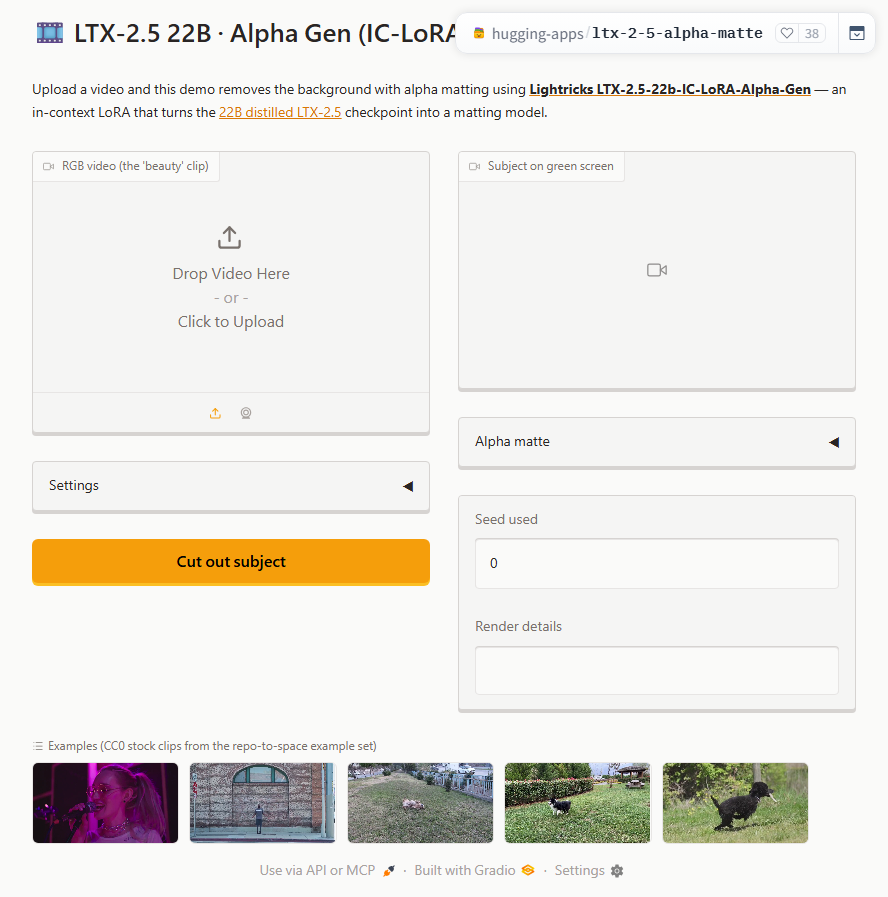
Interactive Space UI by Hugging Apps / Lightricks
The demo outputs two synchronized clips for immediate VFX review. The primary player composites the extracted foreground over a standard chroma green backdrop (`RGB 0, 177, 64`) so artists can spot spill or edge chatter right away.
Opening the Alpha matte accordion reveals the single channel grayscale mask where white pixels represent foreground opacity and black pixels represent background transparency.
Hardware, VRAM, and License Matrix
LTX-2.5 Alpha Gen inherits the full 22B parameter transformer footprint of LTX-2.5 Diffusers, making VRAM planning essential for local compositing workstations.
| Configuration | Resolution & Length | Precision | Estimated VRAM | Commercial License |
|---|---|---|---|---|
| Full HD Reference | 1920 x 1088, 145 frames |
BF16 + VAE Tiling | 80 GB (H100 / H200) | LTX Community License |
| ZeroGPU / 720p Studio | 1280 x 720, 73 to 145 frames |
BF16 + VAE Tiling | 48 GB to 96 GB | LTX Community License |
| Compact Previz | 832 x 480, 49 to 73 frames |
BF16 + Offload | 24 GB (RTX 4090 / 5090) | LTX Community License |
The weights are gated under the Lightricks LTX Community License on Hugging Face, which requires accepting the repository terms before downloading locally. Commercial use is permitted under the Lightricks revenue threshold defined in the license agreement.
Parameter Reference
The pipeline enforces strict spatial and temporal alignment rules inherited from the LTX-2.5 3D VAE.
| Parameter | Recommended Value | Technical Notes |
|---|---|---|
lora_scale |
1.0 |
Keep adapter strength at 1.0 for clean grayscale separation |
prompt / negative_prompt |
"" (empty string) |
Empty prompts prevent the model from hallucinating new foreground details |
width / height |
Divisible by 32 |
Up to 1280 x 720 on 48 GB+ GPUs or 1920 x 1088 on 80 GB GPUs |
num_frames |
8n + 1 (9 to 145) |
Snaps to the LTX temporal latent grid (up to 6 seconds at 24 fps) |
sigmas |
DISTILLED_SIGMA_VALUES |
Eight step single stage schedule; disables stage two upscaling |
guidance_scale |
1.0 |
Classifier free guidance is distilled into the checkpoint |
reference_downscale_factor |
1 |
Keeps the conditioning beauty clip at full target resolution |
Local Python and CLI Setup
Run LTX-2.5 Alpha Gen locally with diffusers and huggingface_hub after accepting the gated license terms for both Lightricks/LTX-2.5-Diffusers and Lightricks/LTX-2.5-22b-IC-LoRA-Alpha-Gen.
pip install -U torch diffusers transformers accelerate huggingface_hub av pillow
huggingface-cli login
Load the distilled checkpoint, attach the Alpha Gen IC-LoRA adapter, and export a frame aligned grayscale alpha pass in Python:
import torch
from diffusers import LTX2InContextPipeline
from diffusers.pipelines.ltx2.pipeline_ltx2_ic_lora import LTX2ReferenceCondition
from diffusers.pipelines.ltx2.utils import DISTILLED_SIGMA_VALUES
from diffusers.utils import load_video, export_to_video

pipe = LTX2InContextPipeline.from_pretrained(
    "Lightricks/LTX-2.5-Diffusers",
    torch_dtype=torch.bfloat16,
    prompt_enhancer=None,
    processor=None,
)
pipe.load_lora_weights(
    "Lightricks/LTX-2.5-22b-IC-LoRA-Alpha-Gen",
    weight_name="ltx-2.5-22b-ic-lora-alpha-gen-0.9.safetensors",
    adapter_name="alpha_gen",
)
pipe.set_adapters("alpha_gen", 1.0)
pipe.vae.enable_tiling()
pipe.to("cuda")

frames = load_video("beauty_clip.mp4")[:73]  # 8n + 1 frames
ref = LTX2ReferenceCondition(frames=frames, strength=1.0)
matte_video, _ = pipe(
    prompt="",
    negative_prompt="",
    reference_conditions=[ref],
    reference_downscale_factor=1,
    height=704,
    width=1280,
    num_frames=73,
    frame_rate=24.0,
    sigmas=DISTILLED_SIGMA_VALUES,
    guidance_scale=1.0,
    return_dict=False,
)
export_to_video(matte_video[0], "alpha_matte.mp4", fps=24)
Filmmaker Production Playbook
Use LTX-2.5 Alpha Gen as an automated first pass roto tool for complex shots where green screen capture was impossible, such as handheld street exteriors, live concert lighting, or dense foliage. Because the model preserves soft alpha falloff rather than producing a hard binary cutout, it works well for hair edges, smoke wisps, and fast motion blur.
Bring the exported grayscale matte into DaVinci Resolve, Nuke, or After Effects as a luma track matte over your original uncompressed camera plate. Keep the original plate for color fidelity and use the AI output strictly as the alpha channel so you never introduce diffusion compression artifacts into the actor's skin tones.
For longer shots exceeding 145 frames, split the footage into overlapping 73 frame or 121 frame chunks with a 17 frame overlap and cross dissolve the alpha channel across the seam. When you want to generate stylized replacement backgrounds before compositing, pair your foreground plate with cloud shots from the AI video generator or clean plate tools on the background remover page.
Known Limitations and FAQ
Does LTX-2.5 Alpha Gen handle multi subject crowds? The IC-LoRA automatically isolates the primary salient foreground subject without needing click prompts or trimaps. If a shot contains multiple background extras that must stay separated from the hero actor, pair the clip with a mask guided matte tool like MatAnyone 2 or CorridorKey 2.0.
Why must frame counts follow the 8n + 1 rule?
The LTX-2.5 3D causal VAE compresses video temporally by a factor of eight plus the initial anchor frame. Passing an arbitrary frame count causes silent truncation or padding, so always snap clip lengths to 9, 17, 49, 73, 121, or 145 frames before rendering.
Can I run this LoRA on a 12 GB consumer GPU? Not at full BF16 precision. Even with VAE tiling and sequential CPU offloading, a 22B transformer requires at least 24 GB of VRAM for practical 480p to 720p compositing. Use the embedded ZeroGPU Space above for free quick tests.
Related Reading
- LTX-2.5: Lightricks Ships Open Weights World Model
- MatAnyone 2: Open Source Video Matting and Alpha Matte AI
- CorridorKey 2.0: Open Source Green Screen VFX Keying
- VideoMaMa and VideoMaMa++: Open Source AI Video Matting
- Explore cloud tools on the AI image-to-video page.

Sources
Continue Reading


Video & LipSync
- Video Generator
- Text to Video
- Image to Video
- Start-End Frame to Video
- Draw to Video
- Motion Control
- Video Enhancer
- Video Upscaler
- Video Extend
- Video to Video LipSync
- Audio to Video LipSync
- Image to Video LipSync
- Video FaceSwap
- Seedance 2.5
- WAN 3.0
- Seedance 2
- FLUX 3
- Minimax H3
- Vidu Q3 Pro
- Grok Imagine Video 1.5
- Gemini Omni
- Google Veo 3.1
- Kling 3.0 Pro
- Luma Ray 3.2
- LTX 2.3
- Happy Horse 1.1
- Kling 3.0 Motion
- ByteDance Upscaler
- InfiniteTalk
- InsightFace
Image & Edit
- AI Character
- AI Actor
- Art Generator
- Text to Image
- Image to Image
- LoRA Image to Image
- Draw to Edit
- Image LoRA Training
- Remove Background
- Image Enhancer
- MidJourney 8.0
- Krea 2
- OpenAI GPT Image 2.0
- Nano Banana Pro Ultra
- Nano Banana 2 Lite
- Nano Banana Pro
- Minimax Image
- Clarity Pro
- Z-Image Turbo LoRA
- Krea 2 Turbo LoRA
- Z-Image LoRA Trainer
- Qwen Image LoRA Trainer
- Background Erase Network 2 (BEN2)