

NVIDIA (OpenMDW-1.1 License)
Share this post:
Nemotron 3 Diarization: Open Source Film Dialogue AI
NVIDIA released Nemotron 3 Diarization (nvidia/Nemotron-3-Diarization, arXiv:2611.12246) in September 2026 under the commercial friendly OpenMDW-1.1 license. The open weight speaker diarization model identifies who spoke when across up to eight overlapping voices with configurable streaming latency down to 0.32 seconds, unlimited audio duration, and native C++ CPU support. You can test Nemotron 3 Diarization free in the embedded NVIDIA browser lab below with zero login.
Studio availability. Try the public Hugging Face demo below; Nemotron 3 Diarization is not part of a paid AI FILMS Studio plan (use ElevenLabs Eleven V3 Text to Speech in the voice workspace for example instead).
Try Nemotron 3 Diarization Live
Upload a multi speaker audio file, test a live microphone feed, or launch one of the built in overlapping multi voice conversations below to inspect real time speaker timelines and tagged transcripts directly in your browser.
Architecture and Technical Design
Traditional diarization systems run separate voice activity detection, embedding extraction, and clustering steps, which often lose track of speakers during cross talk or long documentary interviews. Nemotron 3 Diarization uses an end to end Streaming Sortformer architecture that resolves speaker permutation by assigning output channels strictly according to each speaker's first arrival in the audio stream.
To maintain consistent speaker identities over feature length recordings without running out of memory, the model combines an Arrival-Order Speaker Cache (AOSC) with a rolling FIFO queue. The AOSC retains compact acoustic signatures from earlier scenes so a character who goes silent for ten minutes is recognized under the exact same speaker index when they return, while the FIFO queue supplies local frame context at 10 ms output resolution.
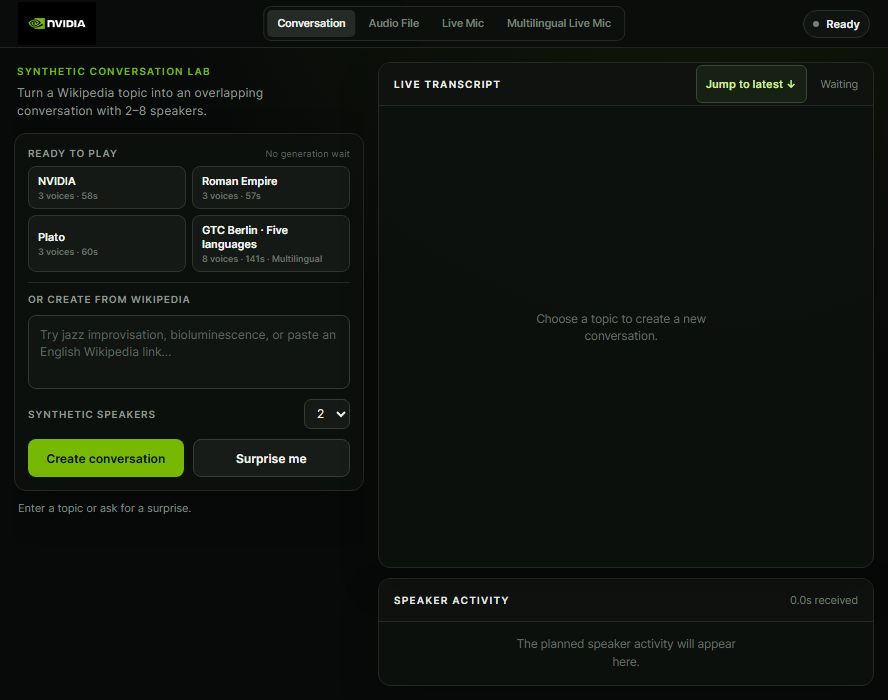
Official live Space UI by NVIDIA
One single checkpoint covers both ultra fast live monitoring and high accuracy offline post production simply by adjusting chunk length and lookahead frames.
In addition to PyTorch and Hugging Face Transformers, community and official exports already ship GGUF, ONNX, CoreML, MLX, and LiteRT builds so editors can run diarization on laptops without a discrete GPU.
Hardware, VRAM, and License Matrix
With over 225,000 Hugging Face downloads, Nemotron 3 Diarization runs smoothly across studio workstations, Apple Silicon laptops, and Linux edit bays under OpenMDW-1.1 (permitted for both commercial and non commercial use).
| Runtime Backend | Hardware Target | Key Advantage | License |
|---|---|---|---|
| NeMo-Speech.cpp | Native CPU / Apple Silicon | Zero Python setup; direct JSON speaker tagged transcripts | OpenMDW-1.1 |
| Hugging Face Transformers | CUDA GPU or CPU | Native AutoModelForAudioFrameClassification integration |
OpenMDW-1.1 |
| NVIDIA NeMo Speech | CUDA GPU (BF16) | Full training, fine tuning, and batch manifest evaluation | OpenMDW-1.1 |
| ONNX / GGUF / CoreML | Edge & Browser / Mac | Lightweight local post production plugins | OpenMDW-1.1 |
Parameter Reference
All streaming parameters are measured in 80 ms frames, where input buffer latency equals (CHUNK_LEN + RIGHT_CONTEXT) x 80 ms.
| Profile | Input Latency | SPKCACHE_LEN |
FIFO_LEN |
CHUNK_LEN |
RIGHT_CONTEXT |
UPDATE_PERIOD |
|---|---|---|---|---|---|---|
| Offline Post (Max Accuracy) | 30.4 s |
264 |
40 |
340 |
40 |
300 |
| Low Latency (Default) | 1.04 s |
264 |
264 |
9 |
4 |
222 |
| Very Low Latency | 0.64 s |
264 |
264 |
6 |
2 |
222 |
| Ultra Low Latency | 0.32 s |
264 |
264 |
3 |
1 |
222 |
Local Python and CLI Setup
For the fastest command line workflow on set or in an edit bay, install NeMo-Speech.cpp and run single command diarization or speaker tagged transcription:
# Extract speaker segments from a production WAV
nemo-speech diarize interview_mix.wav

# Generate word level speaker tagged JSON transcript
nemo-speech transcribe interview_mix.wav --diarize --json
You can also run offline diarization directly through Hugging Face transformers in Python:
import torch
from transformers import AutoModelForAudioFrameClassification, AutoProcessor
from transformers.audio_utils import load_audio

model_id = "nvidia/Nemotron-3-Diarization"
processor = AutoProcessor.from_pretrained(model_id)
model = AutoModelForAudioFrameClassification.from_pretrained(model_id, device_map="auto")

sr = processor.feature_extractor.sampling_rate
audio = load_audio("scene_04_dialogue.wav", sampling_rate=sr)
inputs = processor(audio, sampling_rate=sr).to(model.device, dtype=model.dtype)

with torch.inference_mode():
    logits = model(**inputs).logits  # (1, num_frames, 8), 10 ms per frame

segments = processor.extract_speaker_dict(logits, inputs.attention_mask)[0]
for seg in segments:
    print(f"speaker_{seg['Speaker']}: {seg['Start']:.2f}s - {seg['End']:.2f}s")
Filmmaker Production Playbook
Documentary editors, podcast filmmakers, and ADR supervisors routinely inherit long multi mic or boom recordings where four to eight cast members talk over one another. Manually spotting speaker boundaries for subtitles, localized dubbing scripts, or paper edits eats hours of assistant editor time.
Run Nemotron 3 Diarization in its 30.4 s offline configuration on full dailies or rough cuts to generate 10 ms accurate speaker timecodes, then pair the output with Nemotron-3.5 Transcribe for clean speaker labeled SRT files. When localized dubbing requires re voicing specific actors, feed isolated dialogue stems into Inworld Voice Isolator and synthesize replacement lines in the voice workspace.
Known Limitations and FAQ
What happens if a scene has more than eight speakers? The model outputs eight fixed speaker channels ordered by first arrival. For large panel recordings with more than eight participants, split the recording by scene or isolate individual lavalier tracks before running diarization.
Does the model require a GPU to run locally?
No. While CUDA GPUs speed up long batch manifests, NeMo-Speech.cpp, ONNX, and GGUF builds run faster than real time on modern CPUs, and the official Hugging Face Space above runs entirely on CPU hardware.
Can I combine Nemotron 3 Diarization with live set transcription?
Yes. Pairing the 1.04 s or 0.64 s streaming configuration with NVIDIA's streaming Parakeet ASR powers the live captioning mode shown in the embedded demo above.
Related Reading
- Nemotron-3.5 Transcribe: Open Source Film Subtitling
- Inworld Voice Isolator: Open Source Film Audio Cleanup
- Quail Voice Focus: Open Source Film Dialogue Isolation
- AADD v3.1: Open Source Film Audio Quality Control AI
- Generate voiceovers in the AI FILMS Studio voice workspace.

Sources
Continue Reading


Video & LipSync
- Video Generator
- Text to Video
- Image to Video
- Start-End Frame to Video
- Draw to Video
- Motion Control
- Video Enhancer
- Video Upscaler
- Video Extend
- Video to Video LipSync
- Audio to Video LipSync
- Image to Video LipSync
- Video FaceSwap
- Seedance 2.5
- WAN 3.0
- Seedance 2
- FLUX 3
- Minimax H3
- Vidu Q3 Pro
- Grok Imagine Video 1.5
- Gemini Omni
- Google Veo 3.1
- Kling 3.0 Pro
- Luma Ray 3.2
- LTX 2.3
- Happy Horse 1.1
- Kling 3.0 Motion
- ByteDance Upscaler
- InfiniteTalk
- InsightFace
Image & Edit
- AI Character
- AI Actor
- Art Generator
- Text to Image
- Image to Image
- LoRA Image to Image
- Draw to Edit
- Image LoRA Training
- Remove Background
- Image Enhancer
- MidJourney 8.0
- Krea 2
- OpenAI GPT Image 2.0
- Nano Banana Pro Ultra
- Nano Banana 2 Lite
- Nano Banana Pro
- Minimax Image
- Clarity Pro
- Z-Image Turbo LoRA
- Krea 2 Turbo LoRA
- Z-Image LoRA Trainer
- Qwen Image LoRA Trainer
- Background Erase Network 2 (BEN2)