

AI FILMS Studio technical overview based on ai-coustics/quail-voice-focus
Share this post:
Quail Voice Focus: Open Source Film Dialogue Isolation
Documentary interviews, run and gun street shoots, and live voice driven production tools regularly suffer from heavy room reverb, traffic hum, and background crew chatter that ruins transcription and lip sync timing. Quail Voice Focus (ai-coustics/quail-voice-focus), released in October 2026 by the ai-coustics team, is a real time primary speaker isolation model that locks onto the foreground voice and suppresses competing speakers and environmental noise in 30 ms latency strictly on CPU with zero GPU or ONNX dependency. You can test Quail Voice Focus free in the embedded browser demo below with zero login.
Studio availability. Try the public Hugging Face demo below; Quail Voice Focus is not part of a paid AI FILMS Studio plan (use Mirelo SFX 1.6 Text to SFX in the sound workspace for example instead).
Try Quail Voice Focus Live
Upload a noisy interview clip or record directly from your microphone inside the public Hugging Face Space below to hear primary speaker isolation in your browser.
Architecture and Technical Design
Quail Voice Focus is built as a lightweight, language agnostic speech-to-speech enhancement engine running natively inside the compiled aic-sdk runtime (available for Python, Rust, C/C++, Node.js, and WebAssembly). Processing mono float32 audio one real time safe block at a time at 16 kHz (also compatible with 8 kHz pipelines), it cuts downstream speech-to-text word error rates by up to 43% across major transcription engines.
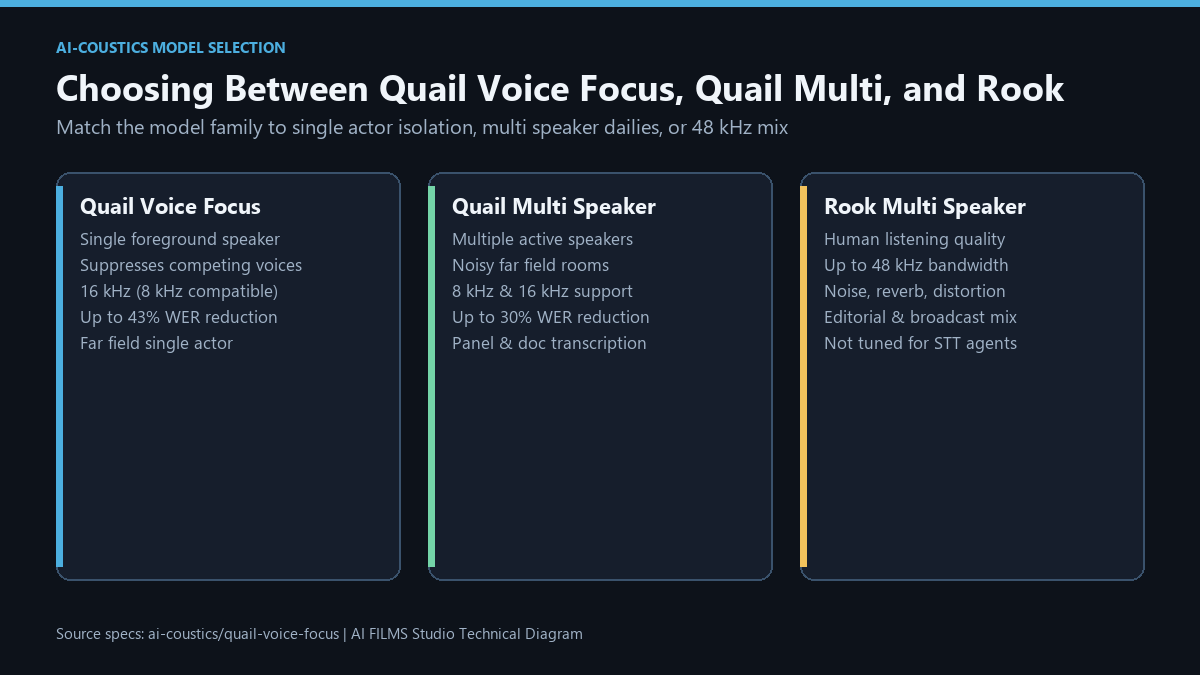
Model selection guide based on ai-coustics/quail-voice-focus
Choosing the right checkpoint from the ai-coustics lineup depends on how many actors share the microphone. Quail Voice Focus isolates one foreground speaker and aggressively suppresses off axis chatter, making it ideal for single subject interviews and solo voice agents.
For multi person roundtable recordings, Quail Multi Speaker preserves every active voice while reducing STT word errors by up to 30%. For final 48 kHz human listening mixes, Rook Multi Speaker handles perceptual noise, reverb, and distortion cleanup.
Unlike static batch denoisers that force a fixed aggressiveness setting across an entire reel, aic-sdk exposes live runtime parameter control through ProcessorParameter.EnhancementLevel (0.0 to 1.0).
Sound editors can dial EnhancementLevel down around 0.6 to 0.8 to retain natural room air on narrative dailies, or push toward 1.0 when extracting clean transcripts and voice cloning reference clips from crowded festival floors.
For live interactive voice pipelines, the developers recommend pairing Quail Voice Focus with its companion VAD Voice Focus model rather than feeding enhanced audio into a generic voice activity detector.
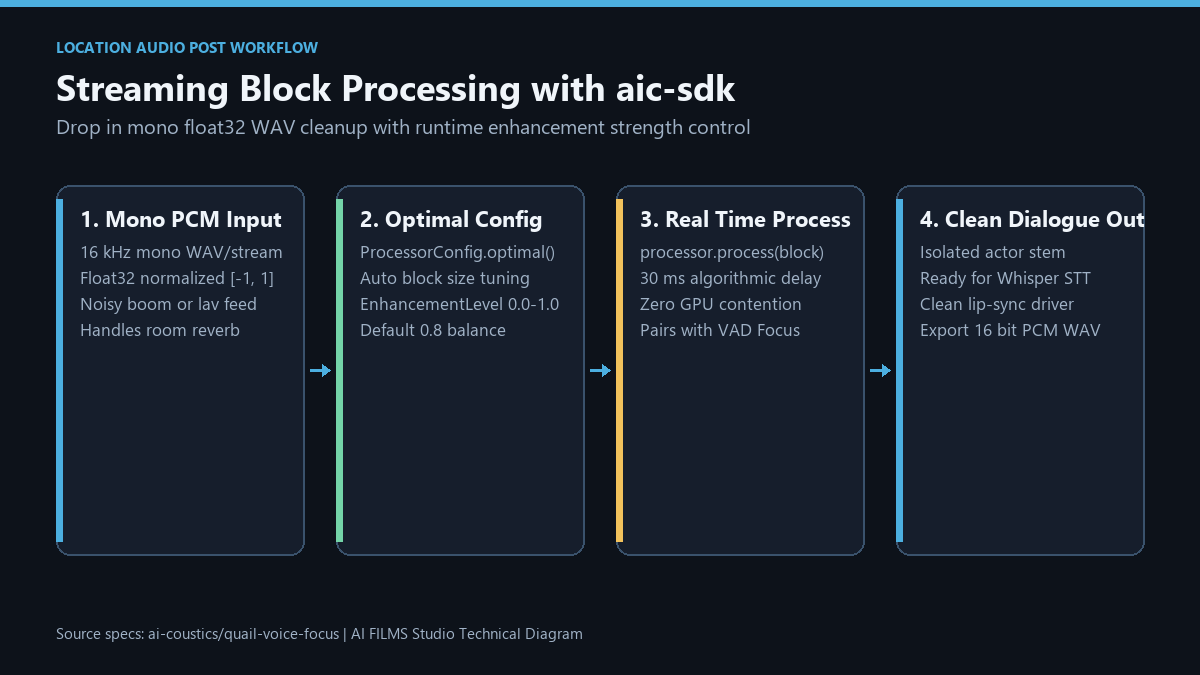
Real time block processing workflow using aic-sdk
Hardware, VRAM, and License Matrix
| Model Family | Target Scenario | Bandwidth | Latency | Hardware | License |
|---|---|---|---|---|---|
quail-vf-2.3-l-16khz (Voice Focus) |
Single primary speaker isolation | 16 kHz (8 kHz compatible) | 30 ms |
CPU only (0 GB VRAM, no ONNX) | ai-coustics Model License |
ai-coustics/quail-multi-speaker |
Multi speaker far field transcription | 8 kHz & 16 kHz | Real time | CPU only | ai-coustics Model License |
ai-coustics/rook-multi-speaker |
Human listening & broadcast clarity | Up to 48 kHz |
Real time | CPU only | ai-coustics Model License |
The aic-sdk package requires a free SDK key from developers.ai-coustics.com (30 day trial with no credit card required) and is governed by the ai-coustics Model License for commercial deployment.
Parameter Reference
| Setting / API Call | Recommended Value | Audio Effect |
|---|---|---|
aic.Model.download(...) |
"quail-vf-2.3-l-16khz" |
Fetches the 16 kHz large primary speaker isolation checkpoint |
ProcessorConfig.optimal(model, sample_rate) |
Input mono WAV sample rate | Configures optimal real time block size automatically |
EnhancementLevel |
0.8 (range 0.0 to 1.0) |
Balances aggressive background voice suppression against natural timbre |
| Input format | Mono float32 normalized [-1.0, 1.0] |
Required buffer layout for processor.process(block) |
Local Python and CLI Setup
Install the aic-sdk package on any CPU workstation and run block level cleanup over a mono location WAV file.
pip install aic-sdk numpy
import wave
import numpy as np
import aic_sdk as aic

license_key = "YOUR_FREE_SDK_KEY"
model = aic.Model.from_file(aic.Model.download("quail-vf-2.3-l-16khz", "./models"))

with wave.open("noisy_interview.wav", "rb") as wf:
    assert wf.getnchannels() == 1, "mono input required"
    sample_rate = wf.getframerate()
    pcm = np.frombuffer(wf.readframes(wf.getnframes()), dtype=np.int16).astype(np.float32) / 32768.0

config = aic.ProcessorConfig.optimal(model, sample_rate=sample_rate)
processor = aic.Processor(model, license_key, config)
processor.get_context().set_parameter(aic.ProcessorParameter.EnhancementLevel, 0.8)

enhanced = np.concatenate([
    processor.process(pcm[i : i + config.block_size])
    for i in range(0, len(pcm) - config.block_size + 1, config.block_size)
])

with wave.open("clean_actor_stem.wav", "wb") as wf:
    wf.setnchannels(1)
    wf.setsampwidth(2)
    wf.setframerate(sample_rate)
    wf.writeframes((enhanced * 32767).astype(np.int16).tobytes())
Because the SDK also compiles to Rust, C/C++, Node.js, and WebAssembly, technical directors can embed the same 30 ms isolator inside browser based review dailies or on set ingest scripts.
Filmmaker Production Playbook
1. Pre cleaning dailies for automatic subtitles and script sync. Passing noisy location boom tracks through Quail Voice Focus before Whisper or cloud transcription cuts word errors by up to 43%, saving hours of manual timecode correction during documentary assembly.
2. Extracting clean lip sync driver tracks. AI lip sync models misalign mouth shapes whenever background crew talk bleeds into the actor's lavalier mic. Stripping competing speakers first produces crisp phoneme timing for avatar and dubbing passes.
3. Selecting Rook 48 kHz for final editorial stems. Use Quail Voice Focus (16 kHz) for transcription, VAD, and voice agent pipelines, and switch to Rook Multi Speaker (up to 48 kHz) whenever the cleaned dialogue will play directly in a theatrical or broadcast sound mix.
4. Building full soundscapes in the cloud. Once your dialogue track is isolated, generate matching ambient beds, foley accents, and original video scenes inside AI FILMS Studio's sound workspace and the AI Text-to-Video Generator page.
Related Reading
- Inworld Voice Isolator: Open Source Film Audio Cleanup
- Breeze-TTS-2: Open Source Zero Shot Voice Cloning AI
- VoxMel 0.3B: Open Source Wavelet Speech Synthesis
- Kitten TTS 2 Mini: Open Source 82M CPU Voice AI
- Animate dialogue scenes on the AI Text-to-Video Generator page
Sources
Continue Reading


Video & LipSync
- Video Generator
- Text to Video
- Image to Video
- Start-End Frame to Video
- Draw to Video
- Motion Control
- Video Enhancer
- Video Upscaler
- Video Extend
- Video to Video LipSync
- Audio to Video LipSync
- Image to Video LipSync
- Video FaceSwap
- Seedance 2.5
- WAN 3.0
- Seedance 2
- FLUX 3
- Minimax H3
- Vidu Q3 Pro
- Grok Imagine Video 1.5
- Gemini Omni
- Google Veo 3.1
- Kling 3.0 Pro
- Luma Ray 3.2
- LTX 2.3
- Happy Horse 1.1
- Kling 3.0 Motion
- ByteDance Upscaler
- InfiniteTalk
- InsightFace
Image & Edit
- AI Character
- AI Actor
- Art Generator
- Text to Image
- Image to Image
- LoRA Image to Image
- Draw to Edit
- Image LoRA Training
- Remove Background
- Image Enhancer
- MidJourney 8.0
- Krea 2
- OpenAI GPT Image 2.0
- Nano Banana Pro Ultra
- Nano Banana 2 Lite
- Nano Banana Pro
- Minimax Image
- Clarity Pro
- Z-Image Turbo LoRA
- Krea 2 Turbo LoRA
- Z-Image LoRA Trainer
- Qwen Image LoRA Trainer
- Background Erase Network 2 (BEN2)