

AI FILMS Studio technical overview based on gribbliest/qwen-image-2.1-qma-camera-angles
Share this post:
QMA Camera Angles: Open Source VFX Shot Framing AI
Generating a single strong hero frame is easy, yet building matching shot reverse shot coverage from that exact set and wardrobe remains tedious. QMA Camera Angles (gribbliest/qwen-image-2.1-qma-camera-angles), released in October 2026 under the Apache 2.0 license, is a Rank 64 edit LoRA for Qwen/Qwen-Image-2.1 that repositions the virtual camera around any reference image across 96 structured azimuth, elevation, and distance combinations. You can test QMA Camera Angles free in the embedded browser demo below with zero login.
Studio availability. Try the public Hugging Face demo below; QMA Camera Angles is not part of a paid AI FILMS Studio plan (use Seedream 5.0 Pro Image to Image in the image workspace for example instead).
Try QMA Camera Angles Live
Upload a production still or concept frame into the public Hugging Face Space below and orbit the camera to a new azimuth, elevation, and focal distance in your browser.
Official Camera Orbit Examples
These official silent orbit loops from the model repository show how QMA Camera Angles preserves subject identity, lighting direction, and set geometry while sweeping the camera around a single reference frame.
Full azimuth camera orbit around a single reference frame
Multi angle elevation and distance coverage test
Architecture and Technical Design
QMA Camera Angles was trained as a Rank 64 LoRA on top of Qwen/Qwen-Image-2.1 for 3,000 steps at 512 and 1024 pixel resolutions using paired photographs and Blender renders. Every training pair captures the same subject and environment from two known camera poses, covering all 96 discrete combinations of 8 azimuth positions, 4 elevations, and 3 shot distances.
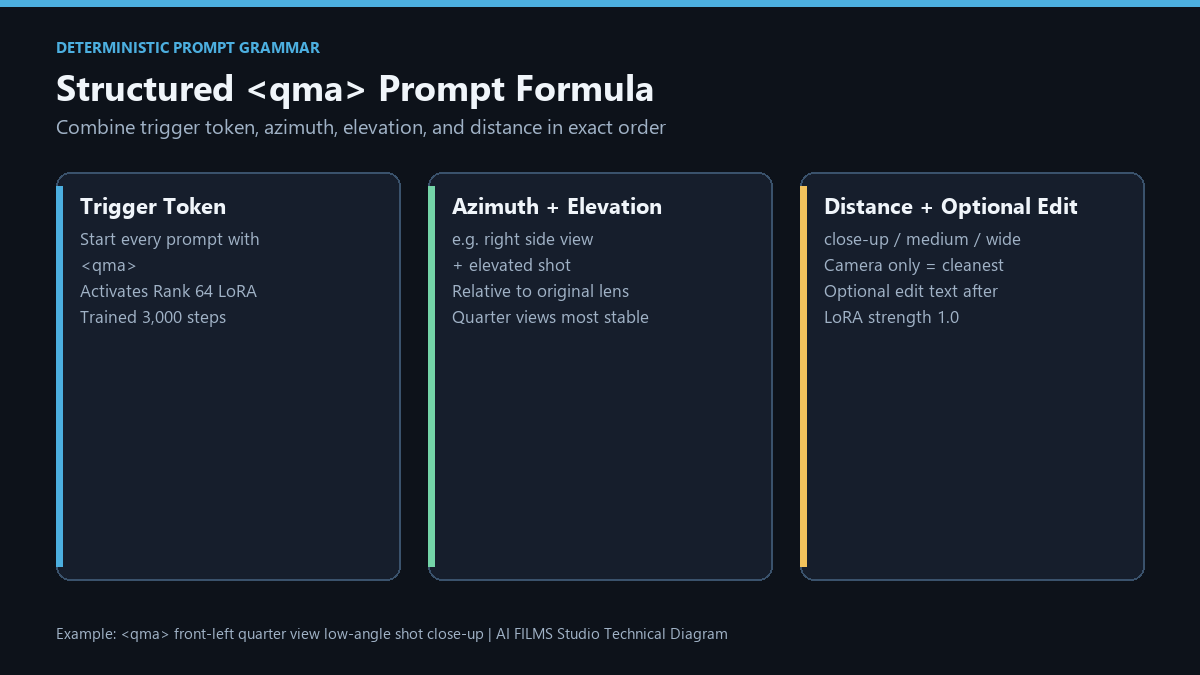
Deterministic <qma> prompt grammar from gribbliest/qwen-image-2.1-qma-camera-angles
Every edit follows one strict formula: <qma> {azimuth} {elevation} {distance}. Azimuth values run in 45 degree increments around the subject, from front view and front-right quarter view all the way to back view.
Crucially, directions are defined relative to the original camera lens rather than the character's gaze. Asking for right side view swings the camera 90 degrees to its own right around the scene, keeping blocking predictable for cinematographers.
Because QMA is an image-to-image edit LoRA, it always requires a source plate. When the camera swings behind a subject, unseen details such as the back of a jacket or rear room walls are synthesized plausibly to match the visible lighting and color temperature.
In production testing, quarter views, elevated shots, and distance shifts produce the highest geometric consistency. Wide exterior scenes rotated a full 90 degrees can occasionally fall short of a full turn, which a second random seed or adjacent azimuth tag resolves quickly.
Camera only prompts produce the cleanest framing fidelity, though editors can append subtle lighting or prop adjustments immediately after the structured camera phrase.
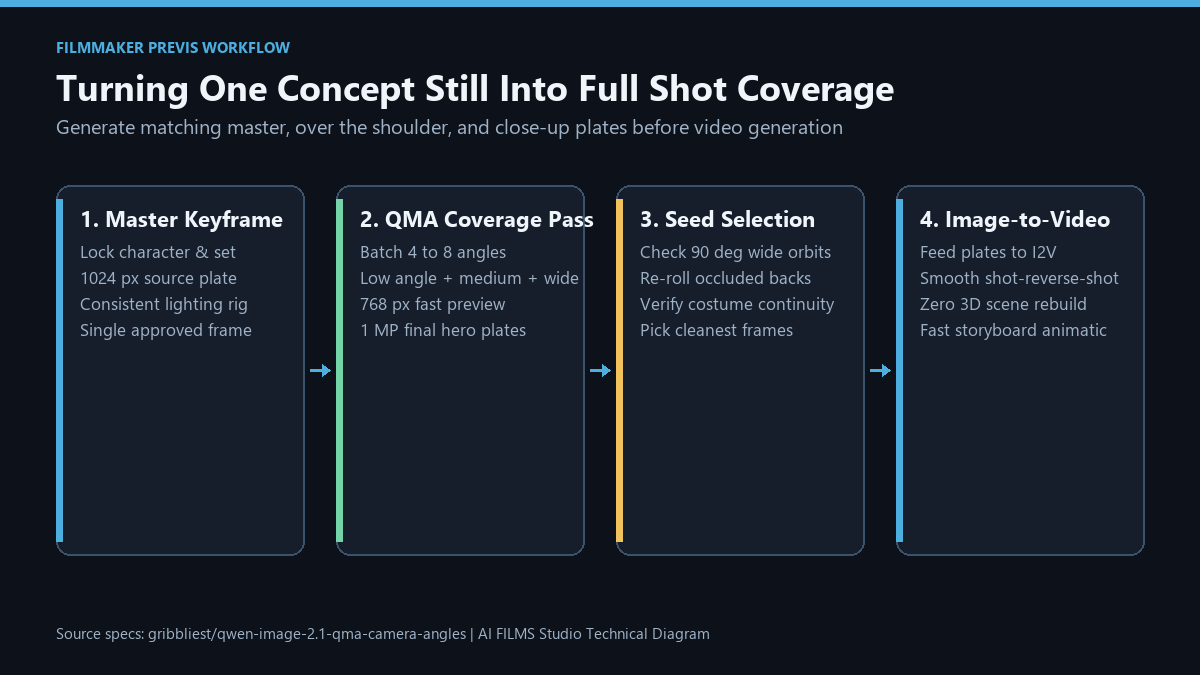
Multi angle shot coverage pipeline for previs and image-to-video preparation
Hardware, VRAM, and License Matrix
| Component | Base / Rank | Recommended Output | Typical GPU VRAM | License | Best Production Role |
|---|---|---|---|---|---|
qwen-image-2.1-qma-camera-angles |
Rank 64 LoRA (Qwen-Image-2.1) |
1 MP hero / 768 px preview | ~16 to 24 GB (BF16 base) | Apache 2.0 | Multi angle storyboards & shot coverage |
| Preview Draft Pass | Strength 1.0 |
768 x 768 |
~12 to 16 GB (quantized base) | Apache 2.0 | Rapid camera angle scouting |
| Hero Plate Pass | Strength 1.0 |
1024 x 1024 (~1 MP) |
~24 GB GPU | Apache 2.0 | Clean keyframes for image-to-video |
Both the QMA Camera Angles LoRA weights and the upstream Qwen/Qwen-Image-2.1 base model carry the Apache 2.0 license, enabling commercial use across film previsualization, pitch decks, and VFX plate generation.
Parameter Reference
| Parameter | Recommended Setting | Production Impact |
|---|---|---|
| Trigger token | <qma> |
Required prefix to activate the 96 pose camera control space |
| Azimuth options (8) | front view, front-right quarter view, right side view, back-right quarter view, back view, back-left quarter view, left side view, front-left quarter view |
Controls horizontal camera orbit in 45 degree steps |
| Elevation options (4) | low-angle shot, eye-level shot, elevated shot, high-angle shot |
Sets vertical camera tilt and horizon placement |
| Distance options (3) | close-up, medium shot, wide shot |
Controls subject framing scale |
| LoRA strength | 1.0 |
Full camera repositioning authority |
| Steps / CFG / Sampler | 30 steps, CFG 3.0, euler, simple scheduler |
Balances geometric accuracy and texture sharpness |
Local Python and CLI Setup
Load Qwen/Qwen-Image-2.1 in Diffusers, attach the QMA Camera Angles LoRA weights, and pass your reference plate alongside a structured <qma> prompt.
pip install -U diffusers transformers accelerate safetensors Pillow
import torch
from PIL import Image
from diffusers import DiffusionPipeline

pipe = DiffusionPipeline.from_pretrained(
    "Qwen/Qwen-Image-2.1",
    torch_dtype=torch.bfloat16,
).to("cuda")

pipe.load_lora_weights("gribbliest/qwen-image-2.1-qma-camera-angles")

source_plate = Image.open("hero_master_shot.png").convert("RGB")

coverage_prompts = [
    "<qma> front-left quarter view low-angle shot close-up",
    "<qma> right side view eye-level shot medium shot",
    "<qma> back-right quarter view elevated shot wide shot",
]

for idx, prompt in enumerate(coverage_prompts):
    out = pipe(
        prompt=prompt,
        image=source_plate,
        num_inference_steps=30,
        guidance_scale=3.0,
        width=1024,
        height=1024,
        generator=torch.Generator("cuda").manual_seed(100 + idx),
    ).images[0]
    out.save(f"coverage_angle_{idx + 1}.png")
For fast visual angle selection without memorizing tags, the open source QMA-Multi-Angle-Lora-Node repository on GitHub provides an interactive sphere gizmo that outputs valid <qma> strings.
Filmmaker Production Playbook
1. One still to full scene coverage. Lock your lead character and set design in a single 1024 px master frame, then batch render four to six QMA angles (establishing wide, medium two shot, low angle close up, and over the shoulder reverse) before cutting an animatic.
2. Clean start and end keyframes for video AI. Pair an eye-level shot wide shot start frame with a front-left quarter view low-angle shot close-up end frame, then feed both into a start end frame video model for controlled camera push ins without warping faces.
3. 768 px scouting before 1 MP hero renders. Test dramatic 90 degree or 180 degree camera swings at 768 px first to confirm the model invents clean background architecture, then re render winning seeds at 1 MP.
4. Cloud image-to-image workflow. To edit reference frames and chain them directly into hosted video models without managing local weights, try AI FILMS Studio's image-to-image workspace.
Related Reading
- Qwen-Image-2.1 Outfit Swap: Open Source Costume AI
- Apple Depth Pro 2: Open Source Metric Depth for VFX
- GeoState & World from Motion: Open Source 4D Camera AI
- BRIA FIBO 2.0 Edit: Open Source JSON Image Editing
- Explore hosted reference editing on the AI Image-to-Image Generator page
Sources
Continue Reading


Video & LipSync
- Video Generator
- Text to Video
- Image to Video
- Start-End Frame to Video
- Draw to Video
- Motion Control
- Video Enhancer
- Video Upscaler
- Video Extend
- Video to Video LipSync
- Audio to Video LipSync
- Image to Video LipSync
- Video FaceSwap
- Seedance 2.5
- WAN 3.0
- Seedance 2
- FLUX 3
- Minimax H3
- Vidu Q3 Pro
- Grok Imagine Video 1.5
- Gemini Omni
- Google Veo 3.1
- Kling 3.0 Pro
- Luma Ray 3.2
- LTX 2.3
- Happy Horse 1.1
- Kling 3.0 Motion
- ByteDance Upscaler
- InfiniteTalk
- InsightFace
Image & Edit
- AI Character
- AI Actor
- Art Generator
- Text to Image
- Image to Image
- LoRA Image to Image
- Draw to Edit
- Image LoRA Training
- Remove Background
- Image Enhancer
- MidJourney 8.0
- Krea 2
- OpenAI GPT Image 2.0
- Nano Banana Pro Ultra
- Nano Banana 2 Lite
- Nano Banana Pro
- Minimax Image
- Clarity Pro
- Z-Image Turbo LoRA
- Krea 2 Turbo LoRA
- Z-Image LoRA Trainer
- Qwen Image LoRA Trainer
- Background Erase Network 2 (BEN2)