

hi3d-official (Hi3D v1.0 multi view geometry comparisons)
Share this post:
Hi3D v1.0: Open Source High Resolution 3D Refinement
Most single image 3D generators produce rough silhouettes that fall apart under close up cinema lenses, melting architectural moldings, armor plates, and mechanical grooves into soft blobs. Hi3D v1.0, released on October 23, 2026 by the Hi3D team on top of the Sparc3D architecture (arXiv:2505.14521), refines coarse 3D meshes up to an effective sparse extraction resolution of 1536^3 using a single reference image. You can test Hi3D v1.0 free in the embedded browser demo below with zero login.
Studio availability. Try the public Hugging Face demo below; Hi3D v1.0 is not part of a paid AI FILMS Studio plan (use FLUX.2 Pro Text to Image in the image workspace for example instead).
Try Hi3D v1.0 Live
Upload a hero prop photo or concept still inside the public Hugging Face Space below to run Hi3D v1.0 sparse 3D geometry refinement directly in your browser.
Architecture and Technical Design
Hi3D v1.0 was trained on approximately two million curated 3D assets and operates as a dedicated second stage geometry refiner. Rather than allocating a dense 1536^3 voxel volume in memory, it samples sparse latents strictly on coordinates derived from an input coarse mesh, decodes them through a self pruning sparse VAE, and revoxelizes each extracted surface to seed the next pass.
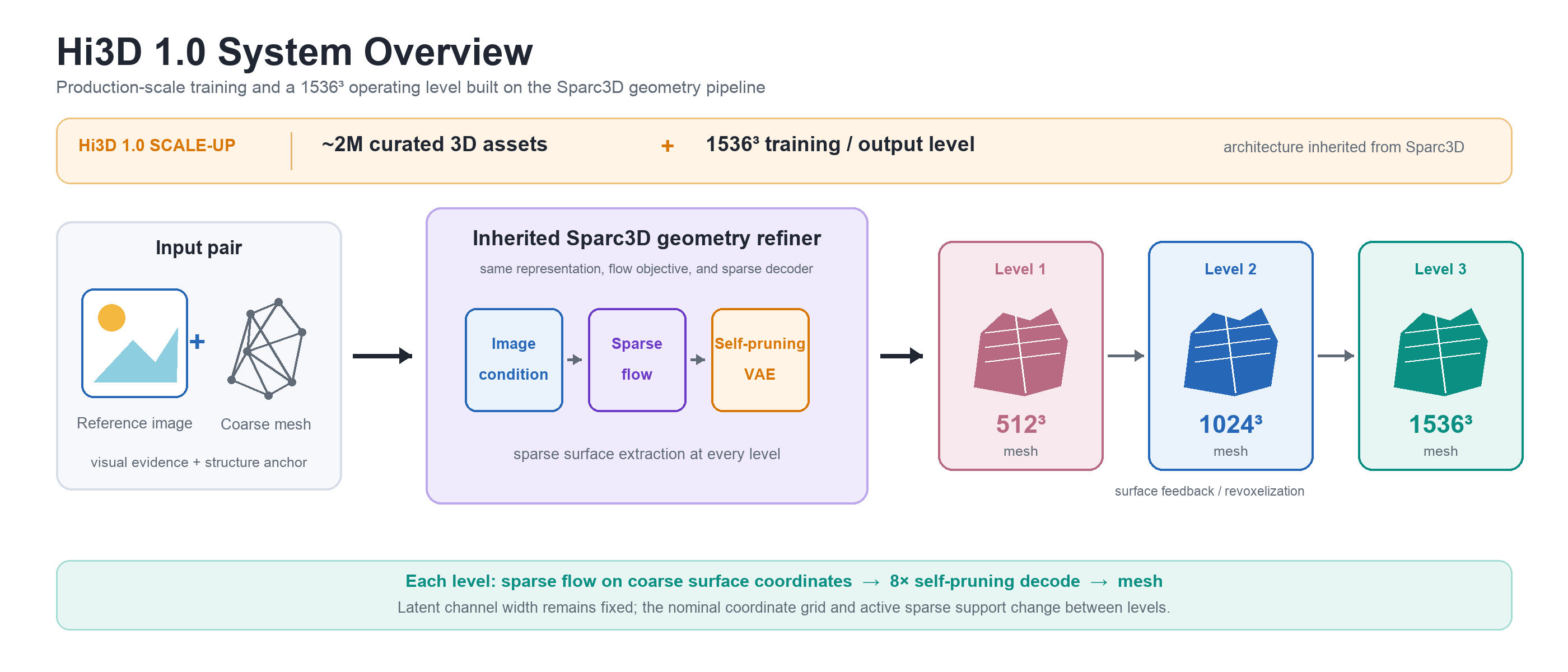
Hi3D v1.0 progressive sparse refinement ladder by hi3d-official
Conditioning features come from two frozen vision encoders loaded automatically on first run, specifically facebook/dinov2-large and openai/clip-vit-large-patch14. A 512^3 pass executes one stage via transformer_512 on a 64^3 structural grid.
Requesting 1024^3 adds a second pass through transformer_1024 on a 128^3 grid, while 1536^3 runs a third pass on a 192^3 structural grid using transformer_1024 for crisp surface relief.
The model outputs geometry only (trimesh.Trimesh) normalized to unit maximum radius, with zero baked vertex colors or PBR textures. Separating geometry refinement from lookdev allows VFX modelers to retopologize, bake normal maps, and shade assets cleanly inside Blender, Maya, or Houdini.
In side by side local detail comparisons across nine 3D methods, Hi3D v1.0 preserves layered relief, concentric mechanical grooves, crisp beveled trims, and sharp character scales where single pass generators blur details together.
Because the refinement pass stays anchored to the input coarse mesh, severe silhouette errors in the base mesh can persist, so clean blocking in stage one pays off directly in stage two.
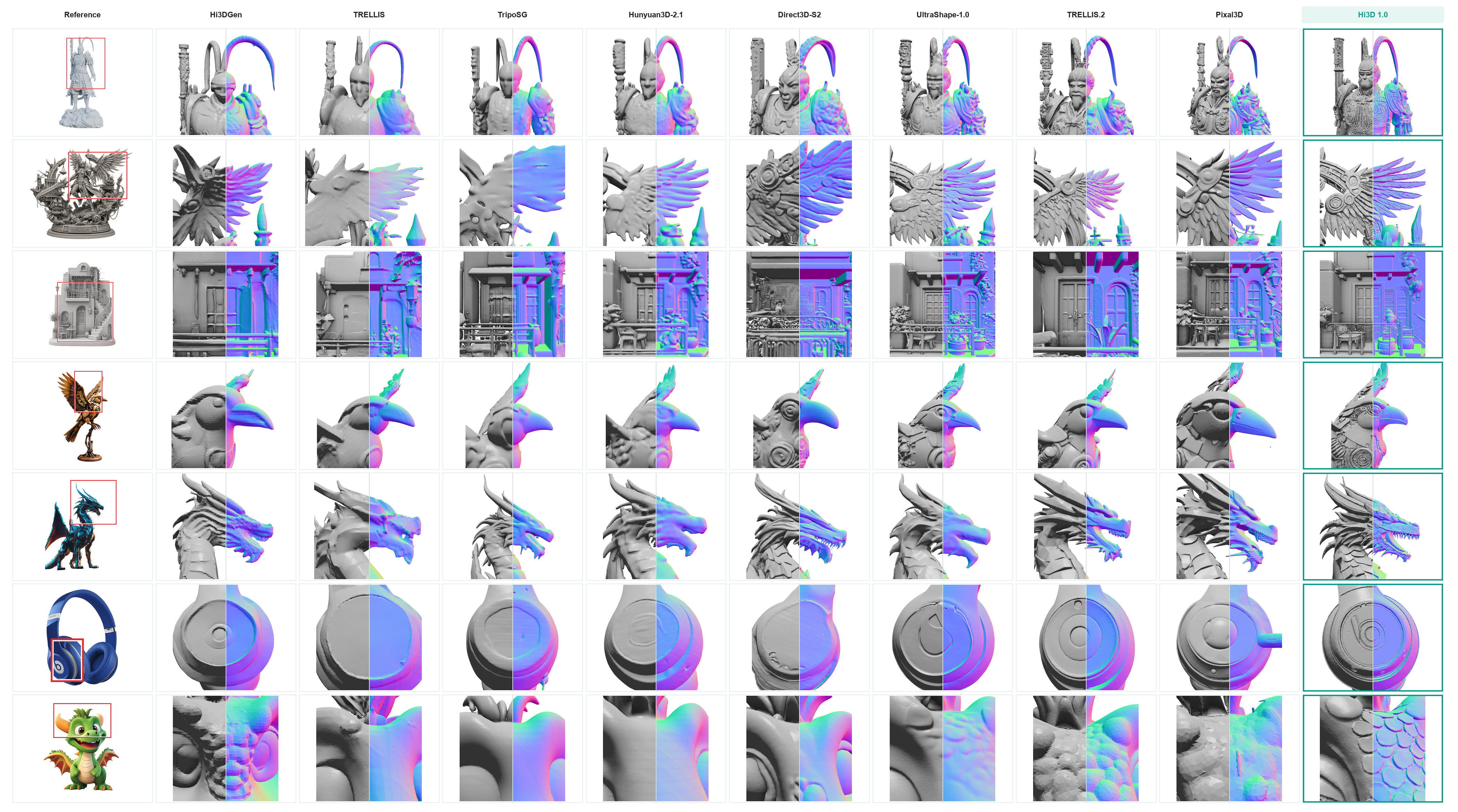
Local geometry detail comparison (Hi3D v1.0 in rightmost teal column) by hi3d-official
Hardware, VRAM, and License Matrix
| Pass / Resolution | Nominal Structural Grid | Sparse Extraction Grid | Transformer Weight | Measured Hardware | License |
|---|---|---|---|---|---|
Pass 1 (512) |
64^3 |
512^3 |
transformer_512 |
CUDA GPU (SM 8.0+) | Hi3D Open License 1.0 |
Pass 2 (1024) |
128^3 |
1024^3 |
transformer_1024 |
CUDA GPU (SM 8.0+) + optional CPU offload | Hi3D Open License 1.0 |
Pass 3 (1536) |
192^3 |
1536^3 |
transformer_1024 |
Validated on 96 GB NVIDIA H20 | Hi3D Open License 1.0 |
Commercial use is permitted under the Hi3D Open License Agreement Version 1.0, with an enterprise license notification requirement for services exceeding 200,000 monthly active users or high scale commercial revenue thresholds. Commercial integrations must display Powered by Hi3D 1.0, whereas standalone exported 3D meshes carry no branding requirement.
Parameter Reference
| Parameter | Default / Options | Geometry Effect |
|---|---|---|
resolution |
512, 1024, or 1536 |
Selects 1, 2, or 3 progressive sparse refinement passes |
num_inference_steps |
25 per pass |
Controls flow matching sampling fidelity per refinement stage |
seed |
Integer (e.g. 0) |
Initializes the local CPU random generator (GPU sparse kernels are not bitwise deterministic) |
enable_sequential_cpu_offload |
Optional flag | Keeps inactive transformers on CPU to reduce peak GPU residency |
--remove-background |
Opt in CLI flag | Runs rembg when input photos lack an alpha cutout |
Local Python and CLI Setup
Hi3D v1.0 requires Linux, Python 3.10, an NVIDIA GPU with compute capability 8.0 or newer, and CUDA 12.0 to 12.5 (flash-attn and spconv have no CPU fallback).
git clone https://github.com/hi3d-official/Hi3Dv1.0.git
cd Hi3Dv1.0

pip install torch==2.5.0+cu124 torchvision==0.20.0+cu124 \
  --extra-index-url https://download.pytorch.org/whl/cu124
pip install packaging ninja psutil
pip install --no-build-isolation flash-attn==2.7.4.post1
pip install -c docker/constraints.txt -e ".[inference]"
Run standalone mesh refinement in Python using Sparc3DPipeline without any external coarse generator dependency.
from PIL import Image
import trimesh
from sparc3d import Sparc3DPipeline

pipeline = Sparc3DPipeline.from_pretrained("hi3d-official/Hi3Dv1.0")
pipeline.enable_sequential_cpu_offload("cuda")

result = pipeline(
    Image.open("hero_prop_ref.png"),
    trimesh.load("coarse_blockout.glb", force="mesh", process=False),
    resolution=1024,
    num_inference_steps=25,
    seed=0,
)
result.mesh.export("hero_prop_refined_1024.glb")
For batch pipeline automation, invoke the included CLI script python demo/refine_mesh.py --model hi3d-official/Hi3Dv1.0 --image input.png --coarse-mesh coarse.glb --output refined.glb --resolution 1024 --sequential-cpu-offload.
Filmmaker Production Playbook
1. Upgrading rough AI meshes into hero VFX props. Pair a fast coarse generator (or a quick Blender blockout) with Hi3D v1.0 at 1024^3 to carve crisp mechanical panel seams, fabric folds, and carved stonework suitable for foreground close ups.
2. High poly normal map baking. Because Hi3D v1.0 outputs clean high resolution untextured geometry, decimate the refined GLB into a lightweight game or virtual production mesh and bake the 1536^3 relief into tangent space normal maps.
3. Alpha cutout discipline. Supply clean transparent PNG references whenever possible so DINOv2 and CLIP focus strictly on the hero prop rather than studio backdrop clutter.
4. Generating clean reference plates first. Before running image-to-3D refinement, produce crisp, evenly lit concept turnarounds on AI FILMS Studio's text-to-image workspace so the sparse flow network receives unambiguous surface detail.
Related Reading
- TRELLIS.2 LoRA: Open Source 3D PBR Asset Fine Tuning
- SplatAnything & Pi4: Open Source 3D 4D Scene AI
- Idol & OOOSplat: Open Source 3D Gaussian Splatting Film
- Qwen3.5-4B-3D-Coder: Open Source 3D Scene AI for Film
- Generate clean hero concept art on the AI Text-to-Image Generator page
Sources
Continue Reading


Video & LipSync
- Video Generator
- Text to Video
- Image to Video
- Start-End Frame to Video
- Draw to Video
- Motion Control
- Video Enhancer
- Video Upscaler
- Video Extend
- Video to Video LipSync
- Audio to Video LipSync
- Image to Video LipSync
- Video FaceSwap
- Seedance 2.5
- WAN 3.0
- Seedance 2
- FLUX 3
- Minimax H3
- Vidu Q3 Pro
- Grok Imagine Video 1.5
- Gemini Omni
- Google Veo 3.1
- Kling 3.0 Pro
- Luma Ray 3.2
- LTX 2.3
- Happy Horse 1.1
- Kling 3.0 Motion
- ByteDance Upscaler
- InfiniteTalk
- InsightFace
Image & Edit
- AI Character
- AI Actor
- Art Generator
- Text to Image
- Image to Image
- LoRA Image to Image
- Draw to Edit
- Image LoRA Training
- Remove Background
- Image Enhancer
- MidJourney 8.0
- Krea 2
- OpenAI GPT Image 2.0
- Nano Banana Pro Ultra
- Nano Banana 2 Lite
- Nano Banana Pro
- Minimax Image
- Clarity Pro
- Z-Image Turbo LoRA
- Krea 2 Turbo LoRA
- Z-Image LoRA Trainer
- Qwen Image LoRA Trainer
- Background Erase Network 2 (BEN2)