

Weiqing Xiao et al., Nanjing University, BAAI & Tsinghua University (Apache 2.0)
Share this post:
Relit-LiVE & GenLit: Open Source Video & Image Relighting
Relit-LiVE (zhuxing0/Relit-LiVE, arXiv:2605.06658) and GenLit (sbharadwajj/genlit, arXiv:2412.11224) approach post production lighting control from two complementary directions. Developed by researchers at Nanjing University, BAAI, Beihang University, and Tsinghua University for SIGGRAPH 2026 under the Apache 2.0 license, Relit-LiVE builds on the Wan 2.1 1.3B (Wan-AI/Wan2.1-T2V-1.3B) video backbone to jointly predict relit video clips and per frame warped environment maps without requiring camera pose priors. Developed at the Max Planck Institute for Intelligent Systems for SIGGRAPH Asia (sbharadwaj/genlit, non commercial scientific research license), GenLit reformulates single image relighting as an image to video generation task where the scene stays static while a virtual point light moves along a 3D hemisphere trajectory.
Studio availability.
Relit-LiVEand GenLit are not available in AI FILMS Studio. This article covers public research releases. To generate and animate relit scenes in the Studio, see the models listed on the Image to Video page or open the video workspace.
Relit-LiVE temporally stable video relighting output on moving footage without camera calibration
Jointly predicted viewpoint aligned warped environment map video from Relit-LiVE
Relit-LiVE: Jointly Learning Relit Video and Environment Video
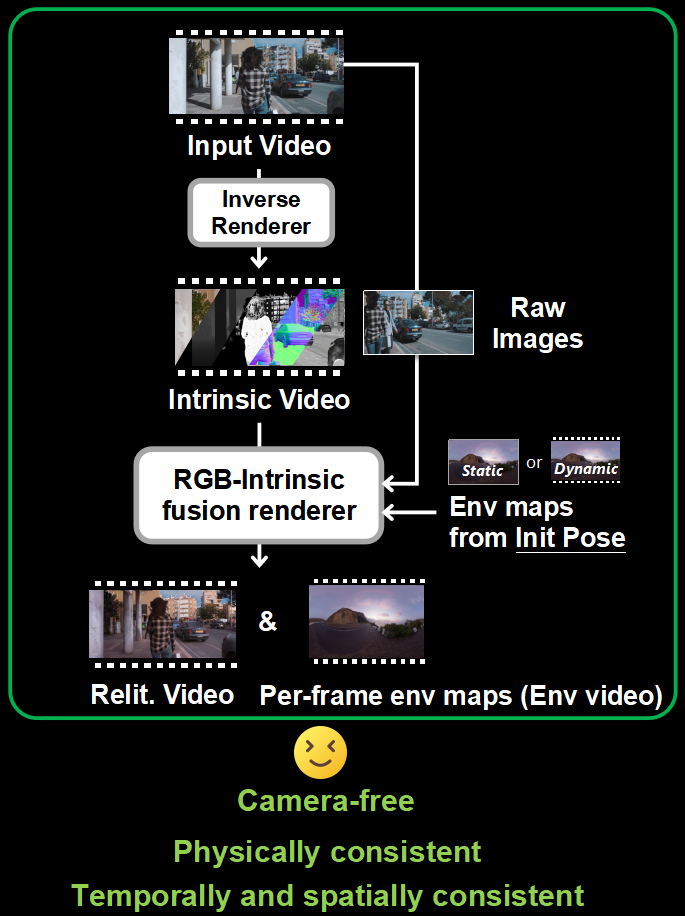
Conventional video relighting pipelines require calibrated camera extrinsics to rotate the target High Dynamic Range (HDR) environment map as the camera pans or tracks through a scene. When camera tracking fails on handheld or long lens shots, specular highlights slide across surfaces and cast shadows flicker between frames.
Relit-LiVE solves this by predicting the relit video and a viewpoint aligned per frame warped environment video simultaneously inside a unified diffusion architecture.
- Pose free environment map warping. Instead of asking the user for 3D camera matrices, the network learns the coupling between scene motion and environment map orientation directly from 10,000 synthetic sequences and more than 13,000 real video clips.
- RGB and intrinsic constraint fusion. For full inverse to forward pipeline inference,
Relit-LiVEpairs withcosmos-transfer1-diffusion-renderer(Diffusion_Renderer_Inverse_Cosmos_7B) to extract intrinsic surface properties including albedo, normal, metallic, and roughness maps before synthesizing new illumination. - Flexible frame and resolution checkpoints. The official Hugging Face release (
weiqingXiao/Relit-LiVE) ships three dedicated checkpoints covering 25 frame video (480x832), 57 frame long sequence video (480x832), and high resolution single frame relighting (1024x1472).
GenLit: Single Image Relighting as Point Light Video Generation
While Relit-LiVE processes moving footage under panoramic environment maps, GenLit (genlit.is.tue.mpg.de) turns a single still photograph into a multi frame lighting study by treating illumination shifts as temporal motion inside a video diffusion model.
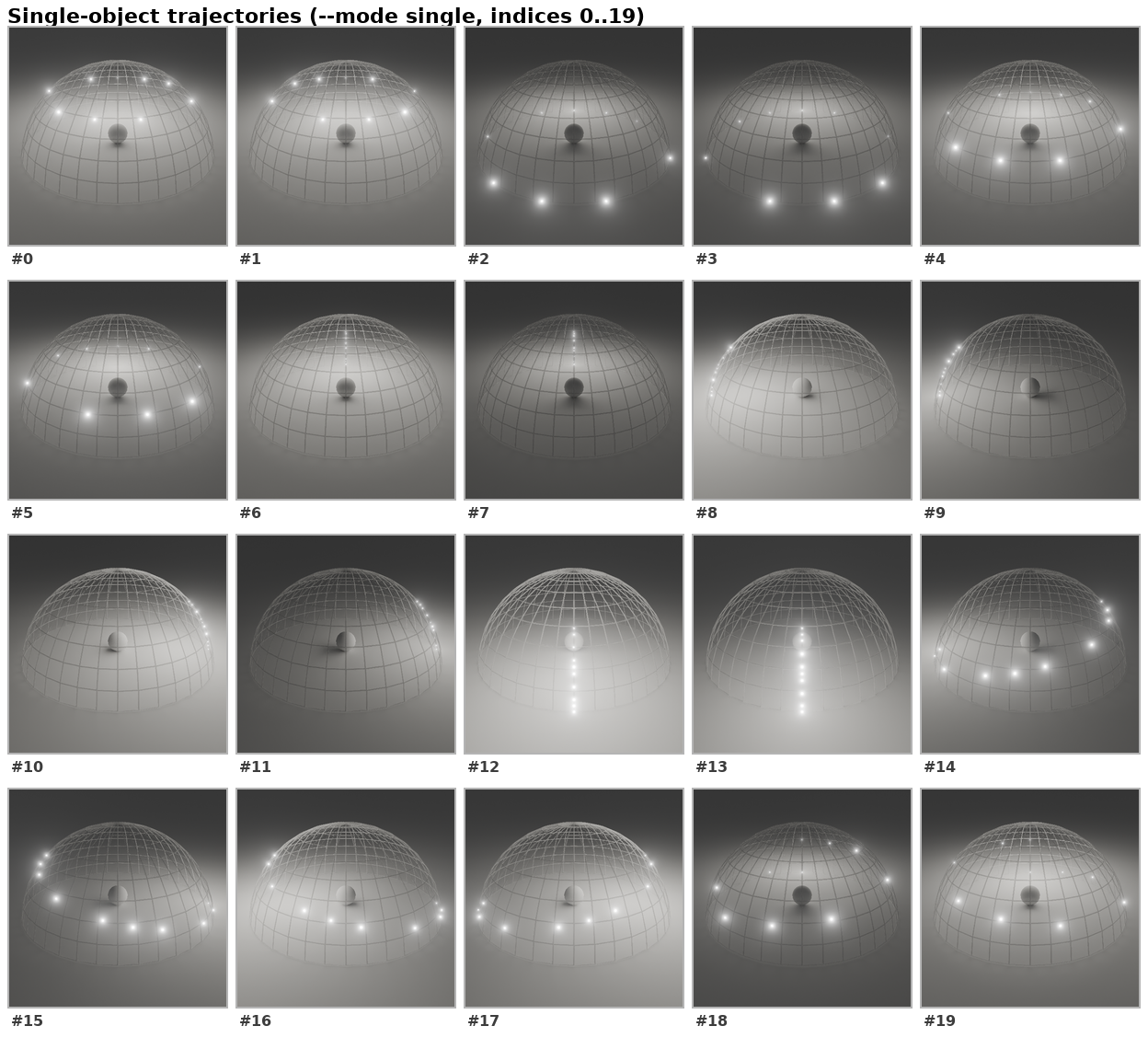
Built on Stable Video Diffusion (stable-video-diffusion-img2vid and -xt) with a 3 GB temporal ControlNet adapter, GenLit keeps the camera and scene geometry locked while moving a virtual point light across a hemisphere.
- Single object mode (
single). Generates 14 frames at512x512resolution as a point light orbits a foreground subject at a fixed radius across 20 preset trajectories. - Multi object scene mode (
multi). Generates 25 frames at640x448resolution where the point light radius varies along an arc across 21 preset trajectories, casting accurate cross object shadows across complex interiors. - MIT Multi Illumination benchmark mode (
mit). Evaluates 14 frame sequences at768x512resolution on real indoor architectural scenes.
GenLit single object relighting sweeping a virtual point light across specular and subsurface textures
GenLit indoor scene relighting synthesizing moving cast shadows and countertop reflections
Checkpoints, VRAM & License Matrix
| Model & Checkpoint | Hugging Face / Source | Output Resolution & Frames | Recommended VRAM | License |
|---|---|---|---|---|
Relit-LiVE 25-Frame (model_frame25_480_832.ckpt) |
weiqingXiao/Relit-LiVE + Wan2.1-T2V-1.3B |
480x832 (1, 9, 17, or 25 frames) |
24 GB VRAM | Apache 2.0 |
Relit-LiVE 57-Frame (model_frame57_480_832.ckpt) |
weiqingXiao/Relit-LiVE + Wan2.1-T2V-1.3B |
480x832 (up to 57 frames) |
24 GB VRAM | Apache 2.0 |
Relit-LiVE High-Res Still (model_frame1_1024_1472.ckpt) |
weiqingXiao/Relit-LiVE + Wan2.1-T2V-1.3B |
1024x1472 (1 frame PNG) |
24 GB VRAM | Apache 2.0 |
GenLit Single Object (single) |
sbharadwaj/genlit (SVD + ControlNet) |
512x512 (14 frames, 20 trajectories) |
24 GB VRAM | MPI Non-Commercial Research |
GenLit Multi Object (multi) |
sbharadwaj/genlit (SVD-XT + ControlNet) |
640x448 (25 frames, 21 trajectories) |
24 to 40 GB VRAM | MPI Non-Commercial Research |
Running Relit-LiVE and GenLit Locally in Python
To run Relit-LiVE on a 24 GB NVIDIA GPU, install the diffsynth environment, place the Wan-AI/Wan2.1-T2V-1.3B base weights under models/, and download the relighting checkpoints from weiqingXiao/Relit-LiVE.
git clone https://github.com/zhuxing0/Relit-LiVE.git
cd Relit-LiVE
conda create -n diffsynth python=3.10 -y
conda activate diffsynth
pip install -e .
pip install -U deepspeed transformers==4.50.0 gradio==6.14.0

# 57-frame video relighting with a target environment map
python relit_inference.py \
    --dataset_path datasets/demos \
    --ckpt_path checkpoints/model_frame57_480_832.ckpt \
    --output_dir inference_output \
    --cfg_scale 1.0 \
    --height 480 \
    --width 832 \
    --num_frames 57 \
    --padding_resolution \
    --use_ref_image \
    --env_map_path datasets/envs/Pink_Sunrise \
    --frame_interval 1 \
    --num_inference_steps 50 \
    --quality 10
You can also pass --use_rotate_light to orbit the environment map dynamically across the 25 or 57 frames, or use model_frame1_1024_1472.ckpt with --num_frames 1 to export a relit 1024x1472 keyframe PNG.
To run GenLit for single image point light sweeps, clone sbharadwajj/genlit, authenticate with Hugging Face after accepting the research license at sbharadwaj/genlit, and specify your trajectory indices.
git clone https://github.com/sbharadwajj/genlit.git
cd genlit
conda create -n genlit python=3.10 -y
conda activate genlit
pip install -e ".[demo]"
huggingface-cli login

# Relight a single subject across hemisphere trajectories 7 and 12
python -m genlit.inference \
    --mode single \
    --img_json examples/single.json \
    --trajectory_indices 7,12 \
    --output_dir out/single/

# Multi-object scene relighting across 25 frames
python -m genlit.inference \
    --mode multi \
    --img_json examples/multi.json \
    --output_dir out/multi/
Look Development & AI FILMS Studio Pipelines
Directors of photography and concept artists use Relit-LiVE and GenLit to test golden hour, neon night, or studio key light directions on location scout photos and live action plates before locking a shot list. A single frame extracted from a GenLit point light sweep can serve as the lighting reference plate (--use_ref_image) for Relit-LiVE, or as the starting keyframe for cloud animation.
For related lighting and camera workflows, read our breakdowns of Light-X 4D video camera and relighting control, ID-V2V identity preserving video relighting, and NVIDIA UniRelight video relighting.
To animate relit concept frames into full production shots in the browser, visit the Image to Video page or connect lighting reference nodes to video generators inside the Nodes Graph Editor.


Sources
- zhuxing0/Relit-LiVE Official GitHub Repository
- Relit-LiVE Official Project Page (SIGGRAPH 2026)
- Relit-LiVE: Relight Video by Jointly Learning Environment Video (arXiv:2605.06658)
- weiqingXiao/Relit-LiVE Checkpoints on Hugging Face
- sbharadwajj/genlit Official GitHub Repository (SIGGRAPH Asia)
- GenLit: Reformulating Single Image Relighting as Video Generation (arXiv:2412.11224)
- sbharadwaj/genlit Weights on Hugging Face
Continue Reading


Video & LipSync
- Video Generator
- Text to Video
- Image to Video
- Start-End Frame to Video
- Draw to Video
- Motion Control
- Video Enhancer
- Video Upscaler
- Video Extend
- Video to Video LipSync
- Audio to Video LipSync
- Image to Video LipSync
- Video FaceSwap
- Seedance 2.5
- WAN 3.0
- Seedance 2
- FLUX 3
- Minimax H3
- Vidu Q3 Pro
- Grok Imagine Video 1.5
- Gemini Omni
- Google Veo 3.1
- Kling 3.0 Pro
- Luma Ray 3.2
- LTX 2.3
- Happy Horse 1.1
- Kling 3.0 Motion
- ByteDance Upscaler
- InfiniteTalk
- InsightFace
Image & Edit
- AI Character
- AI Actor
- Art Generator
- Text to Image
- Image to Image
- LoRA Image to Image
- Draw to Edit
- Image LoRA Training
- Remove Background
- Image Enhancer
- MidJourney 8.0
- Krea 2
- OpenAI GPT Image 2.0
- Nano Banana Pro Ultra
- Nano Banana 2 Lite
- Nano Banana Pro
- Minimax Image
- Clarity Pro
- Z-Image Turbo LoRA
- Krea 2 Turbo LoRA
- Z-Image LoRA Trainer
- Qwen Image LoRA Trainer
- Background Erase Network 2 (BEN2)