
Wan 2.1 VACE: Open Source All in One Video Editing AI

Alibaba Tongyi Lab, VACE (arXiv:2503.07598, Apache 2.0)
Share this post:
Wan 2.1 VACE: Open Source All in One Video Editing AI
VACE (Video Creation and Editing, arXiv:2503.07598) from Alibaba Tongyi Lab unifies reference guided generation, video-to-video restyling, masked video inpainting, and spatial outpainting inside a single open source Diffusion Transformer under the Apache 2.0 license. Released in both consumer friendly 1.3B (Wan-AI/Wan2.1-VACE-1.3B) and production grade 14B (Wan-AI/Wan2.1-VACE-14B) checkpoints, VACE allows filmmakers to chain five distinct editing tasks without switching model weights.
Studio availability. VACE is not available in AI FILMS Studio. This article covers a public research release. To generate video in the Studio, see the models listed on the Image to Video and Start to End Frame pages.
VACE Swap-Anything replacing a moving subject inside an existing shot using a reference image and mask
VACE Move-Anything animating a static object along a user defined trajectory mask
Unifying Five Video Editing Tasks in One Video Condition Unit
Most open source video pipelines require separate specialist checkpoints for character reference generation, depth or pose control, masked object replacement, and canvas outpainting. Maintaining separate 14B weights for each task consumes hundreds of gigabytes of disk space and forces constant VRAM reloads between shots.
VACE replaces task specific adapters with a universal input representation called the Video Condition Unit (VCU) alongside a Context Adapter injected into the Wan 2.1 DiT blocks.
- Reactive and Inactive frame decoupling. Given any source video
Vand spatiotemporal binary maskM, VACE splits the visual input into two streams. The Reactive stream (V * M) isolates pixels that must be modified or guided by structural signals (depth, pose, optical flow, or scribble), while the Inactive stream (V * (1 - M)) preserves untouched background pixels. - Unified token serialization. Reference character images are prepended in temporal dimension ahead of the video sequence, and the Reactive, Inactive, and Mask latents are projected into the shared 3D causal VAE token space.
- Composable multi task editing. Because every task reduces to a combination of text, reference frames, active/inactive video plates, and 3D masks, a director can combine Reference-Anything, Swap-Anything, Expand-Anything (outpainting aspect ratios from vertical to widescreen), Animate-Anything, and Move-Anything in a single inference pass.
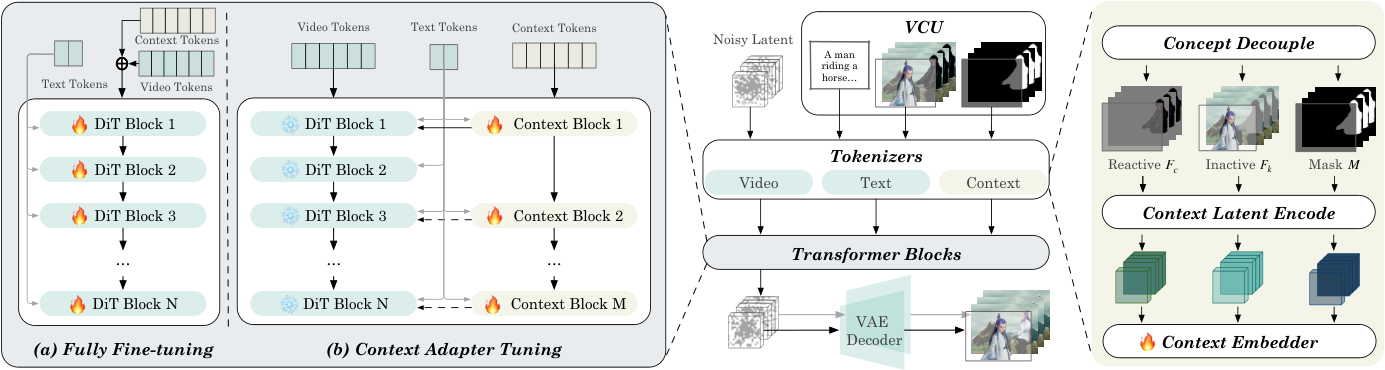
VACE Video Condition Unit (VCU) and Context Adapter architecture. Credit: Alibaba Tongyi Lab (Apache 2.0).
The Context Adapter processes the serialized VCU tokens through dedicated transformer blocks and injects residual spatial and temporal features back into the frozen base DiT backbone.
This design preserves the motion priors of the underlying Wan 2.1 generator while locking pixel fidelity in unmasked regions across 81 frame sequences.
Compositional Editing Modes for Production Shots
By varying which channels of the VCU are populated at inference time, VACE covers the full post production and previsualization spectrum.
In Reference to Video (R2V) mode, supplying segmented character and prop cutouts generates new shots that preserve identity across camera moves. In Masked Video to Video (MV2V) mode, pairing a reference cutout with a tracking mask swaps wardrobe or props inside live action plates.
In Expand-Anything mode, padding the frame borders with active mask ones outpaints a `9:16` vertical clip into a `16:9` cinema frame or extends a static first and last frame into a continuous shot.
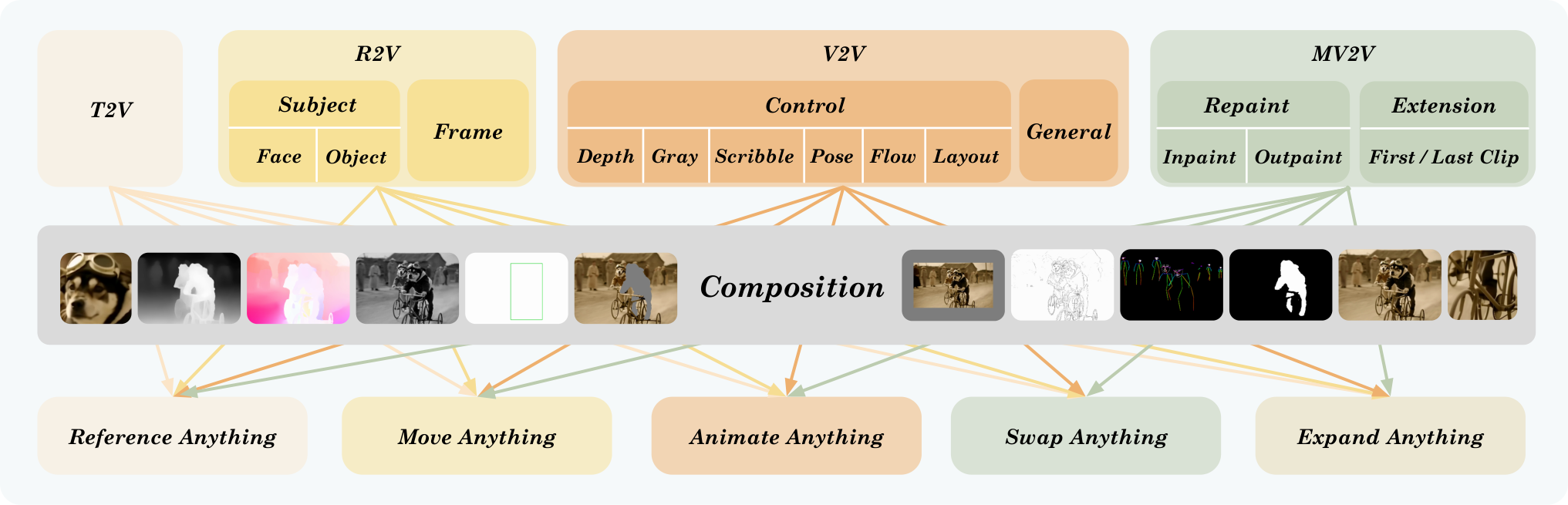
Single task and compositional multi task workflows in VACE. Credit: Alibaba Tongyi Lab (Apache 2.0).
Hardware, VRAM & Checkpoint Matrix
| Checkpoint | Base Backbone | Resolution & Frames | Hardware & VRAM | License |
|---|---|---|---|---|
Wan2.1-VACE-1.3B |
Wan2.1-T2V-1.3B + VACE Context Adapter |
480p (832x480), 81 frames |
8 GB to 12 GB VRAM (with --offload_model) |
Apache 2.0 |
Wan2.1-VACE-14B |
Wan2.1-T2V-14B + VACE Context Adapter |
480p & 720p (1280x720), 81 frames |
24 GB VRAM (offload / quantized) to 80 GB VRAM (multi GPU FSDP + USP) | Apache 2.0 |
VACE-LTX-Video-0.9 |
LTX-Video-2B + VACE Adapter |
480p, 97 frames |
10 GB VRAM | Open Weights |
Running Wan 2.1 VACE Locally
Clone ali-vilab/VACE, install the preprocessing annotators (SAM2, Depth-Anything-V2, and DWpose), and run either the end to end pipeline or the interactive Gradio studio.
git clone https://github.com/ali-vilab/VACE.git
cd VACE
pip install torch==2.5.1 torchvision==0.20.1 --index-url https://download.pytorch.org/whl/cu124
pip install -r requirements.txt
pip install wan@git+https://github.com/Wan-Video/Wan2.1

huggingface-cli download Wan-AI/Wan2.1-VACE-1.3B --local-dir ./models/Wan2.1-VACE-1.3B
huggingface-cli download ali-vilab/VACE-Annotators --local-dir ./models/VACE-Annotators
Run a reference guided masked subject swap on a single consumer GPU with the 1.3B checkpoint, or launch the Gradio interface to paint masks interactively.
# End to end subject swap with automatic SAM2 mask preprocessing
python vace/vace_pipeline.py \
  --base wan \
  --task swap_anything \
  --video assets/videos/source_shot.mp4 \
  --src_ref_images assets/images/actor_ref.png \
  --prompt "A cinematic shot of the detective walking through neon rain." \
  --ckpt_dir ./models/Wan2.1-VACE-1.3B

# Launch interactive Gradio editing studio
python vace/gradios/vace_wan_demo.py --ckpt_dir ./models/Wan2.1-VACE-1.3B
Filmmaker Workflows & AI FILMS Studio Integration
For indie filmmakers working on a single 8 GB to 16 GB workstation, Wan2.1-VACE-1.3B serves as a local Swiss Army knife for previsualization, prop replacement, and aspect ratio outpainting. Studios with multi GPU nodes can step up to Wan2.1-VACE-14B with xDiT sequence parallelism (--ulysses_size 4 --ring_size 2) to render 720p composite shots.
For related open source video workflows, explore our guides on Wan 2.2 GGUF 8GB VRAM video generation, FramePack FLF2V and Wan 2.1 start to end frame interpolation, Kiwi-Edit open source video editing, and ZONOS3-Mini and Tiny-Voca open source voice cloning.
To animate reference images or morph between keyframes in the cloud without local preprocessing setup, visit the Image to Video and Start to End Frame pages, or connect multi stage workflows visually in the Nodes Graph Editor.


Sources
Continue Reading


Video & LipSync
- Video Generator
- Text to Video
- Image to Video
- Start-End Frame to Video
- Draw to Video
- Motion Control
- Video Enhancer
- Video Upscaler
- Video Extend
- Video to Video LipSync
- Audio to Video LipSync
- Image to Video LipSync
- Video FaceSwap
- Seedance 2.5
- WAN 3.0
- Seedance 2
- FLUX 3
- Minimax H3
- Vidu Q3 Pro
- Grok Imagine Video 1.5
- Gemini Omni
- Google Veo 3.1
- Kling 3.0 Pro
- Luma Ray 3.2
- LTX 2.3
- Happy Horse 1.1
- Kling 3.0 Motion
- ByteDance Upscaler
- InfiniteTalk
- InsightFace
Image & Edit
- AI Character
- AI Actor
- Art Generator
- Text to Image
- Image to Image
- LoRA Image to Image
- Draw to Edit
- Image LoRA Training
- Remove Background
- Image Enhancer
- MidJourney 8.0
- Krea 2
- OpenAI GPT Image 2.0
- Nano Banana Pro Ultra
- Nano Banana 2 Lite
- Nano Banana Pro
- Minimax Image
- Clarity Pro
- Z-Image Turbo LoRA
- Krea 2 Turbo LoRA
- Z-Image LoRA Trainer
- Qwen Image LoRA Trainer
- Background Erase Network 2 (BEN2)