

Tencent (WeMM-Video capabilities overview, Apache 2.0)
Share this post:
Tencent WeMM-Video: Open Source Audio Visual Video AI
Most open vision language models watch video muted. When an assistant editor or VFX coordinator asks a silent model to log dailies, catch off screen sound cues, or summarize an interview clip, it misses every spoken line and foley hit. Tencent WeMM-Video, released in November 2026 under an Apache 2.0 license (arXiv:2611.26409), processes timestamped video frames and native soundtracks jointly across a family spanning 2B, 9B, and 35B Mixture of Experts (3B active) checkpoints. You can test Tencent WeMM-Video free in the embedded browser demo below with zero login.
Studio availability. Try the public Hugging Face demo below; Tencent WeMM-Video is not part of a paid AI FILMS Studio plan (use MiniMax H3 Image to Video in the video workspace for example instead).
Try Tencent WeMM-Video Live
Upload a video clip with audio, a standalone soundtrack, or a still frame inside the public Hugging Face Space below to run WeMM-Video-9B directly in your browser.
Architecture and Technical Design
WeMM-Video routes visual streams and audio waveforms through dedicated encoders that project media tokens directly into a unified language backbone alongside text instructions. Each sampled video frame carries explicit temporal timestamps, allowing the decoder to align spoken dialogue, sound effects, and visual cuts on the same timeline.
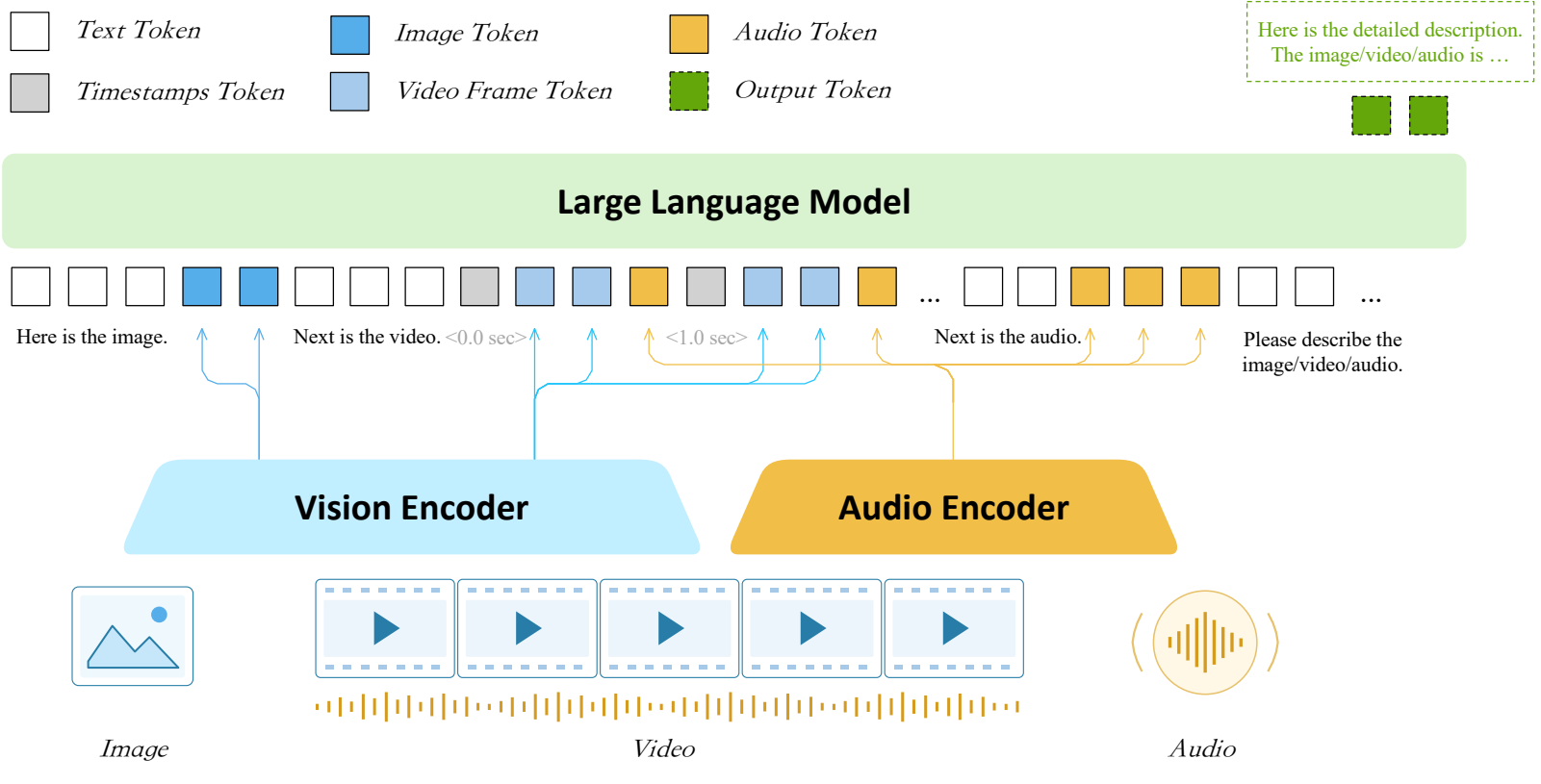
WeMM-Video multimodal encoder architecture by Tencent (Apache 2.0)
Tencent pretrained the model family on roughly 1.2 trillion multimodal tokens before applying a three stage post training recipe combining multi teacher on policy distillation, anti repetition MrDPO, and specialist reinforcement learning. Both English and Chinese inputs and responses are supported natively.
The flagship WeMM-Video-35B-A3B checkpoint packs 36.18B total parameters in BF16 (67.39 GiB on disk) while activating only 3B parameters per token. Companion 9B and 2B dense checkpoints scale the same audio visual pipeline down to single consumer GPUs and edge workstations.
Inference exposes two behavioral modes via enable_thinking in the chat template. Instruct mode (enable_thinking=False) gives immediate captions, shot descriptions, and transcripts, while Thinking mode (enable_thinking=True) runs step by step reasoning over complex multi event scenes and overlapping dialogue.
In Tencent's published evaluation suite, WeMM-Video-35B-A3B sets a new open source mark on omni modal video understanding, outperforming proprietary baselines including Qwen3.5-Omni-Flash and Seed2.0-Mini-0428 while closing the gap with Gemini-3.0-Flash.
Both the 35B MoE and 9B checkpoints also score strongly on standalone audio and music understanding benchmarks, making one local deployment usable for dailies logging, dialogue review, and rough cut continuity checks.
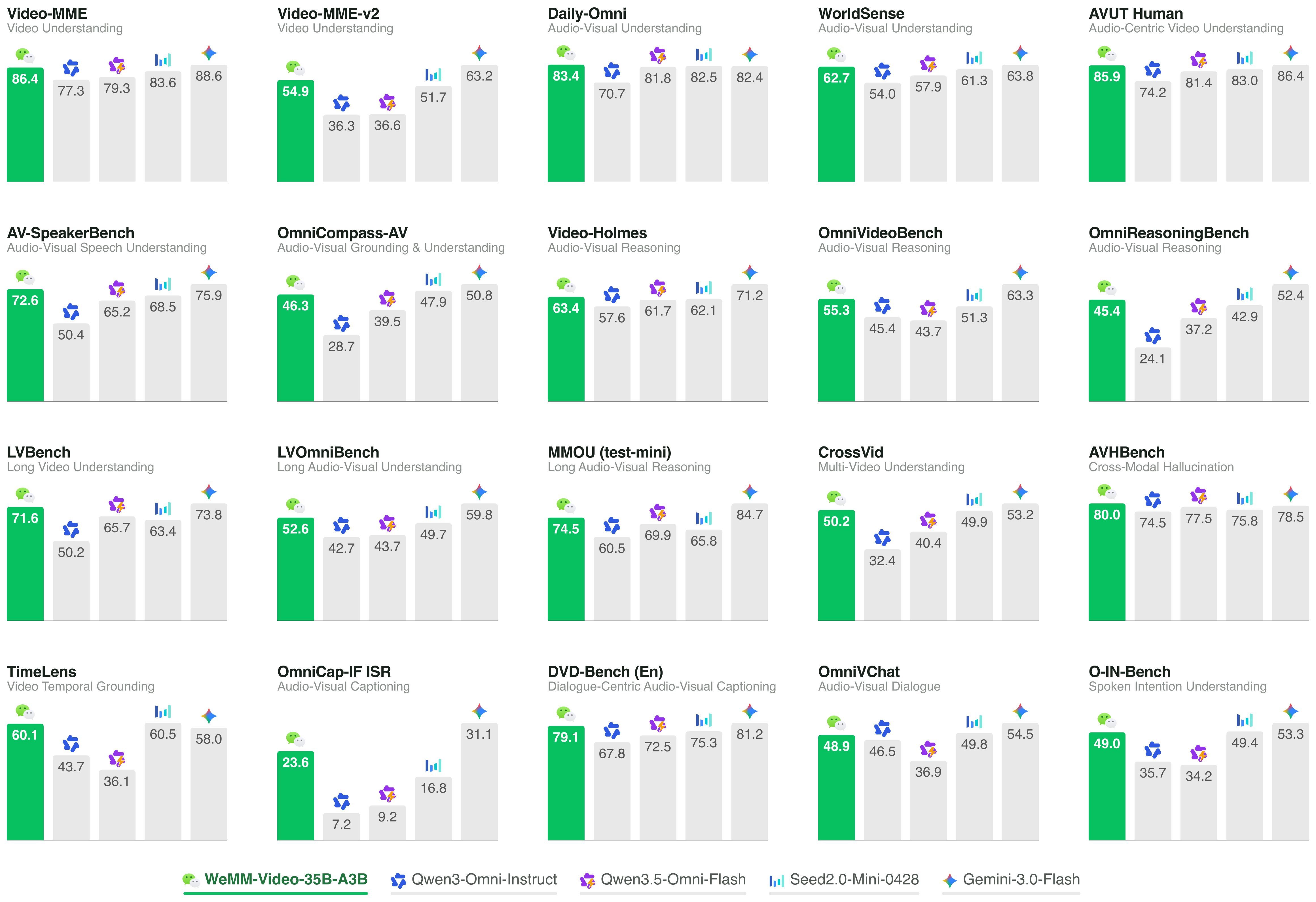
Omni modal video benchmark chart from Tencent/WeMM-Video (Apache 2.0)
Hardware, VRAM, and License Matrix
| Variant | Parameters / Disk Size | Precision & Quantizations | Typical Hardware Target | License | Production Role |
|---|---|---|---|---|---|
tencent/WeMM-Video-35BA3B |
35B total / 3B active (67.39 GiB BF16) | BF16, FP8 Block128, AWQ W4A16, GGUF Q4_K_M, NVFP4 | 2x GPU tensor parallel (BF16) or 24 GB to 48 GB GPU (4 bit) | Apache 2.0 | Highest accuracy dailies analysis and script logging |
tencent/WeMM-Video-9B |
9B dense | BF16 + quantized community ports | Single 24 GB GPU (RTX 4090 / 5090 / L40S) | Apache 2.0 | Fast single workstation audio visual review |
tencent/WeMM-Video-2B |
2B dense | BF16 / 4 bit | 8 GB to 12 GB consumer GPU | Apache 2.0 | Lightweight clip tagging and batch indexing |
Because the entire family ships under Apache 2.0, post houses and independent studios can integrate WeMM-Video directly into commercial DAM systems, ingest pipelines, and local review servers without royalty fees.
Parameter Reference
| Mode & Task | temperature |
top_p |
top_k |
presence_penalty |
repetition_penalty |
|---|---|---|---|---|---|
| Thinking (silent & audio visual video) | 0.6 |
0.95 |
20 |
1.5 |
1.0 |
| Thinking (image & text) | 1.0 |
0.95 |
20 |
1.5 |
1.0 |
| Thinking (audio only) | 0.9 |
0.95 |
20 |
1.5 |
1.0 |
| Instruct (general media tasks) | 1.0 |
0.95 |
20 |
1.5 |
1.0 |
When sending video frames through AutoProcessor or patched vLLM, control visual token budget using fps (1.0 to 2.0), min_frames (4), max_frames (16), and total_pixels (262144). Set video_audio in Python or use_audio: true in the serving API whenever you want the soundtrack decoded alongside picture frames.
Local Python and CLI Setup
Install the official repository dependencies and load any checkpoint directly through transformers, or serve high throughput batches using Tencent's patched vLLM (0.18.0 / 0.31.0) or SGLang (0.5.16 / 0.5.19) profiles.
import torch
from transformers import AutoModelForImageTextToText, AutoProcessor

model_id = "tencent/WeMM-Video-35BA3B"
processor = AutoProcessor.from_pretrained(model_id, trust_remote_code=True)
model = AutoModelForImageTextToText.from_pretrained(
    model_id,
    trust_remote_code=True,
    dtype=torch.bfloat16,
    device_map="auto",
).eval()

clip = {
    "type": "video_audio",
    "video": "scene_04_take_03.mp4",
    "fps": 1.0,
    "min_frames": 4,
    "max_frames": 16,
    "total_pixels": 262144,
}

messages = [{
    "role": "user",
    "content": [clip, {"type": "text", "text": "Log the camera action, spoken lines, and any background sound cues."}],
}]
inputs = processor.apply_chat_template(
    messages,
    tokenize=True,
    return_dict=True,
    return_tensors="pt",
    add_generation_prompt=True,
    enable_thinking=False,
).to(device=model.device, dtype=model.dtype)

with torch.inference_mode():
    output = model.generate(**inputs, max_new_tokens=256, do_sample=False)

print(processor.tokenizer.decode(output[0, inputs.input_ids.shape[1]:], skip_special_tokens=True))
For multi user post production servers, serve the OpenAI compatible endpoint with patched vLLM:
MODEL=tencent/WeMM-Video-35BA3B
vllm serve "$MODEL" --served-model-name "$MODEL" --trust-remote-code --dtype bfloat16 \
  --host 127.0.0.1 --port 8000 --max-model-len 8192 \
  --no-enable-prefix-caching --mamba-ssm-cache-dtype float32 \
  --limit-mm-per-prompt '{"image":4,"video":2,"audio":2}' \
  --media-io-kwargs '{"video":{"fps":2,"min_frames":4,"max_frames":16,"total_pixels":262144}}' \
  --tensor-parallel-size 2
Filmmaker Production Playbook
Automate dailies shot logging with sound context
Point a batch ingest script at daily proxy MP4s with type: "video_audio". Because WeMM-Video hears boom dialogue and director slate callouts alongside visual framing, it produces searchable scene notes that capture both take numbers and physical blocking in a single pass.
Audit continuity and rough cut pacing
Enable enable_thinking=True when reviewing multi shot assemblies. Ask the model to flag mismatched prop positions, off sync sound effects, or moments where dialogue runs past a cut point before handing the timeline to picture lock.
Generate structured prompt briefs for AI B roll
Feed live action reference clips into WeMM-Video-9B to extract detailed descriptions of lens movement, lighting temperature, and ambient sound texture. Paste those structured briefs into your generation prompts to keep synthetic B roll aligned with principal photography.
Related Reading
- Compare real time generative video editing in LiveEdit real time streaming video editing.
- Pair dailies analysis with instruction driven edits in Qwen-Video-Edit open source instruction video editing.
- Explore open source video editing benchmarks in Kiwi-Edit open source video editing framework.
- Generate cinematic B roll directly in the cloud on the AI Video Generator page.

Sources
Continue Reading


Video & LipSync
- Video Generator
- Text to Video
- Image to Video
- Start-End Frame to Video
- Draw to Video
- Motion Control
- Video Enhancer
- Video Upscaler
- Video Extend
- Video to Video LipSync
- Audio to Video LipSync
- Image to Video LipSync
- Video FaceSwap
- Seedance 2.5
- WAN 3.0
- Seedance 2
- FLUX 3
- Minimax H3
- Vidu Q3 Pro
- Grok Imagine Video 1.5
- Gemini Omni
- Google Veo 3.1
- Kling 3.0 Pro
- Luma Ray 3.2
- LTX 2.3
- Happy Horse 1.1
- Kling 3.0 Motion
- ByteDance Upscaler
- InfiniteTalk
- InsightFace
Image & Edit
- AI Character
- AI Actor
- Art Generator
- Text to Image
- Image to Image
- LoRA Image to Image
- Draw to Edit
- Image LoRA Training
- Remove Background
- Image Enhancer
- MidJourney 8.0
- Krea 2
- OpenAI GPT Image 2.0
- Nano Banana Pro Ultra
- Nano Banana 2 Lite
- Nano Banana Pro
- Minimax Image
- Clarity Pro
- Z-Image Turbo LoRA
- Krea 2 Turbo LoRA
- Z-Image LoRA Trainer
- Qwen Image LoRA Trainer
- Background Erase Network 2 (BEN2)