

m-a-p, YuE repository (Apache 2.0 code, CC BY NC 4.0 weights)
Share this post:
YuE2: Open Source Lyrics to Song AI With Editable Score
A film needs songs for scenes, trailers and temp tracks. Most AI music tools give you audio and nothing else. If the melody is wrong, you generate again and hope. YuE2 from the Multimodal Art Projection group (arXiv:2609.33757) writes a score first. It then renders audio from that score. You can read the score, change a note and render again.
Studio availability. YuE2 is not available in AI FILMS Studio. This article covers an open weights release for local deployment. To generate songs in the cloud, use the lyrics to music page or the music workspace.
License Warning
The YuE2 weights use CC BY NC 4.0. This means non commercial use only. A song from YuE2 may not go into a paid film, an ad or a monetized channel under that license. Use it for research, personal projects and temp tracks that you replace before release. The code and third party parts have their own licenses, listed in the repository.
How YuE2 Works
The model follows a score first path.
- Symbolic plan. The model writes a score in ABC notation, with melody and chords.
- Semantic tokens. A causal expert predicts semantic tokens at 25 Hz from the score.
- Acoustic latents. A bidirectional expert generates acoustic latents with flow matching.
- VAE decode. A VAE turns the latents into 48 kHz stereo audio.
The backbone is a single autoregressive and non autoregressive Mixture of Transformers. The planning mode is a setting called cot. Use "full" for melody and chords (default), "melody" for covers, or "off" to skip the plan.
The architecture figure at the top of this article shows the three ways to enter the system. You can create a song from style and lyrics. You can cover an existing song by transcribing it into an ABC melody with SheetSage2. You can also edit a score by hand and render it again.
The model supports Chinese (Mandarin) and English. Inputs are full lyrics with sections and a free text style prompt, for example genre, vocal type and instruments. A seed gives repeatable results.
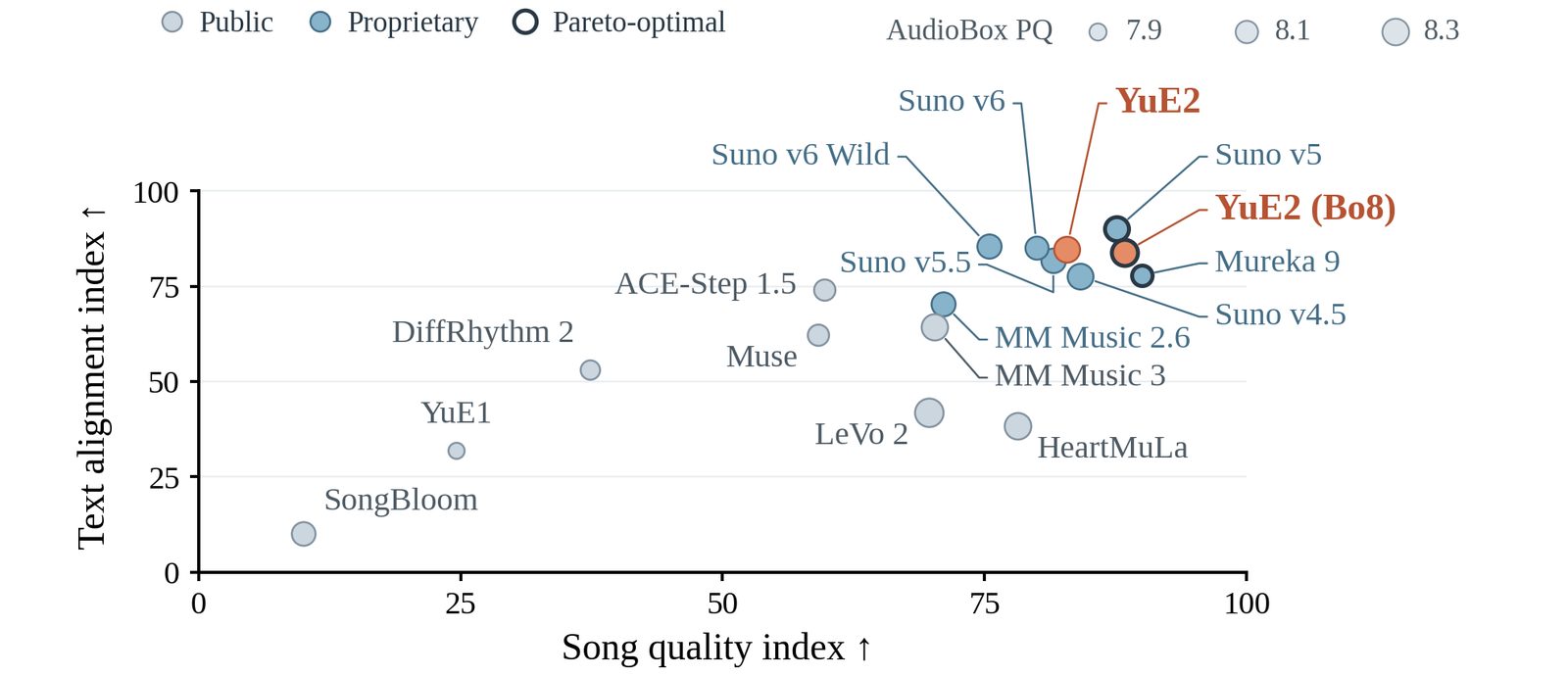
Song quality and text alignment comparison. Credit: Multimodal Art Projection, YuE, Apache 2.0 repository.
Benchmark Results
The model card reports scores on WildSongBench. Higher is better. The authors run these tests themselves, so treat the ranking as a claim to check.
| Model | SongBench average |
|---|---|
| YuE2 (best of 8) | 6.9632 |
| Mureka 9 | 6.9377 |
| Suno v5 | 6.8721 |
| YuE2 (standard, two candidates) | 6.7316 |
| Suno v5.5 | 6.7150 |
| Suno v4.5 | 6.6995 |
On zero shot covers (SHS100K), YuE2 with the full score reaches a CLEWS mAP of 0.647 and Hit at 1 of 71.3%. The model it is compared against, SongEcho, reaches 0.419 and 48.4%.
Agentic Editing
The authors add an agent loop. The agent turns musical feedback, such as "make the chorus lift" or "switch to jazz", into changes to the score, style and lyrics. YuE2 renders each new version. The project page shows a demo called "The Last Train" with 9 steps and 14 versions, going from Mandarin pop to English jazz. Listen to samples on the project page.
You can also run the stages one by one with pipe.plan(), generate_semantic, synthesize and decode. This lets you preview and edit the plan before you spend time on audio.
Hardware
| Item | Detail |
|---|---|
| Parameters | About 4B in BF16 (named 3B) |
| GPU | 24 GB NVIDIA with BF16 recommended |
| Peak VRAM | About 11 GiB on an RTX 4090, 14 GiB at maximum context |
| Host RAM | About 24 GB free |
| Speed | 71 s for a 3.6 minute song on an RTX 4090 (full plan) |
| System | Linux, Python 3.10 or newer |
| Output | 48 kHz stereo FLAC |
Run YuE2 Locally
python -m pip install huggingface-hub==0.36.2
hf download m-a-p/YuE2-3B yue2_infer-0.1.5-py3-none-any.whl --local-dir .
python -m pip install ./yue2_infer-0.1.5-py3-none-any.whl
from yue2 import YuE2Pipeline

style = "cinematic pop, female vocal, piano and strings, slow build"
lyrics = """[verse]
Rain on the platform, the last train is late
[chorus]
Hold the light, hold the light, we will not wait
"""

pipe = YuE2Pipeline.from_pretrained("m-a-p/YuE2-3B", device="cuda")
song = pipe(style=style, lyrics=lyrics, cot="full", seed=42)
song.save("song.flac")
song.save_artifacts("outputs/song")
The call save_artifacts also writes the ABC score, tokens and settings. For a cover, pass cot="melody" and an abc score. The VAE called YuE2-Vae is the default and gives better perceptual quality. The legacy VAE scores higher on the paper benchmarks and exists to reproduce them.
Film Uses
- Temp tracks. Make a song that fits the scene mood and replace it with a licensed score later.
- Diegetic songs. Write a song that a character sings or plays on a radio.
- Melody sketches. Edit the ABC score to match picture timing, then render.
- Reference demos. Give a composer a clear target for tempo and mood.
Each use must stay inside the non commercial terms.
Frequently Asked Questions
Which languages does YuE2 sing in?
Chinese (Mandarin) and English, per the model tags.
Can I edit the melody?
Yes. Edit the ABC score and pass it back with the abc argument, or preview the plan first with pipe.plan().
Music in AI FILMS Studio
The lyrics to music page lists MiniMax Music 2.5 Lyric to Music and ACE-Step 1.5 Lyrics to Music. The text to music page lists Suno Text to Music. Read the ACE-Step 1.5 tutorial and the Suno tutorial for steps. For other open music models, see Stable Audio 3 and Magenta RealTime 2.
Sources
YuE2 Paper (arXiv:2609.33757) | YuE GitHub (Multimodal Art Projection) | YuE2-3B Hugging Face | YuE2 Project Page
Continue Reading


Video & LipSync
- Video Generator
- Text to Video
- Image to Video
- Start-End Frame to Video
- Draw to Video
- Motion Control
- Video Enhancer
- Video Upscaler
- Video Extend
- Video to Video LipSync
- Audio to Video LipSync
- Image to Video LipSync
- Video FaceSwap
- Seedance 2.5
- WAN 3.0
- Seedance 2
- FLUX 3
- Minimax H3
- Vidu Q3 Pro
- Grok Imagine Video 1.5
- Gemini Omni
- Google Veo 3.1
- Kling 3.0 Pro
- Luma Ray 3.2
- LTX 2.3
- Happy Horse 1.1
- Kling 3.0 Motion
- ByteDance Upscaler
- InfiniteTalk
- InsightFace
Image & Edit
- AI Character
- AI Actor
- Art Generator
- Text to Image
- Image to Image
- LoRA Image to Image
- Draw to Edit
- Image LoRA Training
- Remove Background
- Image Enhancer
- MidJourney 8.0
- Krea 2
- OpenAI GPT Image 2.0
- Nano Banana Pro Ultra
- Nano Banana 2 Lite
- Nano Banana Pro
- Minimax Image
- Clarity Pro
- Z-Image Turbo LoRA
- Krea 2 Turbo LoRA
- Z-Image LoRA Trainer
- Qwen Image LoRA Trainer
- Background Erase Network 2 (BEN2)