

MiniMax AI & FlashML-org (Apache 2.0 / Modified MIT)
Share this post:
FreeVideo & MiniMax H3: Open Source Video AI on 8GB VRAM
FreeVideo (FlashML-org/FreeVideo), MiniMax H3, and Pika H3 Flex form an open source video stack that runs 32B multimodal video models on a single consumer GPU with 8 GB of VRAM. Built on OpenVDN's 8 step VDN-H3 checkpoint and the Video DeltaNet hybrid attention architecture, FreeVideo combines hardware adaptive quantization (INT8 on RTX 30 series GPUs and FP8 on RTX 40 and 50 series GPUs), weight streaming, and asynchronous prefetching to generate synchronized video and audio locally on Windows, macOS (Apple Silicon), and Linux.
Studio availability. FreeVideo, MiniMax H3, and Pika H3 Flex are not available in AI FILMS Studio. This guide covers their open source releases and local setup. In the Studio, use Kling 3.0, Runway Gen 4.5, Veo 3.1, Seedance 2.0, or Wan 2.6 on the Text to Video page or in Studio Nodes.
FreeVideo Max preset generation using the 8 step VDN-H3 checkpoint
What the Open Source H3 Stack Includes
Three open source releases anchor this stack for indie filmmakers and technical directors.
- MiniMax H3 (
MiniMaxAI/MiniMax-H3). A 32B multimodal Diffusion Transformer released under a modified MIT license that generates video and synchronized audio from text prompts, first and last frames, or multimodal reference clips. - FreeVideo (
FlashML-org/FreeVideo). An Apache 2.0 local inference engine powered by OpenVDN's 8 stepVDN-H3checkpoint (OpenVDN/vdn-minimax-h3). It coordinates GPU VRAM, system RAM, and NVMe storage so a 32B model runs inside 8 GB of VRAM and 16 GB of system RAM. - Pika H3 Flex 1.0 (
Pika-Org/Pika-H3-Flex-1.0). An open weight release built on the H3 architecture that adds multi reference conditioning (up to 10 reference images, 3 reference videos, and 3 reference audio tracks) alongside an 8 step Turbo LoRA (Pika-H3-Flex-1.0-Turbo-LoRA).
FreeVideo supports text-to-video, first and last frame interpolation, and multimodal reference conditioning across four quality presets. Credit: FlashML-org (Apache 2.0).
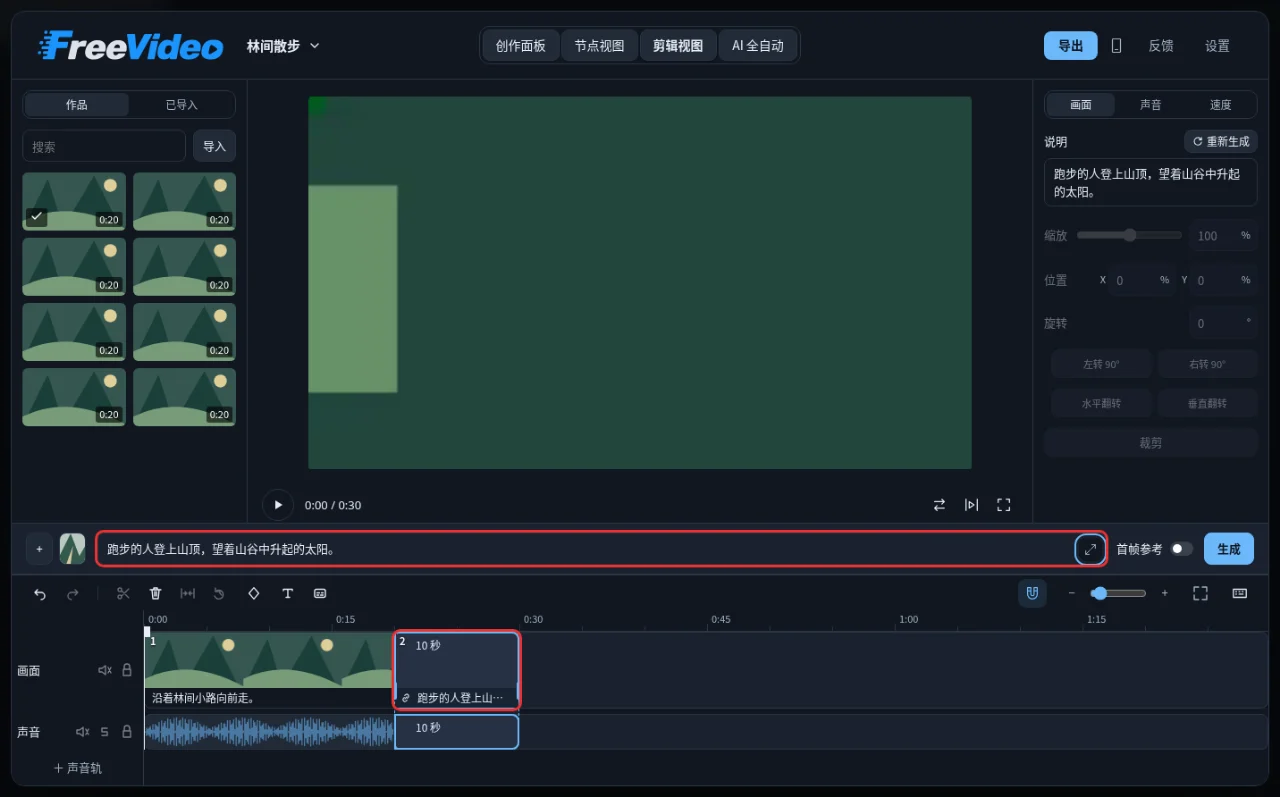
Starting in v0.4.0, FreeVideo includes a timeline editor for extending clips past one minute and chaining shots. Credit: FlashML-org (Apache 2.0).
How Video DeltaNet Fits a 32B Model in 8GB VRAM
Standard full 3D self attention scales quadratically with token count across frames, which rapidly exhausts consumer VRAM on long or 768p clips. Video DeltaNet (arXiv:2609.20744) replaces uniform full attention with a hybrid attention schedule designed for video latents. Combined with step distillation down to 8 denoising steps (VDN-H3) or 4 steps (FlashGen), the runtime avoids classifier free guidance (CFG) doubling and cuts compute requirements by an order of magnitude.
FreeVideo pairs VDN-H3 with an adaptive execution planner that inspects the host GPU at startup.
- Precision routing. Automatically selects
INT8weights on GeForce RTX 30 series GPUs (giving a 2.3x speedup on an RTX 3090 in v0.3.0+) andFP8weights on Ada Lovelace, Blackwell, and workstation GPUs. - Two pass preview. Renders a half resolution preview pass first so you can verify camera motion and framing before committing GPU time to the full pass.
- Four quality tiers. Exposes
Light,Medium,High, andMaxpresets per shot so editors can trade render speed against fine texture fidelity.
FreeVideo Light preset preview pass for fast shot blocking
Hardware, VRAM & License Matrix
| Component / Model | Repository / Checkpoint | Parameters / Steps | Minimum VRAM & RAM | Supported Platforms | License |
|---|---|---|---|---|---|
| FreeVideo Engine (VDN-H3) | FlashML-org/FreeVideo / OpenVDN/vdn-minimax-h3 |
32B (INT8 / FP8), 8 steps |
8 GB VRAM + 16 GB RAM | Windows, Linux, macOS (Apple Silicon 24 GB+ unified memory) | Apache 2.0 |
| MiniMax H3 Base | MiniMaxAI/MiniMax-H3 |
32B (BF16), 40 to 50 steps |
48 to 80 GB VRAM (multi GPU or H100) | Linux (vLLM-Omni, SGLang, LightX2V) |
Modified MIT |
| Pika H3 Flex 1.0 + Turbo LoRA | Pika-Org/Pika-H3-Flex-1.0 |
32B + 8 step LoRA | 24 GB VRAM (quantized or offloaded) to 80 GB VRAM | Linux (Diffusers / PyTorch) |
Modified MIT |
Try the Live 4 Step MiniMax H3 Demo on Hugging Face
You can test 4 step distilled MiniMax H3 generation directly in your browser through the live Hugging Face Space below, or open it in a full tab at hugging-apps-minimax-h3-flashgen-4step.hf.space.
Local Installation & Quick Start
On Linux workstations or remote GPU servers, clone the FreeVideo repository and run the setup script, which downloads the runtime environment and the VDN-H3 quantized model packs.
git clone https://github.com/FlashML-org/FreeVideo.git
cd FreeVideo
./setup.sh

# Launch the local web workspace on port 8188 or expose on your LAN
freevideo server --listen 0.0.0.0
For Windows (FreeVideo.exe) and Apple Silicon macOS (FreeVideo-Mac-arm64.dmg), standalone installers are published on the FreeVideo Releases page. If you prefer running Pika H3 Flex 1.0 with its 8 step Turbo LoRA in a Python pipeline for multi reference character sheets and audio conditioned shots, pull the weights from Hugging Face.
pip install "huggingface_hub[cli]"
huggingface-cli download Pika-Org/Pika-H3-Flex-1.0 --local-dir ./weights/Pika-H3-Flex-1.0
huggingface-cli download Pika-Org/Pika-H3-Flex-1.0-Turbo-LoRA --local-dir ./weights/Pika-H3-Flex-Turbo-LoRA
For production teams comparing local open source engines, see our guides to JoyAI-Video-Edit for 24 FPS streaming video editing, Wan 2.2 GGUF on 8GB VRAM, and MinWM and Matrix-Game 4 for interactive world models.
Generating Video in AI FILMS Studio
FreeVideo and MiniMax H3 run locally on your own workstation. When you need cloud generation without local VRAM ceilings, open the video workspace to run Kling 3.0, Runway Gen 4.5, Veo 3.1, Seedance 2.0, and Wan 2.6, or chain models visually in the Nodes Graph Editor.
Sources
Continue Reading


Video & LipSync
- Video Generator
- Text to Video
- Image to Video
- Start-End Frame to Video
- Draw to Video
- Motion Control
- Video Enhancer
- Video Upscaler
- Video Extend
- Video to Video LipSync
- Audio to Video LipSync
- Image to Video LipSync
- Video FaceSwap
- Seedance 2.5
- WAN 3.0
- Seedance 2
- FLUX 3
- Minimax H3
- Vidu Q3 Pro
- Grok Imagine Video 1.5
- Gemini Omni
- Google Veo 3.1
- Kling 3.0 Pro
- Luma Ray 3.2
- LTX 2.3
- Happy Horse 1.1
- Kling 3.0 Motion
- ByteDance Upscaler
- InfiniteTalk
- InsightFace
Image & Edit
- AI Character
- AI Actor
- Art Generator
- Text to Image
- Image to Image
- LoRA Image to Image
- Draw to Edit
- Image LoRA Training
- Remove Background
- Image Enhancer
- MidJourney 8.0
- Krea 2
- OpenAI GPT Image 2.0
- Nano Banana Pro Ultra
- Nano Banana 2 Lite
- Nano Banana Pro
- Minimax Image
- Clarity Pro
- Z-Image Turbo LoRA
- Krea 2 Turbo LoRA
- Z-Image LoRA Trainer
- Qwen Image LoRA Trainer
- Background Erase Network 2 (BEN2)