

Zhejiang University, Microsoft Research & ModelTC (Apache 2.0)
Share this post:
History-Forcing & LightX2V: Open Source Long Video AI
History-Forcing (ziplab/History-Forcing) and LightX2V (ModelTC/LightX2V) tackle the two main barriers to long open source video production: temporal drift across 60 second rollouts and multi step inference latency. Developed by Zhejiang University and Microsoft Research (arXiv:2611.02782), History-Forcing introduces history contrast distillation (DMD on Wan2.1-T2V-1.3B and OPSD on DreamX-World-5B) so autoregressive video generators remember earlier chunks and track how a scene evolves out of sight when the camera pans away. Paired with the Apache 2.0 LightX2V inference engine, production teams can run 4 step NVFP4 and FP8 distilled video models at up to 50x speedup on a single RTX 5090 or H100 GPU.
Studio availability. History-Forcing and LightX2V are not available in AI FILMS Studio. This guide covers their open source releases and local deployment. In the Studio, use Seedance 2.0, Kling 3.0, Veo 3.1, Wan 2.6, or LTX-2 on the Text to Video page or in Studio Nodes.
History-Forcing 60 second consistent video rollout and world state memory demonstration
1. History-Forcing: 60 Second Consistency & Scene Memory
Autoregressive video generators extend shots chunk by chunk, conditioning each new segment on its own previously generated frames. Over a 30 to 60 second rollout, small color shifts and geometric errors compound into severe drift, and objects that leave the camera frame often vanish or mutate when the camera looks back.
History-Forcing (xzxxntxdy/History-Forcing) fixes both failure modes during distillation.
- History contrast supervision. Evaluates the autoregressive teacher on the same noisy student chunk under two contexts (one with informative early history and one without) and adds the weighted residual to the distillation score or velocity target.
- 60 second consistent generation (
dmd/model.pt). Built onWan-AI/Wan2.1-T2V-1.3B, the DMD student anchors subject identity and lighting to early rollout chunks that have not suffered error accumulation. - Scene evolution outside the frame (
opsd/model.pt). Built onDreamX-World-5B(Wan2.2-TI2V-5B), static camera teacher rollouts simulate how moving actors or physical objects continue evolving while the student camera looks away, ensuring plausible world state upon revisit.
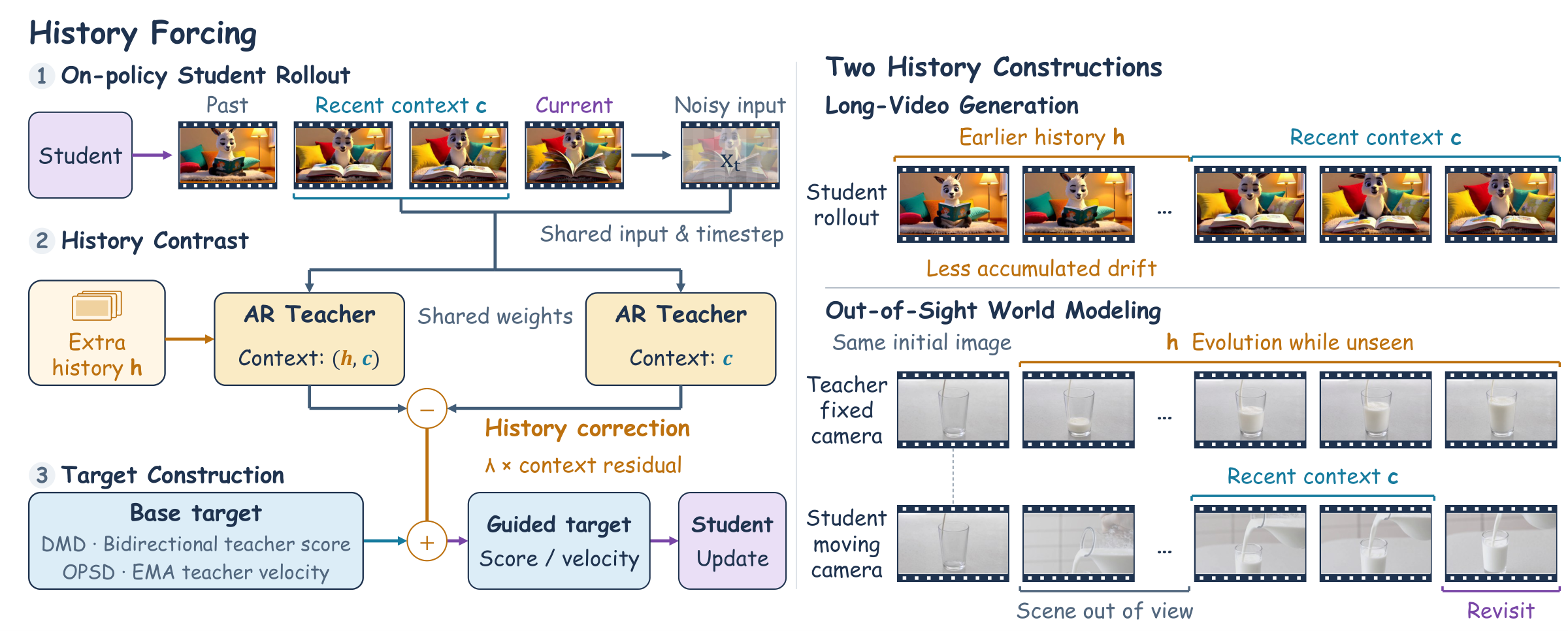
History-Forcing contrasts teacher predictions with and without historical chunks to strengthen long memory and scene state. Credit: ZIPLab.
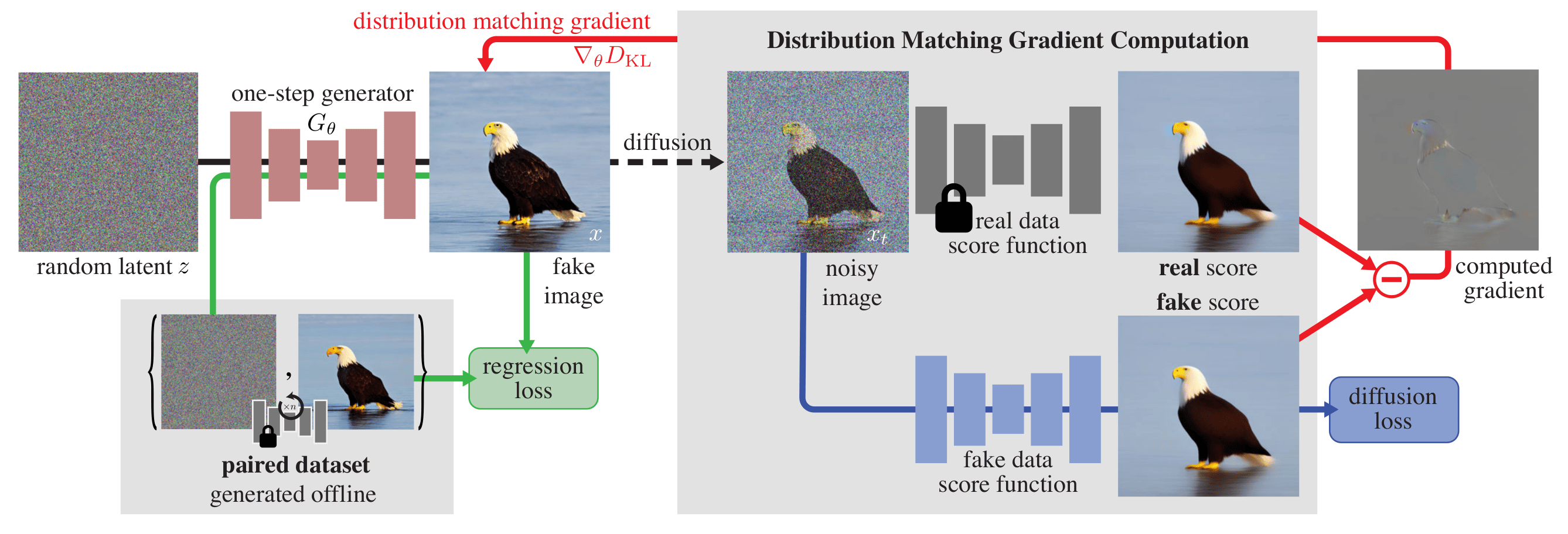
LightX2V combines 4 step distillation without CFG, NVFP4 and FP8 quantization, sparse attention, and block offloading for up to 50x speedup. Credit: ModelTC (Apache 2.0).
2. LightX2V: Up to 50x Faster Video Inference Across Wan, LTX-2, Hunyuan & H3
While History-Forcing solves temporal memory, LightX2V (ModelTC/LightX2V, Apache 2.0) provides the unified deployment engine and distilled checkpoints (huggingface.co/lightx2v) to run open source video models at interactive speeds.
- 50x speedup on RTX 5090 (
Wan2.2-NVFP4-Sparse). Combines 4 step distillation without CFG with BlackwellNVFP4quantization and sparse attention to accelerateWan 2.2 14B(T2VandI2V) by over 50x compared to 40 step baseline inference. - Autoregressive and world model profiles. Ships dedicated 2 step to 4 step scripts for
Self-Forcing(FP8andNVFP4),EdenLive,Matrix-Game-4,LingBot-Fast,StreamRender-H3, andTaoMate-H3. - Support for major open backbones. Includes 4 step and 8 step Turbo LoRAs and quantized weights for
MiniMax-H3(768p audio and video),HunyuanVideo-1.5(25x speedup plusLightTAEfast VAE),LTX-2(FP8plus block offload), andQwen-Image-2.1(including a native macOS app).
Checkpoints, Backbones & Hardware Matrix
| Framework / Checkpoint | Hugging Face / GitHub ID | Base Model | Key Capability & Speed | Hardware & License |
|---|---|---|---|---|
History-Forcing Long Video (DMD) |
xzxxntxdy/History-Forcing |
Wan2.1-T2V-1.3B |
60 second consistent autoregressive video generation | Single 16 to 24 GB VRAM GPU · Open Research |
History-Forcing World Model (OPSD) |
xzxxntxdy/History-Forcing |
DreamX-World-5B (Wan2.2-TI2V-5B) |
Camera controlled world model with scene evolution | 24 to 48 GB VRAM GPU · Open Research |
| LightX2V Engine & Distilled Hub | ModelTC/LightX2V / lightx2v |
Wan 2.1/2.2, MiniMax H3, LTX-2, HunyuanVideo 1.5, Self-Forcing | 4 step, FP8 / NVFP4 / GGUF, block offload, up to 50x speedup |
RTX 4090 / RTX 5090 / H100 / Apple Silicon · Apache 2.0 |
Local Setup & 60 Second Generation Commands
To generate a 60 second video with History-Forcing (DMD), run the following commands.
git clone https://github.com/ziplab/History-Forcing.git
cd History-Forcing

# Download the Wan2.1-T2V-1.3B backbone and History-Forcing DMD checkpoint
hf download Wan-AI/Wan2.1-T2V-1.3B --local-dir models/Wan2.1-T2V-1.3B
hf download xzxxntxdy/History-Forcing dmd/model.pt --local-dir models/History-Forcing

# Generate a 60 second consistent video rollout
bash scripts/long_video/inference.sh \
  --prompt "A musician strumming the strings of an acoustic guitar, lost in the melody of their song." \
  --output-dir output/demo/long_video
To deploy LightX2V via Docker or source for 4 step accelerated inference across Wan 2.2, LTX-2, HunyuanVideo 1.5, or MiniMax H3, run the following commands.
git clone https://github.com/ModelTC/LightX2V.git
cd LightX2V

# Example: Run 4 step distilled inference or launch the LightX2V service API
bash scripts/wan22/run_wan22_i2v_4step.sh
For deeper dives into interactive world models and lightweight consumer GPU video generation, read our guides to Helios real time long video generation, Tencent HunyuanVideo 1.5 on 14GB VRAM, FastVideo and FastWan step distillation, and ShotStream streaming multi shot video.
Long Form Sequences in AI FILMS Studio
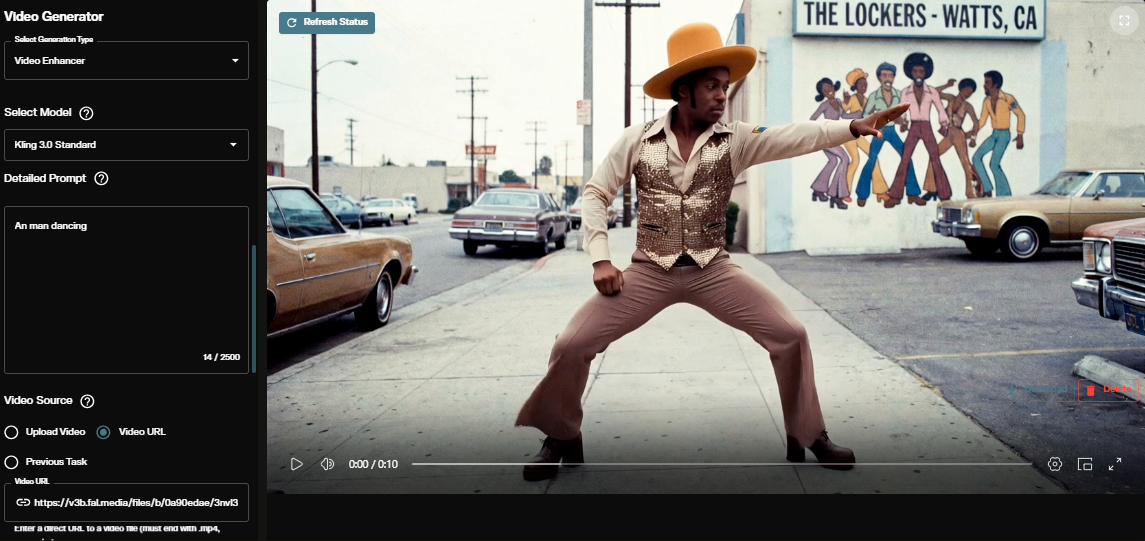
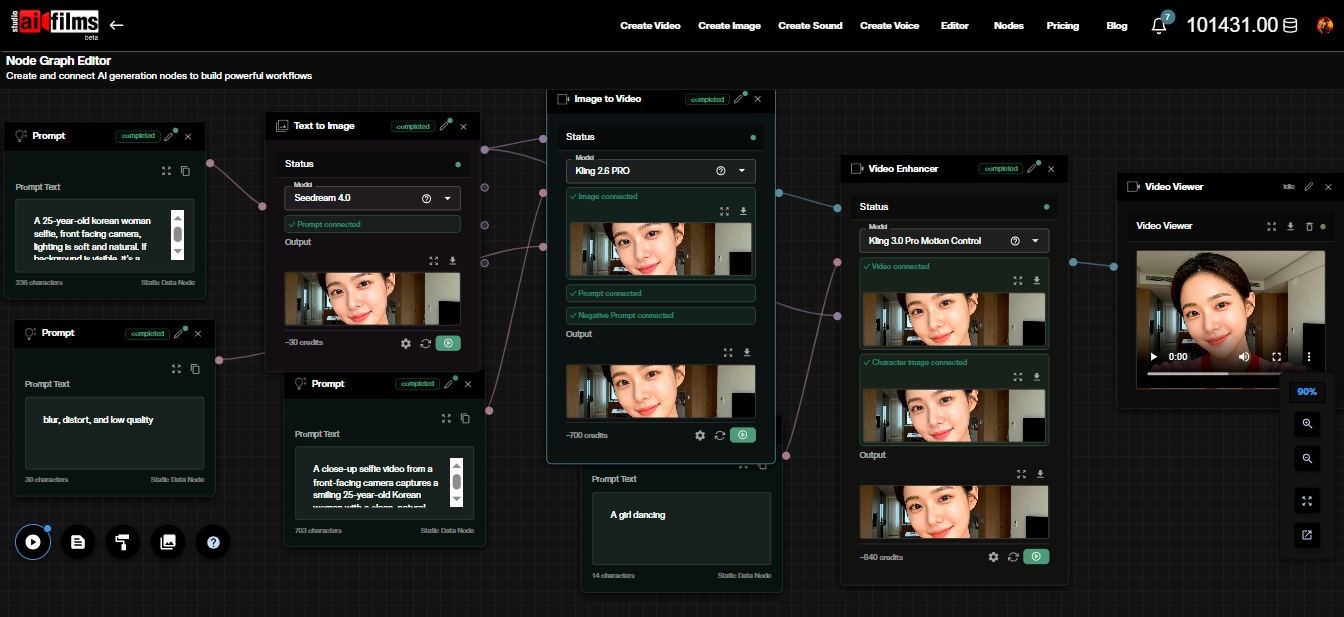
History-Forcing and LightX2V run on local GPUs. To chain consistent shots with first and last frame locking, character references, and synchronized audio in the cloud, open the video workspace to run Seedance 2.0, Kling 3.0, Veo 3.1, Wan 2.6, and LTX-2, or build multi shot sequences in the Nodes Graph Editor.
Sources
- ziplab/History-Forcing GitHub Repository
- History Forcing Official Project Page
- History Forcing: Distilling History-Dependent Continuations for Long-Horizon Video World Models (arXiv:2611.02782)
- xzxxntxdy/History-Forcing on Hugging Face
- ModelTC/LightX2V GitHub Repository
- lightx2v Distilled & Quantized Models on Hugging Face
Continue Reading


Video & LipSync
- Video Generator
- Text to Video
- Image to Video
- Start-End Frame to Video
- Draw to Video
- Motion Control
- Video Enhancer
- Video Upscaler
- Video Extend
- Video to Video LipSync
- Audio to Video LipSync
- Image to Video LipSync
- Video FaceSwap
- Seedance 2.5
- WAN 3.0
- Seedance 2
- FLUX 3
- Minimax H3
- Vidu Q3 Pro
- Grok Imagine Video 1.5
- Gemini Omni
- Google Veo 3.1
- Kling 3.0 Pro
- Luma Ray 3.2
- LTX 2.3
- Happy Horse 1.1
- Kling 3.0 Motion
- ByteDance Upscaler
- InfiniteTalk
- InsightFace
Image & Edit
- AI Character
- AI Actor
- Art Generator
- Text to Image
- Image to Image
- LoRA Image to Image
- Draw to Edit
- Image LoRA Training
- Remove Background
- Image Enhancer
- MidJourney 8.0
- Krea 2
- OpenAI GPT Image 2.0
- Nano Banana Pro Ultra
- Nano Banana 2 Lite
- Nano Banana Pro
- Minimax Image
- Clarity Pro
- Z-Image Turbo LoRA
- Krea 2 Turbo LoRA
- Z-Image LoRA Trainer
- Qwen Image LoRA Trainer
- Background Erase Network 2 (BEN2)