

inclusionAI (Code World Model 2.0 / Invoker-Render 1.0 teaser)
Share this post:
Invoker-Render 1.0: Open Source World Video Renderer
Controlling exact camera motion and blocking inside generative video models remains one of the hardest problems in virtual production. Prompt edits often shift lighting, warp background architecture, or drift off the intended trajectory after a few seconds. Invoker-Render 1.0, released by inclusionAI in November 2026 as the visual renderer for Code World Model 2.0 (arXiv:2611.22925), separates world state from visual appearance by driving a 33.12B parameter causal streaming diffusion transformer with structural proxy video. You can test Invoker-Render 1.0 free in the embedded browser demo below with zero login.
Studio availability. Try the public Hugging Face demo below; Invoker-Render 1.0 is not part of a paid AI FILMS Studio plan (use MiniMax H3 Image to Video in the video workspace for example instead).
Try Invoker-Render 1.0 Live
Upload a structural proxy video and a single appearance reference image inside the public Hugging Face Space below to test proxy conditioned rendering directly in your browser.
Architecture and Technical Design
Code World Model 2.0 keeps scene geometry, physics, and camera paths inside an upstream engine rather than forcing a single diffusion model to guess spatial rules from text alone. The engine exports a 24 FPS structural proxy stream while Invoker-Render 1.0 synthesizes photorealistic lighting, textures, and surface materials on top of that skeleton.
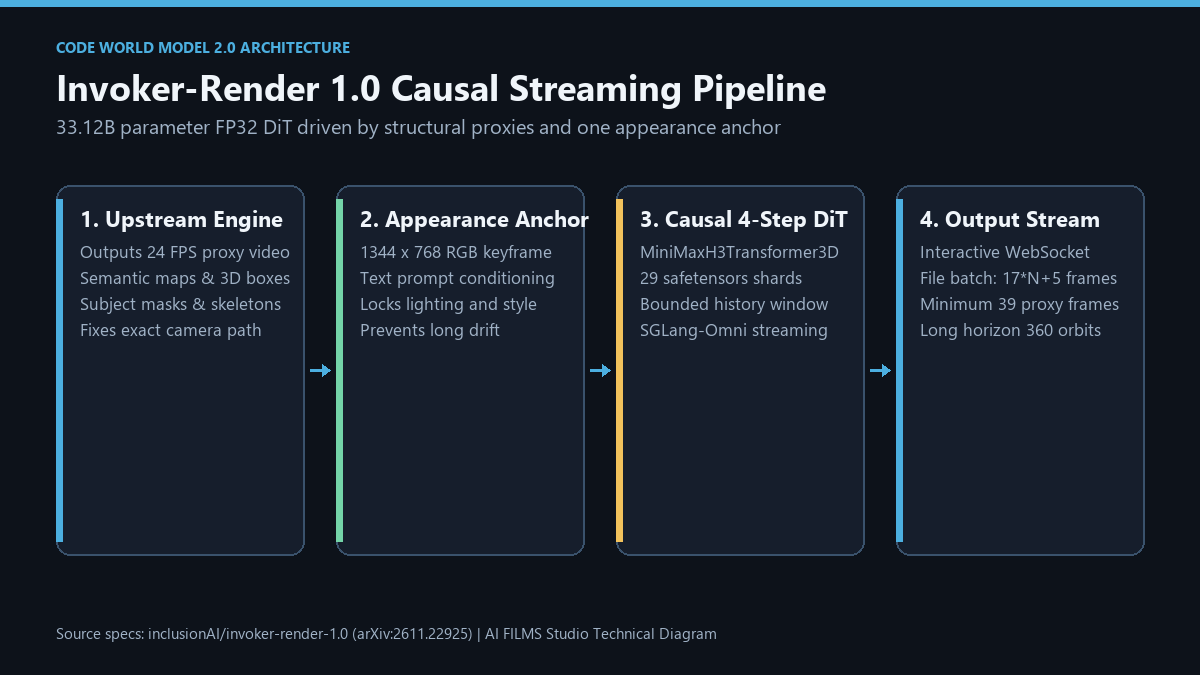
Invoker-Render 1.0 causal streaming pipeline diagram based on inclusionAI/invoker-render-1.0 specifications
The published checkpoint contains 33.12B parameters stored in full FP32 precision across 29 safetensors shards totaling about 132.5 GB. Internally, the configuration retains the MiniMaxH3Transformer3DModel layout and executes causal four step streaming inference via SGLang and SGLang-Omni.
To prevent color shift or identity decay during long takes, the model locks onto a fixed 1344 x 768 RGB first image as an appearance anchor alongside a bounded temporal history window. As long as the upstream engine feeds new proxy frames, the session continues streaming without resetting the scene.
The repository also includes a separate bidirectional teacher LoRA (bidirectional_lora/teacher-live.safetensors, about 2.3 GB) built on MiniMax-H3. That adapter belongs to the bidirectional teacher model and must never be stacked onto the causal streaming weights at the repository root.
Invoker-Render 1.0 supports five distinct proxy modalities so technical directors can dial control precision up or down at each stage of production. Early blocking runs on sparse 3D bounding boxes or boxes paired with character skeletons, while final look development accepts semantic segmentation maps, subject masks, or shaded geometry passes.
Because the proxy carries exact 3D camera trajectories, directors can execute continuous 360 degree orbits and action driven scene branching while preserving consistent room layout and lighting cues.
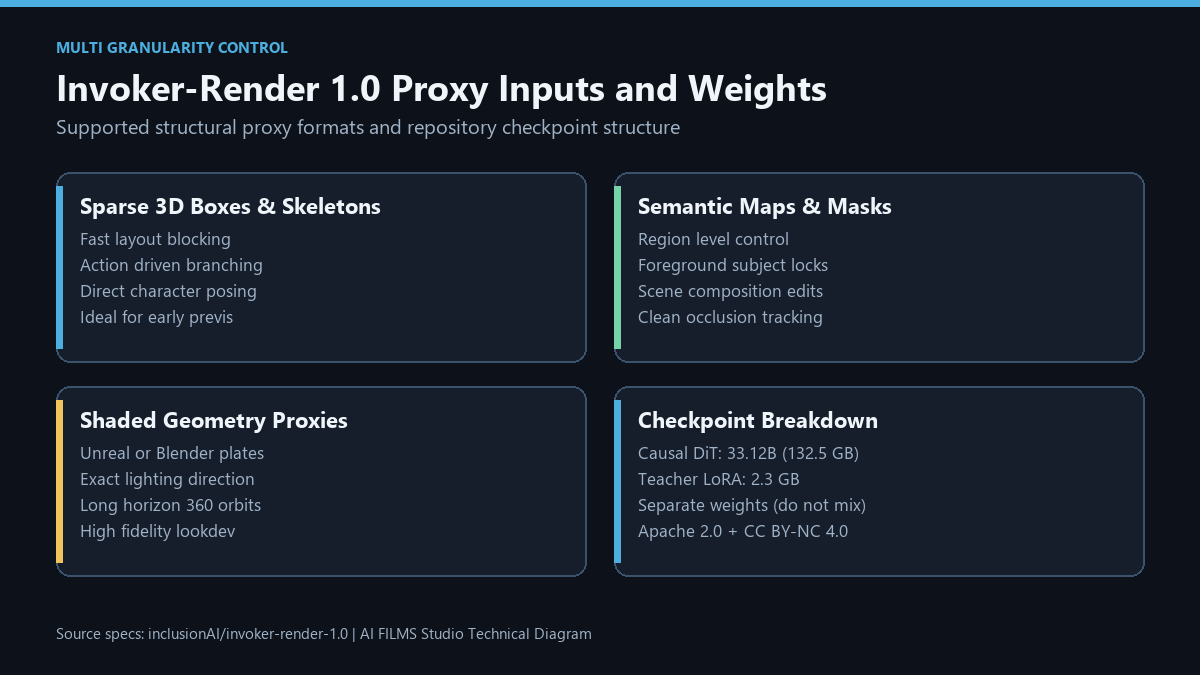
Proxy control modalities and checkpoint layout from inclusionAI/CodeWorldModel
Hardware, VRAM, and License Matrix
| Component / Profile | Parameters / Size | Precision | Hardware Requirement | License | Production Role |
|---|---|---|---|---|---|
invoker-render-1.0 (Root DiT) |
33.12B (132.5 GB, 29 shards) | FP32 (unquantized) | Multi GPU node (8 NVIDIA GPUs default production profile) | Apache 2.0 + CC BY-NC 4.0 | Causal four step streaming video renderer |
bidirectional_lora/teacher-live.safetensors |
~2.3 GB LoRA | FP16 / BF16 | Single or multi GPU with MiniMax-H3 base | Apache 2.0 + CC BY-NC 4.0 | Bidirectional teacher model only (do not mix with root) |
| Companion Assets (VAE, Qwen, Causal Decoder) | Prepared separately | BF16 / FP32 | Hosted on same inference node | Upstream component licenses | Required runtime bundle for local execution |
Note that the Invoker-Render 1.0 weights carry Apache 2.0 and CC BY-NC 4.0 non commercial terms. Review the license documentation in the official CodeWorldModel repository before integrating the weights into commercial client pipelines.
Parameter Reference
| Input / Setting | Required Value | Production Behavior |
|---|---|---|
| Appearance anchor image | 1344 x 768 RGB PNG/JPG |
Establishes global lighting, wardrobe, and texture palette across the entire stream |
| Proxy video frame rate | 24 FPS timeline |
Defines motion cadence of the output clip (distinct from live inference throughput) |
| File inference frame count | 17*N + 5 (minimum 39 frames) |
Matches the causal streaming chunk cadence for offline batch rendering |
| Denoising schedule | Causal 4 step streaming | Balances rapid frame synthesis with stable temporal coherence |
| Deployment modes | WebSocket service, file client, browser client | Supports interactive live sessions or scripted batch rendering via invoker_render.py |
Local Python and CLI Setup
The Hugging Face repository distributes the raw DiT weights only. Clone the companion CodeWorldModel repository to prepare the VAE, Qwen text encoder, causal decoder, and inference bundle before launching file or WebSocket rendering.
git clone https://github.com/inclusionAI/CodeWorldModel.git
cd CodeWorldModel

# Download Invoker-Render 1.0 causal streaming weights
huggingface-cli download inclusionAI/invoker-render-1.0 --local-dir ./weights/invoker-render-1.0
After preparing the runtime bundle as documented in docs/INFERENCE.md, run offline file rendering with a 1344 x 768 reference frame, a 24 FPS proxy video containing at least 39 frames (17*N + 5), and a scene prompt.
python invoker_render.py \
  --model-dir ./weights/invoker-render-1.0 \
  --first-image ./plates/anchor_1344x768.png \
  --proxy-video ./proxies/camera_orbit_24fps.mp4 \
  --prompt "Cinematic overcast city street with wet asphalt reflections, 35mm anamorphic lens" \
  --output ./renders/orbit_shot_01.mp4
For interactive sessions driven by a game engine or real time 3D viewport, launch the WebSocket server included in CodeWorldModel and stream proxy frames directly into the active session.
Filmmaker Production Playbook
1. Previs to final lookdev bridge. Export greybox camera moves from Blender or Unreal Engine as 24 FPS shaded geometry proxies. Pair each scene with one approved 1344 x 768 hero concept still so directors evaluate lighting and lens framing before committing to full CG rendering.
2. Long horizon 360 degree camera orbits. Standard text-to-video generators often hallucinate new walls or reverse character orientation during wide arcs. Feeding sparse 3D boxes and skeletons locks every prop and actor to exact world coordinates throughout a full rotation.
3. Branching interactive dailies. During virtual scouting, switch between alternate blocking paths in the upstream engine while keeping the same appearance anchor. The bounded history window lets crews compare multiple camera angles without lighting drift between takes.
4. Cloud studio alternative for rapid shot turnaround. Running a 33.12B FP32 streaming bundle locally requires an eight GPU server node. When independent teams need fast cloud rendering without provisioning cluster hardware, AI FILMS Studio's image-to-video workspace lets filmmakers animate hero stills directly in the browser.
Related Reading
- PAN2: Open Source World Simulation Video AI
- LingBot-World-V2: Open Source 60 FPS World Simulator
- MiniMax-H3 FlashGen: Open Source 4 Step Video Audio
- GeoState & World from Motion: Open Source 4D Camera AI
- Explore hosted cloud generation on the AI Image-to-Video Generator page
Sources
Continue Reading


Video & LipSync
- Video Generator
- Text to Video
- Image to Video
- Start-End Frame to Video
- Draw to Video
- Motion Control
- Video Enhancer
- Video Upscaler
- Video Extend
- Video to Video LipSync
- Audio to Video LipSync
- Image to Video LipSync
- Video FaceSwap
- Seedance 2.5
- WAN 3.0
- Seedance 2
- FLUX 3
- Minimax H3
- Vidu Q3 Pro
- Grok Imagine Video 1.5
- Gemini Omni
- Google Veo 3.1
- Kling 3.0 Pro
- Luma Ray 3.2
- LTX 2.3
- Happy Horse 1.1
- Kling 3.0 Motion
- ByteDance Upscaler
- InfiniteTalk
- InsightFace
Image & Edit
- AI Character
- AI Actor
- Art Generator
- Text to Image
- Image to Image
- LoRA Image to Image
- Draw to Edit
- Image LoRA Training
- Remove Background
- Image Enhancer
- MidJourney 8.0
- Krea 2
- OpenAI GPT Image 2.0
- Nano Banana Pro Ultra
- Nano Banana 2 Lite
- Nano Banana Pro
- Minimax Image
- Clarity Pro
- Z-Image Turbo LoRA
- Krea 2 Turbo LoRA
- Z-Image LoRA Trainer
- Qwen Image LoRA Trainer
- Background Erase Network 2 (BEN2)