
Light-A-Video: Open Source Training Free Video Relighting

Yujia Zhou et al., Shanghai Jiao Tong University & ByteDance (ICCV 2025, Apache 2.0)
Share this post:
Light-A-Video: Open Source Training Free Video Relighting
Light-A-Video (Training free Video Relighting via Progressive Light Fusion, arXiv:2502.08590) is an open source, training free video relighting framework accepted at ICCV 2025 and released under the Apache 2.0 license by researchers at Shanghai Jiao Tong University and ByteDance. Without training a single new weight, Light-A-Video pairs a 2D image relighting model (IC-Light) with any pretrained video diffusion backbone, including Wan 2.1 1.3B (Wan-AI/Wan2.1-T2V-1.3B-Diffusers), CogVideoX-2B, and AnimateDiff, to relight foreground actors and harmonize new background environments on a single 12 GB to 16 GB GPU.
Studio availability. Light-A-Video is not available in AI FILMS Studio. This article covers a public research release. To generate and restyle video in the Studio, see the models listed on the Image to Video page or open the video workspace.
Light-A-Video ICCV 2025 showcase relighting video clips with directional key lights and background replacement
Training free progressive light fusion eliminating frame to frame exposure flicker across moving subjects
Why Frame by Frame Image Relighting Flickers in Motion
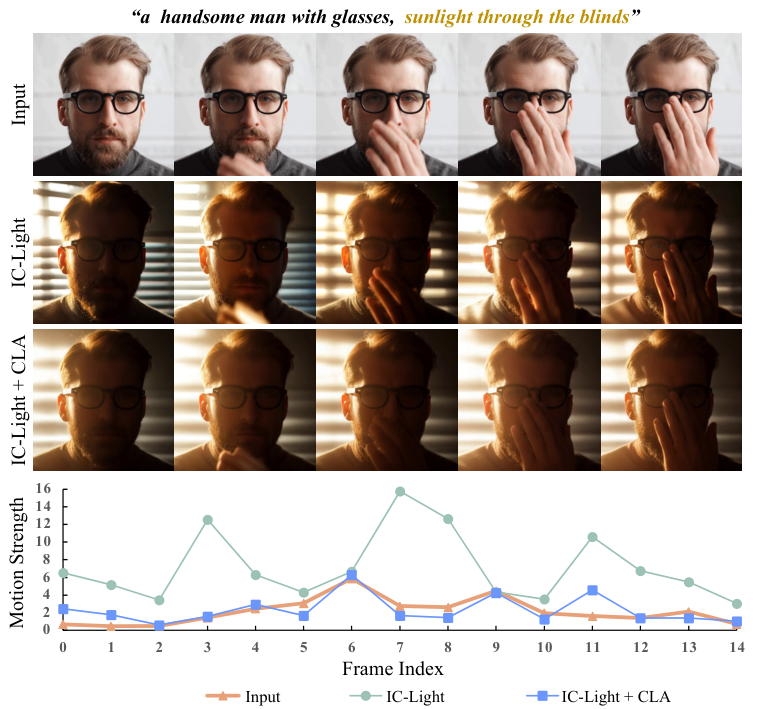
2D image relighting models such as IC-Light (lllyasviel/ic-light) produce accurate specular highlights, rim lighting, and ambient bounce on single photographs. However, applying a 2D relighting model independently to every frame of a video causes severe exposure flicker, shifting shadow angles, and background texture swimming because each frame is denoised without temporal context.
Conversely, passing a video through a standard video-to-video diffusion model (SDEdit) smooths temporal transitions, but it washes out directional light color and alters the subject's facial details. Light-A-Video resolves that conflict at inference time through two zero shot mechanisms: Consistent Light Attention (CLA) and Progressive Light Fusion (PLF).
Consistent Light Attention (CLA) shares self attention keys and values across frames inside IC-Light. Credit: Yujia Zhou et al. (ICCV 2025, Apache 2.0).
Consistent Light Attention (CLA): Inside the self attention layers of `IC-Light`, CLA mixes each frame's original key and value features with the global mean key and value features across the full video sequence.
This cross frame attention sharing forces the 2D relighting model to place specular highlights and shadow gradients at consistent angles on every frame.
Progressive Light Fusion Across Diffusion Timesteps
At each denoising step t, Light-A-Video runs both the temporally enhanced IC-Light branch (which predicts the relit clean target z_0^light) and the motion prior branch (Wan 2.1 1.3B or CogVideoX-2B, which predicts the temporally coherent target z_0^motion).
Progressive Light Fusion (PLF): Early denoising steps establish global lighting direction and shadow geometry, while late denoising steps refine surface detail and temporal smoothness.
PLF blends the two predicted targets using a time decaying fusion weight `lambda_t` that prioritizes the relit `IC-Light` prediction during early steps and shifts weight toward the `Wan 2.1` or `CogVideoX` video backbone during final steps.
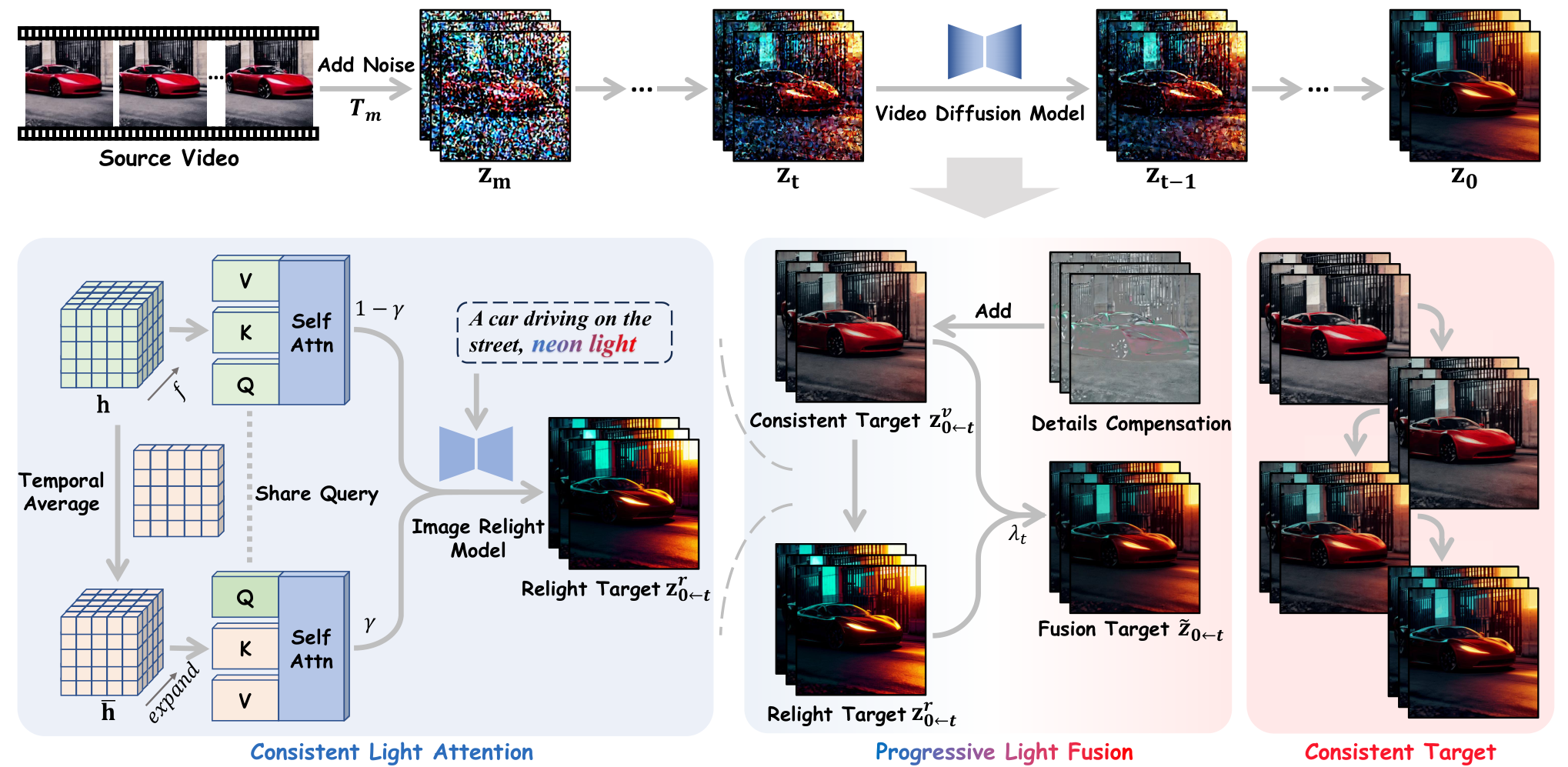
Progressive Light Fusion blends 2D relighting predictions with 3D video diffusion temporal priors across timesteps. Credit: bcmi/Light-A-Video (Apache 2.0).
Hardware, VRAM & Backbone Matrix
| Video Backbone Mode | Required Checkpoints | Relighting Conditioning Modes | Hardware & VRAM | License |
|---|---|---|---|---|
Wan 2.1 1.3B (v2v_wan.py) |
Wan-AI/Wan2.1-T2V-1.3B-Diffusers + lllyasviel/ic-light |
Text prompt + directional light mask (LEFT, RIGHT, TOP, BOTTOM) |
12 GB to 16 GB VRAM | Apache 2.0 |
CogVideoX-2B (v2v_cogvideox.py) |
THUDM/CogVideoX-2b + lllyasviel/ic-light |
Text prompt + directional light or reference background | 12 GB to 16 GB VRAM | Apache 2.0 |
AnimateDiff + Inpaint (relight_bg_ade.py) |
Realistic_Vision_V5.1 + animatediff-motion-adapter-v1-5-3 + briaai/RMBG-1.4 |
Foreground extraction (RMBG-1.4) + new background generation & relighting |
8 GB to 12 GB VRAM | Apache 2.0 (Code) |
Running Light-A-Video Locally With Wan 2.1 1.3B
Clone bcmi/Light-A-Video, install diffusers>=0.32.2 and transformers>=4.49.0 for Wan 2.1 support, and download iclight_sd15_fc.safetensors from lllyasviel/ic-light.
git clone https://github.com/bcmi/Light-A-Video.git
cd Light-A-Video

conda create -n lightavideo python=3.10 -y
conda activate lightavideo
pip install torch==2.4.0 torchvision==0.19.0 --index-url https://download.pytorch.org/whl/cu121
pip install -r requirements.txt
pip install --upgrade transformers>=4.49.0 diffusers>=0.32.2

mkdir -p models
wget -O models/iclight_sd15_fc.safetensors \
  https://huggingface.co/lllyasviel/ic-light/resolve/main/iclight_sd15_fc.safetensors
Relight an existing video clip using Wan 2.1 1.3B by specifying the input video, the target lighting prompt, and the key light direction (LEFT, RIGHT, TOP, or BOTTOM).
# Relight a video clip with Wan 2.1 1.3B and a left neon key light
python v2v_wan.py \
  --video_path input_wan/car.mp4 \
  --prompt "A sports car driving at night, warm golden streetlamp glow." \
  --relight_prompt "neon magenta and cyan cyberpunk lighting, wet reflections" \
  --light_source LEFT \
  --output_path ./outputs/car_relit_wan.mp4
To extract a foreground actor with briaai/RMBG-1.4, generate a new environment behind them, and match the foreground lighting to the new background automatically, run python relight_bg_ade.py.
Color Grading, Compositing & AI FILMS Studio Workflows
When splicing green screen plates, stock footage, or shots generated by different AI models into a single scene, mismatched key light direction immediately gives away the composite. Because Light-A-Video requires zero model training and runs on a single 12 GB GPU with Wan 2.1 1.3B, colorists and compositors can harmonize lighting direction across cuts in minutes.
For related open source relighting guides, read our coverage of Relit-LiVE and GenLit video and image relighting, ID-V2V identity preserving video relighting, Light-X 4D camera and relighting control, and Hunyuan AuK unified speech and dialogue editing.
To restyle shots, remove backgrounds, and chain image-to-video pipelines in the cloud, visit the Image to Video and Background Remover pages or connect nodes visually inside the Nodes Graph Editor.


Sources
Continue Reading


Video & LipSync
- Video Generator
- Text to Video
- Image to Video
- Start-End Frame to Video
- Draw to Video
- Motion Control
- Video Enhancer
- Video Upscaler
- Video Extend
- Video to Video LipSync
- Audio to Video LipSync
- Image to Video LipSync
- Video FaceSwap
- Seedance 2.5
- WAN 3.0
- Seedance 2
- FLUX 3
- Minimax H3
- Vidu Q3 Pro
- Grok Imagine Video 1.5
- Gemini Omni
- Google Veo 3.1
- Kling 3.0 Pro
- Luma Ray 3.2
- LTX 2.3
- Happy Horse 1.1
- Kling 3.0 Motion
- ByteDance Upscaler
- InfiniteTalk
- InsightFace
Image & Edit
- AI Character
- AI Actor
- Art Generator
- Text to Image
- Image to Image
- LoRA Image to Image
- Draw to Edit
- Image LoRA Training
- Remove Background
- Image Enhancer
- MidJourney 8.0
- Krea 2
- OpenAI GPT Image 2.0
- Nano Banana Pro Ultra
- Nano Banana 2 Lite
- Nano Banana Pro
- Minimax Image
- Clarity Pro
- Z-Image Turbo LoRA
- Krea 2 Turbo LoRA
- Z-Image LoRA Trainer
- Qwen Image LoRA Trainer
- Background Erase Network 2 (BEN2)