

InclusionAI (MIT License)
Share this post:
Ming-Image-0.2-Design: Open Source RGBA Image AI
InclusionAI open sourced Ming-Image-0.2-Design (inclusionAI/Ming-Image-0.2-Design) on November 25, 2026 under the MIT license. The 6 billion parameter diffusion transformer ranks first among open weight models on the Artificial Analysis AA-Image-T2I v2.1 overall leaderboard and generates 2048 px visual designs, crisp typography, and native transparent RGBA assets in 12 steps. You can test Ming-Image-0.2-Design free in the embedded browser studio below with zero login.
Studio availability. Try the public Hugging Face demo below; Ming-Image-0.2-Design is not part of a paid AI FILMS Studio plan (use FLUX.2 Pro Text to Image in the image workspace for example instead).
Try Ming-Image-0.2-Design Live
Describe a film title card, poster layout, HUD overlay, or architectural set concept in the official InclusionAI studio below. Scroll inside the panel to access the brief input, aspect ratio presets, and RGBA transparency controls.
Architecture and Technical Design
Ming-Image-0.2-Design uses a 6 billion parameter Diffusion Transformer (DiT) tuned specifically for structured graphic layouts, realistic lighting, and exact text rendering. Unlike general purpose generators that scramble small credits or distort UI grids, the 0.2 release supports both natural language briefs and Figma style structured JSON prompts rewritten by a companion vision language model such as Ling-3.0-flash-VL or Qwen3.8-27B.
A standout capability for art departments and motion designers is native four channel RGBA generation. The model preserves transparent backgrounds directly during synthesis, and pairs with InclusionAI's layer decomposition pipeline to separate finished frames down to individual character parts and typographic overlays ready for downstream animation.
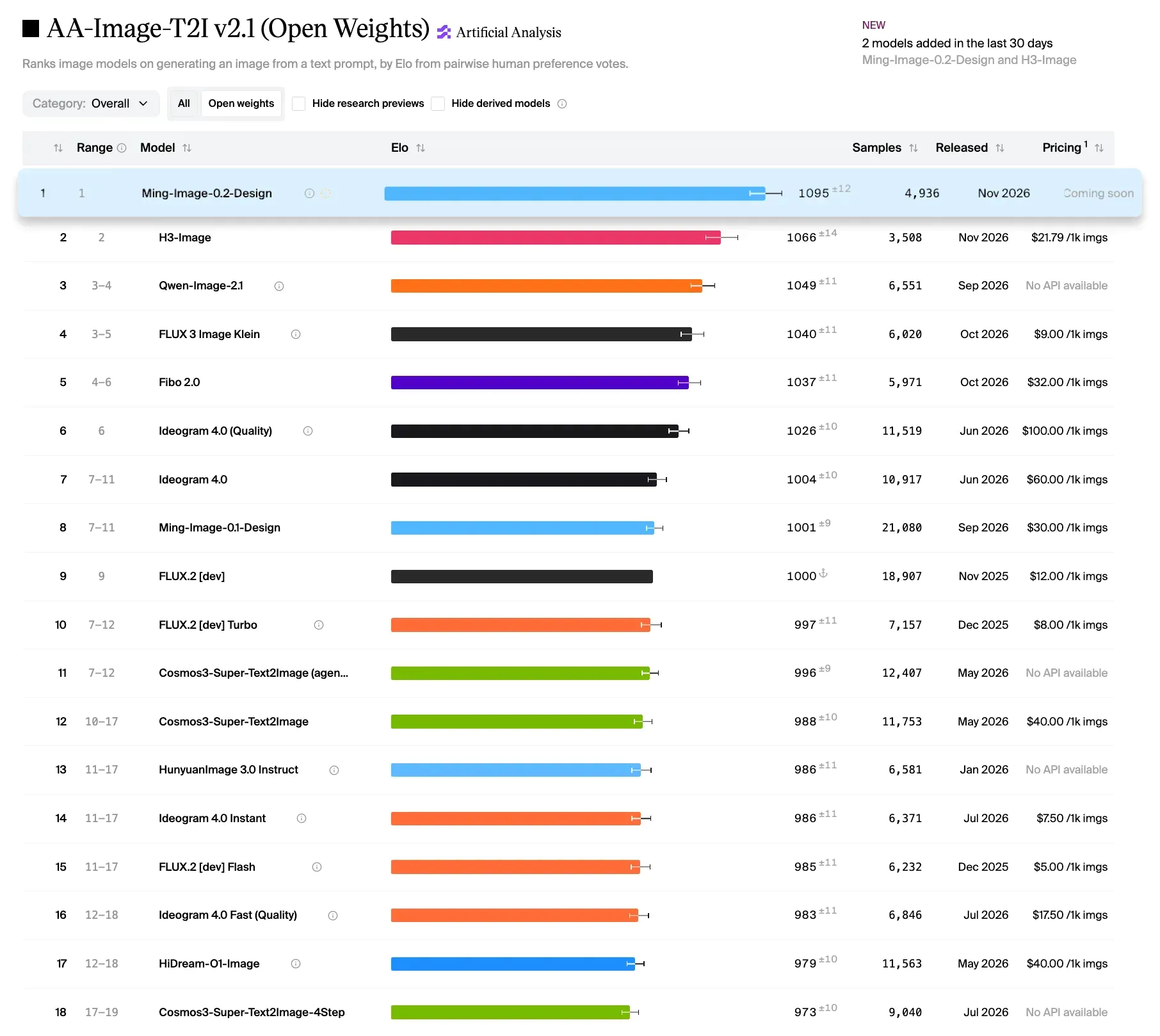
Leaderboard evaluation by InclusionAI / Artificial Analysis (MIT)
Preliminary evaluation results published on November 23, 2026 place Ming-Image-0.2-Design at the top of the open weight text-to-image rankings on Artificial Analysis AA-Image-T2I v2.1, building on version 0.1's earlier lead in UI and UX layout generation.
Because inference converges in just 12 sampling steps at CFG scale 1.0, studios can iterate through multiple key art and set signage variations rapidly without sacrificing letterform legibility.
The official Ming Design Studio interface exposes a checkerboard RGBA canvas so designers can verify alpha transparency immediately before downloading a 2048 x 2048 PNG.
Production teams can switch between the Studio view for single asset generation and the Workflow tab for repeatable visual design pipelines.
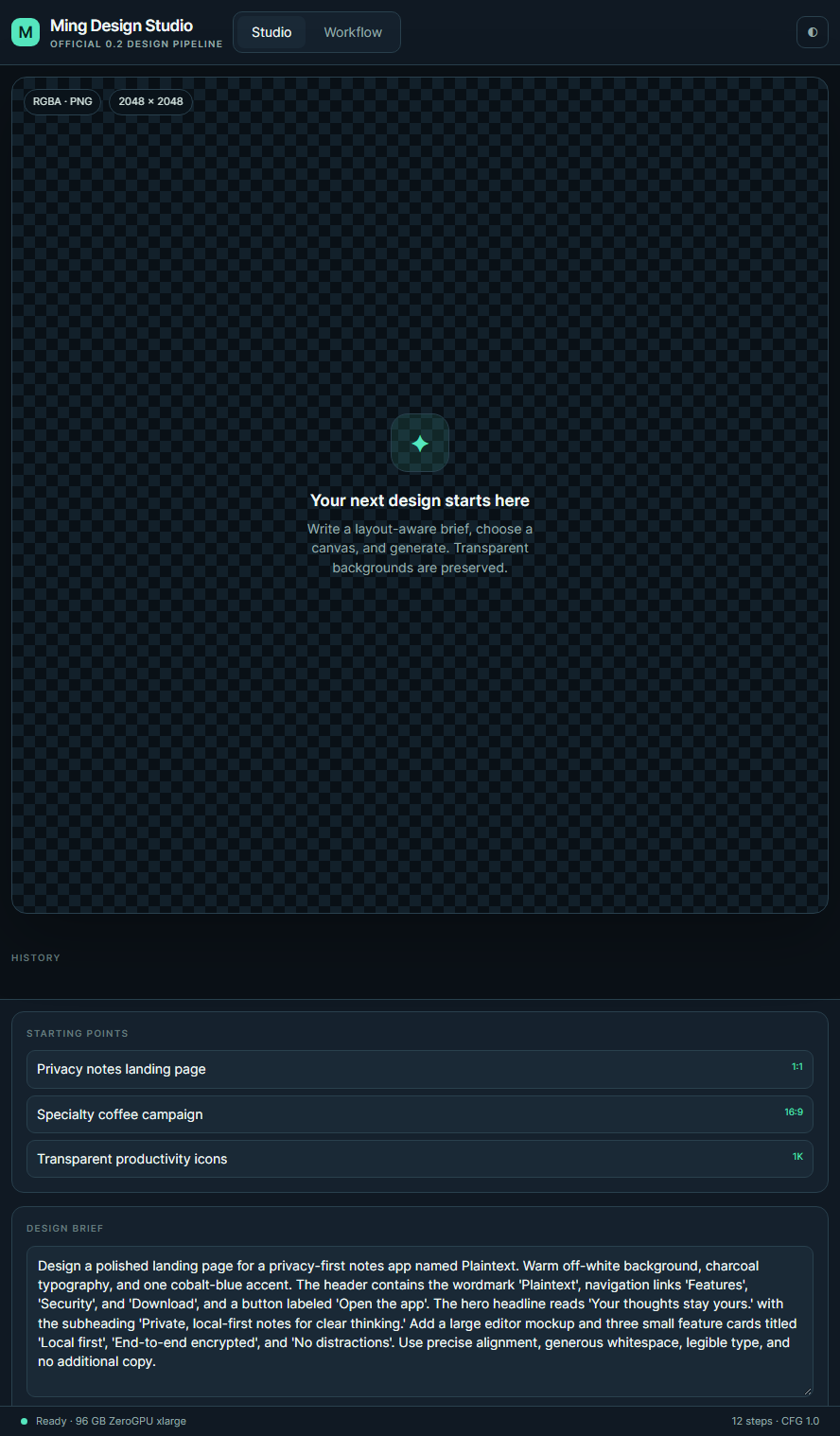
Ming Design Studio UI by InclusionAI
Hardware, VRAM, and License Matrix
Ming-Image-0.2-Design is licensed under MIT, giving commercial studios, agencies, and independent filmmakers full rights to deploy and fine tune the weights.
| Deployment Profile | Target Resolution | Precision | Validated VRAM | License |
|---|---|---|---|---|
| Official Reference | 2048 x 2048 / 2560 x 1440 (16:9) |
BF16 | 80 GiB (A100 / H100) | MIT |
| Fast Square Preview | 1024 x 1024 |
BF16 | 24 GB to 48 GB (with offload) | MIT |
| vLLM-Omni Server | 2048-level aspect buckets |
BF16 | Single 80 GiB CUDA GPU | MIT |
Parameter Reference
Passing --width and --height together lets the inference script select the closest 1024 or 2048 level aspect ratio bucket automatically.
| Parameter | Default / Recommended | Notes |
|---|---|---|
--width / --height |
2048 x 2048 |
Supports 2560 x 1440 (16:9), 2432 x 1824 (4:3), and 1664 x 2496 (2:3) |
| Sampling Steps | 12 |
Fast convergence with distilled guidance |
| CFG Scale | 1.0 |
Do not raise above 1.0 for standard distilled runs |
| Precision | BF16 |
Native training precision for sharp text strokes |
| Prompt Format | Natural text or JSON | Structured JSON prompts improve multi element graphic hierarchy |
Local Python and CLI Setup
Clone the official InclusionAI repository to run text-to-image generation from the command line or serve the model with vLLM-Omni.
git clone https://github.com/inclusionAI/Ming-Image
cd Ming-Image
pip install -r requirements.txt
Run a 16:9 production title card or set screen graphic at 2K resolution:
python infer.py \
  --model inclusionAI/Ming-Image-0.2-Design \
  --task text-to-image \
  --prompt "Widescreen sci fi spacecraft telemetry HUD on a transparent background. Top left header 'ORBITAL APPROACH 04', crisp monospace readouts, amber warning bar 'HULL TEMP 412K', clean vector lines, render all text exactly as written." \
  --width 2560 --height 1440 \
  --output-dir outputs/hud_plate
For complex posters or pitch decks, pass a structured JSON layout file instead of a plain text string:
python infer.py \
  --model inclusionAI/Ming-Image-0.2-Design \
  --task text-to-image \
  --prompt assets/t2i_four_seasons_cabin_prompt.json \
  --width 2048 --height 2048 \
  --output-dir outputs/cabin_board
Filmmaker Production Playbook
Art departments spend hours building diegetic screens, storefront signs, festival posters, and pitch deck key art where misspelled text breaks immersion. Ming-Image-0.2-Design solves that bottleneck by combining accurate multi line typography with native transparent RGBA output.
Generate futuristic monitor overlays, newspaper front pages, or lower third title graphics at 2560 x 1440 and drop the transparent PNG straight into DaVinci Resolve or After Effects without running a separate background remover. Because the model also excels at spatial interior renderings, production designers can draft architectural mood boards in 16:9 and feed those stills into the AI text-to-image page or animate them on the image-to-video page.
Known Limitations and FAQ
Why does the validated hardware spec list 80 GiB VRAM for a 6B DiT?
Native 2048 x 2048 and 2560 x 1440 attention maps plus the companion text encoder consume substantial activation memory in unquantized BF16. Switching to 1024 x 1024 or enabling CPU offloading lowers the peak footprint for workstation GPUs.
Can I use Ming-Image-0.2-Design outputs in commercial films and trailers? Yes. The model weights and repository are published under the permissive MIT license with no revenue cap or royalty requirement.
How does it differ from MOSS-Image or BRIA FIBO 2.0? Ming-Image-0.2-Design pairs high leaderboard aesthetics with native RGBA transparency and 12 step inference, whereas MOSS-Image focuses on spatial bounding box layout prompts and BRIA FIBO 2.0 focuses on licensed JSON editing pipelines.
Related Reading
- MOSS-Image: Open Source Layout Control Image AI
- BRIA FIBO 2.0 Edit: Open Source JSON Image Editing
- Kromoss: Open Source 1024 px Concept Art Image AI
- FLUX.3 Klein: Open Weights Multi Reference Image AI
- Compare cloud generators on the AI text-to-image page.

Sources
Continue Reading


Video & LipSync
- Video Generator
- Text to Video
- Image to Video
- Start-End Frame to Video
- Draw to Video
- Motion Control
- Video Enhancer
- Video Upscaler
- Video Extend
- Video to Video LipSync
- Audio to Video LipSync
- Image to Video LipSync
- Video FaceSwap
- Seedance 2.5
- WAN 3.0
- Seedance 2
- FLUX 3
- Minimax H3
- Vidu Q3 Pro
- Grok Imagine Video 1.5
- Gemini Omni
- Google Veo 3.1
- Kling 3.0 Pro
- Luma Ray 3.2
- LTX 2.3
- Happy Horse 1.1
- Kling 3.0 Motion
- ByteDance Upscaler
- InfiniteTalk
- InsightFace
Image & Edit
- AI Character
- AI Actor
- Art Generator
- Text to Image
- Image to Image
- LoRA Image to Image
- Draw to Edit
- Image LoRA Training
- Remove Background
- Image Enhancer
- MidJourney 8.0
- Krea 2
- OpenAI GPT Image 2.0
- Nano Banana Pro Ultra
- Nano Banana 2 Lite
- Nano Banana Pro
- Minimax Image
- Clarity Pro
- Z-Image Turbo LoRA
- Krea 2 Turbo LoRA
- Z-Image LoRA Trainer
- Qwen Image LoRA Trainer
- Background Erase Network 2 (BEN2)