

Baihan Yang et al., PixelMatte (Apache 2.0)
Share this post:
PixelMatte: Open Source Pixel Space Image Matting
Researchers from UC San Diego and collaborating labs released PixelMatte (WhiteYC/PixelMatte, arXiv:2611.34929) on November 27, 2026 under the Apache 2.0 license. Instead of compressing images through a lossy latent VAE, PixelMatte predicts high resolution alpha mattes directly in pixel space in a single network forward pass. You can test PixelMatte free in the embedded browser demo below with zero login.
Studio availability. Try the public Hugging Face demo below; PixelMatte is not part of a paid AI FILMS Studio plan (use BEN2 Background Remover in the image workspace for example instead).
Try PixelMatte Live
Upload a still frame or click any benchmark photo below, generate a quick trimap by clicking the foreground subject (or upload your own custom trimap), and press Run to download a 16 bit alpha matte and RGBA cutout.
Architecture and Technical Design
Latent diffusion matting methods suffer from a structural flaw. Passing an RGB frame and trimap through an 8x downsampling VAE blurs fine hair strands, spiderwebs, veil fabrics, and semi transparent glass edges before the transformer even sees them. PixelMatte eliminates the VAE and text encoder entirely by adapting pixel space diffusion transformer backbones (HiDream-O1-Image at 8B parameters and PRX at 7B parameters) for single step alpha prediction.
Two lightweight modules complete the architecture. LayerShift applies a learned per layer token shift focused on the unknown trimap region so the transformer concentrates capacity on boundary transitions. A compact High-Pass Refiner then operates at full native pixel resolution to sharpen hair and translucent filaments.
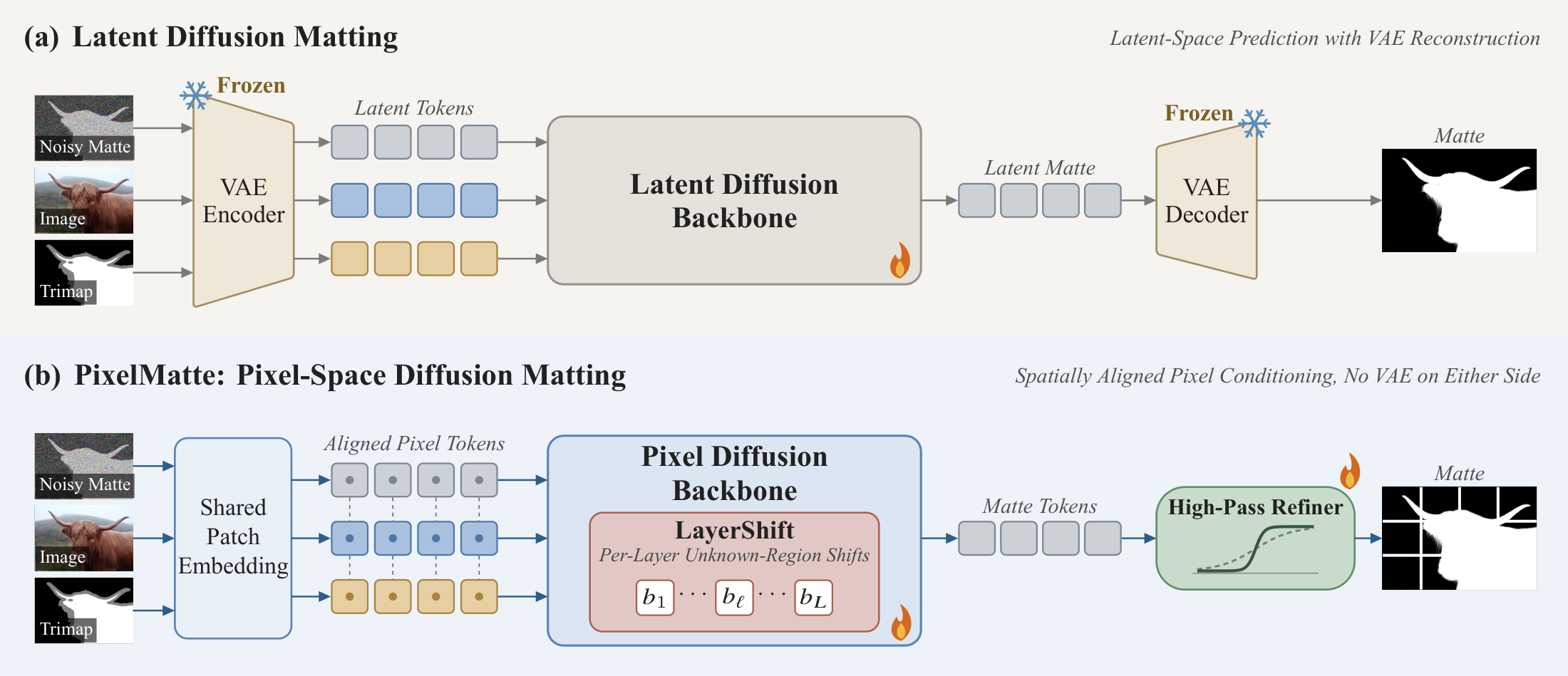
Architecture diagram by Baihan Yang et al. (Apache 2.0)
Each checkpoint bundles the pixel space DiT backbone, LayerShift adapters, and the High-Pass Refiner inside a single BF16 `model.safetensors` file. Because no text encoder or VAE is loaded, inference runs cleanly in one deterministic step.
Pixels marked `0` (definite background) or `255` (definite foreground) in the input trimap remain locked at `0.0` and `1.0`, while the model resolves the unknown gray band (`128`) with continuous float32 precision.
On four standard matting benchmarks (P3M-500-NP, AM-2K, AIM-500, and RenderMatte-2K), PixelMatte preserves delicate fur, translucent netting, and backlit foliage that collapse under latent space matting baselines.
The demo also exports 16 bit alpha PNGs alongside premultiplied RGBA cutouts, giving compositors clean edge values for linear VFX workflows.
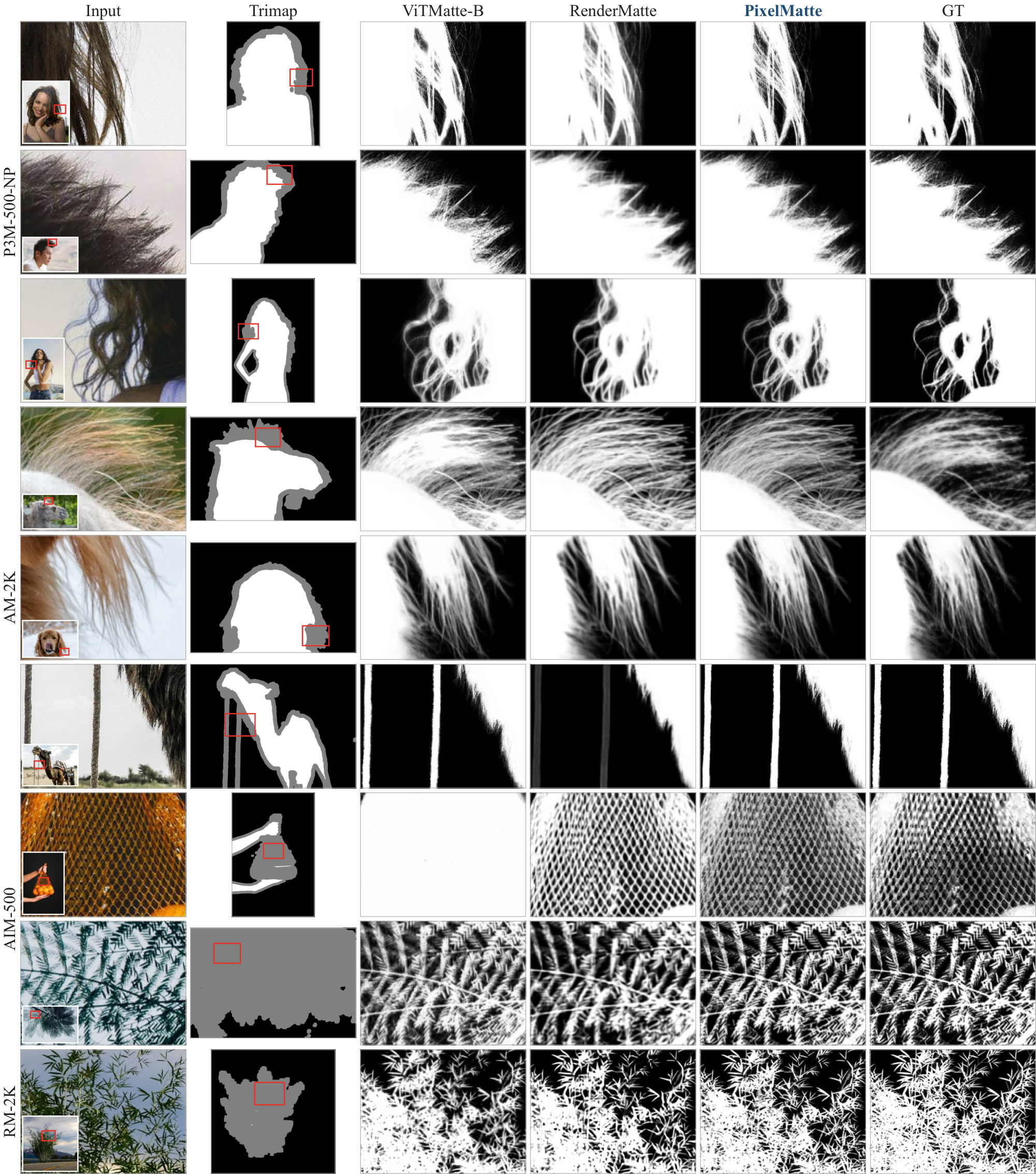
Qualitative results by PixelMatte authors (Apache 2.0)
Hardware, VRAM, and License Matrix
Both official checkpoints live in WhiteYC/PixelMatte under Apache 2.0, with the HiDream-8B backbone code retaining its permissive MIT license.
| Checkpoint | Backbone | Native Short Side | Precision | Peak VRAM | License |
|---|---|---|---|---|---|
| PixelMatte HiDream-8B | HiDream-O1-Image | 2048 px |
BF16 | ~18 GB (2048 x 2048) |
Apache 2.0 / MIT |
| PixelMatte PRX-7B | Photoroom PRX | 1024 px |
BF16 | ~16 GB (1024 x 1024) |
Apache 2.0 |
Parameter Reference
PixelMatte requires only a source RGB image and a matching single channel trimap.
| Parameter | Default / Range | Technical Notes |
|---|---|---|
--subfolder |
HiDream-8B or PRX-7B |
Choose HiDream-8B for 2K hero plates and PRX-7B for 16 GB GPUs |
--trimap |
Single channel PNG | 0 = background, 255 = foreground, 128 (or 1 to 254) = unknown band |
--seed |
42 (integer) |
Controls initial noise in the single evaluation pass |
| Output Format | Float32 [0, 1] / 16 bit PNG |
Matches exact original photo width and height |
Local Python and CLI Setup
Tested with Python 3.12, PyTorch 2.10, and CUDA 12.8. Clone the official repository and install dependencies:
git clone https://github.com/White-YC/pixelmatte
cd pixelmatte
pip install -r requirements.txt
Run single image or batch folder matting from the CLI:
# Single hero plate
python infer.py \
  --model WhiteYC/PixelMatte \
  --subfolder HiDream-8B \
  --image hero_still.jpg \
  --trimap hero_trimap.png \
  --output hero_alpha.png

# Batch process an image sequence
python infer.py \
  --model WhiteYC/PixelMatte \
  --subfolder HiDream-8B \
  --image plates/ \
  --trimap trimaps/ \
  --output mattes/
Or integrate PixelMattePipeline directly inside a Python compositing script:
from PIL import Image
from pixelmatte import PixelMattePipeline

pipe = PixelMattePipeline.from_pretrained("WhiteYC/PixelMatte", subfolder="HiDream-8B")
alpha = pipe(Image.open("hero_still.jpg"), Image.open("hero_trimap.png"))
Filmmaker Production Playbook
PixelMatte shines on hero key art, matte painting extensions, and locked off camera plates where binary segmentation masks leave chunky stair step edges around windblown hair or glass props. Because HiDream-8B runs in ~18 GB of VRAM at 2048 x 2048 in a single forward pass, an RTX 4090 or RTX 3090 can batch extract clean alpha passes for storyboard plates and promotional stills locally.
For best compositing results, paint a tight trimap rather than relying purely on a coarse automatic mask. Keep the gray unknown band narrow around clean hard edges like jackets or props, and widen the band generously around wispy hair, motion blur, or translucent smoke. Pair extracted cutouts with cloud background generation on the AI background remover page or animate the isolated character on the image-to-video page.
Known Limitations and FAQ
Does PixelMatte work without a trimap? PixelMatte always takes a trimap as input. The embedded Space uses SAM to create a quick trimap from foreground clicks for convenience, but hand painted trimaps yield noticeably cleaner results on complex transparent edges.
Can PixelMatte process video directly? It is an image matting model without temporal cross frame attention. You can run it per frame on locked off VFX plates with matching trimap sequences, or use dedicated video matting models like LTX-2.5 Alpha Gen and MatAnyone 2 for moving footage.
Why does PixelMatte need 16 GB to 18 GB VRAM?
Processing full 2048 x 2048 pixel space tokens through an 8B transformer in BF16 keeps memory around 18 GB. Switching to PRX-7B trims the footprint to ~16 GB for 1024 px stills.
Related Reading
- LTX-2.5 Alpha Gen: Open Source Video Alpha Matting
- BRIA RMBG 3.0: Open Source VFX Background Removal
- BiRefNet, Real-ESRGAN and SwinIR: Open Source VFX Matting
- CorridorKey 2.0: Open Source Green Screen VFX Keying
- Try instant cloud cutouts on the AI background remover page.

Sources
Continue Reading


Video & LipSync
- Video Generator
- Text to Video
- Image to Video
- Start-End Frame to Video
- Draw to Video
- Motion Control
- Video Enhancer
- Video Upscaler
- Video Extend
- Video to Video LipSync
- Audio to Video LipSync
- Image to Video LipSync
- Video FaceSwap
- Seedance 2.5
- WAN 3.0
- Seedance 2
- FLUX 3
- Minimax H3
- Vidu Q3 Pro
- Grok Imagine Video 1.5
- Gemini Omni
- Google Veo 3.1
- Kling 3.0 Pro
- Luma Ray 3.2
- LTX 2.3
- Happy Horse 1.1
- Kling 3.0 Motion
- ByteDance Upscaler
- InfiniteTalk
- InsightFace
Image & Edit
- AI Character
- AI Actor
- Art Generator
- Text to Image
- Image to Image
- LoRA Image to Image
- Draw to Edit
- Image LoRA Training
- Remove Background
- Image Enhancer
- MidJourney 8.0
- Krea 2
- OpenAI GPT Image 2.0
- Nano Banana Pro Ultra
- Nano Banana 2 Lite
- Nano Banana Pro
- Minimax Image
- Clarity Pro
- Z-Image Turbo LoRA
- Krea 2 Turbo LoRA
- Z-Image LoRA Trainer
- Qwen Image LoRA Trainer
- Background Erase Network 2 (BEN2)