
SkyReels-A2 & Phantom: Open Source Character Video AI

Lijie Liu et al., ByteDance Intelligent Creation (arXiv:2502.11079, Apache 2.0)
Share this post:
SkyReels-A2 & Phantom: Open Source Character Video AI
Phantom (Subject-Consistent Video Generation via Cross Modal Alignment, arXiv:2502.11079, Apache 2.0) from ByteDance Intelligent Creation and SkyReels-A2 (Compose Anything in Video Diffusion Transformers, arXiv:2504.02436) from Skywork AI are two open source multi reference video generation frameworks built on Wan 2.1. Both models let filmmakers supply separate reference photographs for one or more actors, props, wardrobe items, and background locations and synthesize new 480p and 720p narrative shots that preserve facial identity and garment textures without copy paste stiffness.
Studio availability. Phantom and SkyReels-A2 are not available in AI FILMS Studio. This article covers public research releases. To generate consistent characters and animate reference plates in the Studio, see the models listed on the Character Generator and Image to Video pages.
ByteDance Phantom multi subject reference to video generation preserving actor identity and wardrobe
SkyReels-A2 Elements to Video composing character, object, and environment references into a unified shot
Solving the Copy Paste Effect in Subject to Video Generation
Early subject to video adapters trained on single video clips extract a reference frame from the same video they reconstruct during training. Because the reference image matches the lighting, pose, and camera angle of the target clip, the diffusion model learns a shortcut that copies the static reference pose into the output video, causing frozen facial expressions and rigid lighting.
Phantom breaks that shortcut through a cross modal alignment pipeline (Phantom-Data) that pairs cross video identity references with joint text, image, and video self attention inside Wan2.1-1.3B and Wan2.1-14B.
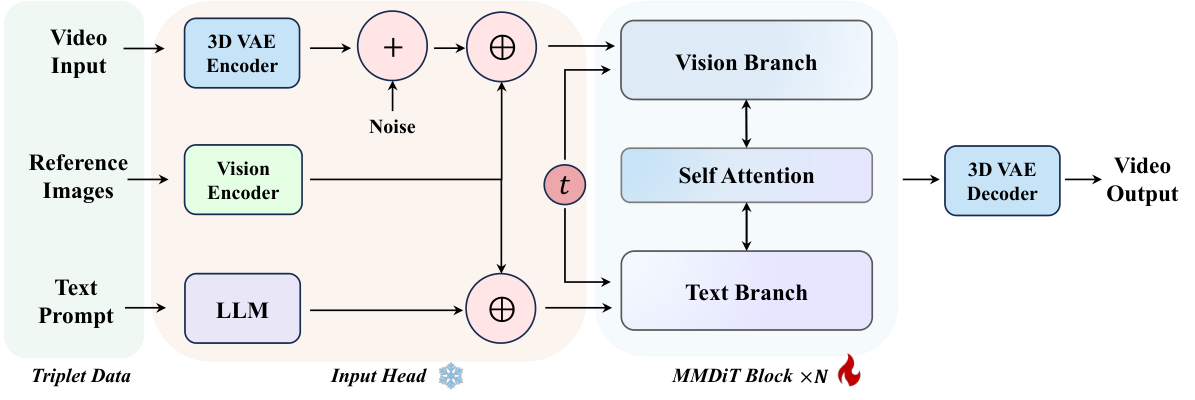
Phantom extracts both 3D VAE latent features and high level vision language semantics from up to four reference images. Credit: Lijie Liu et al., ByteDance (Apache 2.0).
Phantom encodes each reference cutout through two parallel branches. The 3D video VAE preserves fine surface textures, logos, and facial structure, while a vision language encoder captures semantic identity across changing poses.
Both token streams concatenate with the noisy video latents inside the Wan 2.1 Diffusion Transformer, allowing characters to turn their heads, change expressions, and interact with props under new studio lighting.
How SkyReels-A2 Composes Characters, Props & Environments (A2-Bench)
While Phantom specializes in single and multi subject identity preservation across both 1.3B and 14B checkpoints, SkyReels-A2 structures multi element composition explicitly into three filming categories: Character, Object/Prop, and Background Environment.
SkyReels-A2 encodes segmented foreground references through dual spatial (`3D VAE`) and semantic (`CLIP`) branches, and injects the composite feature tokens into every DiT block via dedicated cross attention and concatenation paths.
Alongside the model weights (`Skywork/SkyReels-A2-Wan-14B-480P` and `720P`), the team open sourced A2-Bench (`Skywork/A2-Bench`), an evaluation suite measuring identity fidelity, background preservation, and prompt adherence across multi element film prompts.
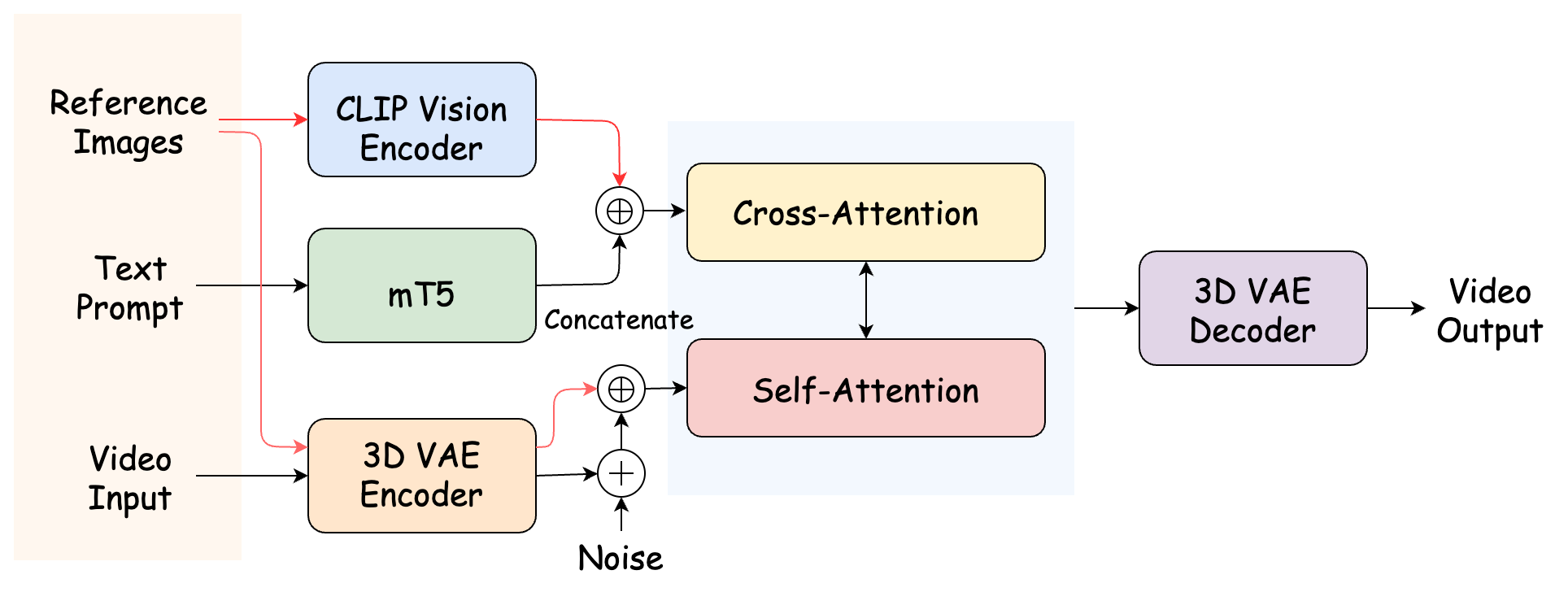
SkyReels-A2 Elements to Video joint spatial and semantic composition architecture. Credit: Skywork AI (arXiv:2504.02436).
Hardware, VRAM & Checkpoint Matrix
| Checkpoint | Base Backbone | Reference Capacity & Resolution | Hardware & VRAM | License |
|---|---|---|---|---|
Phantom-Wan-1.3B |
Wan2.1-T2V-1.3B |
1 to 4 reference images (832x480, 81 frames) |
10 GB to 16 GB VRAM (consumer RTX GPUs) | Apache 2.0 |
Phantom-Wan-14B |
Wan2.1-T2V-14B |
1 to 4 reference images (832x480 & 1280x720, 81 frames) |
24 GB VRAM (CPU offload) to 80 GB VRAM (multi GPU Ulysses/Ring) | Apache 2.0 |
SkyReels-A2-Wan-14B |
Wan2.1-14B (480P & 720P variants) |
Character + Object + Background composition (81 frames) | 28 GB to 80 GB VRAM (supports --offload) |
Open Weights (Skywork/SkyReels-A2) |
Running Multi Reference Character Shots Locally
Clone Phantom-video/Phantom, download the base Wan2.1-T2V-1.3B (or 14B) model plus the bytedance-research/Phantom weights, and pass up to four character, wardrobe, and prop reference images via --ref_image.
git clone https://github.com/Phantom-video/Phantom.git
cd Phantom
pip install -r requirements.txt

huggingface-cli download Wan-AI/Wan2.1-T2V-1.3B --local-dir ./Wan2.1-T2V-1.3B
huggingface-cli download bytedance-research/Phantom --local-dir ./Phantom-ckpts

# Multi-reference generation combining an actor headshot, a prop, and a jacket reference
python generate.py \
  --task s2v-1.3B \
  --size 832*480 \
  --ckpt_dir ./Wan2.1-T2V-1.3B \
  --phantom_ckpt ./Phantom-ckpts/Phantom-Wan-1.3B.pth \
  --ref_image "examples/ref1_actor.png,examples/ref2_jacket.png,examples/ref3_prop.png" \
  --prompt "The woman in the leather jacket examines the brass compass inside a dimly lit train car." \
  --base_seed 42
For multi GPU 14B production rendering without quality loss, enable xfuser sequence parallelism across 4 or 8 GPUs with --dit_fsdp --t5_fsdp --ulysses_size 4 --ring_size 2.
Multi Shot Character Continuity & AI FILMS Studio Workflows
In narrative filmmaking, maintaining a lead actor's face, costume, and hero prop across a 12 shot dialogue scene is the primary bottleneck of text-to-video generation. By locking a character turnaround sheet, a wardrobe plate, and a set background image as reusable reference inputs, Phantom and SkyReels-A2 let directors generate wide, medium, and close up coverage with consistent visual identity.
For related open source character and multi shot guides, read our coverage of HoloCine multi shot narrative generation, MultiShotMaster controllable multi shot video, SkyReels V2 DF 1.3B long video generation, and Viggle Remake and Animate character video recasting.
To create consistent character sheets and animate multi reference scenes directly in the cloud, visit the Character Generator and Image to Video pages, or link character generation and video nodes inside the Nodes Graph Editor.


Sources
- Phantom-video/Phantom Official GitHub Repository (Apache 2.0)
- Phantom Official Project Page (ByteDance Intelligent Creation)
- Phantom: Subject-Consistent Video Generation via Cross Modal Alignment (arXiv:2502.11079)
- bytedance-research/Phantom Checkpoints on Hugging Face
- SkyworkAI/SkyReels-A2 Official GitHub Repository
- SkyReels-A2: Compose Anything in Video Diffusion Transformers (arXiv:2504.02436)
Continue Reading


Video & LipSync
- Video Generator
- Text to Video
- Image to Video
- Start-End Frame to Video
- Draw to Video
- Motion Control
- Video Enhancer
- Video Upscaler
- Video Extend
- Video to Video LipSync
- Audio to Video LipSync
- Image to Video LipSync
- Video FaceSwap
- Seedance 2.5
- WAN 3.0
- Seedance 2
- FLUX 3
- Minimax H3
- Vidu Q3 Pro
- Grok Imagine Video 1.5
- Gemini Omni
- Google Veo 3.1
- Kling 3.0 Pro
- Luma Ray 3.2
- LTX 2.3
- Happy Horse 1.1
- Kling 3.0 Motion
- ByteDance Upscaler
- InfiniteTalk
- InsightFace
Image & Edit
- AI Character
- AI Actor
- Art Generator
- Text to Image
- Image to Image
- LoRA Image to Image
- Draw to Edit
- Image LoRA Training
- Remove Background
- Image Enhancer
- MidJourney 8.0
- Krea 2
- OpenAI GPT Image 2.0
- Nano Banana Pro Ultra
- Nano Banana 2 Lite
- Nano Banana Pro
- Minimax Image
- Clarity Pro
- Z-Image Turbo LoRA
- Krea 2 Turbo LoRA
- Z-Image LoRA Trainer
- Qwen Image LoRA Trainer
- Background Erase Network 2 (BEN2)