

Viggle AI, Viggle Remake & Viggle Animate (MiniMax-H3 Community License)
Share this post:
Viggle Remake & Animate: Open Source Video Recast AI
Viggle Remake (Viggle/Viggle-Remake) and Viggle Animate (Viggle/Viggle-Animate) are open weights video-to-video character replacement and scene restyling models built on MiniMax-H3 and released under the MiniMax-H3 Community License in late 2026. Downloaded more than 252,000 times on Hugging Face, the suite lets filmmakers recast single or multiple performers from reference portraits, swap props and wardrobe, alter time of day or weather, and orchestrate multi shot film remakes through an included Model Context Protocol (MCP) agent across 12 GB to 32 GB consumer GPUs.
Studio availability. Viggle Remake and Viggle Animate are not available in AI FILMS Studio. While MiniMax H3 Text to Video and MiniMax H3 Image to Video are live in the Studio, the Viggle Remake and Viggle Animate checkpoints covered here are separate open weights releases. To animate characters or control motion in the Studio, see the models listed on the Motion Control and Character Generator pages.
Viggle Remake recasting actors, outfits, and lighting 22 ways across a musical dance take (with audio)
Multi character stunt fight recast preserving contact physics, camera motion, and soundtrack
From Single Frame Character Swap to Multi Actor Scene Remake
First generation character swap pipelines require tight per frame body masks and struggle whenever two performers cross paths, occlude each other, or wear outfits with silhouettes that differ from the source actor. Viggle released two complementary open weights models on top of MiniMax-H3 to handle both single character precision and full scene direction.
- Single frame repainted character transfer (
Viggle-Animate). Released on August 31, 2026,Viggle-Animateuses Distribution Matching Distillation (DMD) to propagate a single repainted reference frame across an entire video clip. Artists repaint frame one with a new character or costume, and the distilledMiniMax-H3backbone carries that exact design through fast choreography, high kicks, and camera pans while preserving original audio. - Multi subject and environment direction (
Viggle-Remake). Released on October 22, 2026,Viggle-Remakeremoves the single character restriction. It recasts several people simultaneously from separate portrait references (ref1.png,ref2.png), adds or removes background objects (such as erasing wind turbines or inserting vehicles), and shifts environment weather and lighting at1280x736across up to345 frames(14.3 secondsat24 fps). - Agentic multi shot remakes via MCP.
Viggle-Remakeships with an open sourceMCPserver (viggle-remake-worker) that splits long sequences into shots, edits reference keyframes, dispatches video-to-video jobs to local GPU workers, and reassembles the edited timeline automatically.
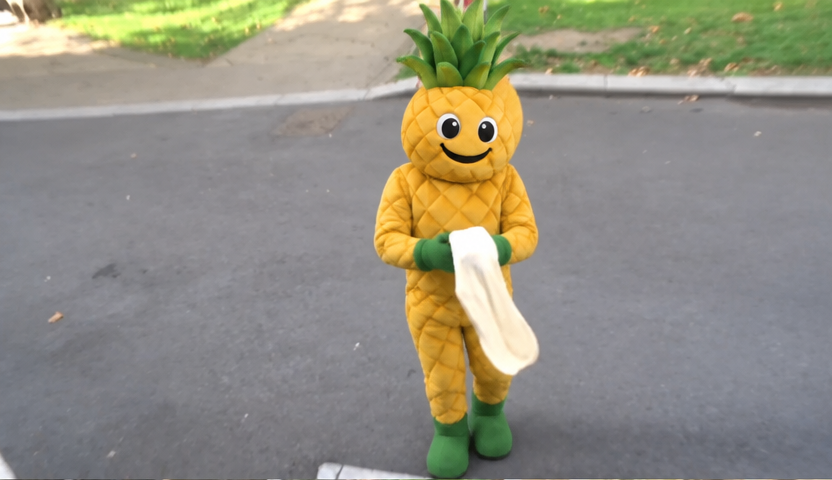
Reference character input for Viggle Remake multi subject replacement. Credit: Viggle/Viggle-Remake.
Because `Viggle-Remake` conditions on reference portraits rather than rigid human skeleton rigs, directors can replace live actors with stylized mascots, animals, or armored sci-fi characters whose body proportions differ significantly from the stunt performer.
The underlying `MiniMax-H3` transformer inpaints disoccluded background areas automatically whenever a thinner character replaces a wider silhouette.
Try Viggle Remake and Viggle Animate Live in the Browser
Both official Viggle Gradio Spaces are live and embeddable below without login. Use the first Space to test Viggle-Remake instruction and reference editing, or scroll to the second Space to test single frame Viggle-Animate character replacement.
In `Viggle-Animate`, pinning the original audio track keeps footsteps, impacts, and spoken lines aligned to the driving video's frame timestamps.
When a filmmaker only wants to swap a lead actor's costume or face while keeping the exact set lighting and camera blocking from rehearsal footage, `Viggle-Animate` completes the pass in a few distilled steps.
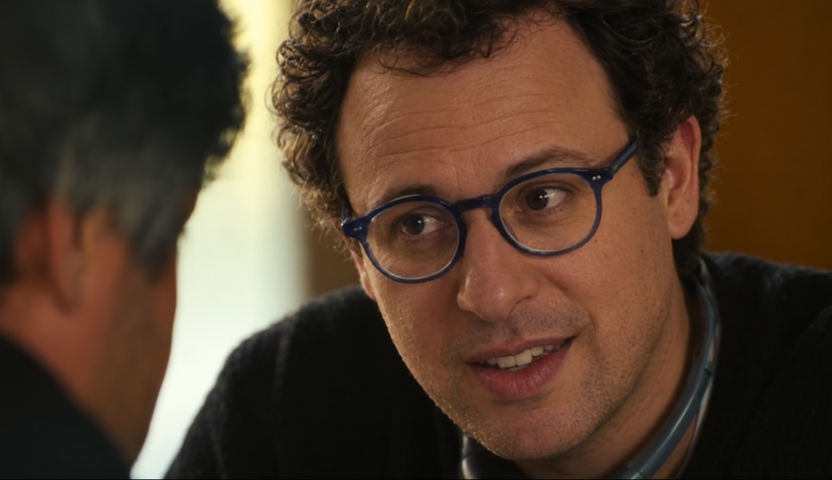
Repainted first frame reference for Viggle Animate DMD video transfer. Credit: Viggle/Viggle-Animate.
Hardware Tiers, Quantization & Resolution Matrix
Viggle-Remake supports four local hardware tiers ranging from 12 GB consumer cards using int8 or GGUF quantization up to 80 GB+ workstation nodes.
| GPU VRAM Tier | Recommended Quantization & Runtime | Maximum Resolution & Frame Count | Agent / MCP Support | License |
|---|---|---|---|---|
| 12 GB to 24 GB VRAM (RTX 3060 / 4090) | int8 or GGUF quantized weights in local node workflows |
720p class, standard 5s (121 frame) clips |
Manual local workflow execution | MiniMax-H3 Community |
| 32 GB VRAM + 60 GB RAM (RTX 5090) | Local worker with memory offloading | 1280x736 up to 345 frames (14.3s) |
Full MCP agent + local worker | MiniMax-H3 Community |
| 80 GB VRAM (A100 / H100) | Native bfloat16 + LoRA (sample.py) |
1280x736 up to 345 frames at full speed |
Full CLI and batch sampling | MiniMax-H3 Community |
| 96 GB+ VRAM (H200 / Blackwell / Multi GPU) | Native bfloat16 + viggle-remake-worker |
Full sequence multi shot agentic remakes | Autonomous MCP server + worker | MiniMax-H3 Community |
Running Viggle Remake Locally via Python CLI
Download Viggle/Viggle-Remake alongside the base MiniMaxAI/MiniMax-H3 weights from Hugging Face and run sample.py with a source video, reference character portraits, and a natural language editing instruction.
# Download Viggle Remake weights and example clips
huggingface-cli download Viggle/Viggle-Remake --local-dir ./Viggle-Remake
cd Viggle-Remake
pip install -r requirements.txt

# Multi-character recast and scene edit on a 1280x736 clip
python sample.py \
  --video examples/inputs/swap-pineapple-mascot/source.mp4 \
  --refs examples/inputs/swap-pineapple-mascot/ref1.png examples/inputs/swap-pineapple-mascot/ref2.png \
  --prompt "Replace the two dancers with the character references, change the street lighting to golden sunset, keep camera movement locked." \
  --height 736 \
  --width 1280 \
  --num_frames 121 \
  --output outputs/recast_sunset.mp4
To remove background structures or add new environmental VFX without changing the actors, omit --refs and pass a direct scene instruction.
# Object removal and weather restyling without character reference portraits
python sample.py \
  --video examples/inputs/edit-remove-turbines/source.mp4 \
  --prompt "Remove the wind turbines from the horizon and turn the sky into a dramatic twilight storm." \
  --height 736 \
  --width 1280 \
  --output outputs/clean_horizon_storm.mp4
Production Playbook for Filmmakers
- Choose
Viggle-AnimatevsViggle-Remakeby shot scope. When you have a locked single actor shot and want exact pixel control over the new costume or face design, paint the first frame carefully in an image editor and feed it toViggle-Animate. When you need to recast two or more actors in a wide shot or alter weather and props simultaneously, useViggle-Remakewith portrait cutouts. - Extend takes up to 345 frames on 32 GB cards. On an RTX 5090 (
32 GBVRAM) with60 GBsystem RAM,Viggle-Remakeprocesses continuous14.3 second(345 frame) takes at1280x736without cutting the scene into 5 second fragments. - Compare with Wan 2.2 and MiniMax-H3 toolchains. Explore how Viggle compares against other open weights character and editing pipelines in our guides on FreeVideo, MiniMax-H3, and Pika-H3-Flex open source video, Wan-Animate-2 character animation and viewpoint control, ReBind and MiVE multi reference video editing, and Wan 2.1 VACE all in one video editing.
To animate character plates, swap faces, or run MiniMax H3 and Kling 3.0 Motion Control in the cloud without local setup, open the Motion Control and Image to Video pages, or chain character and video nodes visually in the Nodes Graph Editor.


Sources
- Viggle/Viggle-Remake Model Repository & Documentation on Hugging Face
- Viggle/Viggle-Animate Model Repository & DMD Guide on Hugging Face
- Viggle/viggle-remake Interactive Gradio Space on Hugging Face
- Viggle/viggle-animate Interactive Gradio Space on Hugging Face
- MiniMaxAI/MiniMax-H3 Base Architecture & Community License
Continue Reading


Video & LipSync
- Video Generator
- Text to Video
- Image to Video
- Start-End Frame to Video
- Draw to Video
- Motion Control
- Video Enhancer
- Video Upscaler
- Video Extend
- Video to Video LipSync
- Audio to Video LipSync
- Image to Video LipSync
- Video FaceSwap
- Seedance 2.5
- WAN 3.0
- Seedance 2
- FLUX 3
- Minimax H3
- Vidu Q3 Pro
- Grok Imagine Video 1.5
- Gemini Omni
- Google Veo 3.1
- Kling 3.0 Pro
- Luma Ray 3.2
- LTX 2.3
- Happy Horse 1.1
- Kling 3.0 Motion
- ByteDance Upscaler
- InfiniteTalk
- InsightFace
Image & Edit
- AI Character
- AI Actor
- Art Generator
- Text to Image
- Image to Image
- LoRA Image to Image
- Draw to Edit
- Image LoRA Training
- Remove Background
- Image Enhancer
- MidJourney 8.0
- Krea 2
- OpenAI GPT Image 2.0
- Nano Banana Pro Ultra
- Nano Banana 2 Lite
- Nano Banana Pro
- Minimax Image
- Clarity Pro
- Z-Image Turbo LoRA
- Krea 2 Turbo LoRA
- Z-Image LoRA Trainer
- Qwen Image LoRA Trainer
- Background Erase Network 2 (BEN2)