

TailSteer authors (Qwen-Image-2.1 TailSteer comparison, arXiv:2611.06741)
Share this post:
TailSteer: Open Source Drift Free Multi Turn Image AI
Iterative art direction breaks most diffusion image editors. Ask a standard model to swap a jacket on turn one, add rain on turn two, adjust background signage on turn three, and by turn ten the actor's face softens, colors shift muddy, and unedited props warp beyond recognition. Qwen-Image-2.1 TailSteer (arXiv:2611.06741), released in November 2026 as a direct drop in checkpoint for Qwen-Image-2.1, solves multi turn drift by steering only the final tail of the denoising trajectory during training. You can test TailSteer free in the embedded browser demo below with zero login.
Studio availability. Try the public Hugging Face demo below; Qwen-Image-2.1 TailSteer is not part of a paid AI FILMS Studio plan (use ByteDance SeedEdit 3.0 Image to Image in the image workspace for example instead).
Try TailSteer Live
Drop a production still or concept frame inside the Endless Edit Studio Hugging Face Space below and stack multiple sequential edits directly in your browser to see how well faces and backgrounds survive ten or more turns.
Architecture and Technical Design
TailSteer changes how an image editor is post trained without adding a single extra module, adapter, or inference step. During training, the method leaves early denoising steps free so the model can synthesize bold new geometry and semantic edits, then applies preservation supervision starting at step 30 of 40 (the trajectory tail) using unchanged source regions from single edit rollouts as the anchor.
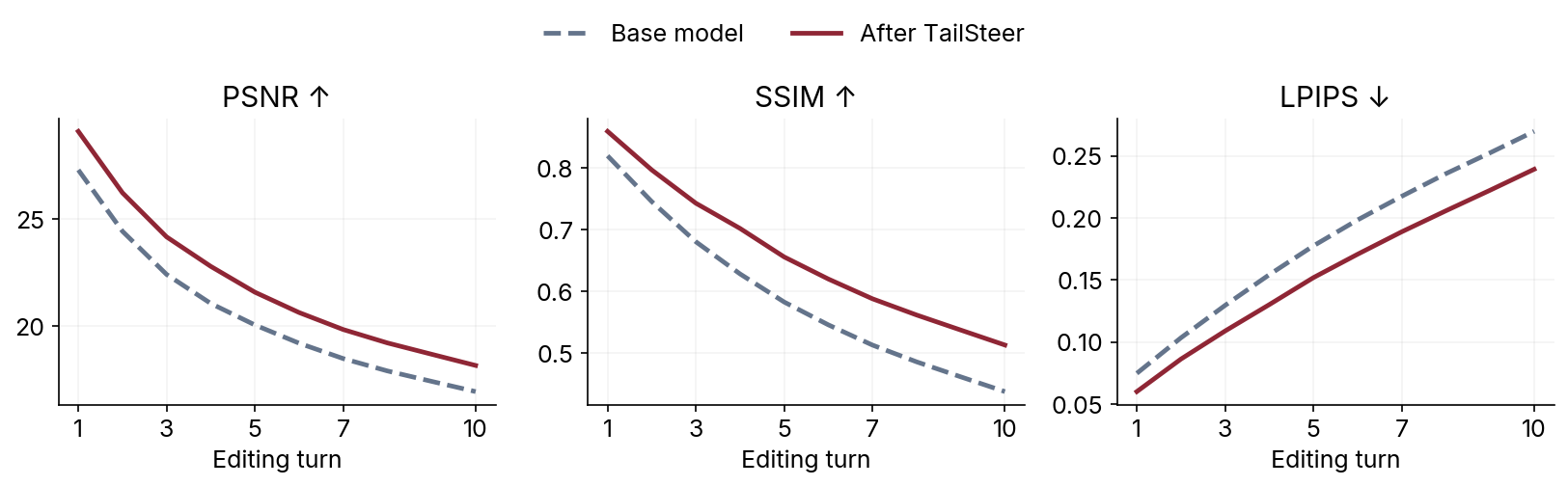
Ten turn preservation curves on Add and Preserve by TailSteer authors (arXiv:2611.06741)
On the 100 image Add and Preserve benchmark at turn 10, TailSteer lifts unedited region fidelity from 16.93 dB to 18.15 dB PSNR (+1.22 dB), boosts SSIM from 0.438 to 0.513, and cuts LPIPS perceptual drift by 11.5% (from 0.270 down to 0.239) while keeping Cumulative Object Accuracy virtually unchanged (66.94% vs 67.36%).
Crucially, because the published 2,000 update BF16 checkpoint keeps the exact Qwen-Image-2.1 architecture and 7.12B transformer parameter layout, filmmakers do not need binary preservation masks or model switching at inference time.
Single turn quality stays tightly aligned with the base checkpoint across standard image benchmarks. On ImgEdit TailSteer scores 4.42 versus 4.40 for base Qwen-Image-2.1, on BizGen ES it reaches 57.38% versus 57.03%, and on GEdit EN it holds 8.04 versus 8.11, though accuracy on RISE reasoning edits dips slightly (18.06% vs 20.56%).
In twenty turn stage tests where each output feeds back as the next input, TailSteer preserves facial identity, garment weave, and background architectural lines long after the base model degrades into oversharpened plastic textures.
Multi image conditioning (such as combining a character portrait with a pose reference) works through the exact same pipeline interface, making sequential wardrobe, lighting, and prop notes practical on a single hero plate.
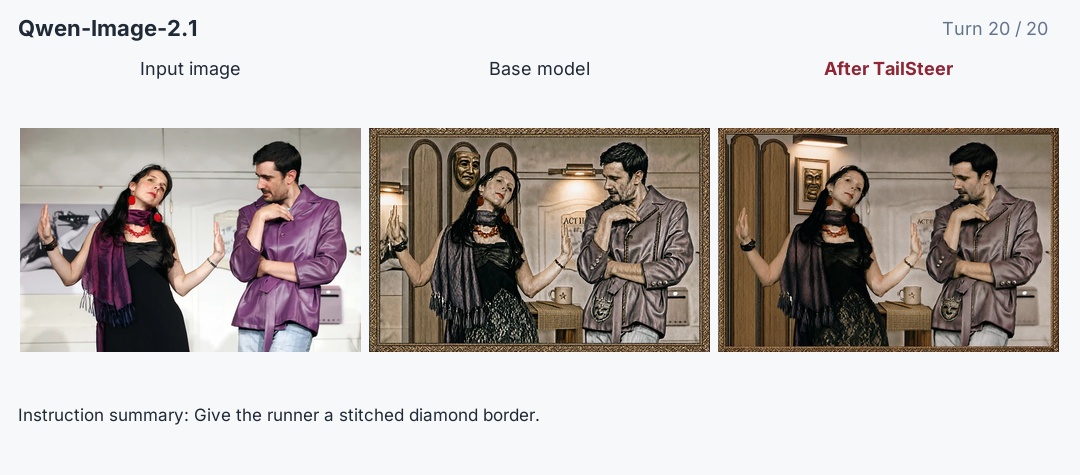
Final frame after 20 sequential edits from TailSteer Project Page
Hardware, VRAM, and License Matrix
| Component / Metric | Specification | Notes |
|---|---|---|
| Checkpoint ID | Lyricccco/Qwen-Image-2.1-TailSteer |
Complete BF16 weights (7.12B BF16 safetensors parameters) |
| Base Architecture | Qwen/Qwen-Image-2.1 |
Identical Diffusers pipeline, text encoder, and VAE |
| Precision Validated | bfloat16 |
Full BF16 validated; quantized consumer builds not yet officially validated |
| Recommended Hardware | 24 GB to 48 GB NVIDIA CUDA GPU | Matches base Qwen-Image-2.1 BF16 memory envelope |
| Benchmark Gains (Turn 10) | +1.22 dB PSNR, +0.075 SSIM, -11.5% LPIPS |
Measured across 100 images on Lyricccco/Add-and-Preserve |
| License | Qwen Research License Agreement | Non commercial research and evaluation; check official LICENSE and NOTICE for commercial rights |
Parameter Reference
| Parameter | Default / Recommended | Production Impact |
|---|---|---|
num_inference_steps |
40 |
Matches the original Qwen-Image-2.1 schedule and 30/40 training onset |
true_cfg_scale |
1.0 |
Standard guidance setting for iterative editing runs |
use_kv_cache |
True |
Accelerates attention computation during multi turn image editing |
torch_dtype |
torch.bfloat16 |
Required precision for parity with published benchmark numbers |
--policies (CLI suite) |
tailsteer |
Runs the evaluation and multi turn benchmark runner |
Local Python and CLI Setup
Swap the Hugging Face model ID in any existing QwenImage21Pipeline script. Pass each edited image straight back into the pipeline for the next art direction round without generating masks.
import torch
from PIL import Image
from diffusers import QwenImage21Pipeline

pipe = QwenImage21Pipeline.from_pretrained(
    "Lyricccco/Qwen-Image-2.1-TailSteer",
    torch_dtype=torch.bfloat16,
).to("cuda")

img = Image.open("hero_plate.png").convert("RGB")
edits = [
    "Change the actor's jacket to weathered navy canvas.",
    "Add soft neon cyan rim light on the left cheek.",
    "Place a vintage brass desk lamp in the background corner.",
]

for idx, instruction in enumerate(edits, start=1):
    img = pipe(
        image=img,
        prompt=instruction,
        num_inference_steps=40,
        true_cfg_scale=1.0,
        use_kv_cache=True,
        generator=torch.Generator(device="cuda").manual_seed(42 + idx),
    ).images[0]
    img.save(f"turn_{idx:02d}.png")
To reproduce the 20 turn cafe evaluation suite from the TailSteer codebase:
tailsteer infer --backbone qwen-image-2.1 \
  --checkpoint Lyricccco/Qwen-Image-2.1-TailSteer \
  --policies tailsteer --inference-suite cafe-20turn --gpus 1
Filmmaker Production Playbook
Run multi round client notes without re compositing
Directors rarely approve a matte painting or concept still in one pass. Stacking five to fifteen targeted instructions inside TailSteer keeps facial likeness and horizon geometry intact without exporting Photoshop layer masks after every note.
Build shot progression storyboards from one locked master frame
Start from one established set photograph, then iteratively open doors, dim practical lamps, add weather, or shift character props across sequential turns. Because background textures do not melt over ten hops, the resulting frames cut cleanly into an animatic.
Respect license boundaries during commercial look dev
Because Qwen-Image-2.1 TailSteer inherits the Qwen Research License, use it for R&D, internal previsualization, and evaluation, and switch to commercially licensed models when rendering final paid deliverables.
Benchmark Comparison Against Base Qwen-Image-2.1
| Evaluation Suite | Base Qwen-Image-2.1 | Qwen-Image-2.1 TailSteer | Key Takeaway |
|---|---|---|---|
| Add and Preserve PSNR at Turn 10 | 16.93 dB |
18.15 dB |
+1.22 dB cleaner unedited pixels |
| Add and Preserve SSIM at Turn 10 | 0.438 |
0.513 |
Higher structural preservation |
| Add and Preserve LPIPS at Turn 10 | 0.270 |
0.239 |
11.5% lower perceptual drift |
| ImgEdit Single Turn Score | 4.40 |
4.42 |
Matches single turn editing quality |
| BizGen ES Score | 57.03% |
57.38% |
Preserves graphic composition accuracy |
Frequently Asked Questions
Does TailSteer require custom Diffusers code or preservation masks?
No. TailSteer ships as a direct drop in BF16 checkpoint for QwenImage21Pipeline. You only replace the model ID and run the standard 40 step schedule with zero binary masks.
Can TailSteer run quantized on smaller consumer GPUs?
The authors validated the published BF16 weights only and note that quantized consumer GPU configurations have not been officially verified for drift parity.
Does TailSteer still handle text-to-image and multi reference editing?
Yes. Text-to-image generation, single turn editing, and multi image conditioning such as person plus pose reference remain intact inside the same weights.
Related Reading
- Compare fast single turn editing in Qwen-Image-2.1 Turbo 8 step 2K image editing.
- Explore wardrobe replacement workflows in Qwen-Image-2.1 Outfit Swap open source costume AI.
- See fast 8 step open weights editing in PrunaAI P-Image-OSS 8 step image editing.
- Edit production stills directly in the cloud on the AI Image to Image Generator page.

Sources
Continue Reading


Video & LipSync
- Video Generator
- Text to Video
- Image to Video
- Start-End Frame to Video
- Draw to Video
- Motion Control
- Video Enhancer
- Video Upscaler
- Video Extend
- Video to Video LipSync
- Audio to Video LipSync
- Image to Video LipSync
- Video FaceSwap
- Seedance 2.5
- WAN 3.0
- Seedance 2
- FLUX 3
- Minimax H3
- Vidu Q3 Pro
- Grok Imagine Video 1.5
- Gemini Omni
- Google Veo 3.1
- Kling 3.0 Pro
- Luma Ray 3.2
- LTX 2.3
- Happy Horse 1.1
- Kling 3.0 Motion
- ByteDance Upscaler
- InfiniteTalk
- InsightFace
Image & Edit
- AI Character
- AI Actor
- Art Generator
- Text to Image
- Image to Image
- LoRA Image to Image
- Draw to Edit
- Image LoRA Training
- Remove Background
- Image Enhancer
- MidJourney 8.0
- Krea 2
- OpenAI GPT Image 2.0
- Nano Banana Pro Ultra
- Nano Banana 2 Lite
- Nano Banana Pro
- Minimax Image
- Clarity Pro
- Z-Image Turbo LoRA
- Krea 2 Turbo LoRA
- Z-Image LoRA Trainer
- Qwen Image LoRA Trainer
- Background Erase Network 2 (BEN2)