

PrunaAI — P-Image-OSS 8-step open source image generation and editing
Share this post:
PrunaAI P-Image-OSS: Open Source 8-Step Image Editing
P-Image-OSS (PrunaAI/P-Image-OSS, late 2026) is PrunaAI's fast open source text to image and multi reference editing model built on the MiniMax H3 image architecture. Engineered for production speed without sacrificing detail, P-Image-OSS renders sharp up to 8 megapixel frames in 8 sampling steps with zero CFG overhead (CFG 1.0), accepts up to 8 reference images in one editing call, and pairs natively with a built in Qwen prompt upsampler and standard Hugging Face diffusers pipelines.
Studio availability. Try the public Hugging Face demo below; P-Image-OSS is not part of a paid AI FILMS Studio plan (use FLUX 2 or Seedream 5.0 Pro in the image workspace for example instead).
Why Filmmakers Use P-Image-OSS for Rapid Look Development
When an art director sits beside a cinematographer during pre production, waiting 35 seconds per storyboard revision kills creative momentum. P-Image-OSS compresses high resolution multi reference image synthesis into interactive turnaround times:
- 8 step CFG free inference. Eliminating classifier free guidance doubles per step speed while preventing the overcooked contrast and plastic skin tones common in high CFG runs.
- Up to 8 megapixel native aspect ratios. Supports widescreen
2.39:1anamorphic frames,16:9broadcast storyboards, and9:16vertical social teasers cleanly across a wide resolution ladder without cropping artifacts. - Up to 8 reference images for locked continuity. Combine cast portraits, wardrobe swatches, prop plates, and color keys inside one call to generate consistent shot lists ready for downstream image to video animation.
- Built in Qwen prompt upsampler. Short filmmaker shorthand expands cleanly into rich camera, lens, and lighting descriptions before the DiT runs.
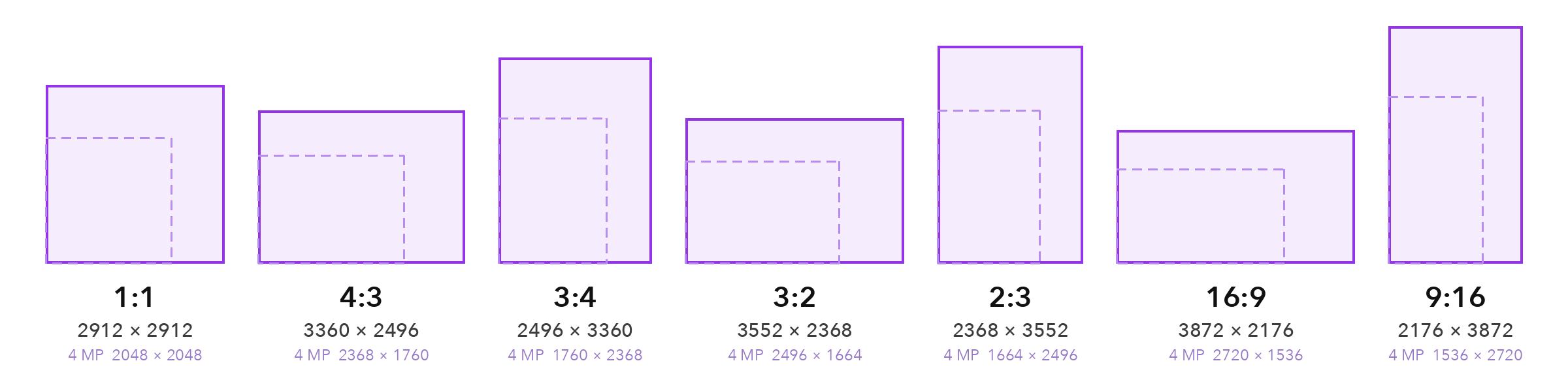
Supported aspect ratios and native resolution ladder up to 8 MP in P-Image-OSS. Credit: PrunaAI.
Native multi aspect support lets production designers render ultra wide establishing plates and tight vertical character sheets from the exact same checkpoint without stretching faces or warping architecture.
Each 8 step render finishes fast enough for live director review sessions on a single workstation GPU.
Try P-Image-OSS Live in the Browser
You can test P-Image-OSS directly in PrunaAI's official Hugging Face Space below (prunaai-p-image-oss.hf.space).
Style versatility spans photorealistic 35mm cinema stills, architectural matte paintings, graphic novel storyboards, and clean typography for on set props and signage.
Because P-Image-OSS ships with native Hugging Face Diffusers support, technical directors can automate batch storyboard rendering directly from Python scripts.
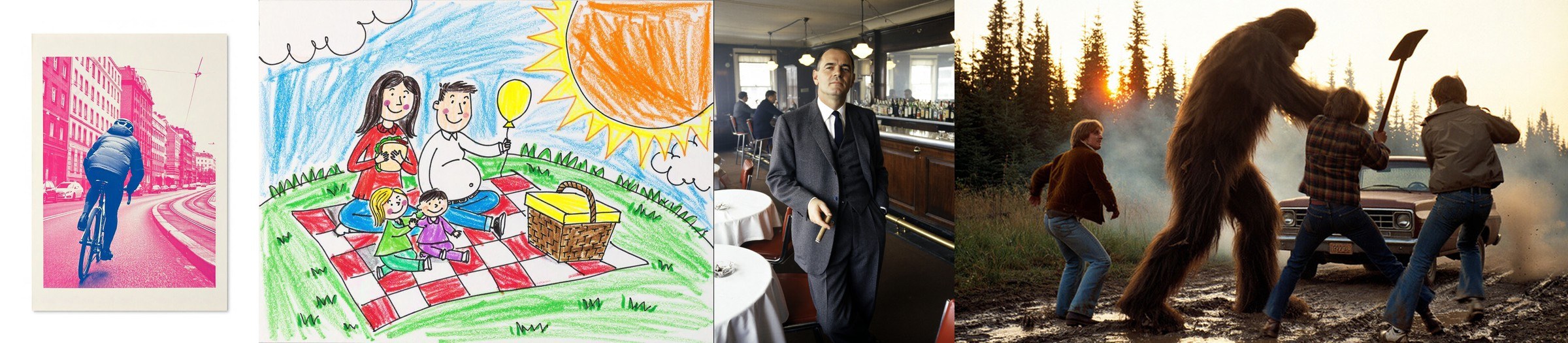
Style range across cinema photography, concept illustration, and graphic layouts in P-Image-OSS. Credit: PrunaAI.
Hardware and Performance Matrix
| Setup | Step Count | Guidance | Max Native Resolution | Reference Images |
|---|---|---|---|---|
P-Image-OSS BF16 (diffusers) |
8 steps |
CFG 1.0 (CFG free) |
Up to 8 MP |
Up to 8 images |
| P-Image-OSS Quantized / Offload | 8 steps |
CFG 1.0 (CFG free) |
1024px – 2048px |
Up to 8 images |
Parameter Reference Table
| Parameter | Recommended Value | Visual Effect |
|---|---|---|
num_inference_steps |
8 |
Matches the distilled schedule for optimal sharpness and speed. |
guidance_scale |
1.0 |
Keep fixed at 1.0; model is distilled CFG free. |
reference_images |
1 to 8 |
Locks character likeness, props, and lighting across edits. |
aspect_ratio |
16:9 or 21:9 |
Produces cinema ready frames for direct image to video handoff. |
Local Setup with Python and Diffusers
pip install -U diffusers transformers accelerate torch
import torch
from diffusers import DiffusionPipeline

pipe = DiffusionPipeline.from_pretrained(
    "PrunaAI/P-Image-OSS",
    torch_dtype=torch.bfloat16,
    trust_remote_code=True,
)
pipe.enable_model_cpu_offload()

img = pipe(
    prompt="Anamorphic 50mm night exterior of a rain soaked diner, warm neon red reflections on wet asphalt, subtle 35mm film grain",
    width=1920,
    height=1080,
    num_inference_steps=8,
    guidance_scale=1.0,
).images[0]

img.save("diner_night_establishing_plate.png")
Filmmaker Production Playbook
- Generate 8 step lookdev grids before locking lighting. Render six lighting keys (overcast, golden hour, sodium streetlamp, moonlight, practical tungsten, fluorescent) in under a minute to align with your director of photography.
- Feed 8 reference plates for ensemble shots. Supply individual actor portraits and prop turnarounds so multi person storyboard panels stay faithful to casting.
- Hand off clean plates to relighting or video. Pair P-Image-OSS stills with LBM Relighting for interactive light shifts or Wan 2.2 / WAN 3.0 for motion.
Related Reading
- MiniMax H3 Image: Open Weights 4K Multi Reference AI
- Qwen-Image-2.1 Turbo: Open Weights 8-Step 2K Image Editing
- MOSS-Image: Open Source Layout Control & Text Rendering
- LBM Relighting & FLUX.2-Klein Relight Brush: Open Source VFX


Sources
Continue Reading


Video & LipSync
- Video Generator
- Text to Video
- Image to Video
- Start-End Frame to Video
- Draw to Video
- Motion Control
- Video Enhancer
- Video Upscaler
- Video Extend
- Video to Video LipSync
- Audio to Video LipSync
- Image to Video LipSync
- Video FaceSwap
- Seedance 2.5
- WAN 3.0
- Seedance 2
- FLUX 3
- Minimax H3
- Vidu Q3 Pro
- Grok Imagine Video 1.5
- Gemini Omni
- Google Veo 3.1
- Kling 3.0 Pro
- Luma Ray 3.2
- LTX 2.3
- Happy Horse 1.1
- Kling 3.0 Motion
- ByteDance Upscaler
- InfiniteTalk
- InsightFace
Image & Edit
- AI Character
- AI Actor
- Art Generator
- Text to Image
- Image to Image
- LoRA Image to Image
- Draw to Edit
- Image LoRA Training
- Remove Background
- Image Enhancer
- MidJourney 8.0
- Krea 2
- OpenAI GPT Image 2.0
- Nano Banana Pro Ultra
- Nano Banana 2 Lite
- Nano Banana Pro
- Minimax Image
- Clarity Pro
- Z-Image Turbo LoRA
- Krea 2 Turbo LoRA
- Z-Image LoRA Trainer
- Qwen Image LoRA Trainer
- Background Erase Network 2 (BEN2)