
VOID & MiniMax-Remover: Open Source Video Object Removal

Netflix Research, VOID (arXiv:2604.02296, Apache 2.0)
Share this post:
VOID & MiniMax-Remover: Open Source Video Object Removal
VOID (Video Object and Interaction Deletion, arXiv:2604.02296) from Netflix Research and MiniMax-Remover (arXiv:2505.24873) are two open source video object removal frameworks that solve complementary production cleanup tasks. VOID builds on the CogVideoX Diffusion Transformer under an Apache 2.0 license (netflix/void-model) to delete not only a masked object, but also its physical interactions, cast shadows, reflections, and mechanical support forces across the scene. MiniMax-Remover (zibojia/minimax-remover) uses a two stage adversarial noise optimization strategy that removes classifier free guidance and completes clean video object removal in 6 sampling steps.
Studio availability. VOID and MiniMax-Remover are not available in AI FILMS Studio. This article covers public research releases. To generate or edit video in the Studio, see the models listed on the Image to Video page or open the video workspace.
Netflix VOID deleting objects alongside their physical interactions and gravity dynamics
MiniMax-Remover fast 6 step video object removal preserving background texture continuity
Why Standard Video Inpainting Fails on Physical Interactions
Traditional video inpainting tools treat object removal as a purely geometric pixel fill problem. When a visual effects artist masks out a boom pole, a stunt wire, or an actor holding a prop, standard diffusion inpainters copy surrounding background textures into the hole while leaving the rest of the frame untouched.
That approach breaks down whenever the deleted object physically affects its environment. If an actor holding a guitar or umbrella is erased from a shot, a conventional inpainter leaves the prop floating in midair and preserves the actor's dark shadow across the pavement. Fixing those secondary interactions manually requires frame by frame rotoscoping, clean plate painting, and 3D rigid body simulation.
How Netflix VOID Deletes Objects and Scene Interactions via Quadmask Conditioning
VOID reformulates video object removal around causality and physical scene dynamics. The system uses a vision language model (Qwen3-VL) and SAM2 segmentation to classify scene regions into a four level quadmask representation before running a two pass Diffusion Transformer (void_pass1.safetensors and void_pass2.safetensors).
- Four region quadmask encoding. Every frame is segmented into unedited background (
0), the primary object to delete (1), secondary interaction regions that must be physically resimulated such as held props or disturbed water (2), and environmental regions where cast shadows or reflections may change (3). - Pass 1 counterfactual scene synthesis. The first transformer pass (
void_pass1) takes the masked video and quadmask channels at reduced spatial resolution and synthesizes counterfactual physics inside the interaction zones, allowing unsupported objects to fall or water ripples to settle naturally. - Pass 2 warped noise high resolution refinement. The second pass (
void_pass2) upsamples the Pass 1 trajectory and applies optical flow warped noise conditioning to restore high frequency surface detail at full resolution without temporal flicker.
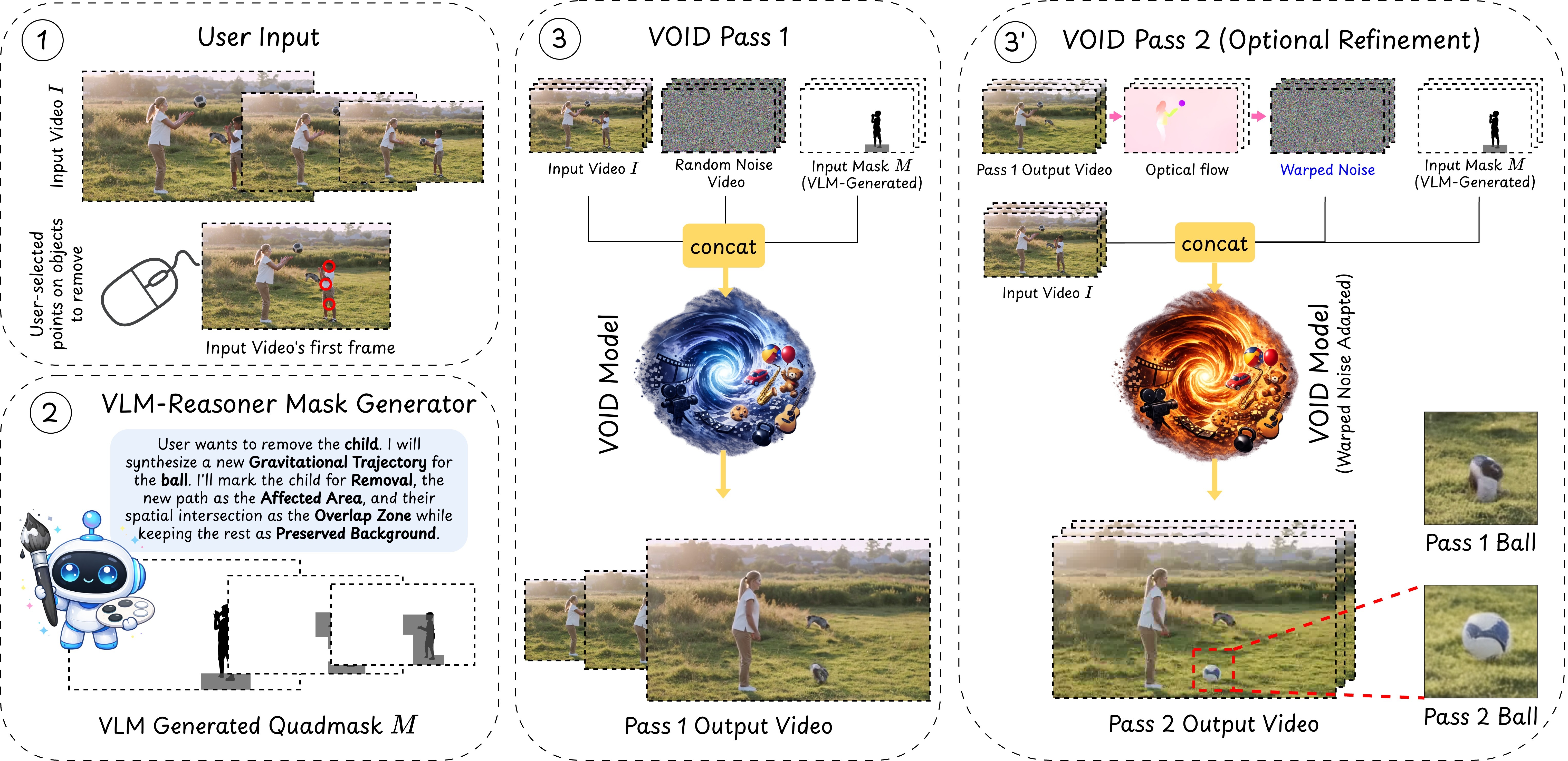
VOID quadmask conditioning separates primary deletion zones from physical interaction regions. Credit: Netflix Research (Apache 2.0).
Separating the object mask from the interaction mask lets the director preserve the verified camera plate outside the action zone. Only the pixels governed by physical contact or shadow casting are regenerated by the diffusion transformer.
Trained on synthetic counterfactual Kubric simulations paired with real world video plates, VOID learns how gravity, collisions, and lighting respond when an actor or rig leaves the frame.
How MiniMax-Remover Achieves 6 Step CFG Free Object Erasure
When a shot does not require counterfactual physics simulation and the filmmaker simply needs fast, clean removal of a passerby, vehicle, or camera rig, MiniMax-Remover optimizes for speed and immunity to object hallucination. Standard text conditioned video diffusion models frequently hallucinate new objects inside large masks when classifier free guidance (CFG) amplifies prompt correlations.
MiniMax-Remover strips away text cross attention layers to reduce parameter count and trains its DiT backbone in two stages. Stage 1 distills clean background reconstruction from a pretrained video generator using synthetic mask triplets.
Stage 2 formulates a minimax optimization game. An inner maximization step identifies worst case adversarial noise ("bad noise") that triggers object regeneration or blur, and an outer minimization step trains the velocity field to erase those artifacts without CFG in just 6 steps.
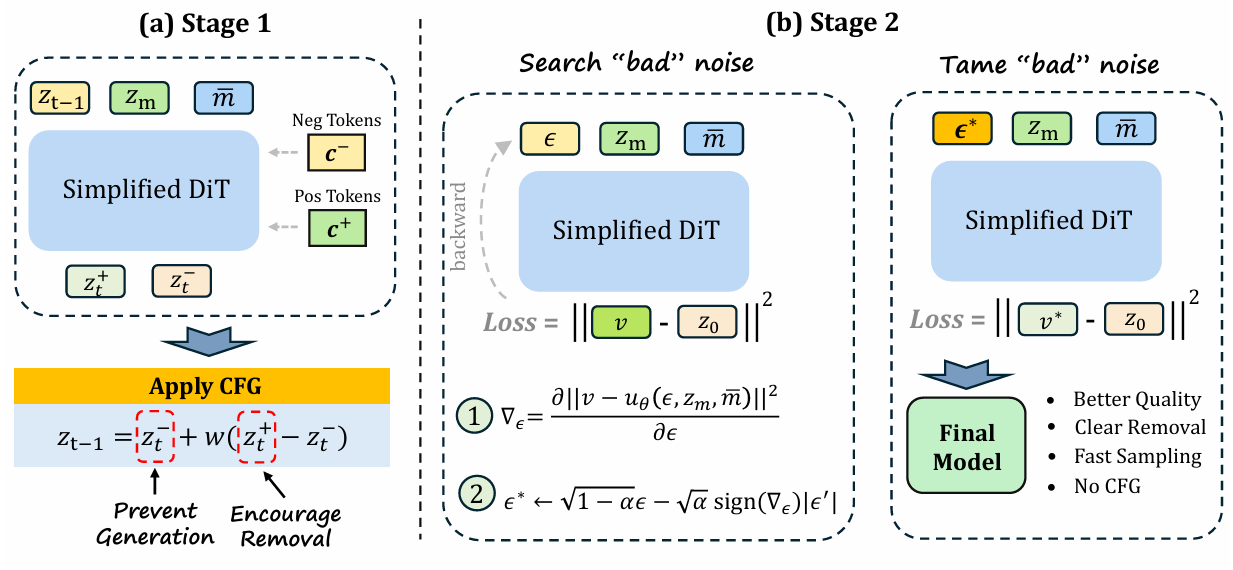
MiniMax-Remover two stage training pipeline with adversarial bad noise suppression. Credit: Bojia Zi et al. (arXiv:2505.24873).
Hardware, VRAM & License Comparison
| Model / Checkpoint | Architecture & Backbone | Conditioning Input | Inference Speed & VRAM | License |
|---|---|---|---|---|
VOID Pass 1 (void_pass1) |
CogVideoX DiT base interaction inpainter | RGB video + 4 level Quadmask (0, 1, 2, 3) |
50 steps, 40 GB VRAM (A100 recommended) | Apache 2.0 |
VOID Pass 2 (void_pass2) |
CogVideoX DiT high resolution warped noise refiner | Pass 1 video + optical flow warped noise | 50 steps, 40 GB VRAM | Apache 2.0 |
| MiniMax-Remover | Streamlined Video DiT (no text cross attention) | RGB video + binary object mask (SAM2) |
6 steps (CFG=1.0), 12 GB to 16 GB VRAM | Open Weights / Research |
Running VOID and MiniMax-Remover Locally
To run Netflix VOID locally, clone netflix/void-model, download void_pass1.safetensors and void_pass2.safetensors from Hugging Face (netflix/void-model), and run the two pass inference script on a 40 GB CUDA GPU.
git clone https://github.com/netflix/void-model.git
cd void-model
pip install -r requirements.txt

huggingface-cli download netflix/void-model --local-dir ./checkpoints

python infer.py \
  --input_video sample/ducky-float/input_video.mp4 \
  --quadmask sample/ducky-float/trimask_quadmask.mp4 \
  --pass1_ckpt checkpoints/void_pass1.safetensors \
  --pass2_ckpt checkpoints/void_pass2.safetensors \
  --output_dir ./outputs
For fast 6 step object cleanup on consumer 12 GB to 16 GB GPUs, download zibojia/minimax-remover from Hugging Face and launch the local Gradio workspace or Diffusers script.
git clone https://github.com/zibojia/MiniMax-Remover.git
cd MiniMax-Remover
pip install -r requirements.txt

huggingface-cli download zibojia/minimax-remover --local-dir ./weights
python gradio_demo/app.py
Filmmaker Cleanup Pipelines & AI FILMS Studio Workflows
In post production, VOID and MiniMax-Remover divide cleanup shots by physical complexity. Use MiniMax-Remover for rapid wire removal, boom mic erasure, and background crowd cleanup where background geometry stays static. Route shots where a removed actor or vehicle interacts with water, foliage, props, or strong key light shadows through VOID so the secondary physics resolve automatically.
For related open source editing and cleanup guides, read our coverage of EffectErase video object removal and insertion, Kiwi-Edit instruction and reference video editing, JoyAI-Video-Edit real time video editing, and ReBind and MiVE multi reference video editing, plus ZONOS3-Mini and Tiny-Voca voice cloning TTS for local dialogue synthesis.
When you need to isolate characters or remove image backgrounds in the browser before animating shots on the Image to Video page, use the Studio Background Remover or chain cleanup and generation stages inside the Nodes Graph Editor.


Sources
- netflix/void-model Official GitHub Repository (Apache 2.0)
- VOID: Video Object and Interaction Deletion (arXiv:2604.02296)
- netflix/void-model Checkpoints on Hugging Face
- zibojia/MiniMax-Remover Official GitHub Repository
- MiniMax-Remover: Taming Bad Noise Helps Video Object Removal (arXiv:2505.24873)
- MiniMax-Remover Project Page & Benchmarks
Continue Reading


Video & LipSync
- Video Generator
- Text to Video
- Image to Video
- Start-End Frame to Video
- Draw to Video
- Motion Control
- Video Enhancer
- Video Upscaler
- Video Extend
- Video to Video LipSync
- Audio to Video LipSync
- Image to Video LipSync
- Video FaceSwap
- Seedance 2.5
- WAN 3.0
- Seedance 2
- FLUX 3
- Minimax H3
- Vidu Q3 Pro
- Grok Imagine Video 1.5
- Gemini Omni
- Google Veo 3.1
- Kling 3.0 Pro
- Luma Ray 3.2
- LTX 2.3
- Happy Horse 1.1
- Kling 3.0 Motion
- ByteDance Upscaler
- InfiniteTalk
- InsightFace
Image & Edit
- AI Character
- AI Actor
- Art Generator
- Text to Image
- Image to Image
- LoRA Image to Image
- Draw to Edit
- Image LoRA Training
- Remove Background
- Image Enhancer
- MidJourney 8.0
- Krea 2
- OpenAI GPT Image 2.0
- Nano Banana Pro Ultra
- Nano Banana 2 Lite
- Nano Banana Pro
- Minimax Image
- Clarity Pro
- Z-Image Turbo LoRA
- Krea 2 Turbo LoRA
- Z-Image LoRA Trainer
- Qwen Image LoRA Trainer
- Background Erase Network 2 (BEN2)