

Pinkstack (LiliPixel-V1 190M official banner, OpenMDW-1.1)
Share this post:
LiliPixel-V1: Open Source 190M Pixel Art Diffusion
Standard high resolution image generators struggle to create true pixel art because they output blurred 1024 px approximations that break down into messy anti aliased grids when downscaled. LiliPixel-V1 (Pinkstack/LiliPixel-V1-190M), released in November 2026 under the OpenMDW-1.1 license, is a from scratch 191M parameter rectified flow diffusion transformer that generates native 16 x 16, 32 x 32, and 64 x 64 pixel graphics directly in RGBA and RGB space using roughly 1 GB of GPU memory in lossless BF16. You can test LiliPixel-V1 free in the embedded browser demo below with zero login.
Studio availability. Try the public Hugging Face demo below; LiliPixel-V1 is not part of a paid AI FILMS Studio plan (use Krea 2 Turbo Text to Image in the image workspace for example instead).
Try LiliPixel-V1 Live
Enter a short sprite or retro scene description in the public Hugging Face Space below to generate pixel aligned graphics directly in your browser.
Architecture and Technical Design
LiliPixel-V1 uses a single stream diffusion transformer with 24 layers, a model width of 768, and 16 attention heads where caption tokens and pixel patch tokens share one sequence with full self attention. Text conditioning runs through a frozen MongoDB/voyage-4-nano encoder (~346M parameters, downloaded automatically on first load) capped at 96 prompt tokens, paired with a learned null caption for classifier free guidance.
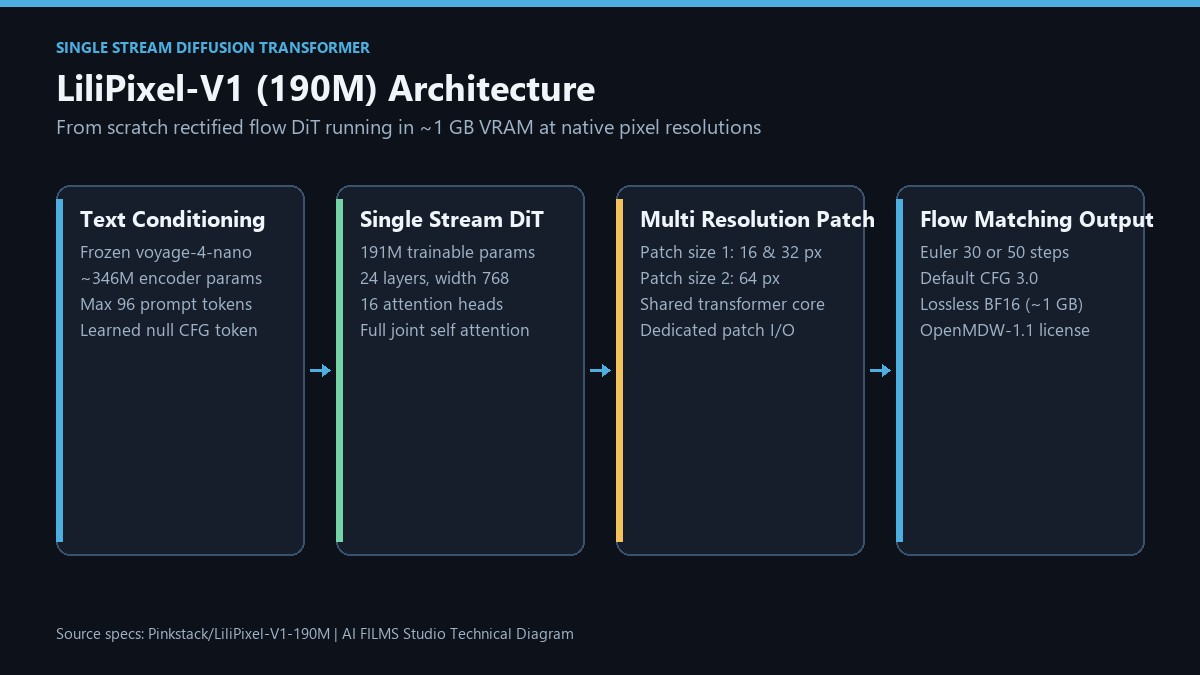
LiliPixel-V1 single stream DiT pipeline based on Pinkstack/LiliPixel-V1-190M specifications
Rather than training separate checkpoints per grid size, LiliPixel-V1 shares one core transformer across all three native resolutions using dedicated patch input and output projections. Patch size 1 handles 16 x 16 and 32 x 32 sprites directly at pixel granularity, while patch size 2 covers 64 x 64 scenes.
The model trained from scratch for 132,000 steps with rectified flow matching, logit normal timesteps, and EMA 0.999 across four open datasets totaling over 2.5 million sprites and smart downscaled pixel scenes.
Because transparency was present only in the 16 px and 32 px sprite training sets, alpha channel behavior is strictly tied to resolution and prompt phrasing.
For 16 x 16 and 32 x 32 assets, outputs are always native RGBA PNGs with clean transparency when prompts end with , transparent background. For 64 x 64 scenes, outputs are always opaque RGB plates, and prepending realistic photo, unlocks a crisp dithered realism mode suited for retro monitor inserts and diegetic computer screens.
Because inference takes fractions of a second per image, the author recommends generating batches of 4 to 16 seeds per prompt and selecting the cleanest pixel silhouette.
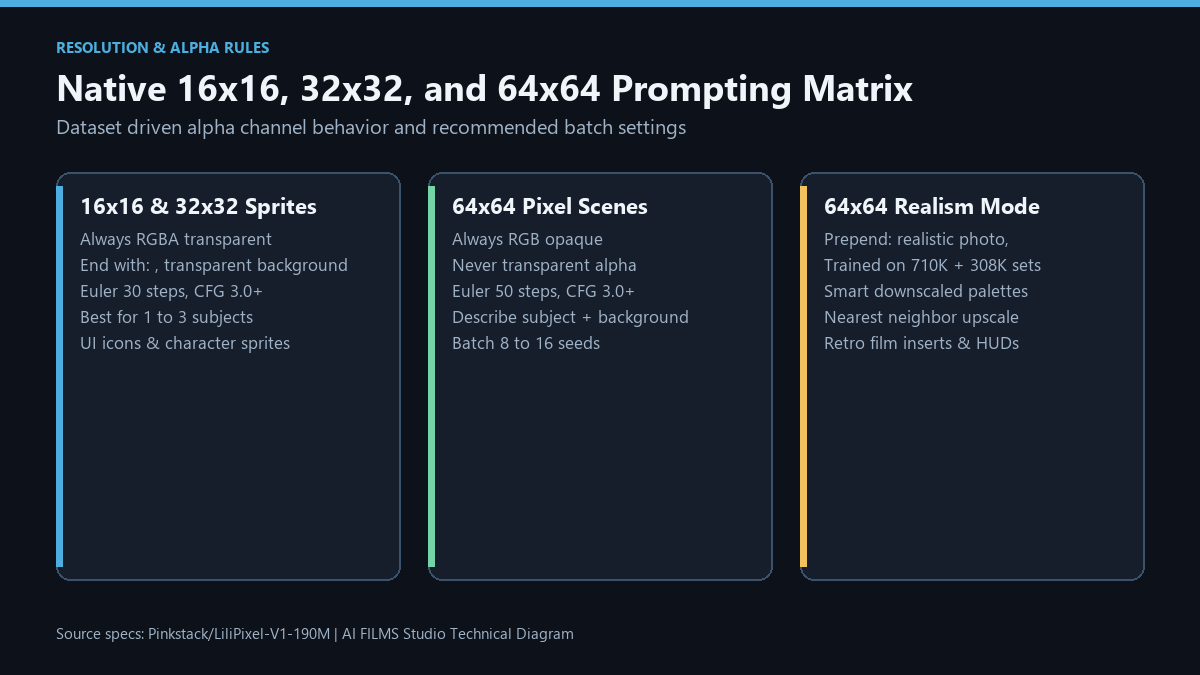
Native resolution, alpha channel, and realism mode rules from Pinkstack/LiliPixel-V1-190M
Hardware, VRAM, and License Matrix
| Resolution Mode | Channels / Alpha | Patch Size | Typical VRAM (BF16) | License | Best Production Role |
|---|---|---|---|---|---|
16 x 16 Native Sprite |
RGBA (transparent) | 1 |
~1 GB GPU (or fast CPU) | OpenMDW-1.1 | Retro HUD icons, diegetic UI props |
32 x 32 Native Sprite |
RGBA (transparent) | 1 |
~1 GB GPU (or fast CPU) | OpenMDW-1.1 | 2D animated character sprites & props |
64 x 64 Pixel Scene |
RGB (opaque) | 2 |
~1 GB GPU (or fast CPU) | OpenMDW-1.1 | Retro background plates & arcade cutscenes |
64 x 64 Realism Mode |
RGB (opaque) | 2 |
~1 GB GPU (or fast CPU) | OpenMDW-1.1 | Lo fi CRT monitor inserts & title graphics |
LiliPixel-V1 is released under the permissive OpenMDW-1.1 open model license, allowing independent studios, animators, and motion designers to embed the weights into local tools with minimal overhead.
Parameter Reference
| Parameter | Recommended Value | Visual Effect |
|---|---|---|
height / width |
16, 32, or 64 |
Selects the native pixel grid and matching patch projection |
num_inference_steps |
30 (16/32 px) or 50 (64 px) |
Euler rectified flow sampling steps |
guidance_scale (CFG) |
3.0 default (3.5+ for strict prompts) |
Strengthens adherence to directional or color specific prompts |
| Prompt length | Under 96 tokens |
Prompts past 96 tokens are truncated by voyage-4-nano |
| Upscaling for display | Nearest neighbor scaling (e.g. to 512 x 512) |
Preserves razor sharp pixel edges for HD or 4K video timelines |
Local Python and CLI Setup
LiliPixel-V1 loads cleanly through Hugging Face Diffusers (transformers >= 4.56 and trust_remote_code=True are required for the custom pipeline and text encoder).
pip install -U diffusers "transformers>=4.56" accelerate safetensors Pillow
import torch
from diffusers import DiffusionPipeline
from PIL import Image

pipe = DiffusionPipeline.from_pretrained(
    "Pinkstack/LiliPixel-V1-190M",
    custom_pipeline="Pinkstack/LiliPixel-V1-190M",
    trust_remote_code=True,
    torch_dtype=torch.bfloat16,
).to("cuda")

# Generate a batch of 4 transparent 32x32 sprites
for i in range(4):
    sprite = pipe(
        prompt="vintage cinema camera on a tripod, transparent background",
        height=32,
        width=32,
        num_inference_steps=30,
        guidance_scale=3.5,
        generator=torch.Generator("cuda").manual_seed(96 + i),
    ).images[0]
    sprite.save(f"camera_sprite_32_{i}.png")
    # Nearest neighbor upscale for clean 4K timeline compositing
    sprite.resize((512, 512), Image.Resampling.NEAREST).save(f"camera_sprite_512_{i}.png")
Keep subjects simple (one subject at 16 x 16, up to three at 32 x 32) and avoid asking the model to render readable text, since it was not trained for typography.
Filmmaker Production Playbook
1. Diegetic computer screens and retro sci fi monitors. Science fiction and period thrillers constantly need authentic low resolution icons, terminal avatars, and 64 x 64 CRT graphics. Generating native RGBA sprites eliminates soft bilinear blur when compositors track graphics onto practical monitors.
2. Stylized 2D animated cutscenes and title sequences. Pair nearest neighbor upscaled 64 x 64 plates with clean 32 x 32 transparent foreground sprites inside After Effects or Blender Grease Pencil for authentic 8 bit and 16 bit narrative sequences.
3. Multi seed curation on any laptop. Because the entire BF16 pipeline fits inside ~1 GB of VRAM and runs smoothly on CPU, art directors can generate 16 seed sheets in seconds on set without touching a cloud render queue.
4. Full resolution concept art and motion. When your sequence transitions from stylized pixel inserts back to full resolution cinema frames, AI FILMS Studio's text-to-image workspace provides hosted high resolution generation ready for video animation.
Related Reading
- Kromoss: Open Source 1024 px Concept Art Image AI
- Jeveration: Open Source Single Pass Image AI
- PrunaAI P-Image-OSS: Open Source 8-Step Image Editing
- BRIA RMBG 3.0: Open Source VFX Background Removal
- Explore hosted image creation on the AI Text-to-Image Generator page
Sources
Continue Reading


Video & LipSync
- Video Generator
- Text to Video
- Image to Video
- Start-End Frame to Video
- Draw to Video
- Motion Control
- Video Enhancer
- Video Upscaler
- Video Extend
- Video to Video LipSync
- Audio to Video LipSync
- Image to Video LipSync
- Video FaceSwap
- Seedance 2.5
- WAN 3.0
- Seedance 2
- FLUX 3
- Minimax H3
- Vidu Q3 Pro
- Grok Imagine Video 1.5
- Gemini Omni
- Google Veo 3.1
- Kling 3.0 Pro
- Luma Ray 3.2
- LTX 2.3
- Happy Horse 1.1
- Kling 3.0 Motion
- ByteDance Upscaler
- InfiniteTalk
- InsightFace
Image & Edit
- AI Character
- AI Actor
- Art Generator
- Text to Image
- Image to Image
- LoRA Image to Image
- Draw to Edit
- Image LoRA Training
- Remove Background
- Image Enhancer
- MidJourney 8.0
- Krea 2
- OpenAI GPT Image 2.0
- Nano Banana Pro Ultra
- Nano Banana 2 Lite
- Nano Banana Pro
- Minimax Image
- Clarity Pro
- Z-Image Turbo LoRA
- Krea 2 Turbo LoRA
- Z-Image LoRA Trainer
- Qwen Image LoRA Trainer
- Background Erase Network 2 (BEN2)