

Wan-Video / Alibaba — Wan 2.2 computational efficiency and MoE scaling benchmark
Share this post:
Wan 2.2 FP8DA + AOTInductor: Fast Open Source Video
Wan 2.2 FP8DA + AOTInductor (zerogpu-aoti/wan2-2-fp8da-aoti-faster, nearly 3,900 likes on Hugging Face) pairs Alibaba's Apache 2.0 Wan 2.2 Mixture of Experts (MoE) video foundation model with FP8 Dynamic Activation (FP8DA) quantization, PyTorch Ahead of Time Inductor (AOTInductor) kernel compilation, and 4 to 8 step distilled Lightning LoRAs. For filmmakers running local image to video shots on RTX 4090, RTX 5090, or Hopper GPUs, AOTInductor + FP8DA slashes render times from minutes down to seconds with minimal visual loss.
Studio availability. Try the public Hugging Face demo below; Wan 2.2 FP8DA is not part of a paid AI FILMS Studio plan (use WAN 3.0 in the video workspace for example instead).
Why FP8DA and AOTInductor Transform Local Wan 2.2 Rendering
Wan 2.2's two expert MoE architecture (27B total parameters, 14B active per denoising step) delivers rich cinematic motion and camera physics, but standard eager mode BF16 execution runs slowly and pushes 24 GB GPUs to their memory ceiling.
Combining FP8DA with AOTInductor (AOTI) removes both compute and Python dispatch bottlenecks:
- FP8 Dynamic Activation (
FP8DA) via TorchAO. Quantizing linear weights and activations dynamically to 8 bit floating point (float8_e4m3fn) halves memory bandwidth pressure and unlocks native FP8 Tensor Core throughput on Ada Lovelace, Blackwell, and Hopper GPUs without degrading skin tones or film grain. - Ahead of Time Inductor (
AOTInductor) compilation. Standardtorch.compileforces a multi minute cold start warmup on every script launch.AOTInductorcompiles fused CUDA kernels ahead of time into portable binary artifacts, delivering instant compiled speed from the very first generated shot. - Paired with 4 to 8 step step distilled LoRAs. Stacking compiled FP8DA kernels with few step Lightning adapters turns
Wan 2.2image to video into an interactive previs and shot iteration engine.

Wan 2.2 dual expert MoE DiT separating early structural layout from late fine texture refinement. Credit: Wan-Video (Apache 2.0).
Wan 2.2 routes early high noise steps to a global motion expert and late low noise steps to a fine detail expert, keeping active compute at 14B per step.
Compiling both experts with FP8DA and AOTInductor preserves that dual expert sharpness while cutting wall clock latency dramatically.
Try Wan 2.2 FP8DA + AOTInductor Live in the Browser
Test Wan 2.2 FP8DA + AOTInductor image to video generation directly in the popular Hugging Face Space below (zerogpu-aoti-wan2-2-fp8da-aoti-faster.hf.space).
Wan 2.2's high compression 3D video VAE shrinks spatio temporal latents aggressively, letting compiled FP8DA transformers generate crisp 480p and 720p widescreen clips on single workstation GPUs.
Combined with Apache 2.0 licensing, local studios gain full commercial ownership over every rendered shot.
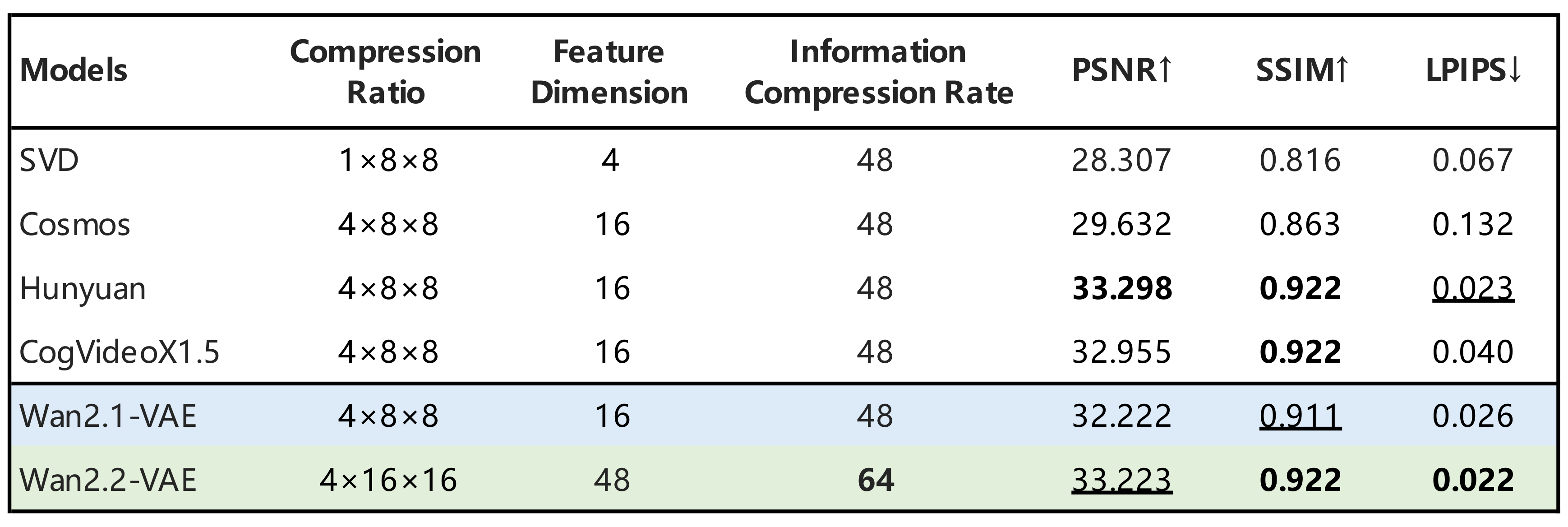
Wan 2.2 3D VAE spatio temporal compression layout reducing token counts for fast inference. Credit: Wan-Video (Apache 2.0).
Hardware and Optimization Matrix
| Execution Path | Precision & Compiler | VRAM Footprint | Speed Gain vs Eager BF16 | License |
|---|---|---|---|---|
| Standard Eager BF16 | BF16 uncompiled |
28 GB – 40 GB |
1.0x baseline |
Apache 2.0 |
| TorchAO FP8DA + AOTInductor | FP8 dynamic activation + AOTI |
16 GB – 24 GB |
2.2x – 3.5x faster (no cold compile wait) |
Apache 2.0 |
| GGUF Q4 + Offload | 4-bit GGUF |
8 GB – 12 GB |
Portable on budget GPUs | Apache 2.0 |
Local Setup with TorchAO FP8DA and Diffusers
pip install -U torch torchao diffusers transformers accelerate
import torch
from diffusers import WanImageToVideoPipeline
from torchao.quantization import quantize_, float8_dynamic_activation_float8_weight

pipe = WanImageToVideoPipeline.from_pretrained(
    "Wan-AI/Wan2.2-I2V-A14B-Diffusers",
    torch_dtype=torch.bfloat16,
).to("cuda")

# Apply FP8 dynamic activation quantization to both MoE transformers
quantize_(pipe.transformer, float8_dynamic_activation_float8_weight())
quantize_(pipe.transformer_2, float8_dynamic_activation_float8_weight())
Filmmaker Production Playbook
- Use FP8DA + AOTI on Ada/Blackwell/Hopper GPUs (
RTX 4090,RTX 5090,H100). Older Ampere GPUs lack native FP8 Tensor Cores and should useGGUForINT8workflows instead (see our Wan 2.2 8GB GGUF guide). - Start from sharp 16:9 key frames. Generate locked production stills in PrunaAI P-Image-OSS or MiniMax-H3-Image before animating with Wan 2.2 I2V.
- Edit approved clips without regenerating. Run instruction tweaks on rendered Wan 2.2 clips with Qwen-Video-Edit.
Related Reading
- Wan 2.2 GGUF 8GB VRAM: Open Source Video Workflow
- Qwen-Video-Edit: Open Source Instruction Video Editing
- FastVideo & FastWan QAD: Ultra Fast Video Generation
- Reference Forcing & MPEG-Diffusion: Fast Long Video AI


Sources
Continue Reading


Video & LipSync
- Video Generator
- Text to Video
- Image to Video
- Start-End Frame to Video
- Draw to Video
- Motion Control
- Video Enhancer
- Video Upscaler
- Video Extend
- Video to Video LipSync
- Audio to Video LipSync
- Image to Video LipSync
- Video FaceSwap
- Seedance 2.5
- WAN 3.0
- Seedance 2
- FLUX 3
- Minimax H3
- Vidu Q3 Pro
- Grok Imagine Video 1.5
- Gemini Omni
- Google Veo 3.1
- Kling 3.0 Pro
- Luma Ray 3.2
- LTX 2.3
- Happy Horse 1.1
- Kling 3.0 Motion
- ByteDance Upscaler
- InfiniteTalk
- InsightFace
Image & Edit
- AI Character
- AI Actor
- Art Generator
- Text to Image
- Image to Image
- LoRA Image to Image
- Draw to Edit
- Image LoRA Training
- Remove Background
- Image Enhancer
- MidJourney 8.0
- Krea 2
- OpenAI GPT Image 2.0
- Nano Banana Pro Ultra
- Nano Banana 2 Lite
- Nano Banana Pro
- Minimax Image
- Clarity Pro
- Z-Image Turbo LoRA
- Krea 2 Turbo LoRA
- Z-Image LoRA Trainer
- Qwen Image LoRA Trainer
- Background Erase Network 2 (BEN2)